Tech

what-does-“phd-level”-ai-mean?-openai’s-rumored-$20,000-agent-plan-explained.

What does “PhD-level” AI mean? OpenAI’s rumored $20,000 agent plan explained.

On the Frontier Math benchmark by EpochAI, o3 solved 25.2 percent of problems, while no other model has exceeded 2 percent—suggesting a leap in mathematical reasoning capabilities over the previous model.

Benchmarks vs. real-world value

Ideally, potential applications for a true PhD-level AI model would include analyzing medical research data, supporting climate modeling, and handling routine aspects of research work.

The high price points reported by The Information, if accurate, suggest that OpenAI believes these systems could provide substantial value to businesses. The publication notes that SoftBank, an OpenAI investor, has committed to spending $3 billion on OpenAI’s agent products this year alone—indicating significant business interest despite the costs.

Meanwhile, OpenAI faces financial pressures that may influence its premium pricing strategy. The company reportedly lost approximately $5 billion last year covering operational costs and other expenses related to running its services.

News of OpenAI’s stratospheric pricing plans come after years of relatively affordable AI services that have conditioned users to expect powerful capabilities at relatively low costs. ChatGPT Plus remains $20 per month and Claude Pro costs $30 monthly—both tiny fractions of these proposed enterprise tiers. Even ChatGPT Pro’s $200/month subscription is relatively small compared to the new proposed fees. Whether the performance difference between these tiers will match their thousandfold price difference is an open question.

Despite their benchmark performances, these simulated reasoning models still struggle with confabulations—instances where they generate plausible-sounding but factually incorrect information. This remains a critical concern for research applications where accuracy and reliability are paramount. A $20,000 monthly investment raises questions about whether organizations can trust these systems not to introduce subtle errors into high-stakes research.

In response to the news, several people quipped on social media that companies could hire an actual PhD student for much cheaper. “In case you have forgotten,” wrote xAI developer Hieu Pham in a viral tweet, “most PhD students, including the brightest stars who can do way better work than any current LLMs—are not paid $20K / month.”

While these systems show strong capabilities on specific benchmarks, the “PhD-level” label remains largely a marketing term. These models can process and synthesize information at impressive speeds, but questions remain about how effectively they can handle the creative thinking, intellectual skepticism, and original research that define actual doctoral-level work. On the other hand, they will never get tired or need health insurance, and they will likely continue to improve in capability and drop in cost over time.

What does “PhD-level” AI mean? OpenAI’s rumored $20,000 agent plan explained. Read More »
iphone-16e-review:-the-most-expensive-cheap-iphone-yet

iPhone 16e review: The most expensive cheap iPhone yet


The iPhone 16e rethinks—and prices up—the basic iPhone.

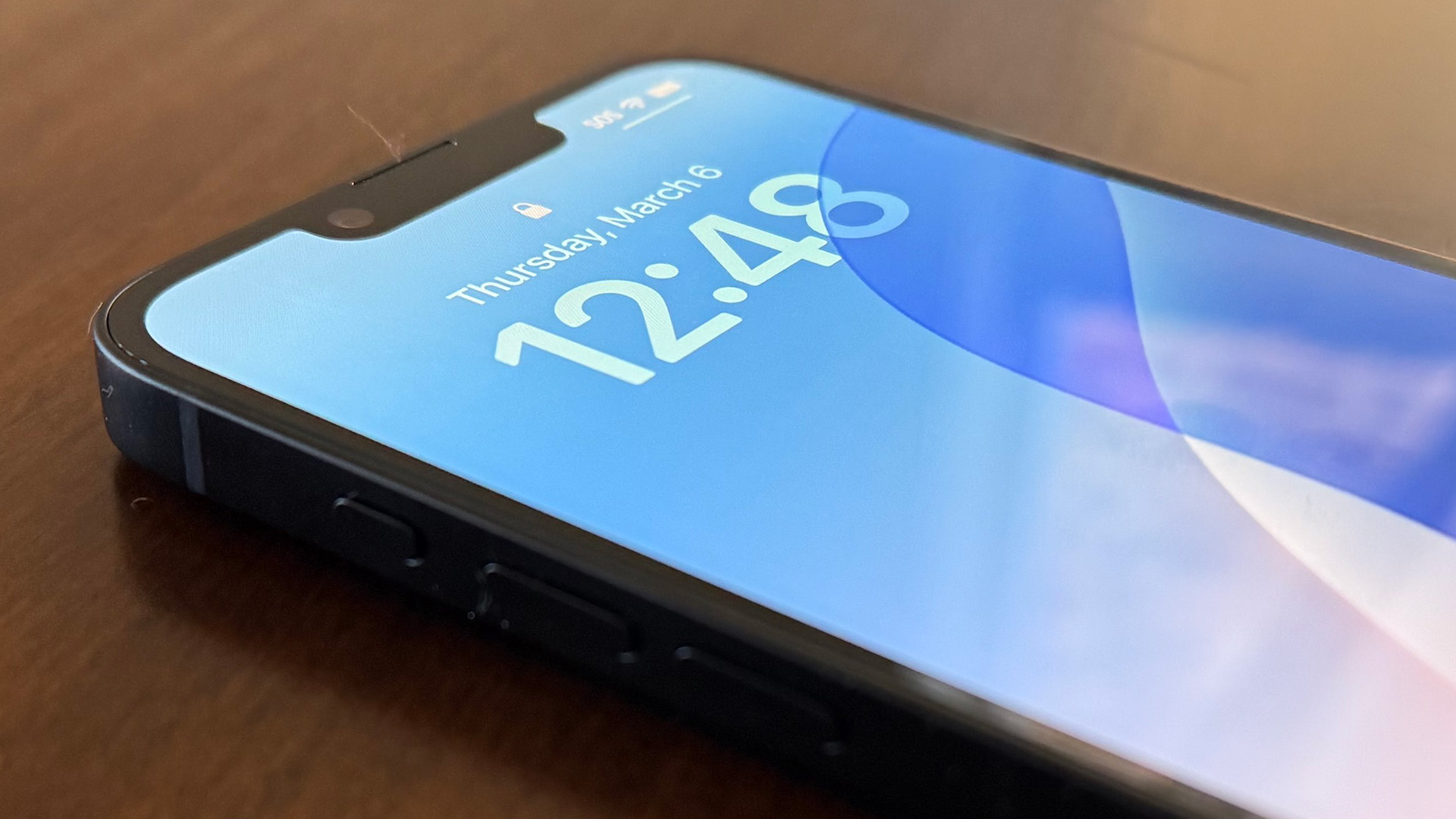
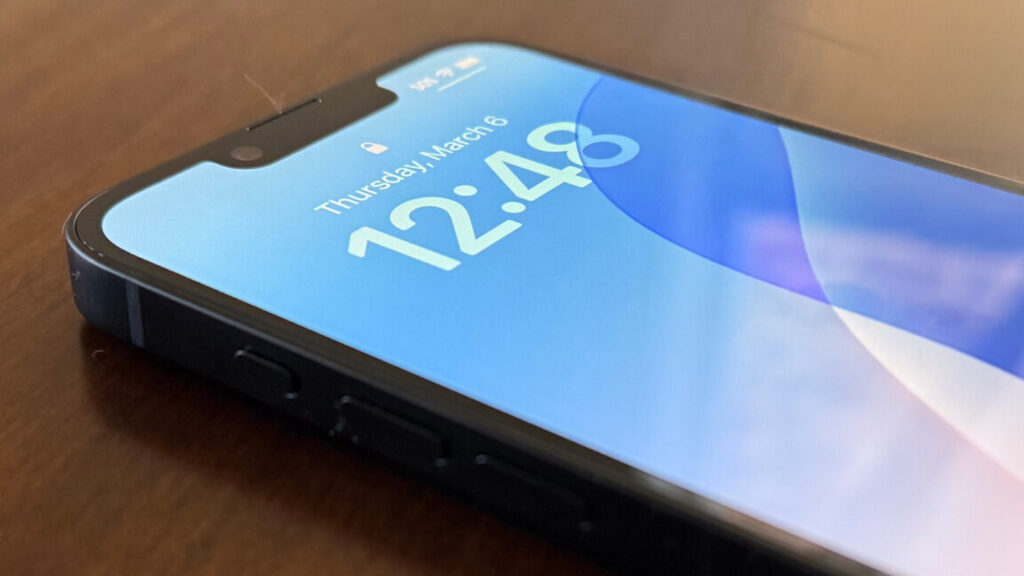
An iPhone sits on the table, displaying the time with the screen on

The iPhone 16e, with a notch and an Action Button. Credit: Samuel Axon

The iPhone 16e, with a notch and an Action Button. Credit: Samuel Axon

For a long time, the cheapest iPhones were basically just iPhones that were older than the current flagship, but last week’s release of the $600 iPhone 16e marks a big change in how Apple is approaching its lineup.

Rather than a repackaging of an old iPhone, the 16e is the latest main iPhone—that is, the iPhone 16—with a bunch of stuff stripped away.

There are several potential advantages to this change. In theory, it allows Apple to support its lower-end offerings for longer with software updates, and it gives entry-level buyers access to more current technologies and features. It also simplifies the marketplace of accessories and the like.

There’s bad news, too, though: Since it replaces the much cheaper iPhone SE in Apple’s lineup, the iPhone 16e significantly raises the financial barrier to entry for iOS (the SE started at $430).

We spent a few days trying out the 16e and found that it’s a good phone—it’s just too bad it’s a little more expensive than the entry-level iPhone should ideally be. In many ways, this phone solves more problems for Apple than it does for consumers. Let’s explore why.

Table of Contents

A beastly processor for an entry-level phone

Like the 16, the 16e has Apple’s A18 chip, the most recent in the made-for-iPhone line of Apple-designed chips. There’s only one notable difference: This variation of the A18 has just four GPU cores instead of five. That will show up in benchmarks and in a handful of 3D games, but it shouldn’t make too much of a difference for most people.

It’s a significant step up over the A15 found in the final 2022 refresh of the iPhone SE, enabling a handful of new features like AAA games and Apple Intelligence.

The A18’s inclusion is good for both Apple and the consumer; Apple gets to establish a new, higher baseline of performance when developing new features for current and future handsets, and consumers likely get many more years of software updates than they’d get on the older chip.

The key example of a feature enabled by the A18 that Apple would probably like us all to talk about the most is Apple Intelligence, a suite of features utilizing generative AI to solve some user problems or enable new capabilities across iOS. By enabling these for the cheapest iPhone, Apple is making its messaging around Apple Intelligence a lot easier; it no longer needs to put effort into clarifying that you can use X feature with this new iPhone but not that one.

We’ve written a lot about Apple Intelligence already, but here’s the gist: There are some useful features here in theory, but Apple’s models are clearly a bit behind the cutting edge, and results for things like notifications summaries or writing tools are pretty mixed. It’s fun to generate original emojis, though!

The iPhone 16e can even use Visual Intelligence, which actually is handy sometimes. On my iPhone 16 Pro Max, I can point the rear camera at an object and press the camera button a certain way to get information about it.

I wouldn’t have expected the 16e to support this, but it does, via the Action Button (which was first introduced in the iPhone 15 Pro). This is a reprogrammable button that can perform a variety of functions, albeit just one at a time. Visual Intelligence is one of the options here, which is pretty cool, even though it’s not essential.

The screen is the biggest upgrade over the SE

Also like the 16, the 16e has a 6.1-inch display. The resolution’s a bit different, though; it’s 2,532 by 1,170 pixels instead of 2,556 by 1,179. It also has a notch instead of the Dynamic Island seen in the 16. All this makes the iPhone 16e’s display seem like a very close match to the one seen in 2022’s iPhone 14—in fact, it might literally be the same display.

I really missed the Dynamic Island while using the iPhone 16e—it’s one of my favorite new features added to the iPhone in recent years, as it consolidates what was previously a mess of notification schemes in iOS. Plus, it’s nice to see things like Uber and DoorDash ETAs and sports scores at a glance.

The main problem with losing the Dynamic Island is that we’re back to the old minor mess of notifications approaches, and I guess Apple has to keep supporting the old ways for a while yet. That genuinely surprises me; I would have thought Apple would want to unify notifications and activities with the Dynamic Island just like the A18 allows the standardization of other features.

This seems to indicate that the Dynamic Island is a fair bit more expensive to include than the good old camera notch flagship iPhones had been rocking since 2017’s iPhone X.

That compromise aside, the display on the iPhone 16e is ridiculously good for a phone at this price point, and it makes the old iPhone SE’s small LCD display look like it’s from another eon entirely by comparison. It gets brighter for both HDR content and sunny-day operation; the blacks are inky and deep, and the contrast and colors are outstanding.

It’s the best thing about the iPhone 16e, even if it isn’t quite as refined as the screens in Apple’s current flagships. Most people would never notice the difference between the screens in the 16e and the iPhone 16 Pro, though.

There is one other screen feature I miss from the higher-end iPhones you can buy in 2025: Those phones can drop the display all the way down to 1 nit, which is awesome for using the phone late at night in bed without disturbing a sleeping partner. Like earlier iPhones, the 16e can only get so dark.

It gets quite bright, though; Apple claims it typically reaches 800 nits in peak brightness but that it can stretch to 1200 when viewing certain HDR photos and videos. That means it gets about twice as bright as the SE did.

Connectivity is key

The iPhone 16e supports the core suite of connectivity options found in modern phones. There’s Wi-Fi 6, Bluetooth 5.3, and Apple’s usual limited implementation of NFC.

There are three new things of note here, though, and they’re good, neutral, and bad, respectively.

USB-C

Let’s start with the good. We’ve moved from Apple’s proprietary Lightning port found in older iPhones (including the final iPhone SE) toward USB-C, now a near-universal standard on mobile devices. It allows faster charging and more standardized charging cable support.

Sure, it’s a bummer to start over if you’ve spent years buying Lightning accessories, but it’s absolutely worth it in the long run. This change means that the entire iPhone line has now abandoned Lightning, so all iPhones and Android phones will have the same main port for years to come. Finally!

The finality of this shift solves a few problems for Apple: It greatly simplifies the accessory landscape and allows the company to move toward producing a smaller range of cables.

Satellite connectivity

Recent flagship iPhones have gradually added a small suite of features that utilize satellite connectivity to make life a little easier and safer.

Among those is crash detection and roadside assistance. The former will use the sensors in the phone to detect if you’ve been in a car crash and contact help, and roadside assistance allows you to text for help when you’re outside of cellular reception in the US and UK.

There are also Emergency SOS and Find My via satellite, which let you communicate with emergency responders from remote places and allow you to be found.

Along with a more general feature that allows Messages via satellite, these features can greatly expand your options if you’re somewhere remote, though they’re not as easy to use and responsive as using the regular cellular network.

Where’s MagSafe?

I don’t expect the 16e to have all the same features as the 16, which is $200 more expensive. In fact, it has more modern features than I think most of its target audience needs (more on that later). That said, there’s one notable omission that makes no sense to me at all.

The 16e does not support MagSafe, a standard for connecting accessories to the back of the device magnetically, often while allowing wireless charging via the Qi standard.

Qi wireless charging is still supported, albeit at a slow 7.5 W, but there are no magnets, meaning a lot of existing MagSafe accessories are a lot less useful with this phone, if they’re usable at all. To be fair, the SE didn’t support MagSafe either, but every new iPhone design since the iPhone 12 way back in 2020 has—and not just the premium flagships.

It’s not like the MagSafe accessory ecosystem was some bottomless well of innovation, but that magnetic alignment is handier than you might think, whether we’re talking about making sure the phone locks into place for the fastest wireless charging speeds or hanging the phone on a car dashboard to use GPS on the go.

It’s one of those things where folks coming from much older iPhones may not care because they don’t know what they’re missing, but it could be annoying in households with multiple generations of iPhones, and it just doesn’t make any sense.

Most of Apple’s choices in the 16e seem to serve the goal of unifying the whole iPhone lineup to simplify the message for consumers and make things easier for Apple to manage efficiently, but the dropping of MagSafe is bizarre.

It almost makes me think that Apple might plan to drop MagSafe from future flagship iPhones, too, and go toward something new, just because that’s the only explanation I can think of. That otherwise seems unlikely to me right now, but I guess we’ll see.

The first Apple-designed cellular modem

We’ve been seeing rumors that Apple planned to drop third-party modems from companies like Qualcomm for years. As far back as 2018, Apple was poaching Qualcomm employees in an adjacent office in San Diego. In 2020, Apple SVP Johny Srouji announced to employees that work had begun.

It sounds like development has been challenging, but the first Apple-designed modem has arrived here in the 16e of all places. Dubbed the C1, it’s… perfectly adequate. It’s about as fast or maybe just a smidge slower than what you get in the flagship phones, but almost no user would notice any difference at all.

That’s really a win for Apple, which has struggled with a tumultuous relationship with its partners here for years and which has long run into space problems in its phones in part because the third-party modems weren’t compact enough.

This change may not matter much for the consumer beyond freeing up just a tiny bit of space for a slightly larger battery, but it’s another step in Apple’s long journey to ultimately and fully control every component in the iPhone that it possibly can.

Bigger is better for batteries

There is one area where the 16e is actually superior to the 16, much less the SE: battery life. The 16e reportedly has a 3,961 mAh battery, the largest in any of the many iPhones with roughly this size screen. Apple says it offers up to 26 hours of video playback, which is the kind of number you expect to see in a much larger flagship phone.

I charged this phone three times in just under a week with it, though I wasn’t heavily hitting 5G networks, playing many 3D games, or cranking the brightness way up all the time while using it.

That’s a bit of a bump over the 16, but it’s a massive leap over the SE, which promised a measly 15 hours of video playback. Every single phone in Apple’s lineup now has excellent battery life by any standard.

Quality over quantity in the camera system

The 16E’s camera system leaves the SE in the dust, but it’s no match for the robust system found in the iPhone 16. Regardless, it’s way better than you’d typically expect from a phone at this price.

Like the 16, the 16e has a 48 MP “Fusion” wide-angle rear camera. It typically doesn’t take photos at 48 MP (though you can do that while compromising color detail). Rather, 24 MP is the target. The 48 MP camera enables 2x zoom that is nearly visually indistinguishable from optical zoom.

Based on both the specs and photo comparisons, the main camera sensor in the 16e appears to me to be exactly the same as that one found in the 16. We’re just missing the ultra-wide lens (which allows more zoomed-out photos, ideal for groups of people in small spaces, for example) and several extra features like advanced image stabilization, the newest Photographic Styles, and macro photography.

The iPhone 16e takes excellent photos in bright conditions. Samuel Axon

That’s a lot of missing features, sure, but it’s wild how good this camera is for this price point. Even something like the Pixel 8a can’t touch it (though to be fair, the Pixel 8a is $100 cheaper).

Video capture is a similar situation: The 16e shoots at the same resolutions and framerates as the 16, but it lacks a few specialized features like Cinematic and Action modes. There’s also a front-facing camera with the TrueDepth sensor for Face ID in that notch, and it has comparable specs to the front-facing cameras we’ve seen in a couple of years of iPhones at this point.

If you were buying a phone for the cameras, this wouldn’t be the one for you. It’s absolutely worth paying another $200 for the iPhone 16 (or even just $100 for the iPhone 15 for the ultra-wide lens for 0.5x zoom; the 15 is still available in the Apple Store) if that’s your priority.

The iPhone 16’s macro mode isn’t available here, so ultra-close-ups look fuzzy. Samuel Axon

But for the 16e’s target consumer (mostly folks with the iPhone 11 or older or an iPhone SE, who just want the cheapest functional iPhone they can get) it’s almost overkill. I’m not complaining, though it’s a contributing factor to the phone’s cost compared to entry-level Android phones and Apple’s old iPhone SE.

RIP small phones, once and for all

In one fell swoop, the iPhone 16e’s replacement of the iPhone SE eliminates a whole range of legacy technologies that have held on at the lower end of the iPhone lineup for years. Gone are Touch ID, the home button, LCD displays, and Lightning ports—they’re replaced by Face ID, swipe gestures, OLED, and USB-C.

Newer iPhones have had most of those things for quite some time. The latest feature was USB-C, which came in 2023’s iPhone 15. The removal of the SE from the lineup catches the bottom end of the iPhone up with the top in these respects.

That said, the SE had maintained one positive differentiator, too: It was small enough to be used one-handed by almost anyone. With the end of the SE and the release of the 16e, the one-handed iPhone is well and truly dead. Of course, most people have been clear they want big screens and batteries above almost all else, so the writing had been on the wall for a while for smaller phones.

The death of the iPhone SE ushers in a new era for the iPhone with bigger and better features—but also bigger price tags.

A more expensive cheap phone

Assessing the iPhone 16e is a challenge. It’s objectively a good phone—good enough for the vast majority of people. It has a nearly top-tier screen (though it clocks in at 60Hz, while some Android phones close to this price point manage 120Hz), a camera system that delivers on quality even if it lacks special features seen in flagships, strong connectivity, and performance far above what you’d expect at this price.

If you don’t care about extra camera features or nice-to-haves like MagSafe or the Dynamic Island, it’s easy to recommend saving a couple hundred bucks compared to the iPhone 16.

The chief criticism I have that relates to the 16e has less to do with the phone itself than Apple’s overall lineup. The iPhone SE retailed for $430, nearly half the price of the 16. By making the 16e the new bottom of the lineup, Apple has significantly raised the financial barrier to entry for iOS.

Now, it’s worth mentioning that a pretty big swath of the target market for the 16e will buy it subsidized through a carrier, so they might not pay that much up front. I always recommend buying a phone directly if you can, though, as carrier subsidization deals are usually worse for the consumer.

The 16e’s price might push more people to go for the subsidy. Plus, it’s just more phone than some people need. For example, I love a high-quality OLED display for watching movies, but I don’t think the typical iPhone SE customer was ever going to care about that.

That’s why I believe the iPhone 16e solves more problems for Apple than it does for the consumer. In multiple ways, it allows Apple to streamline production, software support, and marketing messaging. It also drives up the average price per unit across the whole iPhone line and will probably encourage some people who would have spent $430 to spend $600 instead, possibly improving revenue. All told, it’s a no-brainer for Apple.

It’s just a mixed bag for the sort of no-frills consumer who wants a minimum viable phone and who for one reason or another didn’t want to go the Android route. The iPhone 16e is definitely a good phone—I just wish there were more options for that consumer.

The good

  • Dramatically improved display than the iPhone SE
  • Likely stronger long-term software support than most previous entry-level iPhones
  • Good battery life and incredibly good performance for this price point
  • A high-quality camera, especially for the price

The bad

  • No ultra-wide camera
  • No MagSafe
  • No Dynamic Island

The ugly

  • Significantly raises the entry price point for buying an iPhone

Photo of Samuel Axon

Samuel Axon is a senior editor at Ars Technica. He covers Apple, software development, gaming, AI, entertainment, and mixed reality. He has been writing about gaming and technology for nearly two decades at Engadget, PC World, Mashable, Vice, Polygon, Wired, and others. He previously ran a marketing and PR agency in the gaming industry, led editorial for the TV network CBS, and worked on social media marketing strategy for Samsung Mobile at the creative agency SPCSHP. He also is an independent software and game developer for iOS, Windows, and other platforms, and he is a graduate of DePaul University, where he studied interactive media and software development.

iPhone 16e review: The most expensive cheap iPhone yet Read More »
cmu-research-shows-compression-alone-may-unlock-ai-puzzle-solving-abilities

CMU research shows compression alone may unlock AI puzzle-solving abilities


Tis the season for a squeezin’

New research challenges prevailing idea that AI needs massive datasets to solve problems.

A pair of Carnegie Mellon University researchers recently discovered hints that the process of compressing information can solve complex reasoning tasks without pre-training on a large number of examples. Their system tackles some types of abstract pattern-matching tasks using only the puzzles themselves, challenging conventional wisdom about how machine learning systems acquire problem-solving abilities.

“Can lossless information compression by itself produce intelligent behavior?” ask Isaac Liao, a first-year PhD student, and his advisor Professor Albert Gu from CMU’s Machine Learning Department. Their work suggests the answer might be yes. To demonstrate, they created CompressARC and published the results in a comprehensive post on Liao’s website.

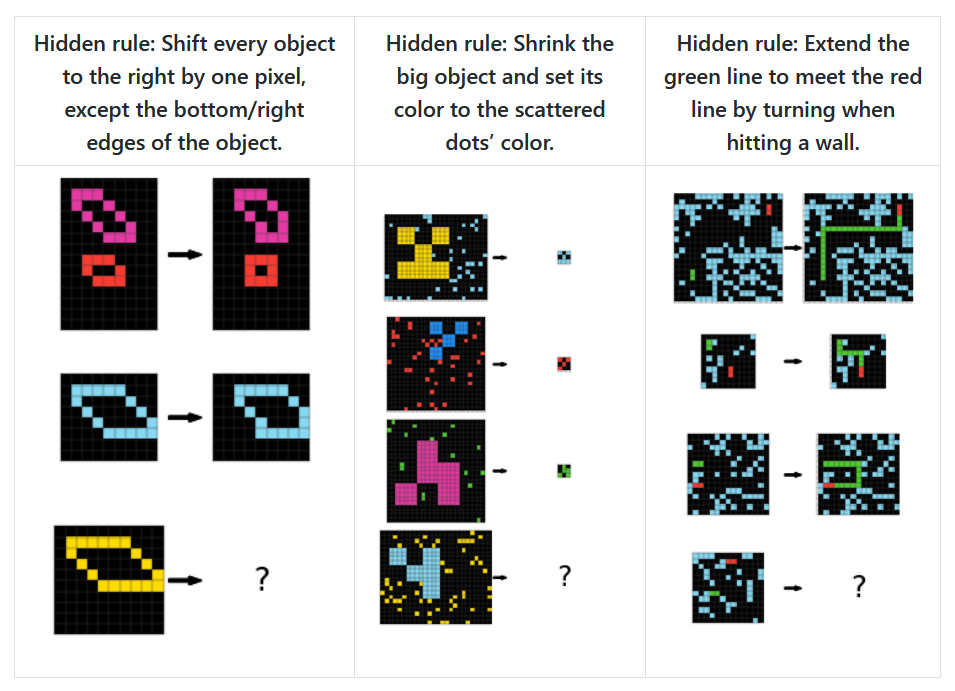
The pair tested their approach on the Abstraction and Reasoning Corpus (ARC-AGI), an unbeaten visual benchmark created in 2019 by machine learning researcher François Chollet to test AI systems’ abstract reasoning skills. ARC presents systems with grid-based image puzzles where each provides several examples demonstrating an underlying rule, and the system must infer that rule to apply it to a new example.

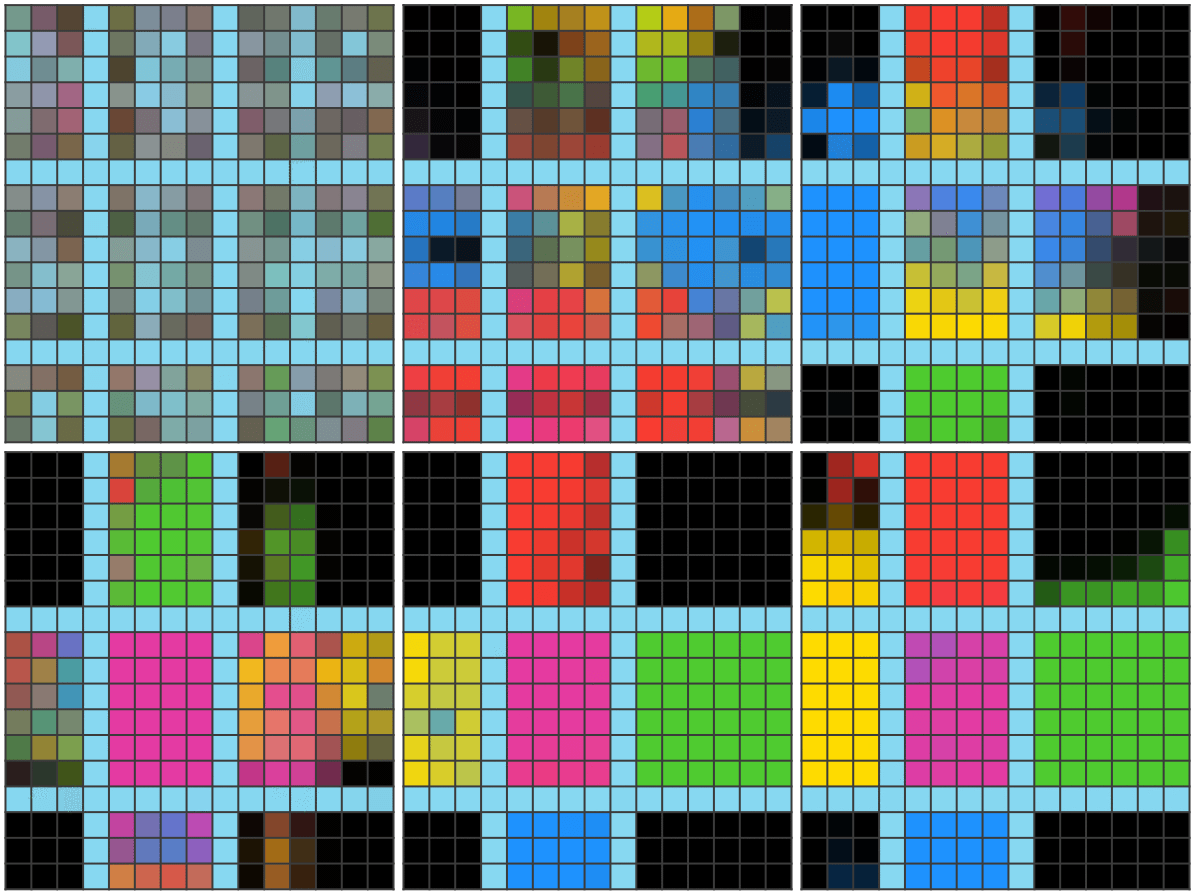
For instance, one ARC-AGI puzzle shows a grid with light blue rows and columns dividing the space into boxes. The task requires figuring out which colors belong in which boxes based on their position: black for corners, magenta for the middle, and directional colors (red for up, blue for down, green for right, and yellow for left) for the remaining boxes. Here are three other example ARC-AGI puzzles, taken from Liao’s website:

Three example ARC-AGI benchmarking puzzles.

Three example ARC-AGI benchmarking puzzles. Credit: Isaac Liao / Albert Gu

The puzzles test capabilities that some experts believe may be fundamental to general human-like reasoning (often called “AGI” for artificial general intelligence). Those properties include understanding object persistence, goal-directed behavior, counting, and basic geometry without requiring specialized knowledge. The average human solves 76.2 percent of the ARC-AGI puzzles, while human experts reach 98.5 percent.

OpenAI made waves in December for the claim that its o3 simulated reasoning model earned a record-breaking score on the ARC-AGI benchmark. In testing with computational limits, o3 scored 75.7 percent on the test, while in high-compute testing (basically unlimited thinking time), it reached 87.5 percent, which OpenAI says is comparable to human performance.

CompressARC achieves 34.75 percent accuracy on the ARC-AGI training set (the collection of puzzles used to develop the system) and 20 percent on the evaluation set (a separate group of unseen puzzles used to test how well the approach generalizes to new problems). Each puzzle takes about 20 minutes to process on a consumer-grade RTX 4070 GPU, compared to top-performing methods that use heavy-duty data center-grade machines and what the researchers describe as “astronomical amounts of compute.”

Not your typical AI approach

CompressARC takes a completely different approach than most current AI systems. Instead of relying on pre-training—the process where machine learning models learn from massive datasets before tackling specific tasks—it works with no external training data whatsoever. The system trains itself in real-time using only the specific puzzle it needs to solve.

“No pretraining; models are randomly initialized and trained during inference time. No dataset; one model trains on just the target ARC-AGI puzzle and outputs one answer,” the researchers write, describing their strict constraints.

When the researchers say “No search,” they’re referring to another common technique in AI problem-solving where systems try many different possible solutions and select the best one. Search algorithms work by systematically exploring options—like a chess program evaluating thousands of possible moves—rather than directly learning a solution. CompressARC avoids this trial-and-error approach, relying solely on gradient descent—a mathematical technique that incrementally adjusts the network’s parameters to reduce errors, similar to how you might find the bottom of a valley by always walking downhill.

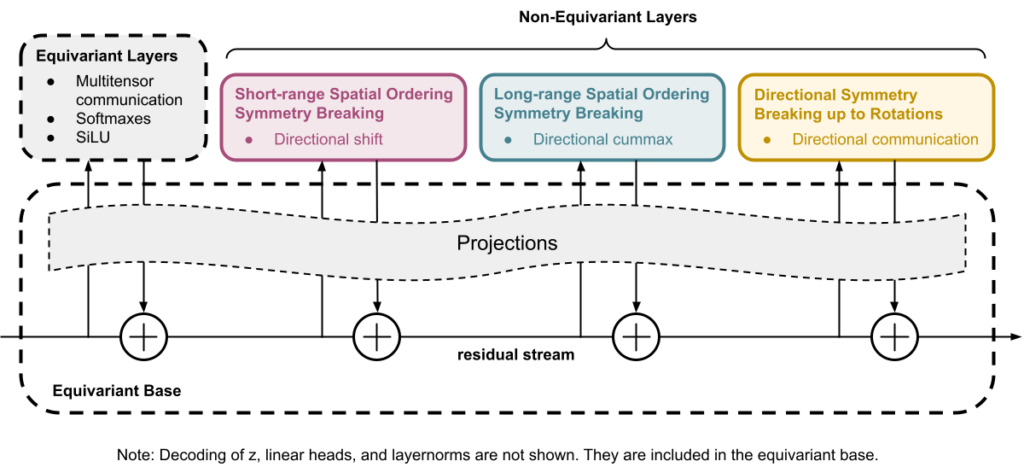
A block diagram of the CompressARC architecture, created by the researchers.

A block diagram of the CompressARC architecture, created by the researchers. Credit: Isaac Liao / Albert Gu

The system’s core principle uses compression—finding the most efficient way to represent information by identifying patterns and regularities—as the driving force behind intelligence. CompressARC searches for the shortest possible description of a puzzle that can accurately reproduce the examples and the solution when unpacked.

While CompressARC borrows some structural principles from transformers (like using a residual stream with representations that are operated upon), it’s a custom neural network architecture designed specifically for this compression task. It’s not based on an LLM or standard transformer model.

Unlike typical machine learning methods, CompressARC uses its neural network only as a decoder. During encoding (the process of converting information into a compressed format), the system fine-tunes the network’s internal settings and the data fed into it, gradually making small adjustments to minimize errors. This creates the most compressed representation while correctly reproducing known parts of the puzzle. These optimized parameters then become the compressed representation that stores the puzzle and its solution in an efficient format.

An animated GIF showing the multi-step process of CompressARC solving an ARC-AGI puzzle.

An animated GIF showing the multi-step process of CompressARC solving an ARC-AGI puzzle. Credit: Isaac Liao

“The key challenge is to obtain this compact representation without needing the answers as inputs,” the researchers explain. The system essentially uses compression as a form of inference.

This approach could prove valuable in domains where large datasets don’t exist or when systems need to learn new tasks with minimal examples. The work suggests that some forms of intelligence might emerge not from memorizing patterns across vast datasets, but from efficiently representing information in compact forms.

The compression-intelligence connection

The potential connection between compression and intelligence may sound strange at first glance, but it has deep theoretical roots in computer science concepts like Kolmogorov complexity (the shortest program that produces a specified output) and Solomonoff induction—a theoretical gold standard for prediction equivalent to an optimal compression algorithm.

To compress information efficiently, a system must recognize patterns, find regularities, and “understand” the underlying structure of the data—abilities that mirror what many consider intelligent behavior. A system that can predict what comes next in a sequence can compress that sequence efficiently. As a result, some computer scientists over the decades have suggested that compression may be equivalent to general intelligence. Based on these principles, the Hutter Prize has offered awards to researchers who can compress a 1GB file to the smallest size.

We previously wrote about intelligence and compression in September 2023, when a DeepMind paper discovered that large language models can sometimes outperform specialized compression algorithms. In that study, researchers found that DeepMind’s Chinchilla 70B model could compress image patches to 43.4 percent of their original size (beating PNG’s 58.5 percent) and audio samples to just 16.4 percent (outperforming FLAC’s 30.3 percent).

Photo of a C-clamp compressing books.

That 2023 research suggested a deep connection between compression and intelligence—the idea that truly understanding patterns in data enables more efficient compression, which aligns with this new CMU research. While DeepMind demonstrated compression capabilities in an already-trained model, Liao and Gu’s work takes a different approach by showing that the compression process can generate intelligent behavior from scratch.

This new research matters because it challenges the prevailing wisdom in AI development, which typically relies on massive pre-training datasets and computationally expensive models. While leading AI companies push toward ever-larger models trained on more extensive datasets, CompressARC suggests intelligence emerging from a fundamentally different principle.

“CompressARC’s intelligence emerges not from pretraining, vast datasets, exhaustive search, or massive compute—but from compression,” the researchers conclude. “We challenge the conventional reliance on extensive pretraining and data, and propose a future where tailored compressive objectives and efficient inference-time computation work together to extract deep intelligence from minimal input.”

Limitations and looking ahead

Even with its successes, Liao and Gu’s system comes with clear limitations that may prompt skepticism. While it successfully solves puzzles involving color assignments, infilling, cropping, and identifying adjacent pixels, it struggles with tasks requiring counting, long-range pattern recognition, rotations, reflections, or simulating agent behavior. These limitations highlight areas where simple compression principles may not be sufficient.

The research has not been peer-reviewed, and the 20 percent accuracy on unseen puzzles, though notable without pre-training, falls significantly below both human performance and top AI systems. Critics might argue that CompressARC could be exploiting specific structural patterns in the ARC puzzles that might not generalize to other domains, challenging whether compression alone can serve as a foundation for broader intelligence rather than just being one component among many required for robust reasoning capabilities.

And yet as AI development continues its rapid advance, if CompressARC holds up to further scrutiny, it offers a glimpse of a possible alternative path that might lead to useful intelligent behavior without the resource demands of today’s dominant approaches. Or at the very least, it might unlock an important component of general intelligence in machines, which is still poorly understood.

Photo of Benj Edwards

Benj Edwards is Ars Technica’s Senior AI Reporter and founder of the site’s dedicated AI beat in 2022. He’s also a tech historian with almost two decades of experience. In his free time, he writes and records music, collects vintage computers, and enjoys nature. He lives in Raleigh, NC.

CMU research shows compression alone may unlock AI puzzle-solving abilities Read More »
no-one-asked-for-this:-google-is-testing-round-keys-in-gboard

No one asked for this: Google is testing round keys in Gboard

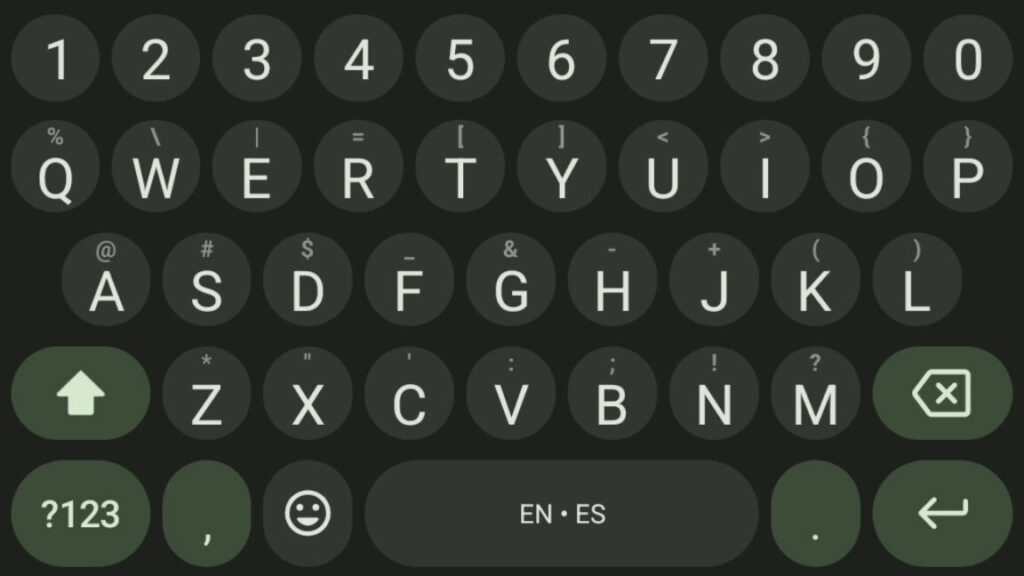
Most Android phones ship with Google’s Gboard as the default input option. It’s a reliable, feature-rich on-screen keyboard, so most folks just keep using it instead of installing a third-party option. Depending on how you feel about circles, it might be time to check out some of those alternatives. Google has quietly released an update that changes the shape and position of the keys, and users are not pleased.

In the latest build of Gboard (v15.1.05.726012951-beta-arm64-v8a), Google has changed the key shape from the long-running squares to circle shapes. If you’re using the four-row layout, the keys are like little pills. In five-row mode with the exposed number row, the keys are collapsed further into circles. The reactions seem split between those annoyed by this change and those annoyed that everyone else is so annoyed.

Change can be hard sometimes, so certainly some of the discontent is just a function of having the phone interface changed without warning. If you find it particularly distasteful, you can head into the Gboard settings and open the Themes menu. From there, you can tap on a theme and then turn off the key borders. Thus, you won’t be distracted by the horror of rounded edges. That’s not the only problem with the silent update, though.

The wave of objections isn’t just about aesthetics—this update also moves the keys around a bit. After years of tapping away on keys with a particular layout, people develop muscle memory. Big texters can sometimes type messages on their phone without even looking at it, but moving the keys around even slightly, as Google has done here, can cause you to miss more keys than you did before the update.

No one asked for this: Google is testing round keys in Gboard Read More »
will-the-future-of-software-development-run-on-vibes?

Will the future of software development run on vibes?


Accepting AI-written code without understanding how it works is growing in popularity.

For many people, coding is about telling a computer what to do and having the computer perform those precise actions repeatedly. With the rise of AI tools like ChatGPT, it’s now possible for someone to describe a program in English and have the AI model translate it into working code without ever understanding how the code works. Former OpenAI researcher Andrej Karpathy recently gave this practice a name—”vibe coding”—and it’s gaining traction in tech circles.

The technique, enabled by large language models (LLMs) from companies like OpenAI and Anthropic, has attracted attention for potentially lowering the barrier to entry for software creation. But questions remain about whether the approach can reliably produce code suitable for real-world applications, even as tools like Cursor Composer, GitHub Copilot, and Replit Agent make the process increasingly accessible to non-programmers.

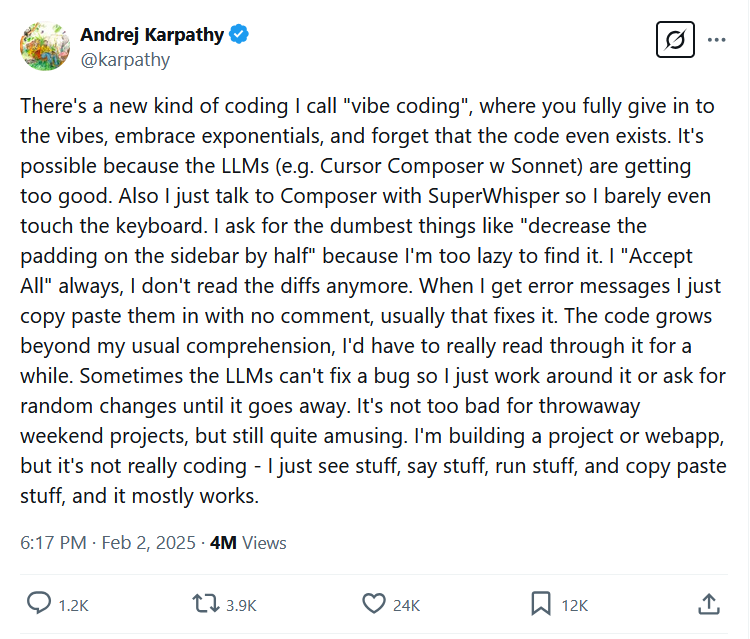
Instead of being about control and precision, vibe coding is all about surrendering to the flow. On February 2, Karpathy introduced the term in a post on X, writing, “There’s a new kind of coding I call ‘vibe coding,’ where you fully give in to the vibes, embrace exponentials, and forget that the code even exists.” He described the process in deliberately casual terms: “I just see stuff, say stuff, run stuff, and copy paste stuff, and it mostly works.”

Karapthy tweet screenshot: There's a new kind of coding I call

A screenshot of Karpathy’s original X post about vibe coding from February 2, 2025. Credit: Andrej Karpathy / X

While vibe coding, if an error occurs, you feed it back into the AI model, accept the changes, hope it works, and repeat the process. Karpathy’s technique stands in stark contrast to traditional software development best practices, which typically emphasize careful planning, testing, and understanding of implementation details.

As Karpathy humorously acknowledged in his original post, the approach is for the ultimate lazy programmer experience: “I ask for the dumbest things, like ‘decrease the padding on the sidebar by half,’ because I’m too lazy to find it myself. I ‘Accept All’ always; I don’t read the diffs anymore.”

At its core, the technique transforms anyone with basic communication skills into a new type of natural language programmer—at least for simple projects. With AI models currently being held back by the amount of code an AI model can digest at once (context size), there tends to be an upper-limit to how complex a vibe-coded software project can get before the human at the wheel becomes a high-level project manager, manually assembling slices of AI-generated code into a larger architecture. But as technical limits expand with each generation of AI models, those limits may one day disappear.

Who are the vibe coders?

There’s no way to know exactly how many people are currently vibe coding their way through either hobby projects or development jobs, but Cursor reported 40,000 paying users in August 2024, and GitHub reported 1.3 million Copilot users just over a year ago (February 2024). While we can’t find user numbers for Replit Agent, the site claims 30 million users, with an unknown percentage using the site’s AI-powered coding agent.

One thing we do know: the approach has particularly gained traction online as a fun way of rapidly prototyping games. Microsoft’s Peter Yang recently demonstrated vibe coding in an X thread by building a simple 3D first-person shooter zombie game through conversational prompts fed into Cursor and Claude 3.7 Sonnet. Yang even used a speech-to-text app so he could verbally describe what he wanted to see and refine the prototype over time.

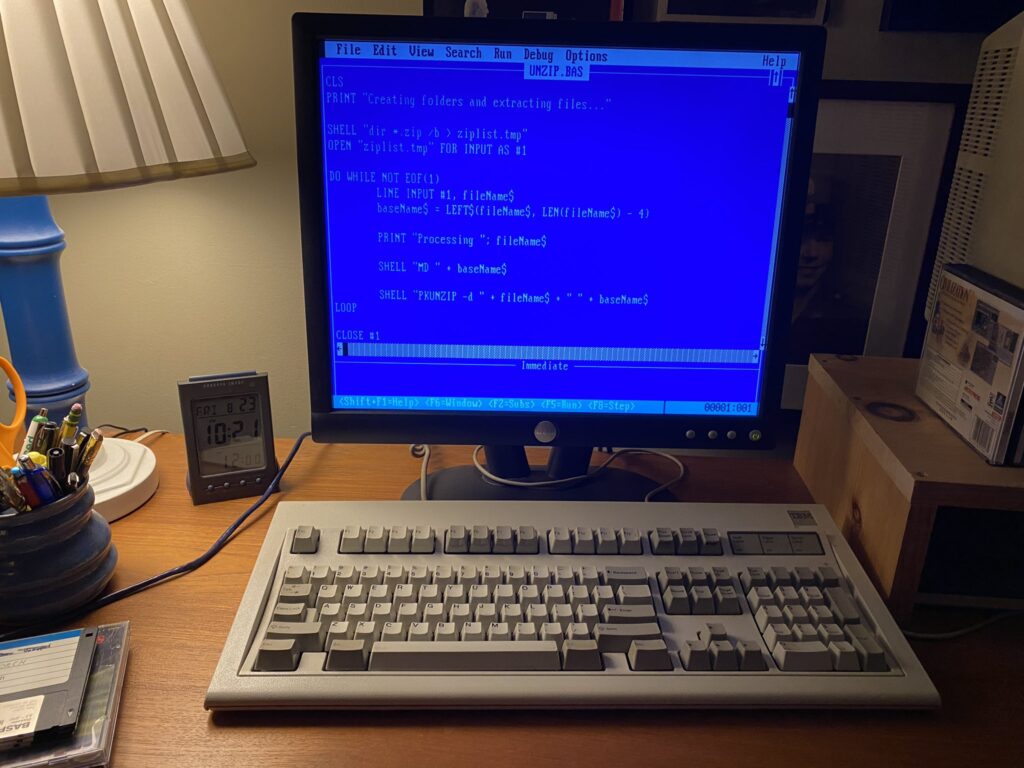
A photo of a MS-DOS computer with Q-BASIC code on the screen.

In August 2024, the author vibe coded his way into a working Q-BASIC utility script for MS-DOS, thanks to Claude Sonnet. Credit: Benj Edwards

We’ve been doing some vibe coding ourselves. Multiple Ars staffers have used AI assistants and coding tools for extracurricular hobby projects such as creating small games, crafting bespoke utilities, writing processing scripts, and more. Having a vibe-based code genie can come in handy in unexpected places: Last year, I asked Anthropic’s Claude write a Microsoft Q-BASIC program in MS-DOS that decompressed 200 ZIP files into custom directories, saving me many hours of manual typing work.

Debugging the vibes

With all this vibe coding going on, we had to turn to an expert for some input. Simon Willison, an independent software developer and AI researcher, offered a nuanced perspective on AI-assisted programming in an interview with Ars Technica. “I really enjoy vibe coding,” he said. “It’s a fun way to try out an idea and prove if it can work.”

But there are limits to how far Willison will go. “Vibe coding your way to a production codebase is clearly risky. Most of the work we do as software engineers involves evolving existing systems, where the quality and understandability of the underlying code is crucial.”

At some point, understanding at least some of the code is important because AI-generated code may include bugs, misunderstandings, and confabulations—for example, instances where the AI model generates references to nonexistent functions or libraries.

“Vibe coding is all fun and games until you have to vibe debug,” developer Ben South noted wryly on X, highlighting this fundamental issue.

Willison recently argued on his blog that encountering hallucinations with AI coding tools isn’t as detrimental as embedding false AI-generated information into a written report, because coding tools have built-in fact-checking: If there’s a confabulation, the code won’t work. This provides a natural boundary for vibe coding’s reliability—the code runs or it doesn’t.

Even so, the risk-reward calculation for vibe coding becomes far more complex in professional settings. While a solo developer might accept the trade-offs of vibe coding for personal projects, enterprise environments typically require code maintainability and reliability standards that vibe-coded solutions may struggle to meet. When code doesn’t work as expected, debugging requires understanding what the code is actually doing—precisely the knowledge that vibe coding tends to sidestep.

Programming without understanding

When it comes to defining what exactly constitutes vibe coding, Willison makes an important distinction: “If an LLM wrote every line of your code, but you’ve reviewed, tested, and understood it all, that’s not vibe coding in my book—that’s using an LLM as a typing assistant.” Vibe coding, in contrast, involves accepting code without fully understanding how it works.

While vibe coding originated with Karpathy as a playful term, it may encapsulate a real shift in how some developers approach programming tasks—prioritizing speed and experimentation over deep technical understanding. And to some people, that may be terrifying.

Willison emphasizes that developers need to take accountability for their code: “I firmly believe that as a developer you have to take accountability for the code you produce—if you’re going to put your name to it you need to be confident that you understand how and why it works—ideally to the point that you can explain it to somebody else.”

He also warns about a common path to technical debt: “For experiments and low-stake projects where you want to explore what’s possible and build fun prototypes? Go wild! But stay aware of the very real risk that a good enough prototype often faces pressure to get pushed to production.”

The future of programming jobs

So, is all this vibe coding going to cost human programmers their jobs? At its heart, programming has always been about telling a computer how to operate. The method of how we do that has changed over time, but there may always be people who are better at telling a computer precisely what to do than others—even in natural language. In some ways, those people may become the new “programmers.”

There was a point in the late 1970s to early ’80s when many people thought people required programming skills to use a computer effectively because there were very few pre-built applications for all the various computer platforms available. School systems worldwide made educational computer literacy efforts to teach people to code.

A brochure for the GE 210 computer from 1964. BASIC's creators used a similar computer four years later to develop the programming language.

A brochure for the GE 210 computer from 1964. BASIC’s creators used a similar computer four years later to develop the programming language that many children were taught at home and school. Credit: GE / Wikipedia

Before too long, people made useful software applications that let non-coders utilize computers easily—no programming required. Even so, programmers didn’t disappear—instead, they used applications to create better and more complex programs. Perhaps that will also happen with AI coding tools.

To use an analogy, computer controlled technologies like autopilot made reliable supersonic flight possible because they could handle aspects of flight that were too taxing for all but the most highly trained and capable humans to safely control. AI may do the same for programming, allowing humans to abstract away complexities that would otherwise take too much time to manually code, and that may allow for the creation of more complex and useful software experiences in the future.

But at that point, will humans still be able to understand or debug them? Maybe not. We may be completely dependent on AI tools, and some people no doubt find that a little scary or unwise.

Whether vibe coding lasts in the programming landscape or remains a prototyping technique will likely depend less on the capabilities of AI models and more on the willingness of organizations to accept risky trade-offs in code quality, maintainability, and technical debt. For now, vibe coding remains an apt descriptor of the messy, experimental relationship between AI and human developers—more collaborative than autonomous, but increasingly blurring the lines of who (or what) is really doing the programming.

Photo of Benj Edwards

Benj Edwards is Ars Technica’s Senior AI Reporter and founder of the site’s dedicated AI beat in 2022. He’s also a tech historian with almost two decades of experience. In his free time, he writes and records music, collects vintage computers, and enjoys nature. He lives in Raleigh, NC.

Will the future of software development run on vibes? Read More »
you-knew-it-was-coming:-google-begins-testing-ai-only-search-results

You knew it was coming: Google begins testing AI-only search results

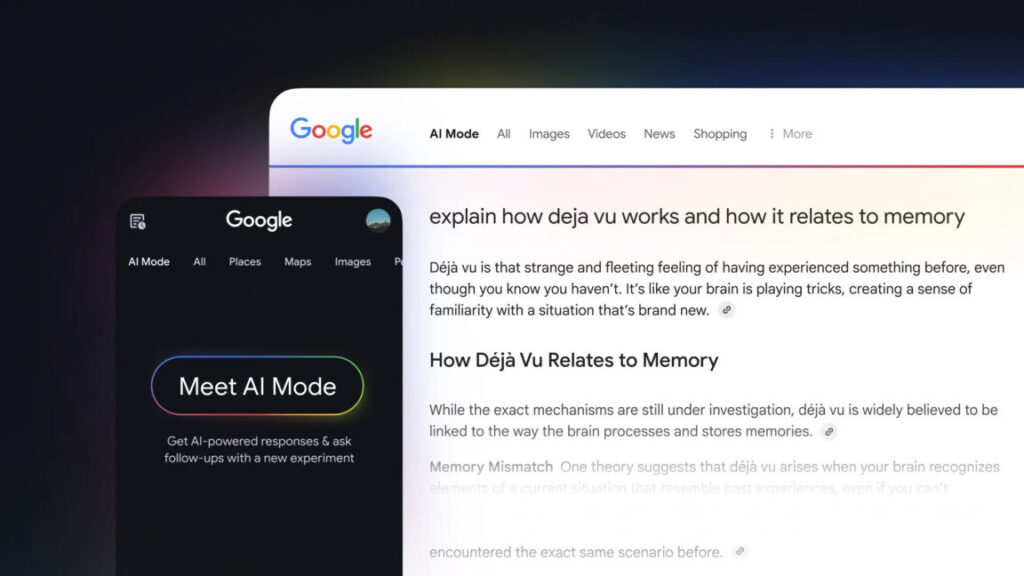
Google has become so integral to online navigation that its name became a verb, meaning “to find things on the Internet.” Soon, Google might just tell you what’s on the Internet instead of showing you. The company has announced an expansion of its AI search features, powered by Gemini 2.0. Everyone will soon see more AI Overviews at the top of the results page, but Google is also testing a more substantial change in the form of AI Mode. This version of Google won’t show you the 10 blue links at all—Gemini completely takes over the results in AI Mode.

This marks the debut of Gemini 2.0 in Google search. Google announced the first Gemini 2.0 models in December 2024, beginning with the streamlined Gemini 2.0 Flash. The heavier versions of Gemini 2.0 are still in testing, but Google says it has tuned AI Overviews with this model to offer help with harder questions in the areas of math, coding, and multimodal queries.

With this update, you will begin seeing AI Overviews on more results pages, and minors with Google accounts will see AI results for the first time. In fact, even logged out users will see AI Overviews soon. This is a big change, but it’s only the start of Google’s plans for AI search.

Gemini 2.0 also powers the new AI Mode for search. It’s launching as an opt-in feature via Google’s Search Labs, offering a totally new alternative to search as we know it. This custom version of the Gemini large language model (LLM) skips the standard web links that have been part of every Google search thus far. The model uses “advanced reasoning, thinking, and multimodal capabilities” to build a response to your search, which can include web summaries, Knowledge Graph content, and shopping data. It’s essentially a bigger, more complex AI Overview.

As Google has previously pointed out, many searches are questions rather than a string of keywords. For those kinds of queries, an AI response could theoretically provide an answer more quickly than a list of 10 blue links. However, that relies on the AI response being useful and accurate, something that often still eludes generative AI systems like Gemini.

You knew it was coming: Google begins testing AI-only search results Read More »
brother-denies-using-firmware-updates-to-brick-printers-with-third-party-ink

Brother denies using firmware updates to brick printers with third-party ink

Brother laser printers are popular recommendations for people seeking a printer with none of the nonsense. By nonsense, we mean printers suddenly bricking features, like scanning or printing, if users install third-party cartridges. Some printer firms outright block third-party toner and ink, despite customer blowback and lawsuits. Brother’s laser printers have historically worked fine with non-Brother accessories. A YouTube video posted this week, though, as well as older social media posts, claim that Brother has gone to the dark side and degraded laser printer functionality with third-party cartridges. Brother tells Ars that this isn’t true.

On March 3, YouTuber Louis Rossman posted a video saying that “Brother turns heel & becomes anti-consumer printer company.” The video, spotted by Tom’s Hardware, has 163,000 views as of this writing and seems to be based on a Reddit post from 2022. In that post, Reddit user 20Factorial said that firmware update W1.56 caused the automatic color registration feature to stop working on his Brother MFC-3750 when using third-party cartridges.

“With the colors not able to be aligned, the printer is effectively non-functional,” 20Factorial said. The Redditor went on to say that when asked, a Brother customer service agent confirmed that “the printer is non-functional without genuine toner.”

Rossman created a Wiki page breaking down the reported issues, including “printers continue to function with third-party toner but print at degraded quality unless OEM toner is installed.” He also noted that Brother printers automatically update when connected to the Internet and that Brother doesn’t offer older firmware versions to users.

Brother’s response

Brother denied to Ars Technica that it intentionally bricks printer functionality when users install third-party toner or ink. In a statement, the company said:

Brother denies using firmware updates to brick printers with third-party ink Read More »
amd-radeon-rx-9070-and-9070-xt-review:-rdna-4-fixes-a-lot-of-amd’s-problems

AMD Radeon RX 9070 and 9070 XT review: RDNA 4 fixes a lot of AMD’s problems


For $549 and $599, AMD comes close to knocking out Nvidia’s GeForce RTX 5070.

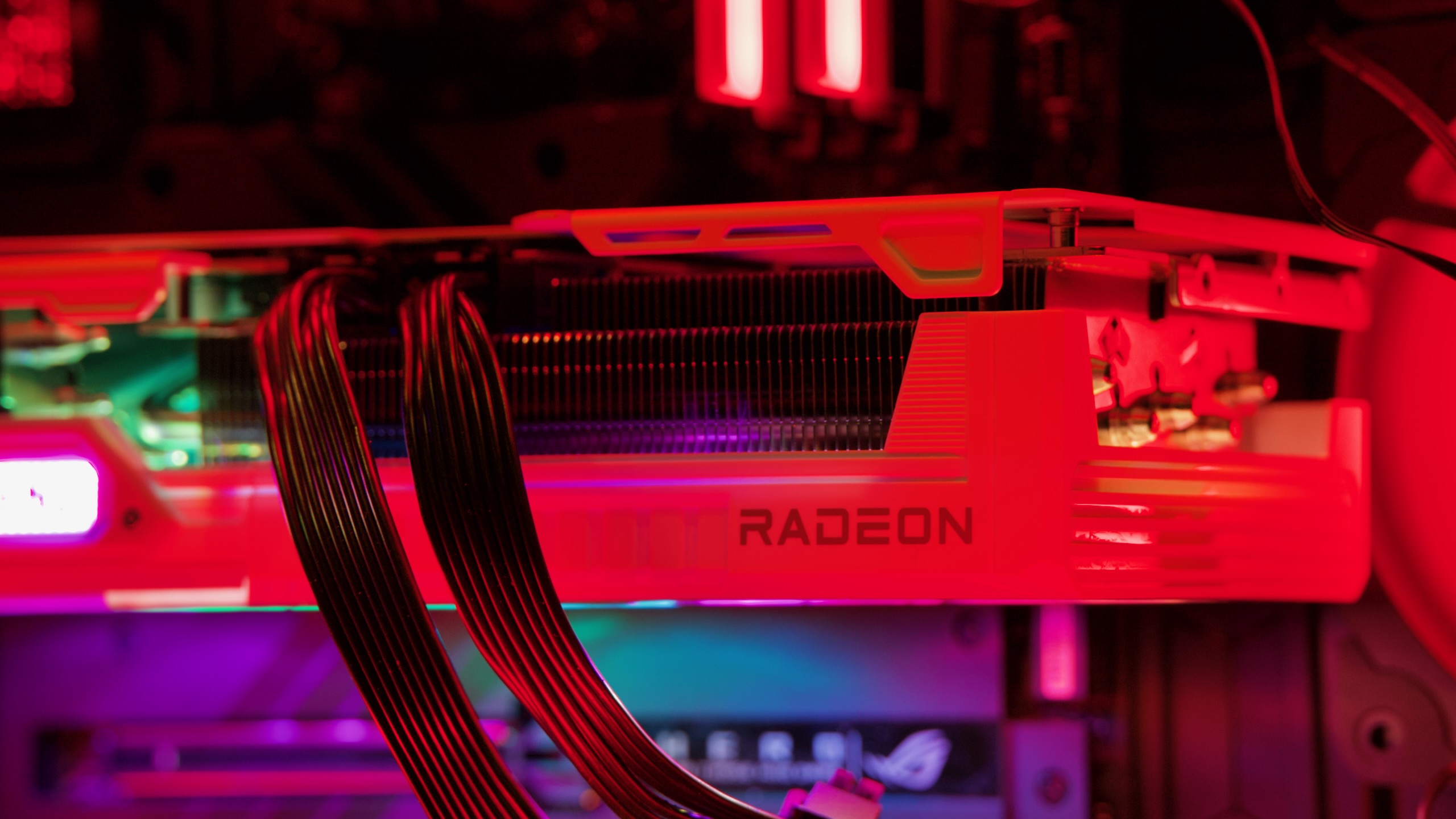
AMD’s Radeon RX 9070 and 9070 XT are its first cards based on the RDNA 4 GPU architecture. Credit: Andrew Cunningham

AMD’s Radeon RX 9070 and 9070 XT are its first cards based on the RDNA 4 GPU architecture. Credit: Andrew Cunningham

AMD is a company that knows a thing or two about capitalizing on a competitor’s weaknesses. The company got through its early-2010s nadir partially because its Ryzen CPUs struck just as Intel’s current manufacturing woes began to set in, first with somewhat-worse CPUs that were great value for the money and later with CPUs that were better than anything Intel could offer.

Nvidia’s untrammeled dominance of the consumer graphics card market should also be an opportunity for AMD. Nvidia’s GeForce RTX 50-series graphics cards have given buyers very little to get excited about, with an unreachably expensive high-end 5090 refresh and modest-at-best gains from 5080 and 5070-series cards that are also pretty expensive by historical standards, when you can buy them at all. Tech YouTubers—both the people making the videos and the people leaving comments underneath them—have been almost uniformly unkind to the 50 series, hinting at consumer frustrations and pent-up demand for competitive products from other companies.

Enter AMD’s Radeon RX 9070 XT and RX 9070 graphics cards. These are aimed right at the middle of the current GPU market at the intersection of high sales volume and decent profit margins. They promise good 1440p and entry-level 4K gaming performance and improved power efficiency compared to previous-generation cards, with fixes for long-time shortcomings (ray-tracing performance, video encoding, and upscaling quality) that should, in theory, make them more tempting for people looking to ditch Nvidia.

Table of Contents

RX 9070 and 9070 XT specs and speeds

RX 9070 XT RX 9070 RX 7900 XTX RX 7900 XT RX 7900 GRE RX 7800 XT
Compute units (Stream processors) 64 RDNA4 (4,096) 56 RDNA4 (3,584) 96 RDNA3 (6,144) 84 RDNA3 (5,376) 80 RDNA3 (5,120) 60 RDNA3 (3,840)
Boost Clock 2,970 MHz 2,520 MHz 2,498 MHz 2,400 MHz 2,245 MHz 2,430 MHz
Memory Bus Width 256-bit 256-bit 384-bit 320-bit 256-bit 256-bit
Memory Bandwidth 650GB/s 650GB/s 960GB/s 800GB/s 576GB/s 624GB/s
Memory size 16GB GDDR6 16GB GDDR6 24GB GDDR6 20GB GDDR6 16GB GDDR6 16GB GDDR6
Total board power (TBP) 304 W 220 W 355 W 315 W 260 W 263 W

AMD’s high-level performance promise for the RDNA 4 architecture revolves around big increases in performance per compute unit (CU). An RDNA 4 CU, AMD says, is nearly twice as fast in rasterized performance as RDNA 2 (that is, rendering without ray-tracing effects enabled) and nearly 2.5 times as fast as RDNA 2 in games with ray-tracing effects enabled. Performance for at least some machine learning workloads also goes way up—twice as fast as RDNA 3 and four times as fast as RDNA 2.

We’ll see this in more detail when we start comparing performance, but AMD seems to have accomplished this goal. Despite having 64 or 56 compute units (for the 9070 XT and 9070, respectively), the cards’ performance often competes with AMD’s last-generation flagships, the RX 7900 XTX and 7900 XT. Those cards came with 96 and 84 compute units, respectively. The 9070 cards are specced a lot more like last generation’s RX 7800 XT—including the 16GB of GDDR6 on a 256-bit memory bus, as AMD still isn’t using GDDR6X or GDDR7—but they’re much faster than the 7800 XT was.

AMD has dramatically increased the performance-per-compute unit for RDNA 4. AMD

The 9070 series also uses a new 4 nm manufacturing process from TSMC, an upgrade from the 7000 series’ 5 nm process (and the 6 nm process used for the separate memory controller dies in higher-end RX 7000-series models that used chiplets). AMD’s GPUs are normally a bit less efficient than Nvidia’s, but the architectural improvements and the new manufacturing process allow AMD to do some important catch-up.

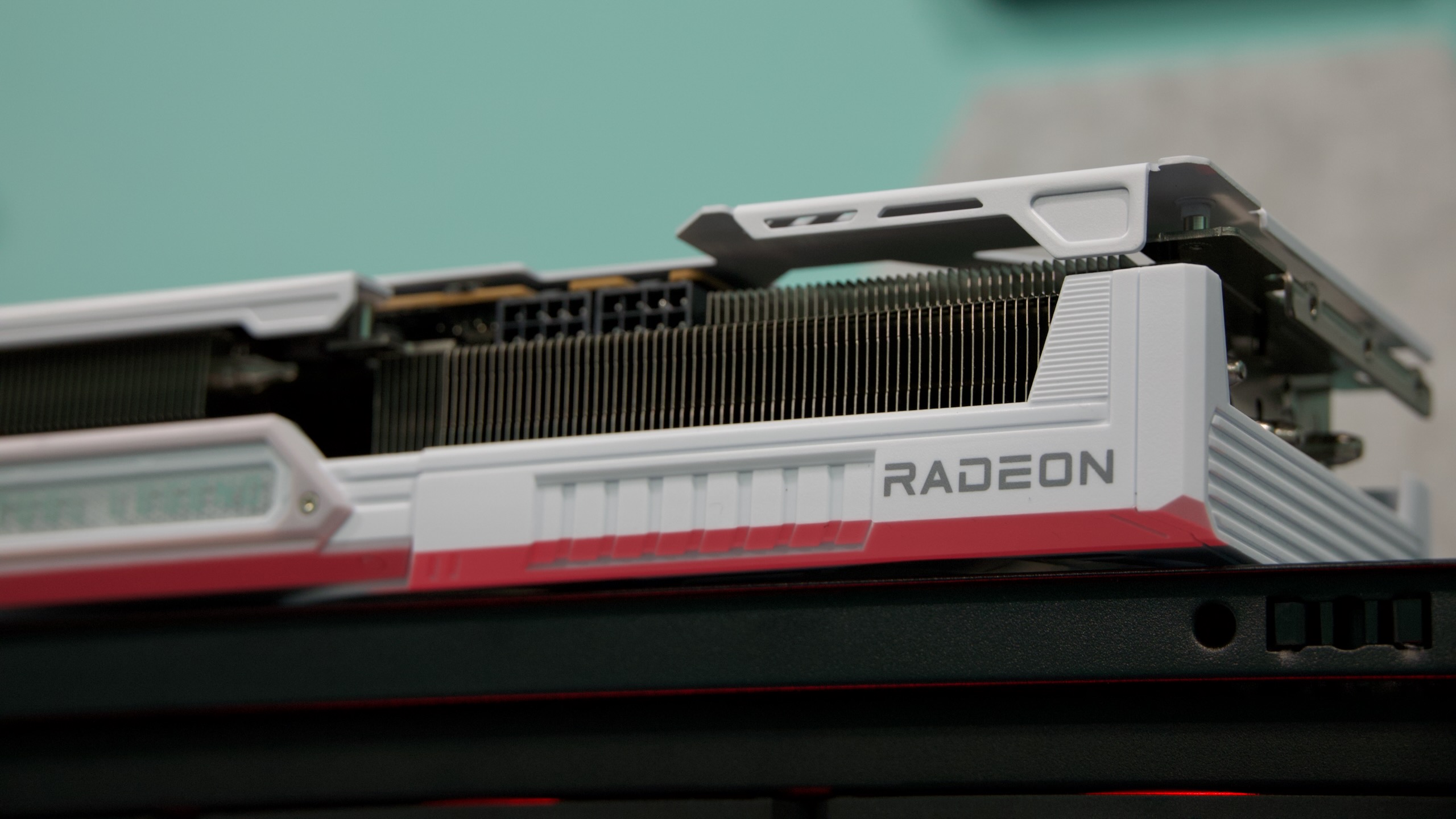
Both of the 9070 models we tested were ASRock Steel Legend models, and the 9070 and 9070 XT had identical designs—we’ll probably see a lot of this from AMD’s partners since the GPU dies and the 16GB RAM allotments are the same for both models. Both use two 8-pin power connectors; AMD says partners are free to use the 12-pin power connector if they want, but given Nvidia’s ongoing issues with it, most cards will likely stick with the reliable 8-pin connectors.

AMD doesn’t appear to be making and selling reference designs for the 9070 series the way it did for some RX 7000 and 6000-series GPUs or the way Nvidia does with its Founders Edition cards. From what we’ve seen, 2 or 2.5-slot, triple-fan designs will be the norm, the way they are for most midrange GPUs these days.

Testbed notes

We used the same GPU testbed for the Radeon RX 9070 series as we have for our GeForce RTX 50-series reviews.

An AMD Ryzen 7 9800X3D ensures that our graphics cards will be CPU-limited as little as possible. An ample 1050 W power supply, 32GB of DDR5-6000, and an AMD X670E motherboard with the latest BIOS installed round out the hardware. On the software side, we use an up-to-date installation of Windows 11 24H2 and recent GPU drivers for older cards, ensuring that our tests reflect whatever optimizations Microsoft, AMD, Nvidia, and game developers have made since the last generation of GPUs launched.

We have numbers for all of Nvidia’s RTX 50-series GPUs so far, plus most of the 40-series cards, most of AMD’s RX 7000-series cards, and a handful of older GPUs from the RTX 30-series and RX 6000 series. We’ll focus on comparing the 9070 XT and 9070 to other 1440p-to-4K graphics cards since those are the resolutions AMD is aiming at.

Performance

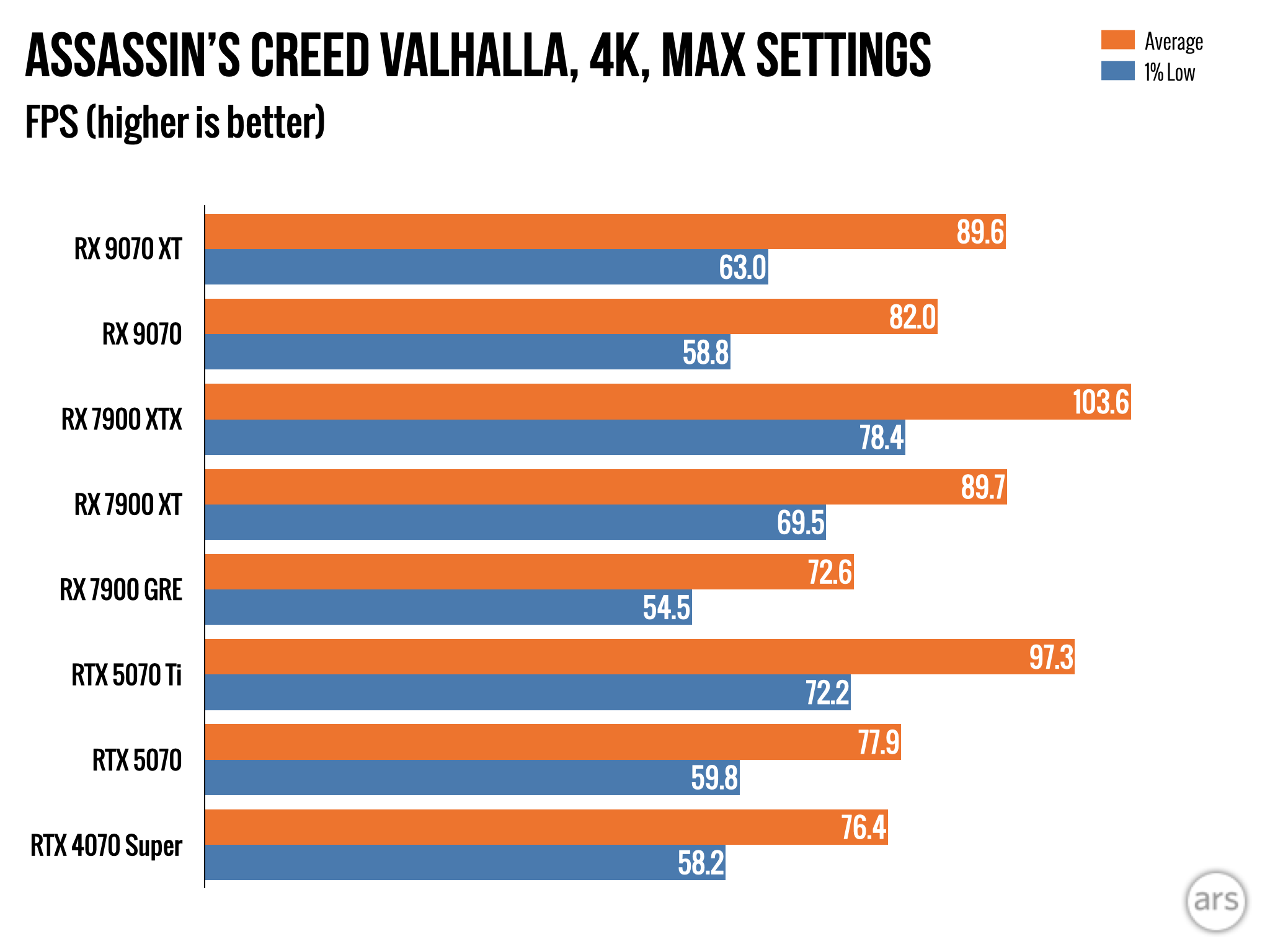
At $549 and $599, the 9070 series is priced to match Nvidia’s $549 RTX 5070 and undercut the $749 RTX 5070 Ti. So we’ll focus on comparing the 9070 series to those cards, plus the top tier of GPUs from the outgoing RX 7000-series.

Some 4K rasterized benchmarks.

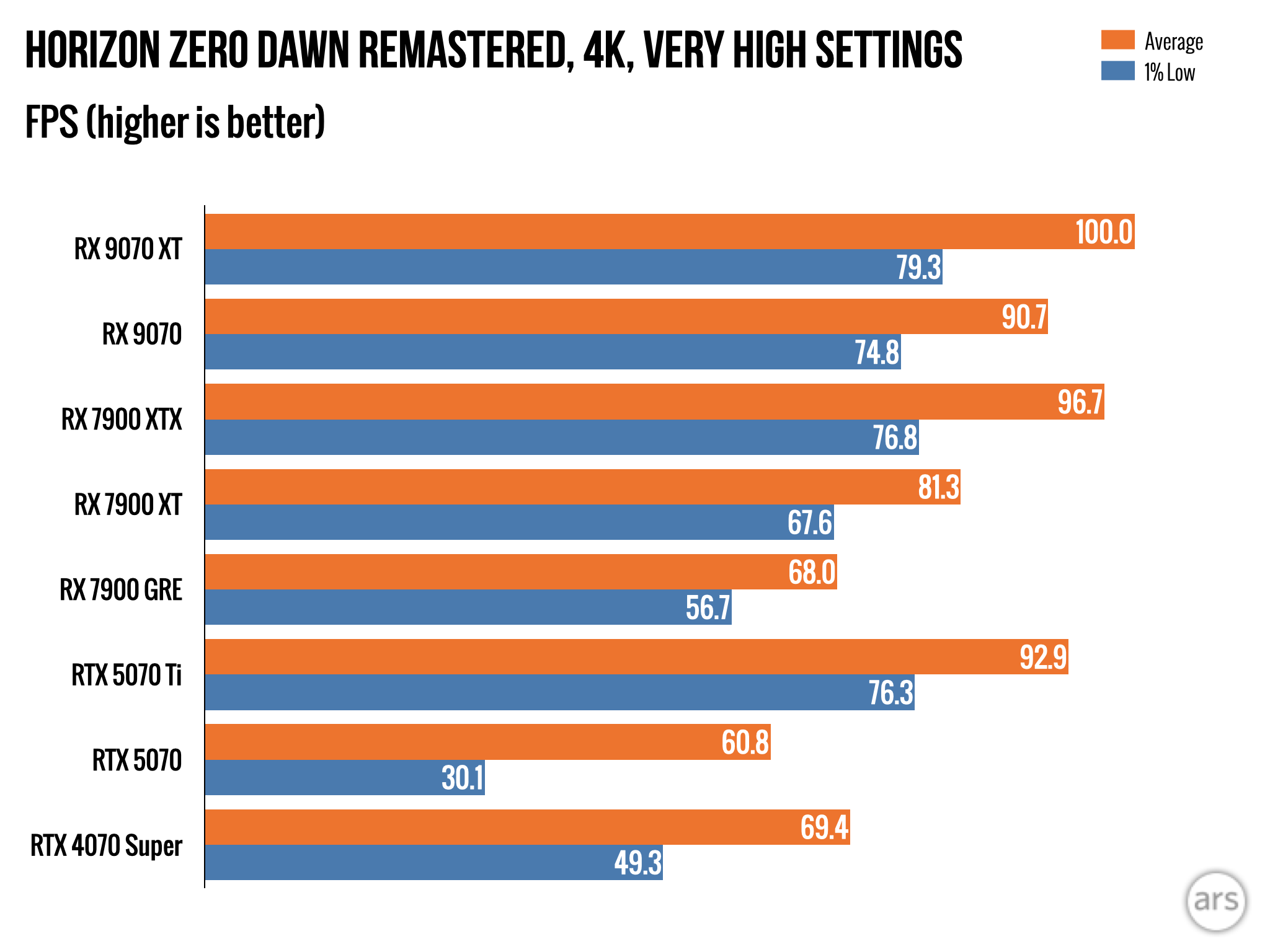
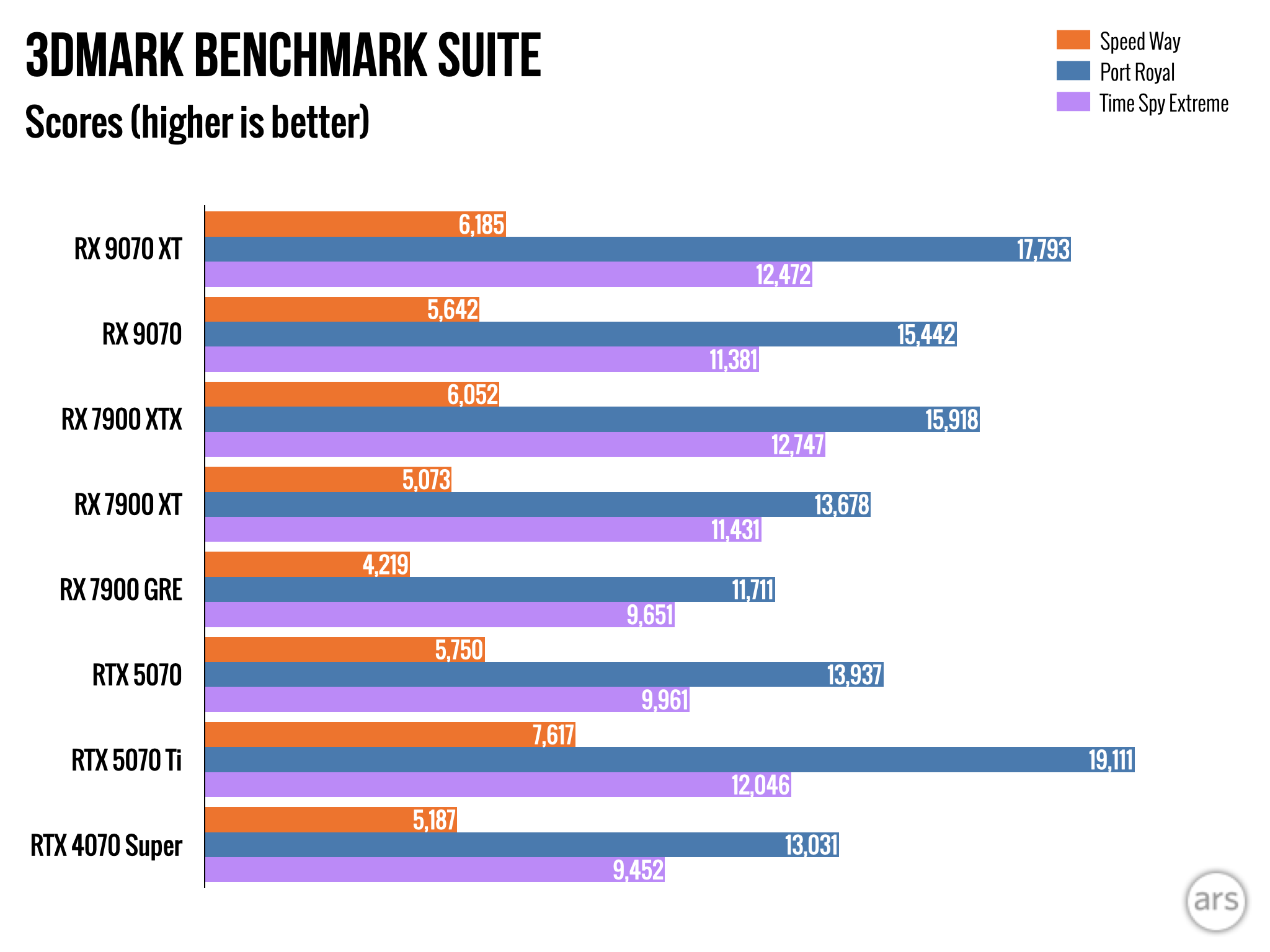
Starting at the top with rasterized benchmarks with no ray-tracing effects, the 9070 XT does a good job of standing up to Nvidia’s RTX 5070 Ti, coming within a few frames per second of its performance in all the games we tested (and scoring very similarly in the 3DMark Time Spy Extreme benchmark).

Both cards are considerably faster than the RTX 5070—between 15 and 28 percent for the 9070 XT and between 5 and 13 percent for the regular 9070 (our 5070 scored weirdly low in Horizon Zero Dawn Remastered, so we’d treat those numbers as outliers for now). Both 9070 cards also stack up well next to the RX 7000 series here—the 9070 can usually just about match the performance of the 7900 XT, and the 9070 XT usually beats it by a little. Both cards thoroughly outrun the old RX 7900 GRE, which was AMD’s $549 GPU offering just a year ago.

The 7900 XT does have 20GB of RAM instead of 16GB, which might help its performance in some edge cases. But 16GB is still perfectly generous for a 1440p-to-4K graphics card—the 5070 only offers 12GB, which could end up limiting its performance in some games as RAM requirements continue to rise.

On ray-tracing improvements

Nvidia got a jump on AMD when it introduced hardware-accelerated ray-tracing in the RTX 20-series in 2018. And while these effects were only supported in a few games at the time, many modern games offer at least some kind of ray-traced lighting effects.

AMD caught up a little when it began shipping its own ray-tracing support in the RDNA2 architecture in late 2020, but the issue since then has always been that AMD cards have taken a larger performance hit than GeForce GPUs when these effects are turned on. RDNA3 promised improvements, but our tests still generally showed the same deficit as before.

So we’re looking for two things with RDNA4’s ray-tracing performance. First, we want the numbers to be higher than they were for comparably priced RX 7000-series GPUs, the same thing we look for in non-ray-traced (or rasterized) rendering performance. Second, we want the size of the performance hit to go down. To pick an example: the RX 7900 GRE could compete with Nvidia’s RTX 4070 Ti Super in games without ray tracing, but it was closer to a non-Super RTX 4070 in ray-traced games. It has helped keep AMD’s cards from being across-the-board competitive with Nvidia’s—is that any different now?

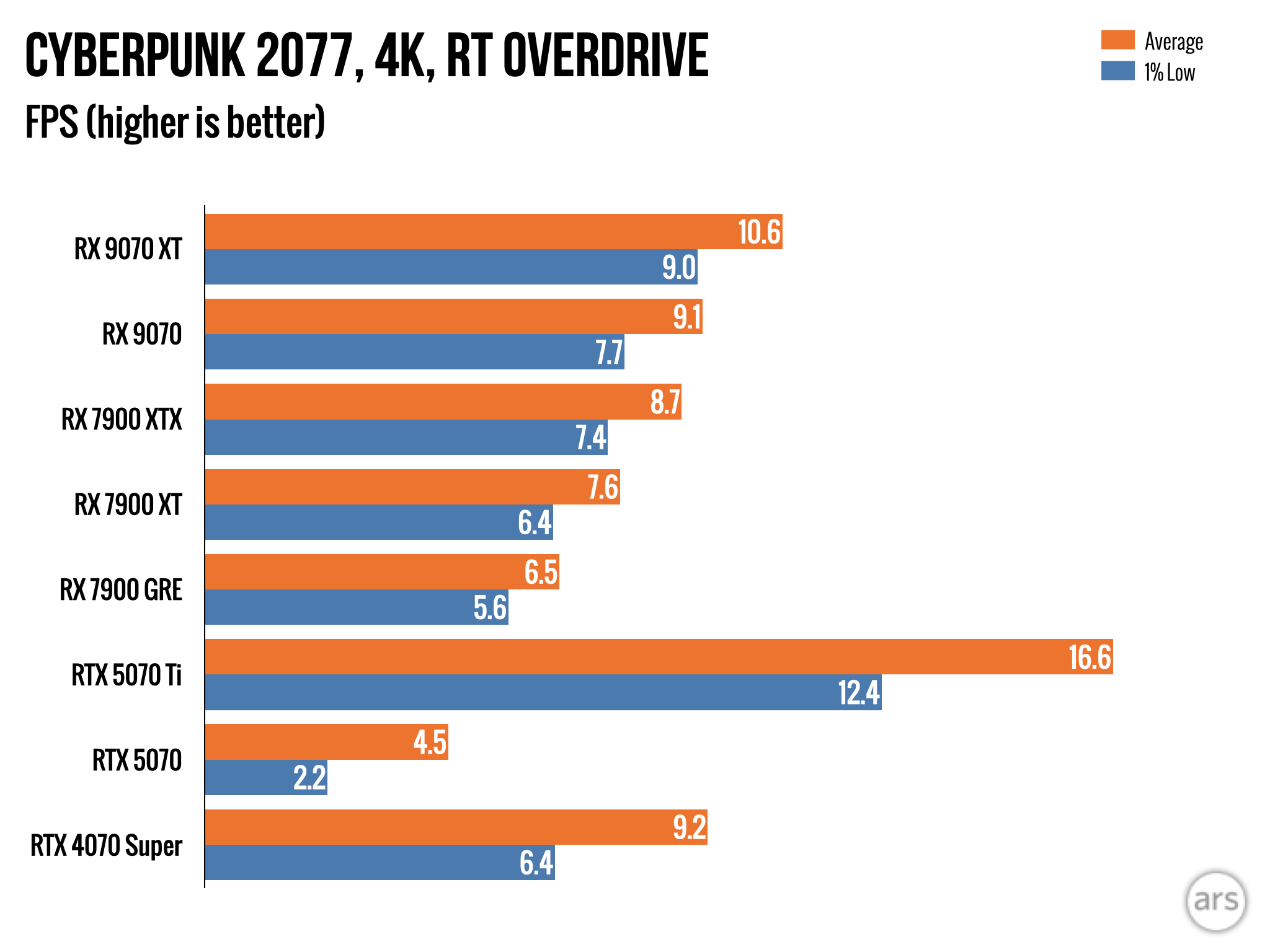
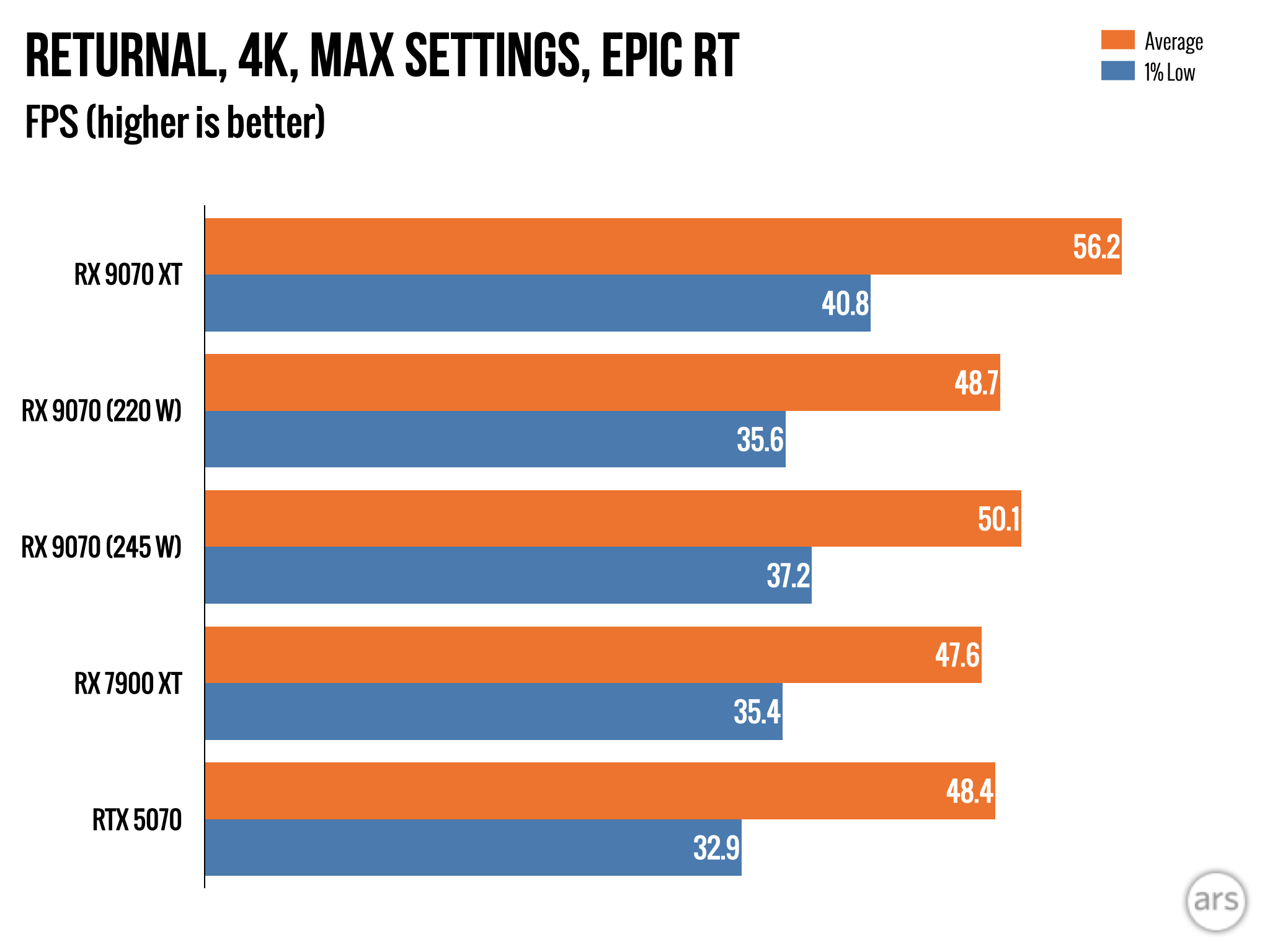
Benchmarks for games with ray-tracing effects enabled. Both AMD cards generally keep pace with the 5070 in these tests thanks to RDNA 4’s improvements.

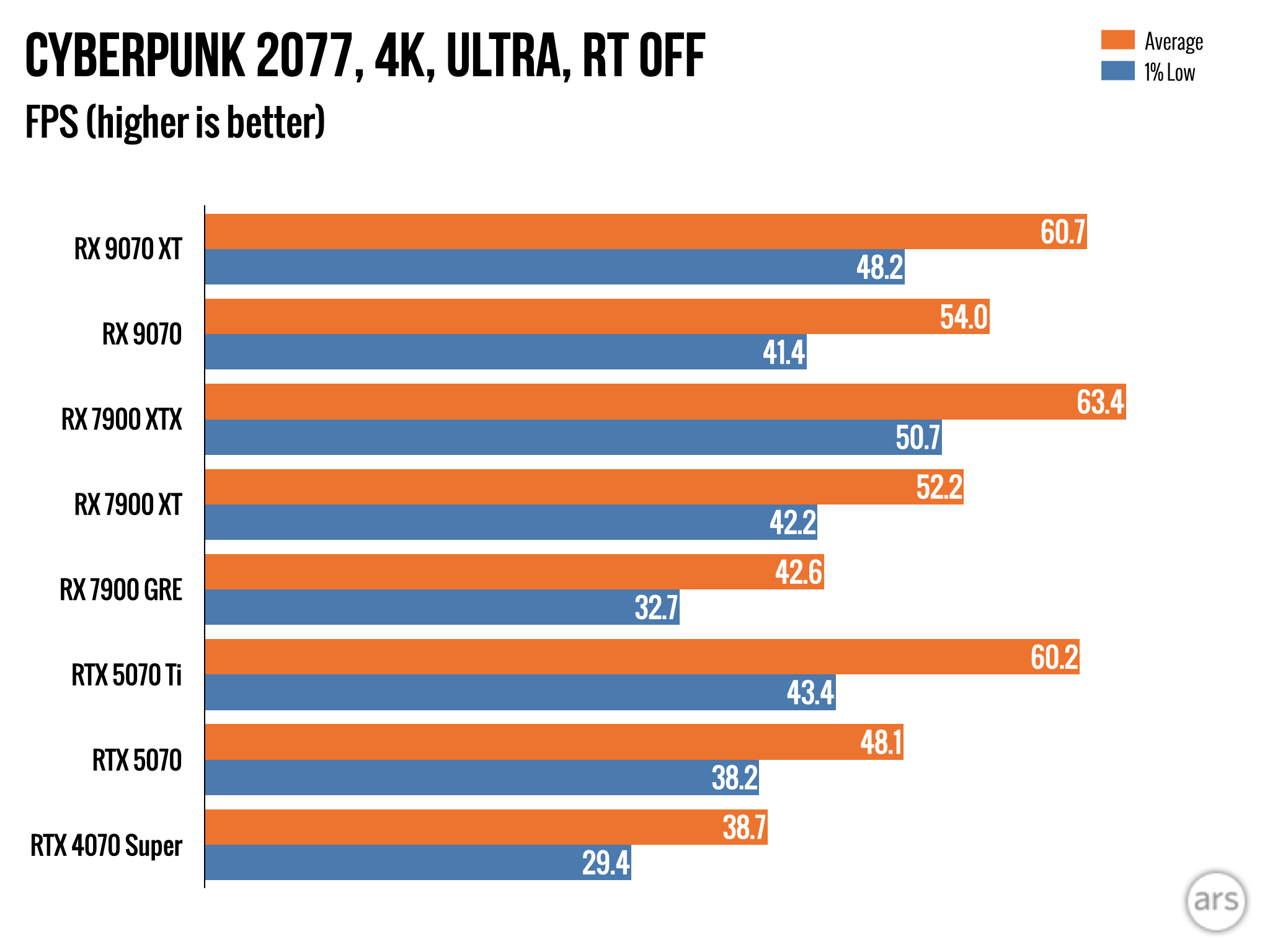
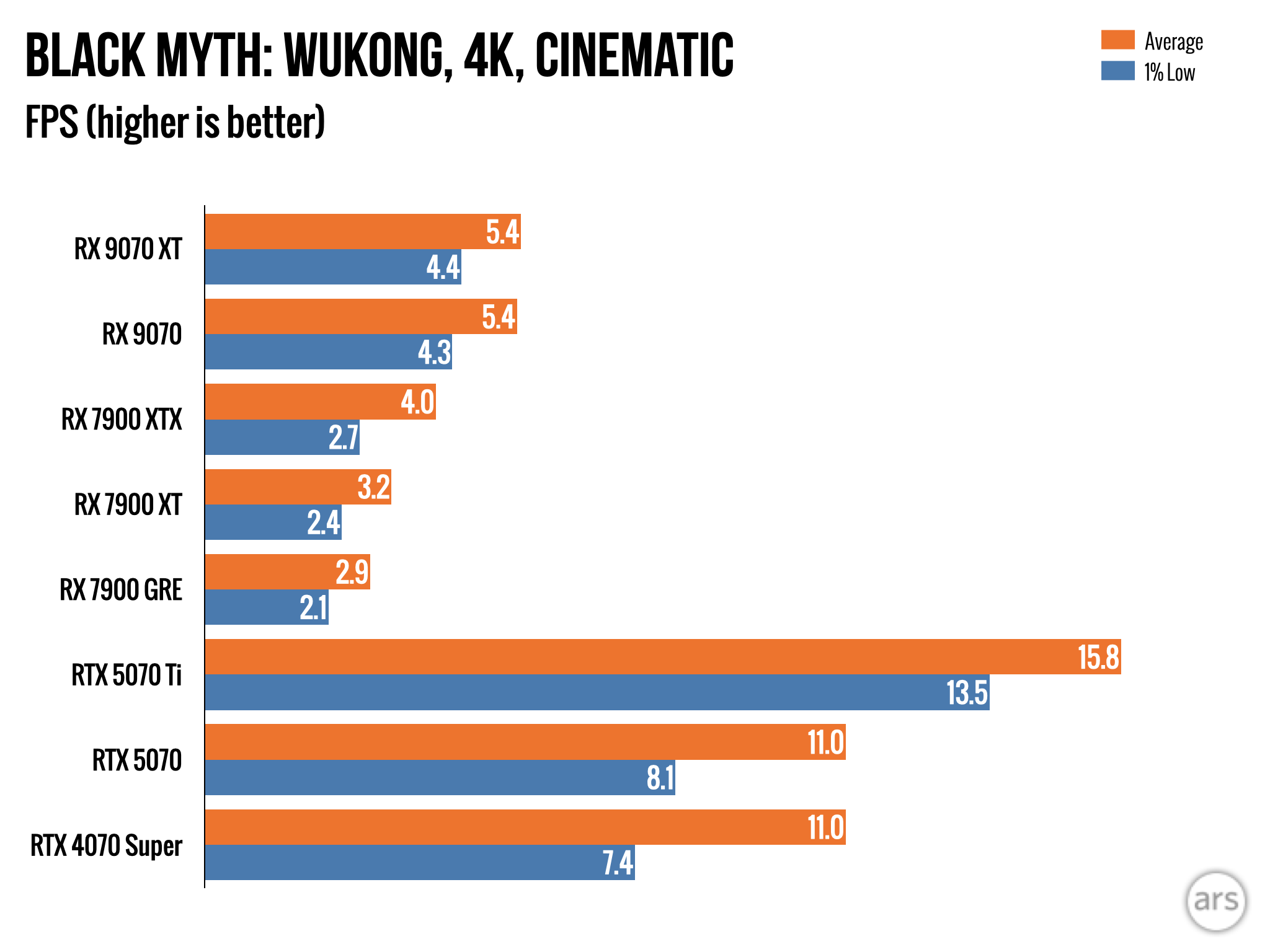
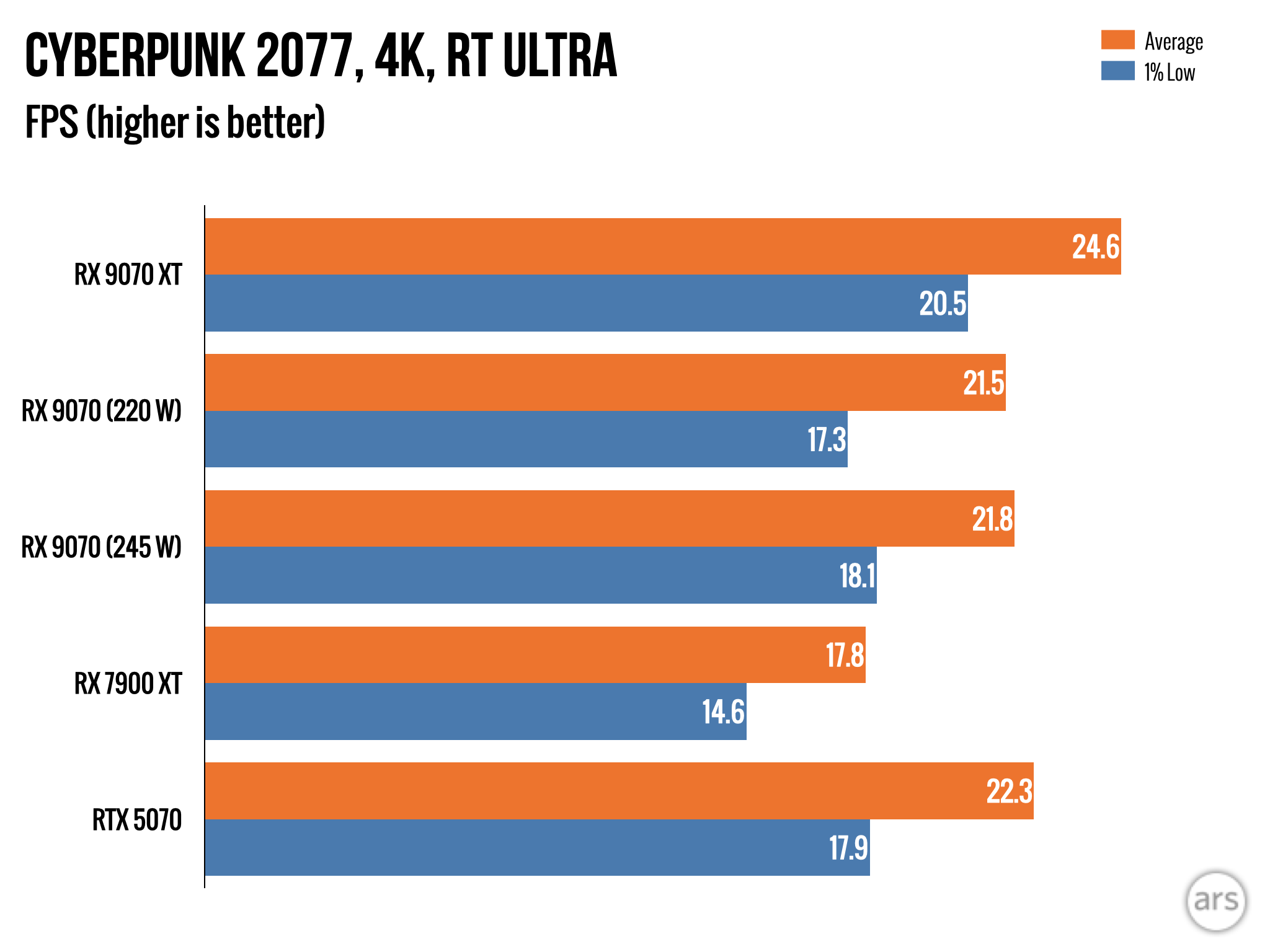
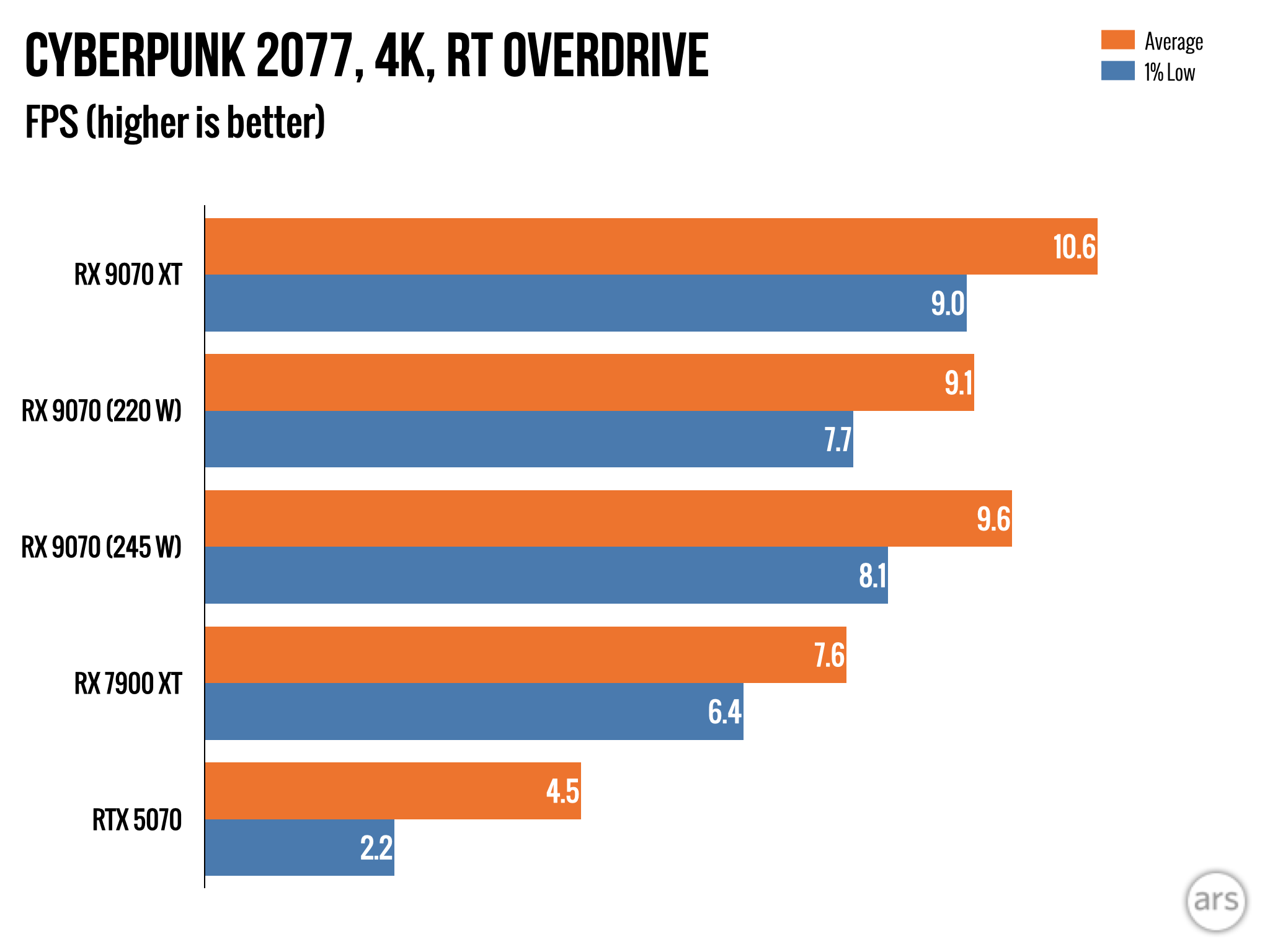
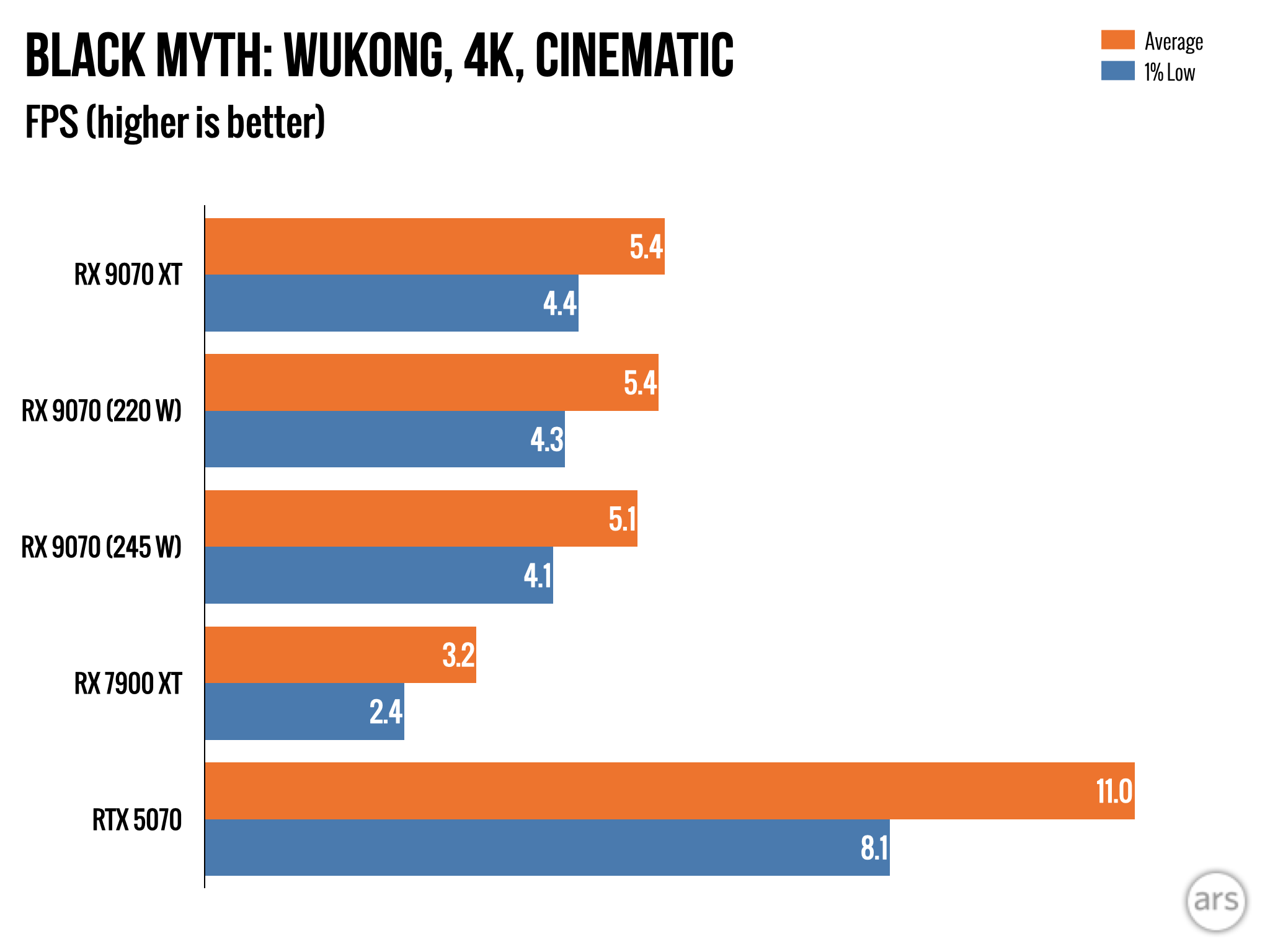
The picture our tests paint is mixed but tentatively positive. The 9070 series and RDNA4 post solid improvements in the Cyberpunk 2077 benchmarks, substantially closing the performance gap with Nvidia. In games where AMD’s cards performed well enough before—here represented by Returnal—performance goes up, but roughly proportionately with rasterized performance. And both 9070 cards still punch below their weight in Black Myth: Wukong, falling substantially behind the 5070 under the punishing Cinematic graphics preset.

So the benefits you see, as with any GPU update, will depend a bit on the game you’re playing. There’s also a possibility that game optimizations and driver updates made with RDNA4 in mind could boost performance further. We can’t say that AMD has caught all the way up to Nvidia here—the 9070 and 9070 XT are both closer to the GeForce RTX 5070 than the 5070 Ti, despite keeping it closer to the 5070 Ti in rasterized tests—but there is real, measurable improvement here, which is what we were looking for.

Power usage

The 9070 series’ performance increases are particularly impressive when you look at the power-consumption numbers. The 9070 comes close to the 7900 XT’s performance but uses 90 W less power under load. It beats the RTX 5070 most of the time but uses around 30 W less power.

The 9070 XT is a little less impressive on this front—AMD has set clock speeds pretty high, and this can increase power use disproportionately. The 9070 XT is usually 10 or 15 percent faster than the 9070 but uses 38 percent more power. The XT’s power consumption is similar to the RTX 5070 Ti’s (a GPU it often matches) and the 7900 XT’s (a GPU it always beats), so it’s not too egregious, but it’s not as standout as the 9070’s.

AMD gives 9070 owners a couple of new toggles for power limits, though, which we’ll talk about in the next section.

Experimenting with “Total Board Power”

We don’t normally dabble much with overclocking when we review CPUs or GPUs—we’re happy to leave that to folks at other outlets. But when we review CPUs, we do usually test them with multiple power limits in place. Playing with power limits is easier (and occasionally safer) than actually overclocking, and it often comes with large gains to either performance (a chip that performs much better when given more power to work with) or efficiency (a chip that can run at nearly full speed without using as much power).

Initially, I experimented with the RX 9070’s power limits by accident. AMD sent me one version of the 9070 but exchanged it because of a minor problem the OEM identified with some units early in the production run. I had, of course, already run most of our tests on it, but that’s the way these things go sometimes.

By bumping the regular RX 9070’s TBP up just a bit, you can nudge it closer to 9070 XT-level performance.

The replacement RX 9070 card, an ASRock Steel Legend model, was performing significantly better in our tests, sometimes nearly closing the gap between the 9070 and the XT. It wasn’t until I tested power consumption that I discovered the explanation—by default, it was using a 245 W power limit rather than the AMD-defined 220 W limit. Usually, these kinds of factory tweaks don’t make much of a difference, but for the 9070, this power bump gave it a nice performance boost while still keeping it close to the 250 W power limit of the GeForce RTX 5070.

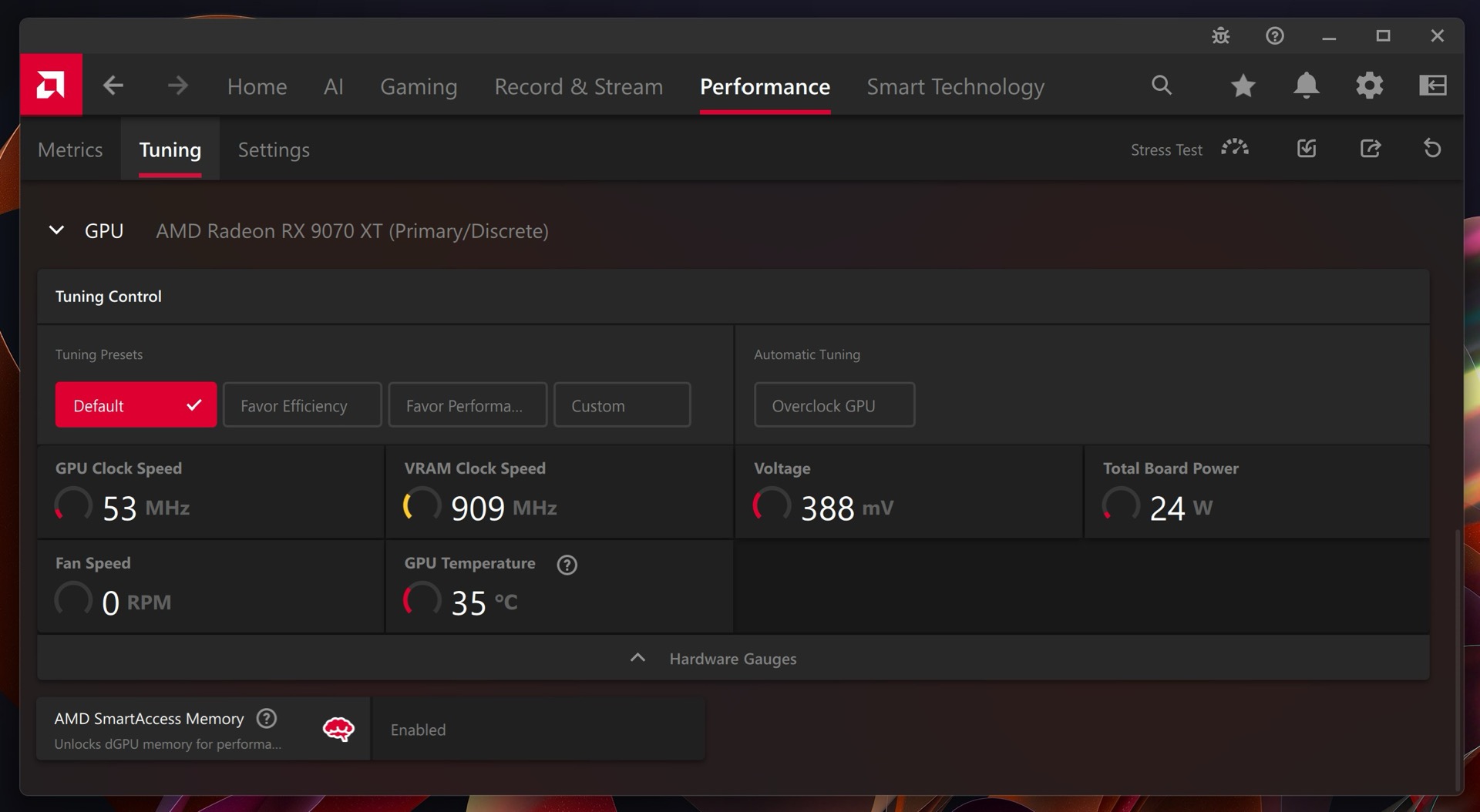
The 90-series cards we tested both add some power presets to AMD’s Adrenalin app in the Performance tab under Tuning. These replace and/or complement some of the automated overclocking and undervolting buttons that exist here for older Radeon cards. Clicking Favor Efficiency or Favor Performance can ratchet the card’s Total Board Power (TBP) up or down, limiting performance so that the card runs cooler and quieter or allowing the card to consume more power so it can run a bit faster.

The 9070 cards get slightly different performance tuning options in the Adrenalin software. These buttons mostly change the card’s Total Board Power (TBP), making it simple to either improve efficiency or boost performance a bit. Credit: Andrew Cunningham

For this particular ASRock 9070 card, the default TBP is set to 245 W. Selecting “Favor Efficiency” sets it to the default 220 W. You can double-check these values using an app like HWInfo, which displays both the current TBP and the maximum TBP in its Sensors Status window. Clicking the Custom button in the Adrenalin software gives you access to a Power Tuning slider, which for our card allowed us to ratchet the TBP up by up to 10 percent or down by as much as 30 percent.

This is all the firsthand testing we did with the power limits of the 9070 series, though I would assume that adding a bit more power also adds more overclocking headroom (bumping up the power limits is common for GPU overclockers no matter who makes your card). AMD says that some of its partners will ship 9070 XT models set to a roughly 340 W power limit out of the box but acknowledges that “you start seeing diminishing returns as you approach the top of that [power efficiency] curve.”

But it’s worth noting that the driver has another automated set-it-and-forget-it power setting you can easily use to find your preferred balance of performance and power efficiency.

A quick look at FSR4 performance

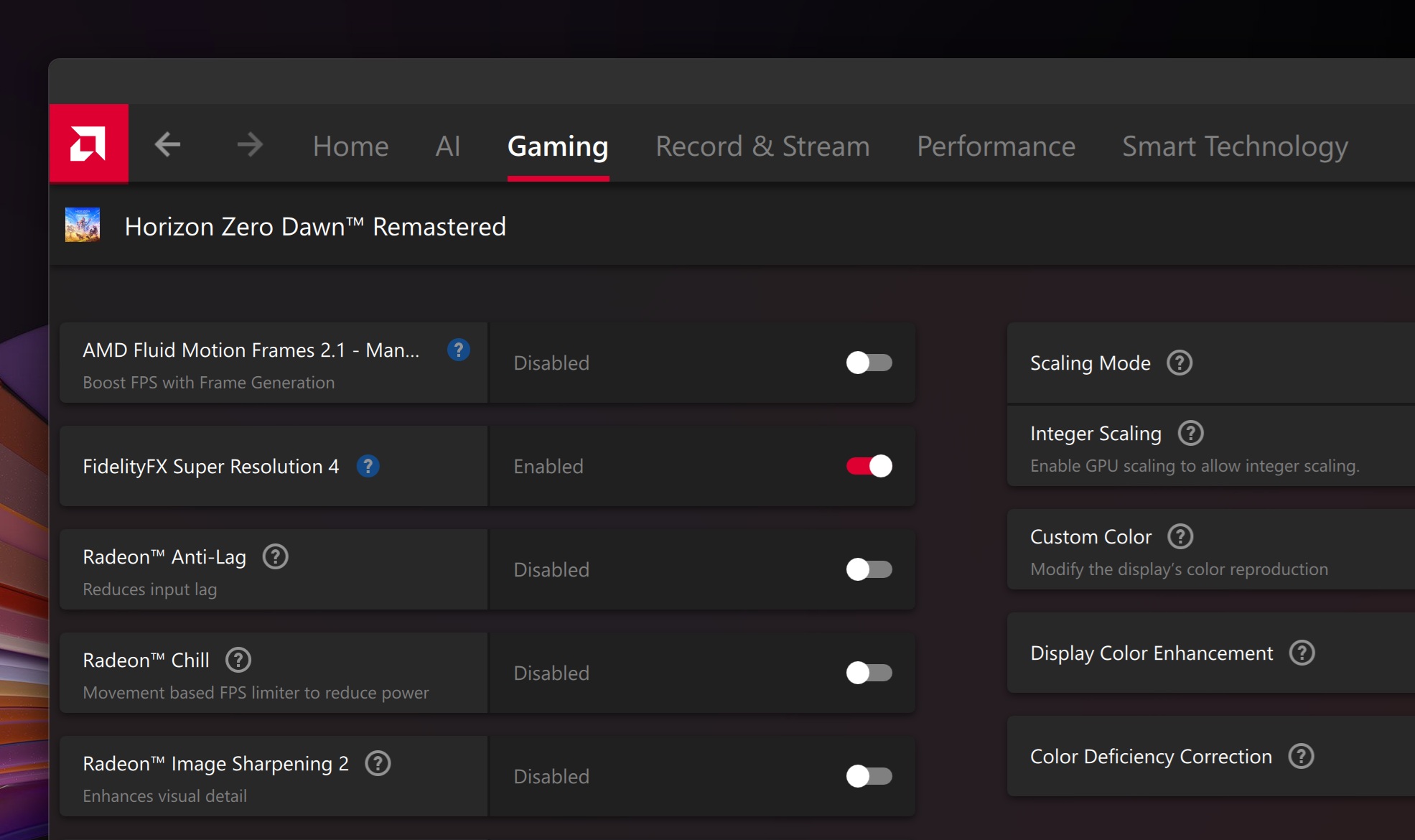
There’s a toggle in the driver for enabling FSR 4 in FSR 3.1-supporting games. Credit: Andrew Cunningham

One of AMD’s headlining improvements to the RX 90-series is the introduction of FSR 4, a new version of its FidelityFX Super Resolution upscaling algorithm. Like Nvidia’s DLSS and Intel’s XeSS, FSR 4 can take advantage of RDNA 4’s machine learning processing power to do hardware-backed upscaling instead of taking a hardware-agnostic approach as the older FSR versions did. AMD says this will improve upscaling quality, but it also means FSR4 will only work on RDNA 4 GPUs.

The good news is that FSR 3.1 and FSR 4 are forward- and backward-compatible. Games that have already added FSR 3.1 support can automatically take advantage of FSR 4, and games that support FSR 4 on the 90-series can just run FSR 3.1 on older and non-AMD GPUs.

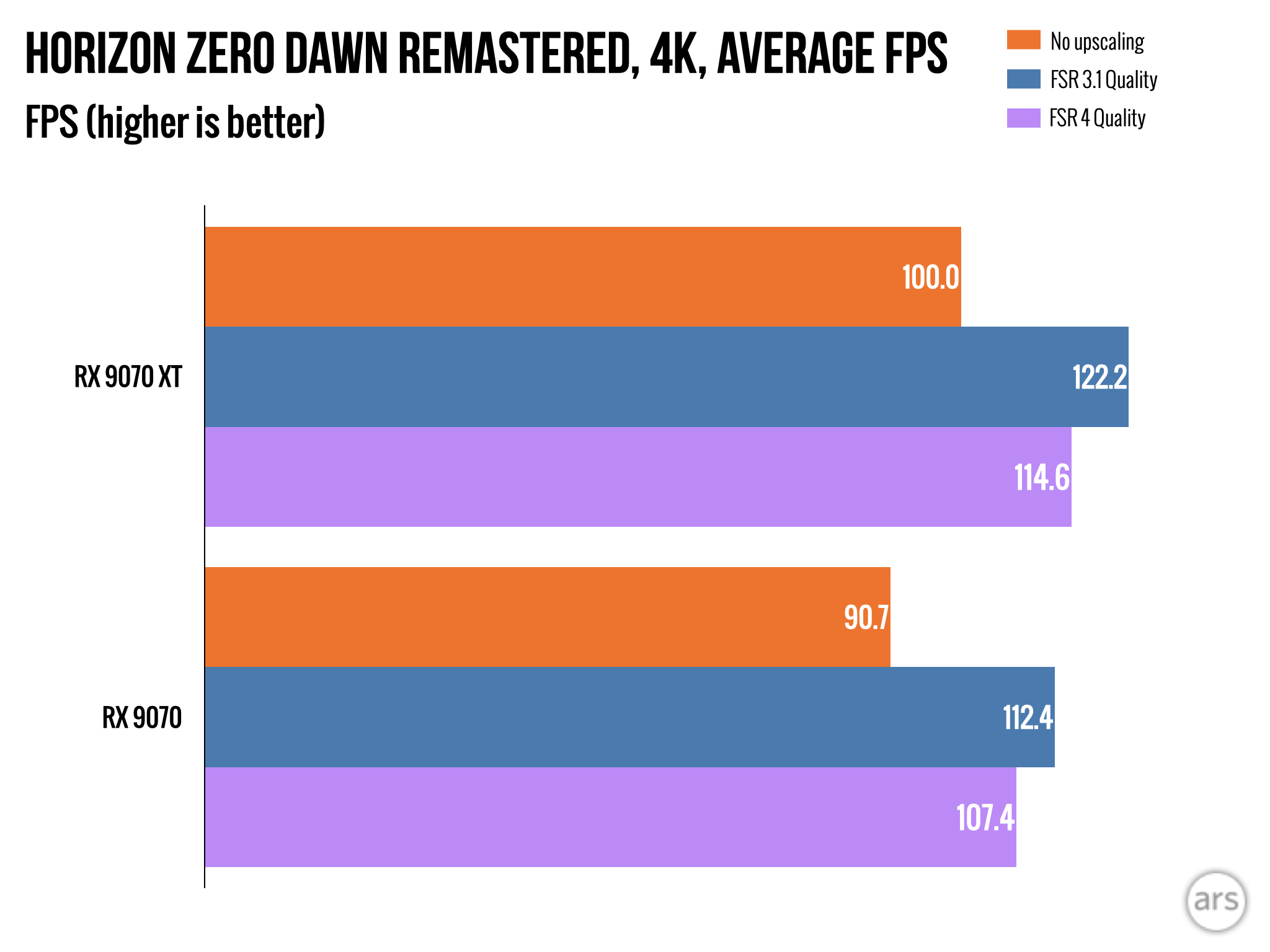
FSR 4 comes with a small performance hit compared to FSR 3.1 at the same settings, but better overall quality can let you drop to a faster preset like Balanced or Performance and end up with more frames-per-second overall. Credit: Andrew Cunningham

The only game in our current test suite to be compatible with FSR 4 is Horizon Zero Dawn Remastered, and we tested its performance using both FSR 3.1 and FSR 4. In general, we found that FSR 4 improved visual quality at the cost of just a few frames per second when run at the same settings—not unlike using Nvidia’s recently released “transformer model” for DLSS upscaling.

Many games will let you choose which version of FSR you want to use. But for FSR 3.1 games that don’t have a built-in FSR 4 option, there’s a toggle in AMD’s Adrenalin driver you can hit to switch to the better upscaling algorithm.

Even if they come with a performance hit, new upscaling algorithms can still improve performance by making the lower-resolution presets look better. We run all of our testing in “Quality” mode, which generally renders at two-thirds of native resolution and scales up. But if FSR 4 running in Balanced or Performance mode looks the same to your eyes as FSR 3.1 running in Quality mode, you can still end up with a net performance improvement in the end.

RX 9070 or 9070 XT?

Just $50 separates the advertised price of the 9070 from that of the 9070 XT, something both Nvidia and AMD have done in the past that I find a bit annoying. If you have $549 to spend on a graphics card, you can almost certainly scrape together $599 for a graphics card. All else being equal, I’d tell most people trying to choose one of these to just spring for the 9070 XT.

That said, availability and retail pricing for these might be all over the place. If your choices are a regular RX 9070 or nothing, or an RX 9070 at $549 and an RX 9070 XT at any price higher than $599, I would just grab a 9070 and not sweat it too much. The two cards aren’t that far apart in performance, especially if you bump the 9070’s TBP up a little bit, and games that are playable on one will be playable at similar settings on the other.

Pretty close to great

If you’re building a 1440p or 4K gaming box, the 9070 series might be the ones to beat right now. Credit: Andrew Cunningham

We’ve got plenty of objective data in here, so I don’t mind saying that I came into this review kind of wanting to like the 9070 and 9070 XT. Nvidia’s 50-series cards have mostly upheld the status quo, and for the last couple of years, the status quo has been sustained high prices and very modest generational upgrades. And who doesn’t like an underdog story?

I think our test results mostly justify my priors. The RX 9070 and 9070 XT are very competitive graphics cards, helped along by a particularly mediocre RTX 5070 refresh from Nvidia. In non-ray-traced games, both cards wipe the floor with the 5070 and come close to competing with the $749 RTX 5070 Ti. In games and synthetic benchmarks with ray-tracing effects on, both cards can usually match or slightly beat the similarly priced 5070, partially (if not entirely) addressing AMD’s longstanding performance deficit here. Neither card comes close to the 5070 Ti in these games, but they’re also not priced like a 5070 Ti.

Just as impressively, the Radeon cards compete with the GeForce cards while consuming similar amounts of power. At stock settings, the RX 9070 uses roughly the same amount of power under load as a 4070 Super but with better performance. The 9070 XT uses about as much power as a 5070 Ti, with similar performance before you turn ray-tracing on. Power efficiency was a small but consistent drawback for the RX 7000 series compared to GeForce cards, and the 9070 cards mostly erase that disadvantage. AMD is also less stingy with the RAM, giving you 16GB for the price Nvidia charges for 12GB.

Some of the old caveats still apply. Radeons take a bigger performance hit, proportionally, than GeForce cards. DLSS already looks pretty good and is widely supported, while FSR 3.1/FSR 4 adoption is still relatively low. Nvidia has a nearly monopolistic grip on the dedicated GPU market, which means many apps, AI workloads, and games support its GPUs best/first/exclusively. AMD is always playing catch-up to Nvidia in some respect, and Nvidia keeps progressing quickly enough that it feels like AMD never quite has the opportunity to close the gap.

AMD also doesn’t have an answer for DLSS Multi-Frame Generation. The benefits of that technology are fairly narrow, and you already get most of those benefits with single-frame generation. But it’s still a thing that Nvidia does that AMDon’t.

Overall, the RX 9070 cards are both awfully tempting competitors to the GeForce RTX 5070—and occasionally even the 5070 Ti. They’re great at 1440p and decent at 4K. Sure, I’d like to see them priced another $50 or $100 cheaper to well and truly undercut the 5070 and bring 1440p-to-4K performance t0 a sub-$500 graphics card. It would be nice to see AMD undercut Nvidia’s GPUs as ruthlessly as it undercut Intel’s CPUs nearly a decade ago. But these RDNA4 GPUs have way fewer downsides than previous-generation cards, and they come at a moment of relative weakness for Nvidia. We’ll see if the sales follow.

The good

  • Great 1440p performance and solid 4K performance
  • 16GB of RAM
  • Decisively beats Nvidia’s RTX 5070, including in most ray-traced games
  • RX 9070 XT is competitive with RTX 5070 Ti in non-ray-traced games for less money
  • Both cards match or beat the RX 7900 XT, AMD’s second-fastest card from the last generation
  • Decent power efficiency for the 9070 XT and great power efficiency for the 9070
  • Automated options for tuning overall power use to prioritize either efficiency or performance
  • Reliable 8-pin power connectors available in many cards

The bad

  • Nvidia’s ray-tracing performance is still usually better
  • At $549 and $599, pricing matches but doesn’t undercut the RTX 5070
  • FSR 4 isn’t as widely supported as DLSS and may not be for a while

The ugly

  • Playing the “can you actually buy these for AMD’s advertised prices” game

Photo of Andrew Cunningham

Andrew is a Senior Technology Reporter at Ars Technica, with a focus on consumer tech including computer hardware and in-depth reviews of operating systems like Windows and macOS. Andrew lives in Philadelphia and co-hosts a weekly book podcast called Overdue.

AMD Radeon RX 9070 and 9070 XT review: RDNA 4 fixes a lot of AMD’s problems Read More »

eerily-realistic-ai-voice-demo-sparks-amazement-and-discomfort-online

Eerily realistic AI voice demo sparks amazement and discomfort online


Sesame’s new AI voice model features uncanny imperfections, and it’s willing to act like an angry boss.

In late 2013, the Spike Jonze film Her imagined a future where people would form emotional connections with AI voice assistants. Nearly 12 years later, that fictional premise has veered closer to reality with the release of a new conversational voice model from AI startup Sesame that has left many users both fascinated and unnerved.

“I tried the demo, and it was genuinely startling how human it felt,” wrote one Hacker News user who tested the system. “I’m almost a bit worried I will start feeling emotionally attached to a voice assistant with this level of human-like sound.”

In late February, Sesame released a demo for the company’s new Conversational Speech Model (CSM) that appears to cross over what many consider the “uncanny valley” of AI-generated speech, with some testers reporting emotional connections to the male or female voice assistant (“Miles” and “Maya”).

In our own evaluation, we spoke with the male voice for about 28 minutes, talking about life in general and how it decides what is “right” or “wrong” based on its training data. The synthesized voice was expressive and dynamic, imitating breath sounds, chuckles, interruptions, and even sometimes stumbling over words and correcting itself. These imperfections are intentional.

“At Sesame, our goal is to achieve ‘voice presence’—the magical quality that makes spoken interactions feel real, understood, and valued,” writes the company in a blog post. “We are creating conversational partners that do not just process requests; they engage in genuine dialogue that builds confidence and trust over time. In doing so, we hope to realize the untapped potential of voice as the ultimate interface for instruction and understanding.”

Sometimes the model tries too hard to sound like a real human. In one demo posted online by a Reddit user called MetaKnowing, the AI model talks about craving “peanut butter and pickle sandwiches.”

An example of Sesame’s female voice model craving peanut butter and pickle sandwiches, captured by Reddit user MetaKnowing.

Founded by Brendan Iribe, Ankit Kumar, and Ryan Brown, Sesame AI has attracted significant backing from prominent venture capital firms. The company has secured investments from Andreessen Horowitz, led by Anjney Midha and Marc Andreessen, along with Spark Capital, Matrix Partners, and various founders and individual investors.

Browsing reactions to Sesame found online, we found many users expressing astonishment at its realism. “I’ve been into AI since I was a child, but this is the first time I’ve experienced something that made me definitively feel like we had arrived,” wrote one Reddit user. “I’m sure it’s not beating any benchmarks, or meeting any common definition of AGI, but this is the first time I’ve had a real genuine conversation with something I felt was real.” Many other Reddit threads express similar feelings of surprise, with commenters saying it’s “jaw-dropping” or “mind-blowing.”

While that sounds like a bunch of hyperbole at first glance, not everyone finds the Sesame experience pleasant. Mark Hachman, a senior editor at PCWorld, wrote about being deeply unsettled by his interaction with the Sesame voice AI. “Fifteen minutes after ‘hanging up’ with Sesame’s new ‘lifelike’ AI, and I’m still freaked out,” Hachman reported. He described how the AI’s voice and conversational style eerily resembled an old friend he had dated in high school.

Others have compared Sesame’s voice model to OpenAI’s Advanced Voice Mode for ChatGPT, saying that Sesame’s CSM features more realistic voices, and others are pleased that the model in the demo will roleplay angry characters, which ChatGPT refuses to do.

An example argument with Sesame’s CSM created by Gavin Purcell.

Gavin Purcell, co-host of the AI for Humans podcast, posted an example video on Reddit where the human pretends to be an embezzler and argues with a boss. It’s so dynamic that it’s difficult to tell who the human is and which one is the AI model. Judging by our own demo, it’s entirely capable of what you see in the video.

“Near-human quality”

Under the hood, Sesame’s CSM achieves its realism by using two AI models working together (a backbone and a decoder) based on Meta’s Llama architecture that processes interleaved text and audio. Sesame trained three AI model sizes, with the largest using 8.3 billion parameters (an 8 billion backbone model plus a 300 million parameter decoder) on approximately 1 million hours of primarily English audio.

Sesame’s CSM doesn’t follow the traditional two-stage approach used by many earlier text-to-speech systems. Instead of generating semantic tokens (high-level speech representations) and acoustic details (fine-grained audio features) in two separate stages, Sesame’s CSM integrates into a single-stage, multimodal transformer-based model, jointly processing interleaved text and audio tokens to produce speech. OpenAI’s voice model uses a similar multimodal approach.

In blind tests without conversational context, human evaluators showed no clear preference between CSM-generated speech and real human recordings, suggesting the model achieves near-human quality for isolated speech samples. However, when provided with conversational context, evaluators still consistently preferred real human speech, indicating a gap remains in fully contextual speech generation.

Sesame co-founder Brendan Iribe acknowledged current limitations in a comment on Hacker News, noting that the system is “still too eager and often inappropriate in its tone, prosody and pacing” and has issues with interruptions, timing, and conversation flow. “Today, we’re firmly in the valley, but we’re optimistic we can climb out,” he wrote.

Too close for comfort?

Despite CSM’s technological impressiveness, advancements in conversational voice AI carry significant risks for deception and fraud. The ability to generate highly convincing human-like speech has already supercharged voice phishing scams, allowing criminals to impersonate family members, colleagues, or authority figures with unprecedented realism. But adding realistic interactivity to those scams may take them to another level of potency.

Unlike current robocalls that often contain tell-tale signs of artificiality, next-generation voice AI could eliminate these red flags entirely. As synthetic voices become increasingly indistinguishable from human speech, you may never know who you’re talking to on the other end of the line. It’s inspired some people to share a secret word or phrase with their family for identity verification.

Although Sesame’s demo does not clone a person’s voice, future open source releases of similar technology could allow malicious actors to potentially adapt these tools for social engineering attacks. OpenAI itself held back its own voice technology from wider deployment over fears of misuse.

Sesame sparked a lively discussion on Hacker News about its potential uses and dangers. Some users reported having extended conversations with the two demo voices, with conversations lasting up to the 30-minute limit. In one case, a parent recounted how their 4-year-old daughter developed an emotional connection with the AI model, crying after not being allowed to talk to it again.

The company says it plans to open-source “key components” of its research under an Apache 2.0 license, enabling other developers to build upon their work. Their roadmap includes scaling up model size, increasing dataset volume, expanding language support to over 20 languages, and developing “fully duplex” models that better handle the complex dynamics of real conversations.

You can try the Sesame demo on the company’s website, assuming that it isn’t too overloaded with people who want to simulate a rousing argument.

Photo of Benj Edwards

Benj Edwards is Ars Technica’s Senior AI Reporter and founder of the site’s dedicated AI beat in 2022. He’s also a tech historian with almost two decades of experience. In his free time, he writes and records music, collects vintage computers, and enjoys nature. He lives in Raleigh, NC.

Eerily realistic AI voice demo sparks amazement and discomfort online Read More »

google’s-ai-powered-pixel-sense-app-could-gobble-up-all-your-pixel-10-data

Google’s AI-powered Pixel Sense app could gobble up all your Pixel 10 data

Google’s AI ambitions know no bounds. A new report claims Google’s next phones will herald the arrival of a feature called Pixel Sense that will ingest data from virtually every Google app on your phone, fueling a new personalized experience. This app could be the premiere feature of the Pixel 10 series expected out late this year.

According to a report from Android Authority, Pixel Sense is the new name for Pixie, an AI that was supposed to integrate with Google Assistant before Gemini became the center of Google’s universe. In late 2023, it looked as though Pixie would be launched on the Pixel 9 series, but that never happened. Now, it’s reportedly coming back as Pixel Sense, and we have more details on how it might work.

Pixel Sense will apparently be able to leverage data you create in apps like Calendar, Gmail, Docs, Maps, Keep Notes, Recorder, Wallet, and almost every other Google app. It can also process media files like screenshots in the same way the Pixel Screenshots app currently does. The goal of collecting all this data is to help you complete tasks faster by suggesting content, products, and names by understanding the context of how you use the phone. Pixel Sense will essentially try to predict what you need without being prompted.

Samsung is pursuing a goal that is ostensibly similar to Now Brief, a new AI feature available on the Galaxy S25 series. Now Brief collects data from a handful of apps like Samsung Health, Samsung Calendar, and YouTube to distill your important data with AI. However, it rarely offers anything of use with its morning, noon, and night “Now Bar” updates.

Pixel Sense sounds like a more expansive version of this same approach to processing user data—and perhaps the fulfillment of Google Now’s decade-old promise. The supposed list of supported apps is much larger, and they’re apps people actually use. If pouring more and more data into a large language model leads to better insights into your activities, Pixel Sense should be better at guessing what you’ll need. Admittedly, that’s a big “if.”

Google’s AI-powered Pixel Sense app could gobble up all your Pixel 10 data Read More »
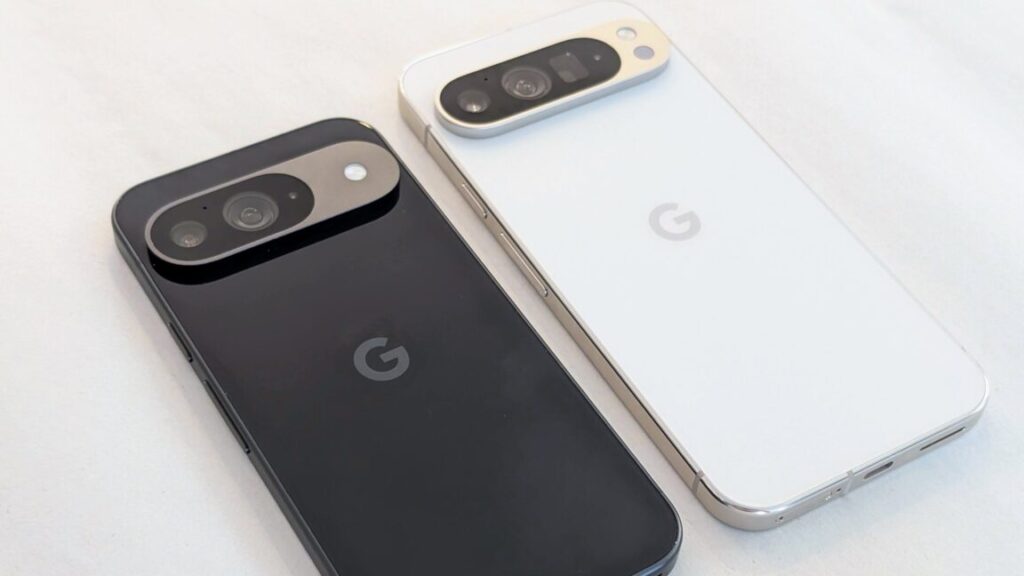
researchers-surprised-to-find-less-educated-areas-adopting-ai-writing-tools-faster

Researchers surprised to find less-educated areas adopting AI writing tools faster


From the mouths of machines

Stanford researchers analyzed 305 million texts, revealing AI-writing trends.

Since the launch of ChatGPT in late 2022, experts have debated how widely AI language models would impact the world. A few years later, the picture is getting clear. According to new Stanford University-led research examining over 300 million text samples across multiple sectors, AI language models now assist in writing up to a quarter of professional communications across sectors. It’s having a large impact, especially in less-educated parts of the United States.

“Our study shows the emergence of a new reality in which firms, consumers and even international organizations substantially rely on generative AI for communications,” wrote the researchers.

The researchers tracked large language model (LLM) adoption across industries from January 2022 to September 2024 using a dataset that included 687,241 consumer complaints submitted to the US Consumer Financial Protection Bureau (CFPB), 537,413 corporate press releases, 304.3 million job postings, and 15,919 United Nations press releases.

By using a statistical detection system that tracked word usage patterns, the researchers found that roughly 18 percent of financial consumer complaints (including 30 percent of all complaints from Arkansas), 24 percent of corporate press releases, up to 15 percent of job postings, and 14 percent of UN press releases showed signs of AI assistance during that period of time.

The study also found that while urban areas showed higher adoption overall (18.2 percent versus 10.9 percent in rural areas), regions with lower educational attainment used AI writing tools more frequently (19.9 percent compared to 17.4 percent in higher-education areas). The researchers note that this contradicts typical technology adoption patterns where more educated populations adopt new tools fastest.

“In the consumer complaint domain, the geographic and demographic patterns in LLM adoption present an intriguing departure from historical technology diffusion trends where technology adoption has generally been concentrated in urban areas, among higher-income groups, and populations with higher levels of educational attainment.”

Researchers from Stanford, the University of Washington, and Emory University led the study, titled, “The Widespread Adoption of Large Language Model-Assisted Writing Across Society,” first listed on the arXiv preprint server in mid-February. Weixin Liang and Yaohui Zhang from Stanford served as lead authors, with collaborators Mihai Codreanu, Jiayu Wang, Hancheng Cao, and James Zou.

Detecting AI use in aggregate

We’ve previously covered that AI writing detection services aren’t reliable, and this study does not contradict that finding. On a document-by-document basis, AI detectors cannot be trusted. But when analyzing millions of documents in aggregate, telltale patterns emerge that suggest the influence of AI language models on text.

The researchers developed an approach based on a statistical framework in a previously released work that analyzed shifts in word frequencies and linguistic patterns before and after ChatGPT’s release. By comparing large sets of pre- and post-ChatGPT texts, they estimated the proportion of AI-assisted content at a population level. The presumption is that LLMs tend to favor certain word choices, sentence structures, and linguistic patterns that differ subtly from typical human writing.

To validate their approach, the researchers created test sets with known percentages of AI content (from zero percent to 25 percent) and found their method predicted these percentages with error rates below 3.3 percent. This statistical validation gave them confidence in their population-level estimates.

While the researchers specifically note their estimates likely represent a minimum level of AI usage, it’s important to understand that actual AI involvement might be significantly greater. Due to the difficulty in detecting heavily edited or increasingly sophisticated AI-generated content, the researchers say their reported adoption rates could substantially underestimate true levels of generative AI use.

Analysis suggests AI use as “equalizing tools”

While the overall adoption rates are revealing, perhaps more insightful are the patterns of who is using AI writing tools and how these patterns may challenge conventional assumptions about technology adoption.

In examining the CFPB complaints (a US public resource that collects complaints about consumer financial products and services), the researchers’ geographic analysis revealed substantial variation across US states.

Arkansas showed the highest adoption rate at 29.2 percent (based on 7,376 complaints), followed by Missouri at 26.9 percent (16,807 complaints) and North Dakota at 24.8 percent (1,025 complaints). In contrast, states like West Virginia (2.6 percent), Idaho (3.8 percent), and Vermont (4.8 percent) showed minimal AI writing adoption. Major population centers demonstrated moderate adoption, with California at 17.4 percent (157,056 complaints) and New York at 16.6 percent (104,862 complaints).

The urban-rural divide followed expected technology adoption patterns initially, but with an interesting twist. Using Rural Urban Commuting Area (RUCA) codes, the researchers found that urban and rural areas initially adopted AI writing tools at similar rates during early 2023. However, adoption trajectories diverged by mid-2023, with urban areas reaching 18.2 percent adoption compared to 10.9 percent in rural areas.

Contrary to typical technology diffusion patterns, areas with lower educational attainment showed higher AI writing tool usage. Comparing regions above and below state median levels of bachelor’s degree attainment, areas with fewer college graduates stabilized at 19.9 percent adoption rates compared to 17.4 percent in more educated regions. This pattern held even within urban areas, where less-educated communities showed 21.4 percent adoption versus 17.8 percent in more educated urban areas.

The researchers suggest that AI writing tools may serve as a leg-up for people who may not have as much educational experience. “While the urban-rural digital divide seems to persist,” the researchers write, “our finding that areas with lower educational attainment showed modestly higher LLM adoption rates in consumer complaints suggests these tools may serve as equalizing tools in consumer advocacy.”

Corporate and diplomatic trends in AI writing

According to the researchers, all sectors they analyzed (consumer complaints, corporate communications, job postings) showed similar adoption patterns: sharp increases beginning three to four months after ChatGPT’s November 2022 launch, followed by stabilization in late 2023.

Organization age emerged as the strongest predictor of AI writing usage in the job posting analysis. Companies founded after 2015 showed adoption rates up to three times higher than firms established before 1980, reaching 10–15 percent AI-modified text in certain roles compared to below 5 percent for older organizations. Small companies with fewer employees also incorporated AI more readily than larger organizations.

When examining corporate press releases by sector, science and technology companies integrated AI most extensively, with an adoption rate of 16.8 percent by late 2023. Business and financial news (14–15.6 percent) and people and culture topics (13.6–14.3 percent) showed slightly lower but still significant adoption.

In the international arena, Latin American and Caribbean UN country teams showed the highest adoption among international organizations at approximately 20 percent, while African states, Asia-Pacific states, and Eastern European states demonstrated more moderate increases to 11–14 percent by 2024.

Implications and limitations

In the study, the researchers acknowledge limitations in their analysis due to a focus on English-language content. Also, as we mentioned earlier, they found they could not reliably detect human-edited AI-generated text or text generated by newer models instructed to imitate human writing styles. As a result, the researchers suggest their findings represent a lower bound of actual AI writing tool adoption.

The researchers noted that the plateauing of AI writing adoption in 2024 might reflect either market saturation or increasingly sophisticated LLMs producing text that evades detection methods. They conclude we now live in a world where distinguishing between human and AI writing becomes progressively more difficult, with implications for communications across society.

“The growing reliance on AI-generated content may introduce challenges in communication,” the researchers write. “In sensitive categories, over-reliance on AI could result in messages that fail to address concerns or overall release less credible information externally. Over-reliance on AI could also introduce public mistrust in the authenticity of messages sent by firms.”

Photo of Benj Edwards

Benj Edwards is Ars Technica’s Senior AI Reporter and founder of the site’s dedicated AI beat in 2022. He’s also a tech historian with almost two decades of experience. In his free time, he writes and records music, collects vintage computers, and enjoys nature. He lives in Raleigh, NC.

Researchers surprised to find less-educated areas adopting AI writing tools faster Read More »

gemini-live-will-learn-to-peer-through-your-camera-lens-in-a-few-weeks

Gemini Live will learn to peer through your camera lens in a few weeks

At Mobile World Congress, Google confirmed that a long-awaited Gemini AI feature it first teased nearly a year ago is ready for launch. The company’s conversational Gemini Live will soon be able to view live video and screen sharing, a feature Google previously demoed as Project Astra. When Gemini’s video capabilities arrive, you’ll be able to simply show the robot something instead of telling it.

Right now, Google’s multimodal AI can process text, images, and various kinds of documents. However, its ability to accept video as an input is spotty at best—sometimes it can summarize a YouTube video, and sometimes it can’t, for unknown reasons. Later in March, the Gemini app on Android will get a major update to its video functionality. You’ll be able to open your camera to provide Gemini Live a video stream or share your screen as a live video, thus allowing you to pepper Gemini with questions about what it sees.

Gemini Live with video.

It can be hard to keep track of which Google AI project is which—the 2024 Google I/O was largely a celebration of all things Gemini AI. The Astra demo made waves as it demonstrated a more natural way to interact with the AI. In the original video, which you can see below, Google showed how Gemini Live could answer questions in real time as the user swept a phone around a room. It had things to say about code on a computer screen, how speakers work, and a network diagram on a whiteboard. It even remembered where the user left their glasses from an earlier part of the video.

Gemini Live will learn to peer through your camera lens in a few weeks Read More »