For the lazy techie: These are Ars staff’s last-minute holiday gift picks
Two wireless mice, two external hard drives, and a partridge in a pear tree.
Credit: Aurich Lawson | Getty Images
The holidays have snuck up on us. How is it already that time?
If you’re on top of things and have already bought all your Christmas gifts, I commend you. Not all of us are so conscientious. In fact, one of us is so behind on holiday prep that he is not only running late on buying gifts; he’s also behind on publishing the Ars staff gift guide he said he’d write. (Whoever could we be talking about?)
So for my fellow last-minute scramblers, I polled Ars writers and editors for gift ideas they know will be solid because they’ve actually used them. As such, you’ll find gift options below that Ars staffers have used enough to feel good about recommending. Further, I made sure all of these are available for delivery before Christmas as of today, at least where I live.
For each gadget (or whatever else it might be), we have a brief description of how or why we’ve been using this particular thing and why we would recommend it. Note that the prices we’ve listed here represent where they were at the time this article was written, but online retailers often vary prices based on different factors, so you might see something different when you click through.
Ars Commentariat: If you feel inclined, feel free to share some other ideas. I genuinely might take advantage if you share something good.
Ars Technica may earn compensation for sales from links on this post through affiliate programs. (We won’t affiliatize any shared links in the comments, of course.)
Under $50
Tiny USB-A to USB-C adapter pack – $8
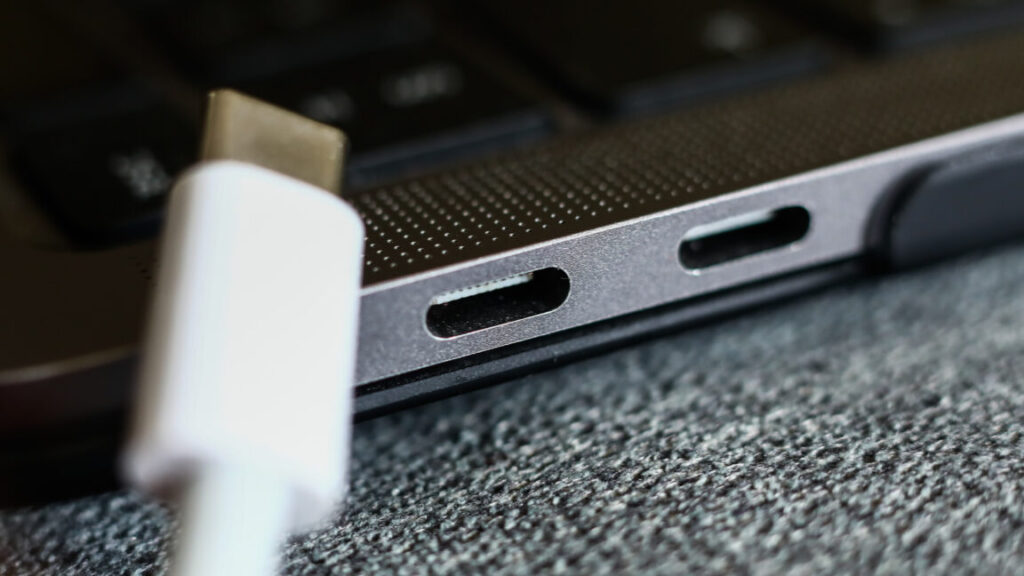
Somehow, amazingly, we are still living in a split USB-C/USB-A world all these years later. No one’s thrilled about it, but there’s no end in sight. Some folks in the Apple ecosystem turn to Apple’s first-party adapters, but there are two problems with them in my view: first, they’re weirdly expensive, as you’d expect. And second, they’re larger than they need to be.
I have about a dozen of these little adapters sitting around my house. The only downside is that because they’re shorter, they’re thicker, so you can’t always put two right next to each other in the MacBook Pro’s USB-C ports. But in the aforementioned mixed-use quagmire we all now occupy, odds are good you can just put it next to something that actually uses a USB-C connection. If you’re like me, you’re at about 2/3 USB-C and 1/3 USB-A at this point.
There are a bunch of brands for these, but they’re all pretty interchangeable, and I’ve not had any problems with these in particular.
– Samuel Axon
The Thing on 4K UltraHD Blu-ray – $12
People often debate whether Die Hard is a Christmas movie. (I definitely think it is.) But there’s another movie I often watch during the holidays: John Carpenter’s The Thing. I’ll freely admit it’s not holiday-themed in any way, but it’s at least filled with snow and winter gloom!
I don’t buy every movie on physical media—I’ve accepted that a lot of my library is going to be on Apple’s TV app or coming and going on streaming services—but I try to collect the lifelong favorites to make sure I’ll still have them decades down the road. (As long as they keep making Blu-ray players, anyway, which unfortunately is starting to look as uncertain as whether a favorite film stays on Netflix.)

MacReady is admittedly not known for his holiday cheer. Credit: Universal
For me, The Thing definitely qualifies as a favorite that’s worth holding onto for years to come.
– Samuel Axon
Acer USB C Hub, 7 in 1 Multi-Port Adapter – $18
Modern laptops with only two USB-C ports basically require a hub. This Acer turns one port into HDMI (4K@30Hz), two USB-A ports for legacy gear, SD/microSD slots, and 100 W passthrough charging. At $18, I keep one in my bag and one on my desk. It’s not fancy, but it earns its keep the first time you need to dump a memory card or plug into a TV set.
– Benj Edwards
Artificial Intelligence: A Guide for Thinking Humans by Melanie Mitchell – $20
Originally published in 2019, it’s an amazing testament to how strong this book is that even after all that’s happened, the 2025 reissue doesn’t change much. Melanie Mitchell, a professor of computer science at Portland State University and an external professor at the Santa Fe Institute, nails this historical summary of how we got to this point through multiple AI springs and AI winters.
She carefully explains the concepts and research underpinnings of contemporary developments in machine learning, large language models, image generation, and so on, while amplifying key voices from several of the people who contributed to progress in this field—both doomsayers and boosters alike—with a technically rigorous and ethically informed point of view.
If you or someone you know is just getting started learning about AI as we know it today, there are a lot of books they could read, and some of them are surely more contemporary. But I can hardly think of any that make a better foundation.
– Samuel Axon
Pinecil soldering iron – $40
Every self-respecting geek should own a soldering iron. Even if you aren’t making your own PCBs or recapping old electronics, it’s the kind of thing that just comes in handy. Especially around the holidays, when people are getting out their old battery-powered decorations that come with a lot of memories, wear, and flaky power terminals. Be the hero that brings a treasured light-up keepsake back to life!
When you don’t need a full-on soldering station, though, it’s nice to have something compact and easy to slip in a drawer. Enter the Pinecil, conveniently powered over USB-C, with a slick little screen allowing for easy temperature control (in F or C) and firmware that auto-sleeps if you forget to unplug it.
– Aurich Lawson
Anker 67 watt USB charger and Anker USB-C silicon power cable – $25 and $16
If you already have a suitable USB-C power supply (you really want at least 60 watts) and a USB-C cable, you’re set. If not, this power supply from Anker—a reliable brand, in my experience—is compact and folds up for easy storage. Not all USB-C cables are up to the task of transmitting the magic wall juice, so if you’re not sure you have an appropriate one, pick up the above cable, which is sheathed in silicon to keep it nice and floppy so you’re not wrestling with a stiff cord while using your iron.
– Aurich Lawson
Knog Bike Bells – $22 – $33
While a lot of my road bike’s miles are spent on actual roads, it’s hard to do any long rides in my area without spending a little time on a cycle trail—one shared by pedestrians, runners, scooter riders, casual cyclists, and random others. Even if the rules of most of those trails didn’t specify using a bell, it’s a smart idea to have one—especially one that’s loud enough to cut through whatever’s coming out of the headphones that most people wear.
But real estate on my handlebars is limited. They already host a cycling computer and a light, and two cables and two hydraulic tubes snake their way through the area, emerging from under the handlebar tape before diving into the frame. Finding a bell that both works and keeps out of the way turned into a bit of a challenge. And then a solution presented itself: A company called Knog sent me an email about their bell offerings.
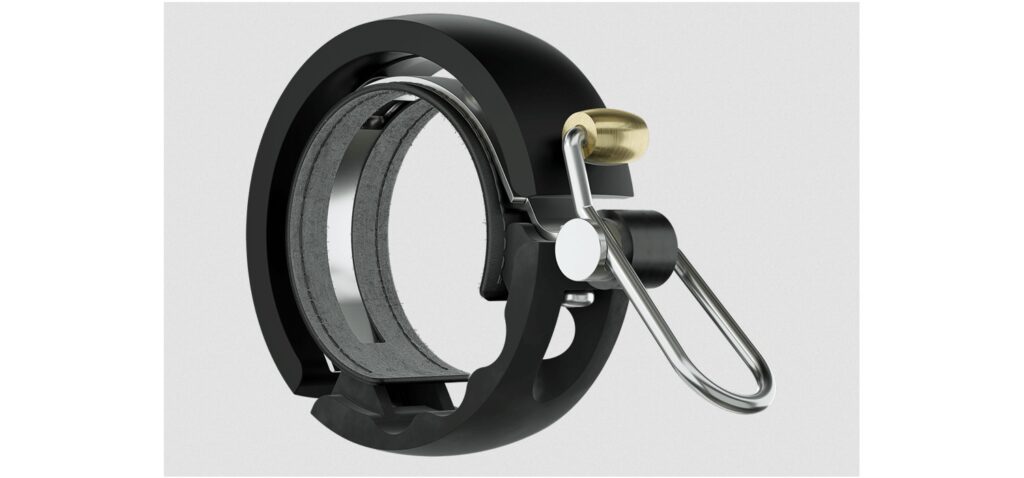
One of Knog’s bike bells. Credit: Knog
All of Knog’s options are mechanically simple—just a half circle of metal that follows the circumference of the handlebar and a spring-loaded hammer to strike it—and loud enough to catch even headphone wearers’ attention. They’re also low-profile, barely sticking out from the handlebars themselves, and they’re narrow enough that it was easy to find space for one without bumping it into any of the cabling. It’s all unobtrusive enough that I forget mine’s there until I need it. Yes, you can find lots of cheaper alternative designs (the Knogs run between $20 and $45), but for me, it’s worth paying an extra $10–$15 for something that suits my needs this well.
– John Timmer
Razer Orochi V2 wireless mouse – $34
This is the mouse I’m using right now as I type this. I wanted a mouse that could cross basically every domain: It needed to be good enough for gaming, but conveniently wireless, while also working well across macOS, Windows, and Linux—and it needed to be portable and not too embarrassing in a professional context because I fly to far-flung cities for work at least a dozen times a year. Razer’s Orochi met all of those goals, and I appreciate that it looks neat and professional, despite the fact that it’s very much a gamer mouse.
The only area where it fumbles is that Razer’s app seems to crash and cause problems for me on both macOS and Windows, but it works just fine without the app, so I uninstalled it, and everything’s been golden since. (To be clear, you don’t need to install it to use the mouse.)
It wins points for versatility; I don’t think it really compromises anything across all the situations I mentioned.
As of this writing, it’s on sale for $34, but the typical price is $70—still not bad for what you’re getting.
– Samuel Axon
Pricier picks
OWC Express 1M2 – $90
I set up a home studio this year to record my righteous jams, and as part of that process, I needed an external SSD both to back up project files and to hold many hundreds of gigs of virtual instruments. I wanted something 1) blazingly fast, 2) good-looking, 3) bus-powered, 4) free of all (and all too common) sleep/wake glitches, 5) unlikely to burst into flames (these things can get hot), and yet also 6) completely fanless because my righteous jams would be far less righteous with a fan droning in the background.
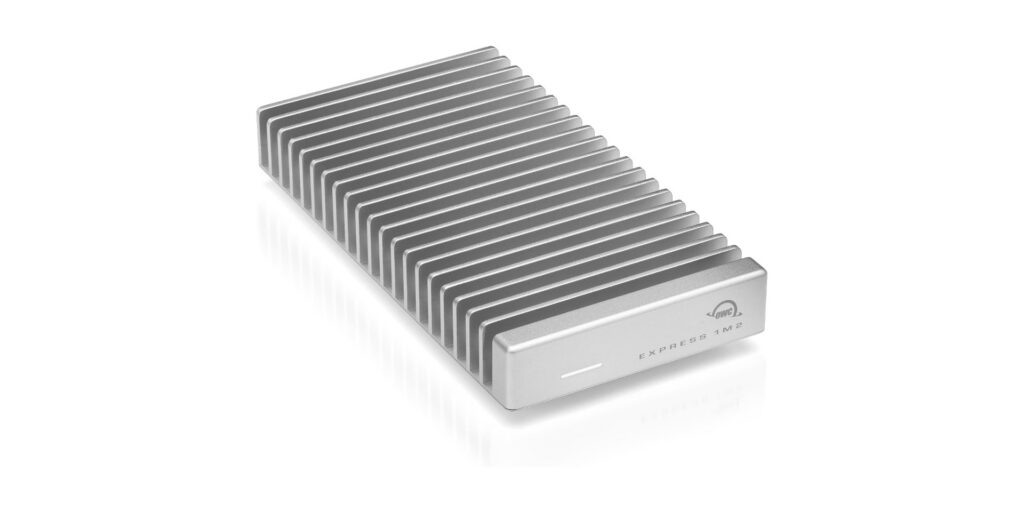
The OWC Express 1M2 is used for backups for Nate’s “righteous jams.” Credit: OWC
Those criteria led me to OWC’s Express 1M2, an SSD enclosure that transfers data at 40Gb/s over USB 4, matches the look of my Mac mini perfectly (and works with PCs), and is bus-powered. It has never given me a sleep/wake problem; it gets warm but never palm-searingly hot, and it dissipates heat through a chonky, milled-aluminum case that requires no fan.
I love this thing. It was ludicrously easy to install my own NVMe M.2 drive in it (though you can also pay a small premium for pre-installed storage). I’ve never had a moment of trouble—nor have I ever heard it. Yes, the enclosure costs more than some other options, but it’s a well-made piece of kit that can transfer data nearly as fast as my Mac’s internal SSD and should last for years. If someone in your life needs an SSD enclosure, they could do far, far worse than the Express 1M2.
– Nate Anderson
Kagi subscription – $108/year
It’s been about a year since I switched full-time to Kagi for my search engine needs, leaving Google behind in a cloud of dust and not looking back, and it was the correct choice, at least for me. Kagi’s upsides are many—including and especially search that works how it’s supposed to work instead of by fabricating garbage or tricking you into buying things—but the big downside is that while Kagi has a free tier, real daily usage requires money.
But if you’re a happy Kagi user like me and you want to tempt others into using the service, Kagi has gift subscriptions! If you’ve been trying to tempt a friend or relative into abandoning Google’s sinking AI ship but they’re balking at the price, throw some money at that problem and knock that barrier down! A “pro” Kagi subscription with unlimited search costs about a hundred dollars a year, and while that obviously isn’t nothing, it’s also not an unfair price—especially for something I use every day. Kagi: It’s what’s for Christmas!
– Lee Hutchinson
Philips Hue Bridge Pro – $99
Unlike Kagi, I’ve been using Philips Hue lights for a long, long time—13 years and counting, and most of those old first-gen bulbs are still operational. But the bridge, the Hue component that actually connects to your LAN, has long had an annoying problem: It can hook up to a max of about 50 Hue bulbs, and that’s it. (The reason has to do with cost-saving choices Philips made on the bridge design.)
Thirteen years has been enough for me to accumulate at least 50 Hue devices, so this limit has been problematic for me—but it’s a problem no more! After a decade and change, Philips has finally released an updated “Pro” bridge that handles far more Hue devices—and it comes in stylish black! The new bridge brings some new capabilities, too, but the big news is that new device limit—something long-time customers like me have spent years pining for. Now I can festoon my house with even more automatic lights!
– Lee Hutchinson
The Logitech MX Master 4 – $120
The Logitech MX Master 3S and the newer MX Master 4 remain two of the best productivity mice on the market. Both use an 8,000-DPI Darkfield sensor, the excellent MagSpeed electromagnetic scroll wheel, and Logitech’s deep customization stack. The 3S has been our long-standing recommendation, but the MX Master 4 brings a few quality-of-life improvements that may justify the upgrade. Most notably, it replaces the 3S’s soft-touch palm coating, which wears quickly and tends to attract grime, with more durable textured materials. The redesigned switches also make the 4 one of the quietest mice you can buy, with muted clicks and a near-silent scroll wheel.

Logitech MX Master 4, the mouse used by Ars Editor-in-Chief Ken Fisher. Credit: Logitech
The more ambitious addition is the new haptic system, meant to provide tactile feedback for shortcut triggers and app-specific “Actions Ring” menus. In practice, though, software support remains thin. Productivity apps haven’t yet embraced haptic signaling, and months after launch, the plugin ecosystem is still limited. The MX Master 4 is a well-executed refinement, but its headline feature is waiting for the software world to catch up.
– Ken Fisher
Ray-Ban Meta Wayfarer glasses – $247
The Ray-Ban Meta glasses may look bulkier than a standard pair of Wayfarers, but the added hardware delivers a genuinely interesting glimpse at where mobile computing is headed. After spending time with them, it’s clear that eyewear will likely follow the same trajectory as smartwatches: once niche, now a viable surface for ambient computing. The multimodal AI features are impressive, and the built-in camera produces better-than-expected 1080p/30fps video, though low-light performance remains limited by the small sensor.
These are still early-stage devices with the usual growing pains, but they’re a compelling gift for early adopters who want a front-row seat to the future of wearable interfaces.
– Ken Fisher
Samsung T9 external SSD (2 TB) – $235
As I once again attempted to make the Sophie’s Choice of which Steam game to uninstall because I ran out of disk space, I realized that part of my problem is that I have two computers (a macOS laptop and a Windows desktop) and I’ve doubled up on storing certain things—like the absolutely enormous eXoDOS collection, for example—on both machines so I could access them regardless of where I was at.
The best thing I could do to help my constant space woes was to consolidate anything that I needed on both machines into an external drive I could share between them. I went with Samsung’s T9 external SSD, and so far, I’m happy with it. As planned, I now have a lot more breathing room on both computers.
– Samuel Axon

Samuel Axon is the editorial lead for tech and gaming coverage at Ars Technica. He covers AI, software development, gaming, entertainment, and mixed reality. He has been writing about gaming and technology for nearly two decades at Engadget, PC World, Mashable, Vice, Polygon, Wired, and others. He previously ran a marketing and PR agency in the gaming industry, led editorial for the TV network CBS, and worked on social media marketing strategy for Samsung Mobile at the creative agency SPCSHP. He also is an independent software and game developer for iOS, Windows, and other platforms, and he is a graduate of DePaul University, where he studied interactive media and software development.
For the lazy techie: These are Ars staff’s last-minute holiday gift picks Read More »