ads

peacock-showing-ads-upon-launch-opens-the-door-for-more-disruptive-streaming-ads

Peacock showing ads upon launch opens the door for more disruptive streaming ads

Peacock subscribers will see ads immediately upon opening the streaming app or website next year. It’s a bold new strategy for attracting advertisers—something that’s been increasingly important to subscription-based streaming services—but it also risks alienating viewers

As reported by Variety, the new type of ads will display on the profile selection page that shows when a subscriber launches Peacock. Starting next year, instead of the profile page just showing your different Peacock profiles, most of the page will be dominated by an advertorial image. The circles of NBCUniversal-owned characters selected for user profiles will be relegated to a vertical column on the screen’s left side, as you can see here.

To avoid seeing what NBCUniversal is calling “Arrival Ads” every time you open Peacock, you need to subscribe to Peacock’s most expensive plan, which is ad-free and starts at $17 per month (Peacock’s ad-based plans start at $8/month.)

NBCUniversal’s announcement claims that Peacock will be the first streaming service to implement this type of ad. But that may not be the brag the entertainment giant thinks it is, as subscribers may quickly find the startup ads disruptive.

Peacock isn’t making money

Over the past couple of years, it’s become increasingly important for streaming services to generate revenue beyond subscription fees. Peacock and many other streaming services have struggled with profitability after spending years focusing on pricey content production and licensing to attract subscribers.

For its part, Peacock has 41 million subscribers and isn’t profitable. In its most recent quarterly earnings report, shared in October, NBCUniversal parent company Comcast reported that the service lost $217 million in earnings before interest, taxes, depreciation, and amortization, compared to losing $436 million in the same quarter in 2024. At the same time, Peacock has struggled to grow viewership and has had the same number of subscribers since Q1 2025. In Q1 2024, Peacock had 31 million subscribers.

Peacock showing ads upon launch opens the door for more disruptive streaming ads Read More »

how-to-break-free-from-smart-tv-ads-and-tracking

How to break free from smart TV ads and tracking


The Ars guide to “dumb” TVs

Sick of smart TVs? Here are your best options.

Credit: Aurich Lawson | Getty Images

Credit: Aurich Lawson | Getty Images

Smart TVs can feel like a dumb choice if you’re looking for privacy, reliability, and simplicity.

Today’s TVs and streaming sticks are usually loaded up with advertisements and user tracking, making offline TVs seem very attractive. But ever since smart TV operating systems began making money, “dumb” TVs have been hard to find.

In response, we created this non-smart TV guide that includes much more than dumb TVs. Since non-smart TVs are so rare, this guide also breaks down additional ways to watch TV and movies online and locally without dealing with smart TVs’ evolution toward software-centric features and snooping. We’ll discuss a range of options suitable for various budgets, different experience levels, and different rooms in your home.

Table of Contents

Our best recommendation

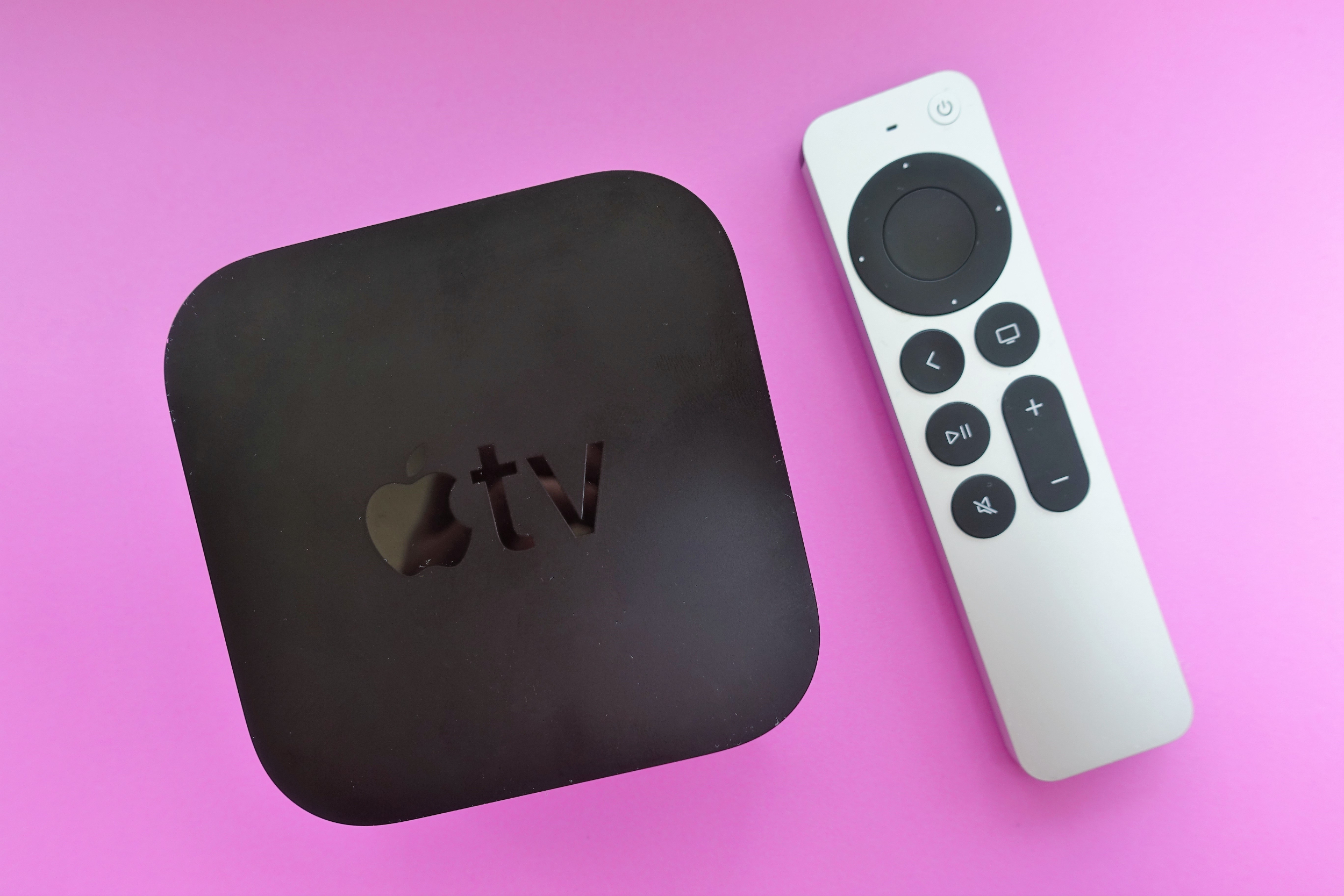
This is a dumb TV guide, but first, let’s briefly highlight the best recommendation for most people: Take your TV offline and plug in an Apple TV box.

The Apple TV 4K and Siri Remote.

Your best option.

Credit: Jeff Dunn

Your best option. Credit: Jeff Dunn

An Apple TV lets you replace smart TV software with Apple’s cleaner tvOS, and it’s more intuitive than using most smart TVs and other streaming devices. Apple’s tvOS usually runs faster and more reliably, and it isn’t riddled with distracting ads or recommendations. And there’s virtually no learning curve for family members or visitors, something that can’t always be said for DIY alternatives.

Critically, Apple TV boxes are also an easy recommendation on the privacy front. The setup process makes it simple for anyone to ensure that the device is using relatively minimal user tracking. You’re likely to use an Apple TV box with the Apple TV app or with an Apple account, which means sending some data to Apple. But Apple has a better reputation for keeping user information in-house, and Apple TV boxes don’t have automatic content recognition (ACR).

For more information, read my previous article on why Apple TVs are privacy advocates’ go-to streaming device.

Differing from other smart TV alternatives in this guide (such as a laptop), you don’t have to worry about various streaming services’ requirements for streaming in 4K or HDR with an Apple TV. But you still have to make sure your display and HDMI cable are HDCP 2.2-compliant and that you’re using HDMI 2.0 or better if you want to watch 4K or HDR content. You could even connect network-attached storage (NAS) to your Apple TV box so you can stream files from the storage device.

Plus, using a smart TV offline means you’ll have access to the latest and greatest display technologies, which is generally not the case for dumb TVs.

Things to keep in mind

One common concern about using smart TVs offline is the fear that the TV will repeatedly nag you to connect to the Internet. I’ve seen some reports of this happening over the years, but generally speaking, this doesn’t seem to be expected behavior. If you can’t find a way to disable TV notifications, try contacting support.

You may want your offline TV to keep LAN access so you can still use some smart TV features, like phone mirroring or streaming from a NAS. In this case, you can use your router (if supported) to block your TV’s IP address from connecting to the Internet.

And Google TV users should remember to set their TV to “basic TV” mode, which lets you use the TV without connecting to the Internet.

Dumb TVs are endangered

Buying a TV that doesn’t connect to the Internet is an obvious solution to avoiding smart TV tracking and ads, but that’s much easier said than done.

Smart TV OSes help TV-makers stay afloat in an industry with thin margins on hardware. Not only do they provide ad space, but they also give OS operators and their partners information on how people use their TVs—data that is extremely valuable to advertisers. Additionally, mainstream acceptance of the Internet of Things has led many people to expect their TVs to have integrated Wi-Fi. These factors have all made finding a dumb TV difficult, especially in the US.

Dumb TVs sold today have serious image and sound quality tradeoffs, simply because companies don’t make dumb versions of their high-end models. On the image side, you can expect lower resolutions, sizes, and brightness levels and poorer viewing angles. You also won’t find premium panel technologies like OLED. If you want premium image quality or sound, you’re better off using a smart TV offline. Dumb TVs also usually have shorter (one-year) warranties.

Any display or system you end up using needs HDCP 2.2 compliance to play 4K or HDR content via a streaming service or any other DRM-protected 4K or HDR media, like a Blu-ray disc.

Best ways to find a dumb TV

Below are the brands I’ve identified as most likely to have dumb TVs available for purchase online as of this writing.

Emerson

I was able to find the greatest number of non-smart TVs from Emerson. Emerson is a Parsippany, New Jersey, electronics company that was founded in 1948.

As of this writing, Emerson’s dumb TV options range from 7-inch portable models to 50-inch 4K TVs. Its TVs are relatively easy to get since they’re sold directly and through various online retailers, including Amazon, Home Depot, Best Buy, and, for some reason, Shein.

Westinghouse


Another company still pushing non-smart TVs is Westinghouse, a Pittsburgh-headquartered company founded in 1886. In addition to other types of electronics and home goods, Westinghouse also has an industrial business that includes nuclear fuel.

Westinghouse’s dumb TVs max out at 32 inches and 720p resolution, but some of them also have a built-in DVD player. You can find Westinghouse’s dumb TVs on Amazon. However, Westinghouse seems to have the most dubious reputation of these brands based on online chatter.

Sceptre

Sceptre, a Walmart brand, still has a handful of dumb TVs available. I’ve noticed inventory dwindle in recent months, but Walmart usually has at least one Sceptre dumb TV available.

Amazon search

Outside the above brands, your best bet for finding a non-smart TV is Amazon. I’ve had success searching for “dumb TVs” and have found additional results by searching for a “non-smart TV.”

Projectors

For now, it’s not hard to find a projector that doesn’t connect to the Internet or track user activity. And there are options that are HDCP 2.2-compliant so you can project in 4K and HDR.

Things to keep in mind

Projectors aren’t for everyone. They still require dim rooms and a decent amount of physical space to produce the best image. (To see how much space you need for a projector, I recommend RTINGS’ handy throw calculator.)

The smart-tech bug has come for projectors, too, though, and we’ve started seeing more smart projectors released over the past two years.

Computer monitors

If you want a dumb display for watching TV, it’s cheaper to buy a smart TV and keep it offline than it is to get a similarly specced computer monitor. But there are benefits to using a monitor instead of a dumb TV or an offline smart TV. (Of course, this logic doesn’t carry over to “smart monitors.”)

When it comes to smaller screens, you’ll have more options if you look at monitors instead of TVs. This is especially true if you want premium features, like high refresh rates or quality speakers, which are hard to find among TVs that are under 42 inches.

Monitor vendors are typically more forthcoming about product specs than TV makers are. It’s hard to find manufacturer claims about a TV’s color gamut, color accuracy, or typical brightness, but a computer monitor’s product page usually has all this information. It’s also easier to find a monitor with professional-grade color accuracy than a TV with the same, and some monitors have integrated calibration tools.

Things to keep in mind

Newer and advanced types of display technologies are rarer in monitors. This includes OLED, Mini LED, and Micro RGB. And if you buy a new monitor, you’ll probably need to supply your own speakers.

A computer monitor isn’t a TV, so there’s no TV tuner or way to use an antenna. If you really wanted to, you could get a cable box to work with a monitor with the right ports or adapters. People are streaming more than they’re watching broadcast and cable channels, though, so you may not mind the lack of traditional TV capabilities.

Digital signage

Digital signage displays are purpose-built for displaying corporate messages, often for all or most hours of the day. They typically have features that people don’t need for TV watching, such as content management software. And due to their durability and warranty needs, digital signage displays are often more expensive than similarly specced computer monitors.

Again, it’s important to ensure that the digital signage is HDCP 2.2-compliant if you plan to watch 4K or HDR.

Things to keep in mind

But if you happen to come across a digital signage display that’s the right size and the right price, is there any real reason why you shouldn’t use it as a TV? I asked Panasonic, which makes digital signage. A spokesperson from Panasonic Connect North America told me that digital signage displays are made to be on for 16 to 24 hours per day and with high brightness levels to accommodate “retail and public environments.”

The spokesperson added:

Their rugged construction and heat management systems make them ideal for demanding commercial use, but these same features can result in higher energy consumption, louder operation, and limited compatibility with home entertainment systems.

Panasonic’s representative also pointed out that real TVs offer consumer-friendly features for watching TV, like “home-optimized picture tuning, simplified audio integration, and user-friendly menu interfaces.”

If you’re fine with these caveats, though, and digital signage is your easiest option, there isn’t anything stopping you from using one to avoid smart TVs.

What to connect to your dumb TV

After you’ve settled on an offline display, you’ll need something to give it life. Below is a breakdown of the best things to plug into your dumb TV (or dumb display) so you can watch TV without your TV watching you.

Things to keep in mind

If you’re considering using an older device for TV, like a used laptop, make sure it’s HDCP 2.2-compliant if you want to watch 4K or HDR.

And although old systems and displays and single-board computers can make great dumb TV alternatives, remember that these devices need HDMI 2.0 or DisplayPort 1.2 or newer to support 4K at 60 Hz.

What to connect: a Phone

Before we get into more complex options for powering your dumb TV, let’s start with devices you may already own.

It’s possible to connect your phone to a dumb display, but doing so is harder than connecting a PC. You’d need an adapter, such as a USB-C (or Lightning) Digital AV Adapter.

You can use a Bluetooth mouse and keyboard to control the phone from afar. By activating Assistive Touch, I’ve even been able to use my iPhone with a mouse that claims not to support iOS. With an extra-long cable, you could potentially control the phone from your lap. That’s not the cleanest setup, though, and it would look odd in a family room.

Things to keep in mind

If your phone is outputting to your display, you can’t use it to check your email, read articles, or doomscroll while you watch TV. You can fix this by using a secondary phone as your streaming device.

If you’re using a phone to watch a streaming service, there’s a good chance you won’t be watching in 4K, even if your streaming subscription supports it. Netflix, for example, limits resolution to 1080p or less (depending on the model) for iPhones. HDR is supported across iPhone models but not with Android devices.

Screen mirroring doesn’t always work well with streaming services and phones. Netflix, for instance, doesn’t support AirPlay or Android phone casting. Disney+ supports Chromecast and AirPlay, but AirPlay won’t work if you subscribe to Disney+ with ads (due to “technical reasons”).

What to connect: A laptop

A laptop is an excellent smart TV alternative that’s highly customizable yet simple to deploy.

Most mainstream streaming providers that have dedicated smart TV apps, like Netflix and HBO Max, have PC versions of their apps. And most of those services are also available via web browsers, which work much better on computers than they do on smart TVs. You can also access local files—all via a user interface that you and anyone else watching TV is probably familiar with already.

With a tethered laptop, you can quickly set up a multi-picture view for watching two games or shows simultaneously. Multi-view support on streaming apps is extremely limited right now, with only Peacock and dedicated sports apps like ESPN and MLB TV offering it.

A laptop also lets you use your dumb TV for common PC tasks, like PC gaming or using productivity software (sometimes you just want to see that spreadsheet on a bigger screen).

Things to keep in mind

Streaming in 4K or HDR sometimes comes with specific requirements that are easy to overlook. Some streaming services, for example, won’t stream in 4K on certain web browsers—or with any web browser at all.

Streaming services sometimes have GPU requirements for 4K and HDR streaming. For example, to stream Netflix in 4K or HDR from a browser, you need Microsoft Edge and an Intel 7th Generation Core or AMD Ryzen CPU or better, plus the latest graphics drivers. Disney+ doesn’t allow 4K HDR streaming from any web browsers. Streaming 4K content in a web browser might also require you to acquire the HEVC/H.265 codec, depending on your system.

If 4K or HDR streaming is critical to you, it’s important to check your streaming providers’ 4K and HDR limits; it may be best to rely on a dedicated app.

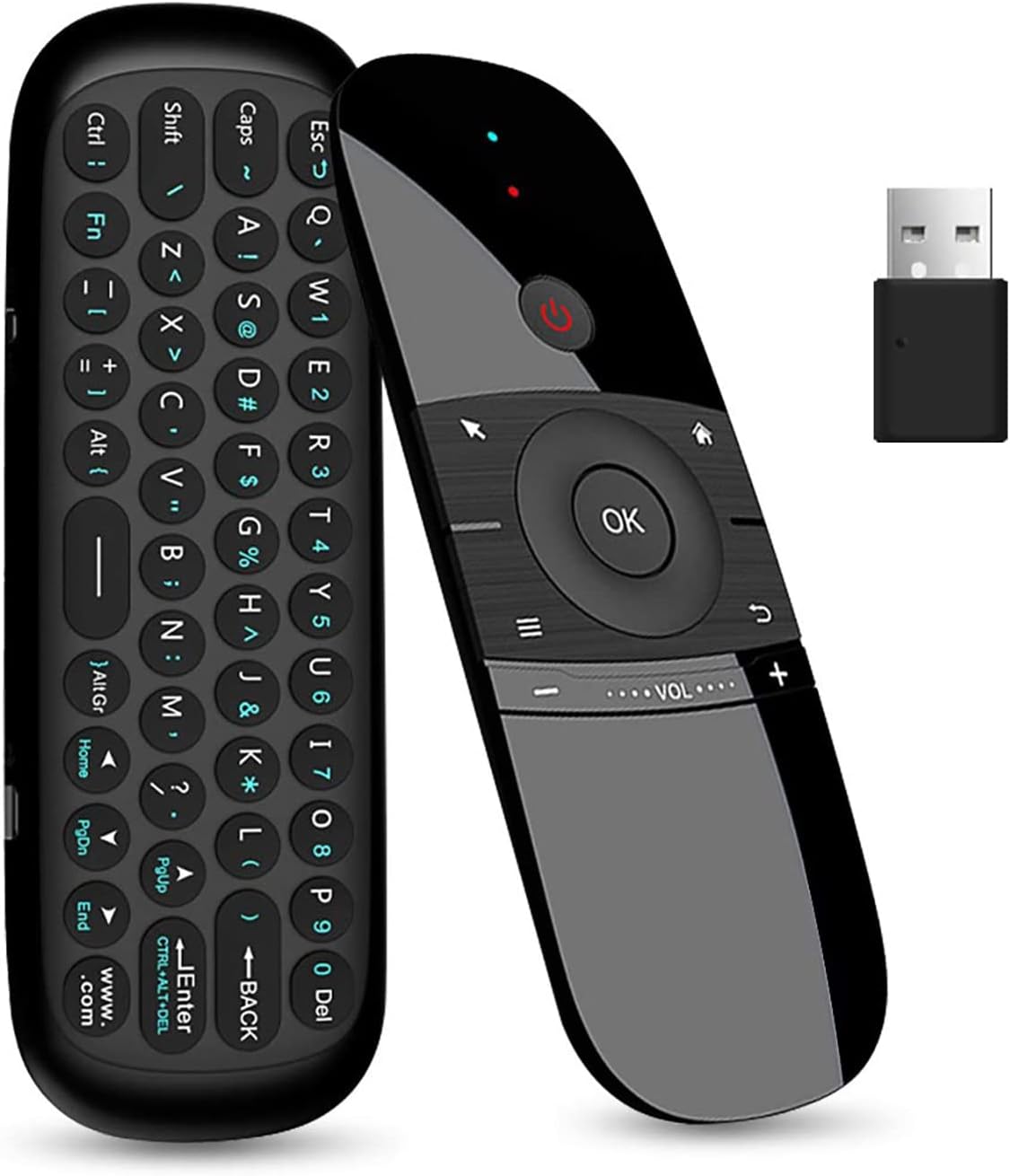
If you want to be able to comfortably control your computer from a couch, you’ll also need to invest in some hardware or software. You can get away with a basic Bluetooth mouse and keyboard. Air mice are another popular solution.

The WeChip W1 air mouse.

The WeChip W1 air mouse.

Credit: WeChip/Amazon

The WeChip W1 air mouse. Credit: WeChip/Amazon

If you don’t want extra gadgets taking up space, software like the popular Unified Remote (for iOS and Android) can turn your phone into a remote control for your computer. It also supports Wake-On-LAN.

You may encounter hiccups with streaming availability. Most streaming services available on smart TVs are also accessible via computers, but some aren’t. Many FAST (free ad-supported streaming television) services and channels, such as the Samsung TV Plus service and Filmrise FAST app and channel, are only available via smart TVs. And many streaming services’ apps, including Netflix and Disney+, aren’t available on macOS. If you’re using a very old computer, you might run into compatibility issues with streaming services. Netflix’s PC app, for example, requires Windows 10 or newer, and if you stream Netflix via a browser on a system running an older OS, you’re limited to SD resolution.

And while a laptop and dumb display setup can keep snooping TVs out of your home, there are obviously lots of user tracking and privacy concerns with web browsers, too. You can alleviate some concerns by researching the browsers you want to use for watching TV.

What to connect: A home theater PC

For a more permanent setup, consider a dedicated home theater PC (HTPC). They don’t require beefy, expensive specs and are more flexible than smart TV platforms in terms of software support and customization.

You can pick a system that fits on your living room console table, like a mini PC, or match your home’s aesthetics with a custom build. Raspberry Pis are a diminutive solution that you can dress up in a case and use for various additional tasks, like streaming games from your gaming PC to your TV or creating an AirPlay music server for streaming Spotify and other online music and local music to AirPlay-compatible speakers.

The right accessories can take an HTPC to the next level. You can use an app like TeamViewer or the more TV-remote-like Unified Remote to control your PC with your phone. But investing in dedicated hardware is worthwhile for long-term and multi-person use. Bluetooth keyboards and mice last a long time without needing a charge and can even be combined into one device.

K400 Plus Wireless Touch Keyboard

Logitech’s wireless K400 combines a keyboard with a touchpad.

Credit: Logitech

Logitech’s wireless K400 combines a keyboard with a touchpad. Credit: Logitech

Other popular options for HTPC control are air remotes and the Flirc USB, which plugs into a computer’s USB-A port to enable IR remote control. Speaking of USB ports, you could use them to connect a Blu-ray/DVD player or gaming controller to your HTPC. If you want to add support for live TV, you can still find PCIe over-the-air (OTA) tuner cards.

Pepper Jobs W10 GYRO Smart Remote

The Pepper Jobs W10 GYRO Smart Remote is a popular air remote for controlling Windows 10 PCs.

Credit: Pepper Jobs

The Pepper Jobs W10 GYRO Smart Remote is a popular air remote for controlling Windows 10 PCs. Credit: Pepper Jobs

Helpful software for home theater PCs

With the right software, an HTPC can be more useful to a household than a smart TV. You probably already have some apps in mind for your ideal HTPC. That makes this a fitting time to discuss some solid software that you may not have initially considered or that would be helpful to recommend to other cord cutters.

If you have a lot of media files you’d like to easily navigate through on your HTPC, media server software, such as Plex Media Server, is a lifesaver. Plex specifically has an app streamlined for HTPC use. The company has taken some criticism recently due to changes like new remote access rules, higher prices, and a foray into movie rentals. Although Plex is probably the most common and simplest media server software, alternatives like Jellyfin have been gaining popularity lately and are worth checking out.

Whichever media server software you use, consider pairing it with a dedicated NAS. NAS media servers are especially helpful if you want to let people, including those outside of your household, watch stuff from your media library at any time and without having to keep a high-power system turned on 24/7.

You can stream files from your NAS to a dumb TV by setting up a streaming system—such as a Raspberry Pi, Nvidia Shield, or Apple TV box—that connects to the dumb display. That device can then stream video from the NAS by using Network File System or the Infuse app, for example. 

What to connect: An antenna

Nowadays, you can watch traditional, live TV channels over the Internet through over-the-top streaming services like YouTube TV and Sling TV. But don’t underestimate the power of TV antennas, which have improved in recent years and let you watch stuff for free.

This year, Horowitz Research surveyed 2,200 US adults and found that 19 percent of respondents were still using a TV antenna.

If you haven’t checked them out in a while, you might be surprised by how sleek bunny ears look now. Many of the best TV antennas now have flat, square shapes and can be mounted to your wall or windowsill.

Mohu's Leaf antenna.

Mohu’s Leaf antenna. Bye, bye, bunny ears.

Mohu’s Leaf antenna. Bye, bye, bunny ears. Credit: Mohu

The best part is that companies can’t track what you watch with an antenna. As Nielsen said in a January 2024 blog post:

Big data sources alone can’t provide insight into the viewing behaviors of the millions of viewers who watch TV using a digital antenna.

Antennas have also gotten more versatile. For example, in addition to local stations, an antenna can provide access to dozens of digital subchannels. They’re similar to the free ad-supported television channels gaining popularity with smart TVs users today, in that they often show niche programming or a steady stream of old shows and movies with commercial breaks. You can find a list of channels you’re likely to get with an antenna via this website from the Federal Communications Commission.

TV and movies watched through an antenna are likely to be less compressed than what you get with cable, which means you can get excellent image quality with the right setup.

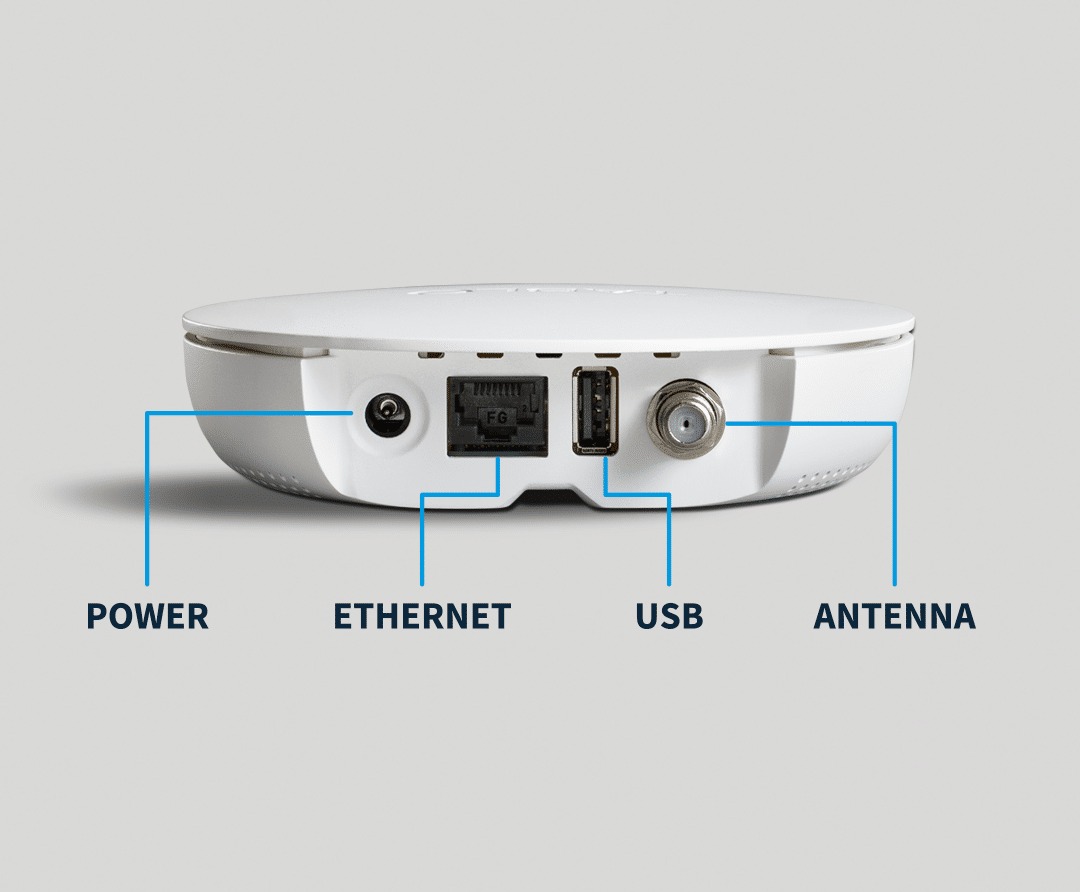
You can also add DVR capabilities, like record and pause, to live broadcasts through hardware, such as a Tablo OTA DVR device or Plex DVR, a subscription service that lets antenna users add broadcast TV recordings to their Plex media servers.

A diagram of the 4th Gen Tablo's ports.

A diagram of the 4th Gen Tablo’s ports.

A diagram of the 4th Gen Tablo’s ports. Credit: Tablo

Things to keep in mind

You’re unlikely to get 4K or HDR broadcasts with an antenna. ATSC 3.0, also known as Next Gen TV, enables stations to broadcast in 4K HDR but has been rolling out slowly. Legislation recently proposed by the FCC could further slow things.

In order to watch a 4K or HDR broadcast, you’ll also need an ATSC 3.0 tuner or an ATSC 3.0-equipped TV. The latter is rare. LG, for example, dropped support in 2023 over a patent dispute. You can find a list of ATSC 3.0-certified TVs and converters here.

Realistically, an antenna doesn’t have enough channels to provide sufficient entertainment for many modern households. Sixty percent of antenna owners also subscribe to some sort of streaming service, according to Nielsen.

Further, obstructions like tall buildings and power lines could hurt an antenna’s performance. Another challenge is getting support for multiple TVs in your home. If you want OTA TV in multiple rooms, you either need to buy multiple antennas or set up a way to split the signal (such as by using an old coaxial cable and splitter, running a new coaxial cable, or using an OTA DVR, such as a Tablo or SiliconDust’s HDHomeRun).

Photo of Scharon Harding

Scharon is a Senior Technology Reporter at Ars Technica writing news, reviews, and analysis on consumer gadgets and services. She’s been reporting on technology for over 10 years, with bylines at Tom’s Hardware, Channelnomics, and CRN UK.

How to break free from smart TV ads and tracking Read More »

apple-tv-execs-dismiss-introducing-an-ad-tier,-buying-warner-bros.-discovery

Apple TV execs dismiss introducing an ad tier, buying Warner Bros. Discovery

Focused on original content

Another obvious way to grow Apple TV is through more subscribers. With talk of Warner Bros. Discovery considering a sale, it’s worth wondering if Apple TV may try to grow through acquisition. But the execs Screen International spoke with seemed focused on building out Apple TV’s library with originals. Cue noted that “at least in the timeframe that we’re thinking about right now, we’re not looking at licensing any content or adding anything to our service.”

“We’re building an all-original services; we’re not building on the back of pre-existing IP or library,” Jamie Erlicht, one of Apple’s heads of worldwide video, said.

More directly, when asked if Apple might buy Warner Bros., A24, or Disney, Cue pointed out that Apple hasn’t historically done “a lot of major acquisitions.”

“We do very small acquisitions in general, not related to Apple TV, so I don’t see that happening because we like what we’re doing,” Cue said.

Since its 2019 debut, some have questioned whether Apple TV is an authentic attempt to improve streaming options for customers, or if Apple TV is a “vanity project,” as Screen International put it, or if the service is merely a tool for getting people to buy other Apple products. Naturally, the interviewed executives claimed that the service is built on a commitment to distributing unique and premium shows and movies.

The interview provided more insight on how Apple TV leadership defines the latter. Zack Van Amburg, one of Apple’s heads of worldwide video, said:

A core tenet of everything Apple does is the notion that humanity needs to be at the center of it, and that’s everything from app design to hardware engineering, to everything in between. We try to think a little more deeply about that.

Our shows and our movies tend to be about the emotional experience, the stakes involved, even when we’re doing a comedy.

Apple TV execs dismiss introducing an ad tier, buying Warner Bros. Discovery Read More »

people-regret-buying-amazon-smart-displays-after-being-bombarded-with-ads

People regret buying Amazon smart displays after being bombarded with ads

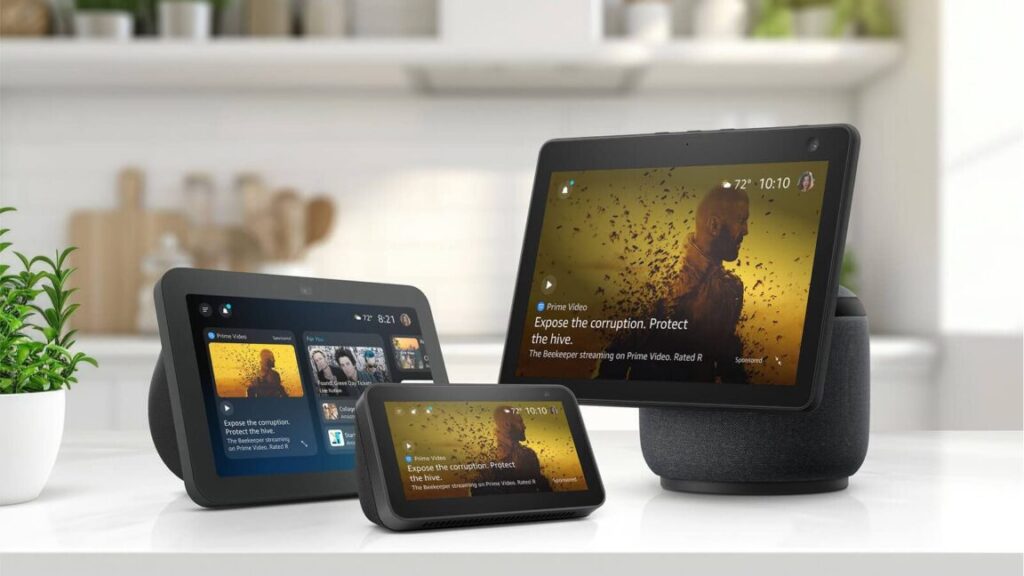
Amazon Echo Show owners are reporting an uptick in advertisements on their smart displays.

The company’s Echo Show smart displays have previously shown ads through the company’s Shopping Lists feature, as well as advertising for Alexa skills. Additionally, Echo Shows may play audio ads when users listen to Amazon Music on Alexa.

However, reports on Reddit (examples here, here, and here) and from The Verge’s Jennifer Pattison Tuohy, who owns more than one Echo Show, suggest that Amazon has increased the amount of ads it shows on its smart displays’ home screens. The Echo Show’s apparent increase in ads is pushing people to stop using or even return their Echo Shows.

The smart displays have also started showing ads for Alexa+, the new generative AI version of Amazon’s Alexa voice assistant. Ads for the subscription-based Alexa+ are reportedly taking over Echo Show screens, even though the service is still in Early Access.

“This is getting ridiculous and I’m about to just toss the whole thing and move back to Google,” one Redditor said of the “full-volume” ads for Alexa+ on their Echo Show.

The Verge’s Tuohy reported seeing ads on one (but not all) of her Echo Shows for the first time this week and said ads sometimes show when the display is set to show personal photos. She reported seeing ads for “elderberry herbal supplements, Quest sports chips, and tabletop picture frames.”

Users are unable to disable the home screen ads. When reached for comment, an Amazon spokesperson told Ars Technica:

People regret buying Amazon smart displays after being bombarded with ads Read More »

amazon-is-considering-shoving-ads-into-alexa+-conversations

Amazon is considering shoving ads into Alexa+ conversations

Since 2023, Amazon has been framing Alexa+ as a monumental evolution of Amazon’s voice assistant that will make it more conversational, capable, and, for Amazon, lucrative. Amazon said in a press release on Thursday that it has given early access of the generative AI voice assistant to “millions” of people. The product isn’t publicly available yet, and some advertised features are still unavailable, but Amazon’s CEO is already considering loading the chatbot up with ads.

During an investors call yesterday, as reported by TechCrunch, Andy Jassy noted that Alexa+ started rolling out as early access to some customers in the US and that a broader rollout, including internationally, should happen later this year. An analyst on the call asked Amazon executives about Alexa+’s potential for “increasing engagement” long term.

Per a transcript of the call, Jassy responded by saying, in part, “I think over time, there will be opportunities, you know, as people are engaging in more multi-turn conversations to have advertising play a role to help people find discovery and also as a lever to drive revenue.”

Like other voice assistants, Alexa has yet to monetize users. Amazon is hoping to finally make money off the service through Alexa+, which is eventually slated to play a bigger role in e-commerce, including by booking restaurant reservations, keeping track of and ordering groceries, and recommending streaming content based on stated interests. But with Alexa reportedly costing Amazon $25 billion across four years, Amazon is eyeing additional routes to profitability.

Echo Show devices already show ads, and Echo speaker users may hear ads when listening to music. Advertisers have shown interest in advertising with Alexa+, but the inclusion of ads in a new offering like Alexa+ could drive people away.

Amazon is considering shoving ads into Alexa+ conversations Read More »

dictionary.com-“devastated”-paid-users-by-abruptly-deleting-saved-words-lists

Dictionary.com “devastated” paid users by abruptly deleting saved words lists

Logophiles are “devastated” after Dictionary.com deleted their logs of favorited words that they carefully crafted for years. The company deleted all accounts, as well as the only ways to use Dictionary.com without seeing ads —even if you previously paid for an ad-free experience.

Dictionary.com offers a free dictionary through its website and free Android and iOS apps. It used to offer paid-for mobile apps, called Dictionary.com Pro, that let users set up accounts, use the app without ads, and enabled other features (like grammar tips and science and rhyming dictionaries) that are gone now. Dictionary.com’s premium apps also let people download an offline dictionary (its free apps used to let you buy a downloadable dictionary as a one-time purchase), but offline the dictionaries aren’t available anymore.

Accounts axed abruptly

About a year ago, claims of Dictionary.com’s apps being buggy surfaced online. We also found at least one person claiming that they were unable to buy an ad-free upgrade at that time.

Reports of Dictionary.com accounts being deleted and the apps not working as expected, and with much of its content removed, started appearing online about two months ago. Users reported being unable to log in and access premium features, like saved words. Soon after, Dictionary.com’s premium apps were removed from Google Play and Apple’s App Store. The premium version was available for download for $6 as recently as March 23, per the Internet Archive’s Wayback Machine.

A Reddit user who described themselves as a premium customer said they reached out to Dictionary.com’s support email and received a response saying, in part:

After careful consideration, user accounts within the Dictionary.com app have been discontinued. As a result, users are no longer able to sign in to their accounts, and any saved word lists are no longer available.

Unfortunately, since the coding technology that was used in the previous app version is different from what is used in the new app, it is not possible to recover word lists.

This change was part of our recent app update to improve the design, speed, and functionality of the Dictionary.com app. While we understand that this changes how you use Dictionary.com, we are hopeful that you will find the overall improvements provide faster search, additional content, and a better design.

Another person online supposedly received a similar message. Some people said they were unable to get in contact with Dictionary.com. Ars Technica tried contacting Dictionary.com through multiple messages to its support team, the press office of parent company IXL Learning, and The Dictionary Media Group, which IXL launched after acquiring Dictionary.com in 2024 and includes websites like Vocabulary.com, Multiplication.com, and HomeschoolMath.net. We didn’t receive any response.

Dictionary.com “devastated” paid users by abruptly deleting saved words lists Read More »

longer-commercial-breaks-lower-the-value-of-ad-based-streaming-subscriptions

Longer commercial breaks lower the value of ad-based streaming subscriptions

But that old promise to HBO Max subscribers hasn’t carried over to Max, even though WBD is renaming Max to HBO Max this summer. As PCWorld noted, Max has been showing ads during HBO original content like The Last of Us. The publication reported seeing three ad breaks during the show in addition to ads before the show started.

Ars Technica reached out to WBD for comment about these changes but didn’t receive a response ahead of publication.

Depleting value

With numerous streaming services launching over the past few years, many streaming customers have been pushed to subscribe to multiple streaming services to have access to all of the shows and movies that they want. Streaming providers also regularly increase subscription fees and implement password crackdowns, and ad-based subscriptions were supposed to offer a cheaper way to stream.

Streaming providers forcing subscribers to watch more commercials risk depleting the value of ad-based streaming tiers. Online, for example, people are questioning the value of their ad-based Max subscriptions, which start at $10 per month, compared to $17/month for ad-free Max.

“I don’t how it could be worse. I watched several HBO documentaries, and they already had more adverts than Pluto TV [a free, ad-supported streaming service]. The kids programs for Cartoon Network started out with few adverts, but they have been loading up on adverts,” a Reddit user said in response to Max showing more ads.

Another Reddit user said that “if [Max] has ads, it shouldn’t be $10/month.”

Beyond Max, PCWorld cited MediaRadar data finding that Disney+ shows over 5.3 minutes of ads per hour, and Hulu shows over seven minutes of commercials hourly.

Such lengthy commercial breaks can extend past a convenient snack or bathroom break and force subscribers to consider the value of their time and how much time they want to allocate to get through a 22-minute program, for example.

With linear TV reportedly showing 13 to 16 minutes of commercials per hour, though, streaming providers still have space to show even more ads while still claiming that they show fewer ads than alternatives.

Longer commercial breaks lower the value of ad-based streaming subscriptions Read More »

smart-tv-os-owners-face-“constant-conflict”-between-privacy,-advertiser-demands

Smart TV OS owners face “constant conflict” between privacy, advertiser demands

DENVER—Most smart TV operating system (OS) owners are in the ad sales business now. Software providers for budget and premium TVs are honing their ad skills, which requires advancing their ability to collect user data. This is creating an “inherent conflict” within the industry, Takashi Nakano, VP of content and programming at Samsung TV Plus, said at the StreamTV Show in Denver last week.

During a panel at StreamTV Insider’s conference entitled “CTV OS Leader Roundtable: From Drivers to Engagement and Content Strategy,” Nakano acknowledged the opposing needs of advertisers and smart TV users, who are calling for a reasonable amount of data privacy.

“Do you want your data sold out there and everyone to know exactly what you’ve been watching … the answer is generally no,” the Samsung executive said. “Yet, advertisers want all of this data. They wanna know exactly what you ate for breakfast.”

Nakano also suggested that the owners of OSes targeting smart TVs and other streaming hardware, like streaming sticks, are inundated with user data that may not actually be that useful or imperative to collect:

I think that there’s inherent conflict in the ad ecosystem supplying so much data. … We’re fortunate to have all that data, but we’re also like, ‘Do we really want to give it all, and hand it all out?’ There’s a constant conflict around that, right? So how do we create an ecosystem where we can serve ads that are pretty good? Maybe it’s not perfect …

Today, connected TV (CTV) OSes are largely built around not just gathering user data, but also creating ways to collect new types of information about viewers in order to deliver more relevant, impactful ads. LG, for example, recently announced that its smart TV OS, webOS, will use a new AI model that informs ad placement based on viewers’ emotions and personal beliefs.

Smart TV OS owners face “constant conflict” between privacy, advertiser demands Read More »

inside-the-firm-turning-eerie-blank-streaming-ads-into-useful-nonprofit-messages

Inside the firm turning eerie blank streaming ads into useful nonprofit messages

AdGood’s offerings also include a managed service for ad campaign management for nonprofits. AdGood doesn’t yet offer pixels, but Johns said developments like that are “in the works.”

Johns explained that while many nonprofits use services like Meta and Google AdWords for tracking ads, they’re “hitting plateaus” with their typical methods. He said there is nonprofit interest in reaching younger audiences, who often use CTV devices:

A lot of them have been looking for ways to get [into CTV ads], but, unfortunately, with minimum spend amounts, they’re just not able to access it.

Helping nonprofits make commercials

AdGood also sells a self-serve generative AI ad manager, which it offers via a partnership with Streamr.AI. The tool is designed to simplify the process of creating 30-second video ads that are “completely editable via a chat prompt,” according to Johns.

“It automatically generates all their targeting. They can update their targeting for whatever they want, and then they can swipe a credit card and essentially run that campaign. It goes into our approval queue, which typically takes 24 hours for us to approve because it needs to be deemed TV-quality,” he explained.

The executive said AdGood charges nonprofits a $7 CPM and a $250 flat fee for the service. He added:

Think about a small nonprofit in a local community, for instance, my son’s special needs baseball team. I can get together with five other parents, easily pull together a campaign, and run it in our local town. We get seven kids to show up, and it changes their lives. We’re talking about $250 having a massive impact in a local market.

Looking ahead, Johns said he’d like to see AdGood’s platform and team grow to be able to give every customer “a certain allocation of inventory, whether it’s 50,000 impressions a month or 100,000 a month.”

For some, streaming ads are rarely a good thing. But when those ads can help important causes and replace odd blank ad spaces that make us question our own existence, it brings new meaning to the idea of a “good” commercial.

Inside the firm turning eerie blank streaming ads into useful nonprofit messages Read More »

amazon-prime-video-subscribers-sit-through-up-to-6-minutes-of-ads-per-hour

Amazon Prime Video subscribers sit through up to 6 minutes of ads per hour

Amazon forced all Prime Video subscribers onto a new ad-based subscription tier in January 2024 unless users paid more for their subscription type. Now, the tech giant is reportedly showing twice as many ads to subscribers as it did when it started selling ad-based streaming subscriptions.

Currently, anyone who signs up for Amazon Prime (which is $15 per month or $139 per year) gets Prime Video with ads. If they don’t want to see commercials, they have to pay an extra $3 per month. One can also subscribe to Prime Video alone for $9 per month with ads or $12 per month without ads.

When Amazon originally announced the ad tier, it said it would deliver “meaningfully fewer ads than linear TV and other streaming TV providers.” Based on “six ad buyers and documents” ad trade publication AdWeek reported viewing, Amazon has determined the average is four to six minutes of advertisements per hour.

“Prime Video ad load has gradually increased to four to six minutes per hour,” an Amazon representative said via email to an ad buyer this month, AdWeek reported.

That would mean that Prime Video subscribers are spending significantly more time sitting through ads than they did at the launch of Prime Video with ads. According to a report from The Wall Street Journal (WSJ) at the time, which cited an Amazon presentation it said it reviewed, “the average ad load at launch was two to three-and-a-half minutes.” However, when reached for comment, an Amazon Ads representative told Ars Technica that the WSJ didn’t confirm that figure directly with Amazon.

Amazon’s Ads spokesperson, however, declined to specify to Ars how many ads Amazon typically shows to Prime Videos subscribers today or in the past.

Instead, they shared a statement saying:

We remain focused on prioritizing ad innovation over volume. While demand continues to grow, our commitment is to improving ad experiences rather than simply increasing the number of ads shown. Since the beginning of this year alone, we’ve announced multiple capabilities, including Brand+, Complete TV, and new ad formats—all designed to deliver industry-leading relevancy and enhanced customer experiences. We will continue to invest in this important work, creating meaningful innovations that benefit both customers and advertisers alike.

Kendra Tang, programmatic supervisor at ad firm Rain the Growth Agency, told AdWeek that Amazon “told us the ad load would be increasing” and that she’s seen more ad opportunities made available in Amazon’s ad system.

Amazon Prime Video subscribers sit through up to 6 minutes of ads per hour Read More »

breaking-down-why-apple-tvs-are-privacy-advocates’-go-to-streaming-device

Breaking down why Apple TVs are privacy advocates’ go-to streaming device


Using the Apple TV app or an Apple account means giving Apple more data, though.

Credit: Aurich Lawson | Getty Images

Credit: Aurich Lawson | Getty Images

Every time I write an article about the escalating advertising and tracking on today’s TVs, someone brings up Apple TV boxes. Among smart TVs, streaming sticks, and other streaming devices, Apple TVs are largely viewed as a safe haven.

“Just disconnect your TV from the Internet and use an Apple TV box.”

That’s the common guidance you’ll hear from Ars readers for those seeking the joys of streaming without giving up too much privacy. Based on our research and the experts we’ve consulted, that advice is pretty solid, as Apple TVs offer significantly more privacy than other streaming hardware providers.

But how private are Apple TV boxes, really? Apple TVs don’t use automatic content recognition (ACR, a user-tracking technology leveraged by nearly all smart TVs and streaming devices), but could that change? And what about the software that Apple TV users do use—could those apps provide information about you to advertisers or Apple?

In this article, we’ll delve into what makes the Apple TV’s privacy stand out and examine whether users should expect the limited ads and enhanced privacy to last forever.

Apple TV boxes limit tracking out of the box

One of the simplest ways Apple TVs ensure better privacy is through their setup process, during which you can disable Siri, location tracking, and sending analytics data to Apple. During setup, users also receive several opportunities to review Apple’s data and privacy policies. Also off by default is the boxes’ ability to send voice input data to Apple.

Most other streaming devices require users to navigate through pages of settings to disable similar tracking capabilities, which most people are unlikely to do. Apple’s approach creates a line of defense against snooping, even for those unaware of how invasive smart devices can be.

Apple TVs running tvOS 14.5 and later also make third-party app tracking more difficult by requiring such apps to request permission before they can track users.

“If you choose Ask App Not to Track, the app developer can’t access the system advertising identifier (IDFA), which is often used to track,” Apple says. “The app is also not permitted to track your activity using other information that identifies you or your device, like your email address.”

Users can access the Apple TV settings and disable the ability of third-party apps to ask permission for tracking. However, Apple could further enhance privacy by enabling this setting by default.

The Apple TV also lets users control which apps can access the set-top box’s Bluetooth functionality, photos, music, and HomeKit data (if applicable), and the remote’s microphone.

“Apple’s primary business model isn’t dependent on selling targeted ads, so it has somewhat less incentive to harvest and monetize incredible amounts of your data,” said RJ Cross, director of the consumer privacy program at the Public Interest Research Group (PIRG). “I personally trust them more with my data than other tech companies.”

What if you share analytics data?

If you allow your Apple TV to share analytics data with Apple or app developers, that data won’t be personally identifiable, Apple says. Any collected personal data is “not logged at all, removed from reports before they’re sent to Apple, or protected by techniques, such as differential privacy,” Apple says.

Differential privacy, which injects noise into collected data, is one of the most common methods used for anonymizing data. In support documentation (PDF), Apple details its use of differential privacy:

The first step we take is to privatize the information using local differential privacy on the user’s device. The purpose of privatization is to assure that Apple’s servers don’t receive clear data. Device identifiers are removed from the data, and it is transmitted to Apple over an encrypted channel. The Apple analysis system ingests the differentially private contributions, dropping IP addresses and other metadata. The final stage is aggregation, where the privatized records are processed to compute the relevant statistics, and the aggregate statistics are then shared with relevant Apple teams. Both the ingestion and aggregation stages are performed in a restricted access environment so even the privatized data isn’t broadly accessible to Apple employees.

What if you use an Apple account with your Apple TV?

Another factor to consider is Apple’s privacy policy regarding Apple accounts, formerly Apple IDs.

Apple support documentation says you “need” an Apple account to use an Apple TV, but you can use the hardware without one. Still, it’s common for people to log into Apple accounts on their Apple TV boxes because it makes it easier to link with other Apple products. Another reason someone might link an Apple TV box with an Apple account is to use the Apple TV app, a common way to stream on Apple TV boxes.

So what type of data does Apple harvest from Apple accounts? According to its privacy policy, the company gathers usage data, such as “data about your activity on and use of” Apple offerings, including “app launches within our services…; browsing history; search history; [and] product interaction.”

Other types of data Apple may collect from Apple accounts include transaction information (Apple says this is “data about purchases of Apple products and services or transactions facilitated by Apple, including purchases on Apple platforms”), account information (“including email address, devices registered, account status, and age”), device information (including serial number and browser type), contact information (including physical address and phone number), and payment information (including bank details). None of that is surprising considering the type of data needed to make an Apple account work.

Many Apple TV users can expect Apple to gather more data from their Apple account usage on other devices, such as iPhones or Macs. However, if you use the same Apple account across multiple devices, Apple recognizes that all the data it has collected from, for example, your iPhone activity, also applies to you as an Apple TV user.

A potential workaround could be maintaining multiple Apple accounts. With an Apple account solely dedicated to your Apple TV box and Apple TV hardware and software tracking disabled as much as possible, Apple would have minimal data to ascribe to you as an Apple TV owner. You can also use your Apple TV box without an Apple account, but then you won’t be able to use the Apple TV app, one of the device’s key features.

Data collection via the Apple TV app

You can download third-party apps like Netflix and Hulu onto an Apple TV box, but most TV and movie watching on Apple TV boxes likely occurs via the Apple TV app. The app is necessary for watching content on the Apple TV+ streaming service, but it also drives usage by providing access to the libraries of many (but not all) popular streaming apps in one location. So understanding the Apple TV app’s privacy policy is critical to evaluating how private Apple TV activity truly is.

As expected, some of the data the app gathers is necessary for the software to work. That includes, according to the app’s privacy policy, “information about your purchases, downloads, activity in the Apple TV app, the content you watch, and where you watch it in the Apple TV app and in connected apps on any of your supported devices.” That all makes sense for ensuring that the app remembers things like which episode of Severance you’re on across devices.

Apple collects other data, though, that isn’t necessary for functionality. It says it gathers data on things like the “features you use (for example, Continue Watching or Library),” content pages you view, how you interact with notifications, and approximate location information (that Apple says doesn’t identify users) to help improve the app.

Additionally, Apple tracks the terms you search for within the app, per its policy:

We use Apple TV search data to improve models that power Apple TV. For example, aggregate Apple TV search queries are used to fine-tune the Apple TV search model.

This data usage is less intrusive than that of other streaming devices, which might track your activity and then sell that data to third-party advertisers. But some people may be hesitant about having any of their activities tracked to benefit a multi-trillion-dollar conglomerate.

Data collected from the Apple TV app used for ads

By default, the Apple TV app also tracks “what you watch, your purchases, subscriptions, downloads, browsing, and other activities in the Apple TV app” to make personalized content recommendations. Content recommendations aren’t ads in the traditional sense but instead provide a way for Apple to push you toward products by analyzing data it has on you.

You can disable the Apple TV app’s personalized recommendations, but it’s a little harder than you might expect since you can’t do it through the app. Instead, you need to go to the Apple TV settings and then select Apps > TV > Use Play History > Off.

The most privacy-conscious users may wish that personalized recommendations were off by default. Darío Maestro, senior legal fellow at the nonprofit Surveillance Technology Oversight Project (STOP), noted to Ars that even though Apple TV users can opt out of personalized content recommendations, “many will not realize they can.”

Apple can also use data it gathers on you from the Apple TV app to serve traditional ads. If you allow your Apple TV box to track your location, the Apple TV app can also track your location. That data can “be used to serve geographically relevant ads,” according to the Apple TV app privacy policy. Location tracking, however, is off by default on Apple TV boxes.

Apple’s tvOS doesn’t have integrated ads. For comparison, some TV OSes, like Roku OS and LG’s webOS, show ads on the OS’s home screen and/or when showing screensavers.

But data gathered from the Apple TV app can still help Apple’s advertising efforts. This can happen if you allow personalized ads in other Apple apps serving targeted apps, such as Apple News, the App Store, or Stocks. In such cases, Apple may apply data gathered from the Apple TV app, “including information about the movies and TV shows you purchase from Apple, to serve ads in those apps that are more relevant to you,” the Apple TV app privacy policy says.

Apple also provides third-party advertisers and strategic partners with “non-personal data” gathered from the Apple TV app:

We provide some non-personal data to our advertisers and strategic partners that work with Apple to provide our products and services, help Apple market to customers, and sell ads on Apple’s behalf to display on the App Store and Apple News and Stocks.

Apple also shares non-personal data from the Apple TV with third parties, such as content owners, so they can pay royalties, gauge how much people are watching their shows or movies, “and improve their associated products and services,” Apple says.

Apple’s policy notes:

For example, we may share non-personal data about your transactions, viewing activity, and region, as well as aggregated user demographics[,] such as age group and gender (which may be inferred from information such as your name and salutation in your Apple Account), to Apple TV strategic partners, such as content owners, so that they can measure the performance of their creative work [and] meet royalty and accounting requirements.

When reached for comment, an Apple spokesperson told Ars that Apple TV users can clear their play history from the app.

All that said, the Apple TV app still shares far less data with third parties than other streaming apps. Netflix, for example, says it discloses some personal information to advertising companies “in order to select Advertisements shown on Netflix, to facilitate interaction with Advertisements, and to measure and improve effectiveness of Advertisements.”

Warner Bros. Discovery says it discloses information about Max viewers “with advertisers, ad agencies, ad networks and platforms, and other companies to provide advertising to you based on your interests.” And Disney+ users have Nielsen tracking on by default.

What if you use Siri?

You can easily deactivate Siri when setting up an Apple TV. But those who opt to keep the voice assistant and the ability to control Apple TV with their voice take somewhat of a privacy hit.

According to the privacy policy accessible in Apple TV boxes’ settings, Apple boxes automatically send all Siri requests to Apple’s servers. If you opt into using Siri data to “Improve Siri and Dictation,” Apple will store your audio data. If you opt out, audio data won’t be stored, but per the policy:

In all cases, transcripts of your interactions will be sent to Apple to process your requests and may be stored by Apple.

Apple TV boxes also send audio and transcriptions of dictation input to Apple servers for processing. Apple says it doesn’t store the audio but may store transcriptions of the audio.

If you opt to “Improve Siri and Dictation,” Apple says your history of voice requests isn’t tied to your Apple account or email. But Apple is vague about how long it may store data related to voice input performed with the Apple TV if you choose this option.

The policy states:

Your request history, which includes transcripts and any related request data, is associated with a random identifier for up to six months and is not tied to your Apple Account or email address. After six months, you request history is disassociated from the random identifier and may be retained for up to two years. Apple may use this data to develop and improve Siri, Dictation, Search, and limited other language processing functionality in Apple products …

Apple may also review a subset of the transcripts of your interactions and this … may be kept beyond two years for the ongoing improvements of products and services.

Apple promises not to use Siri and voice data to build marketing profiles or sell them to third parties, but it hasn’t always adhered to that commitment. In January, Apple agreed to pay $95 million to settle a class-action lawsuit accusing Siri of recording private conversations and sharing them with third parties for targeted ads. In 2019, contractors reported hearing private conversations and recorded sex via Siri-gathered audio.

Outside of Apple, we’ve seen voice request data used questionably, including in criminal trials and by corporate employees. Siri and dictation data also represent additional ways a person’s Apple TV usage might be unexpectedly analyzed to fuel Apple’s business.

Automatic content recognition

Apple TVs aren’t preloaded with automatic content recognition (ACR), an Apple spokesperson confirmed to Ars, another plus for privacy advocates. But ACR is software, so Apple could technically add it to Apple TV boxes via a software update at some point.

Sherman Li, the founder of Enswers, the company that first put ACR in Samsung TVs, confirmed to Ars that it’s technically possible for Apple to add ACR to already-purchased Apple boxes. Years ago, Enswers retroactively added ACR to other types of streaming hardware, including Samsung and LG smart TVs. (Enswers was acquired by Gracenote, which Nielsen now owns.)

In general, though, there are challenges to adding ACR to hardware that people already own, Li explained:

Everyone believes, in theory, you can add ACR anywhere you want at any time because it’s software, but because of the way [hardware is] architected… the interplay between the chipsets, like the SoCs, and the firmware is different in a lot of situations.

Li pointed to numerous variables that could prevent ACR from being retroactively added to any type of streaming hardware, “including access to video frame buffers, audio streams, networking connectivity, security protocols, OSes, and app interface communication layers, especially at different levels of the stack in these devices, depending on the implementation.”

Due to the complexity of Apple TV boxes, Li suspects it would be difficult to add ACR to already-purchased Apple TVs. It would likely be simpler for Apple to release a new box with ACR if it ever decided to go down that route.

If Apple were to add ACR to old or new Apple TV boxes, the devices would be far less private, and the move would be highly unpopular and eliminate one of the Apple TV’s biggest draws.

However, Apple reportedly has a growing interest in advertising to streaming subscribers. The Apple TV+ streaming service doesn’t currently show commercials, but the company is rumored to be exploring a potential ad tier. The suspicions stem from a reported meeting between Apple and the United Kingdom’s ratings body, Barb, to discuss how it might track ads on Apple TV+, according to a July report from The Telegraph.

Since 2023, Apple has also hired several prominent names in advertising, including a former head of advertising at NBCUniversal and a new head of video ad sales. Further, Apple TV+ is one of the few streaming services to remain ad-free, and it’s reported to be losing Apple $1 billion per year since its launch.

One day soon, Apple may have much more reason to care about advertising in streaming and being able to track the activities of people who use its streaming offerings. That has implications for Apple TV box users.

“The more Apple creeps into the targeted ads space, the less I’ll trust them to uphold their privacy promises. You can imagine Apple TV being a natural progression for selling ads,” PIRG’s Cross said.

Somewhat ironically, Apple has marketed its approach to privacy as a positive for advertisers.

“Apple’s commitment to privacy and personal relevancy builds trust amongst readers, driving a willingness to engage with content and ads alike,” Apple’s advertising guide for buying ads on Apple News and Stocks reads.

The most private streaming gadget

It remains technologically possible for Apple to introduce intrusive tracking or ads to Apple TV boxes, but for now, the streaming devices are more private than the vast majority of alternatives, save for dumb TVs (which are incredibly hard to find these days). And if Apple follows its own policies, much of the data it gathers should be kept in-house.

However, those with strong privacy concerns should be aware that Apple does track certain tvOS activities, especially those that happen through Apple accounts, voice interaction, or the Apple TV app. And while most of Apple’s streaming hardware and software settings prioritize privacy by default, some advocates believe there’s room for improvement.

For example, STOP’s Maestro said:

Unlike in the [European Union], where the upcoming Data Act will set clearer rules on transfers of data generated by smart devices, the US has no real legislation governing what happens with your data once it reaches Apple’s servers. Users are left with little way to verify those privacy promises.

Maestro suggested that Apple could address these concerns by making it easier for people to conduct security research on smart device software. “Allowing the development of alternative or modified software that can evaluate privacy settings could also increase user trust and better uphold Apple’s public commitment to privacy,” Maestro said.

There are ways to limit the amount of data that advertisers can get from your Apple TV. But if you use the Apple TV app, Apple can use your activity to help make business decisions—and therefore money.

As you might expect from a device that connects to the Internet and lets you stream shows and movies, Apple TV boxes aren’t totally incapable of tracking you. But they’re still the best recommendation for streaming users seeking hardware with more privacy and fewer ads.

Photo of Scharon Harding

Scharon is a Senior Technology Reporter at Ars Technica writing news, reviews, and analysis on consumer gadgets and services. She’s been reporting on technology for over 10 years, with bylines at Tom’s Hardware, Channelnomics, and CRN UK.

Breaking down why Apple TVs are privacy advocates’ go-to streaming device Read More »

discord-lures-users-to-click-on-ads-by-offering-them-new-orbs-currency

Discord lures users to click on ads by offering them new Orbs currency

Sellis also announced that Discord is working with brand measurement firm Kantar to help advertisers track ad success. With Kantar technology, advertisers can measure things like “awareness, recall, and intent,” Sellis said. The partnership further underscores Discord’s growing reliance on advertising revenue.

“Our partnership with Discord is helping marketers better understand Discord as an advertising platform for new generations,” Nicole Jones, Kantar’s chief commercial lead, said on Discord’s blog.

Rethinking ads

Discord also announced this week that it will soon sell Play Quests to more advertisers. The announcement follows the company’s introduction of video ads to the Discord mobile app in June. Video Quests, as they’re called, allow advertisers to show trailers, announcements, and other types of content.

Overall, Discord’s new ad-friendly approach to business is very different than its previous strategy, which kept Discord ad-free from its 2015 launch until last year. Because the company is expected to go public soon, its leaders have determined that it’s no longer sufficient to rely completely on premium add-ons and subscriptions. Discord isn’t profitable, forcing the firm to reconsider its use of ads, which cofounder and CEO Jason Citron felt were too intrusive as recently as 2021.

Currently, Discord’s ads are limited to clickable sidebars within the platform and offer direct benefits to users. Introducing ads can be a slippery slope, though, especially for social media companies that prioritize ad revenue to please investors. On the other hand, another social media company, Reddit, has seen success by boosting its ad business. Reddit went public in March 2024 and became profitable in October 2024 after reporting a 60 percent year-over-year increase in ad revenue. Reddit has hinted at plans to introduce new and more types of ads, and we can expect Discord to consider the same after its IPO, which a March Bloomberg report suggested could happen as soon as this year.

Advance Publications, which owns Ars Technica parent Condé Nast, is the largest shareholder in Reddit.

Discord lures users to click on ads by offering them new Orbs currency Read More »