Claude Code

how-ai-coding-agents-work—and-what-to-remember-if-you-use-them

How AI coding agents work—and what to remember if you use them


Agents of uncertain change

From compression tricks to multi-agent teamwork, here’s what makes them tick.

AI coding agents from OpenAI, Anthropic, and Google can now work on software projects for hours at a time, writing complete apps, running tests, and fixing bugs with human supervision. But these tools are not magic and can complicate rather than simplify a software project. Understanding how they work under the hood can help developers know when (and if) to use them, while avoiding common pitfalls.

We’ll start with the basics: At the core of every AI coding agent is a technology called a large language model (LLM), which is a type of neural network trained on vast amounts of text data, including lots of programming code. It’s a pattern-matching machine that uses a prompt to “extract” compressed statistical representations of data it saw during training and provide a plausible continuation of that pattern as an output. In this extraction, an LLM can interpolate across domains and concepts, resulting in some useful logical inferences when done well and confabulation errors when done poorly.

These base models are then further refined through techniques like fine-tuning on curated examples and reinforcement learning from human feedback (RLHF), which shape the model to follow instructions, use tools, and produce more useful outputs.

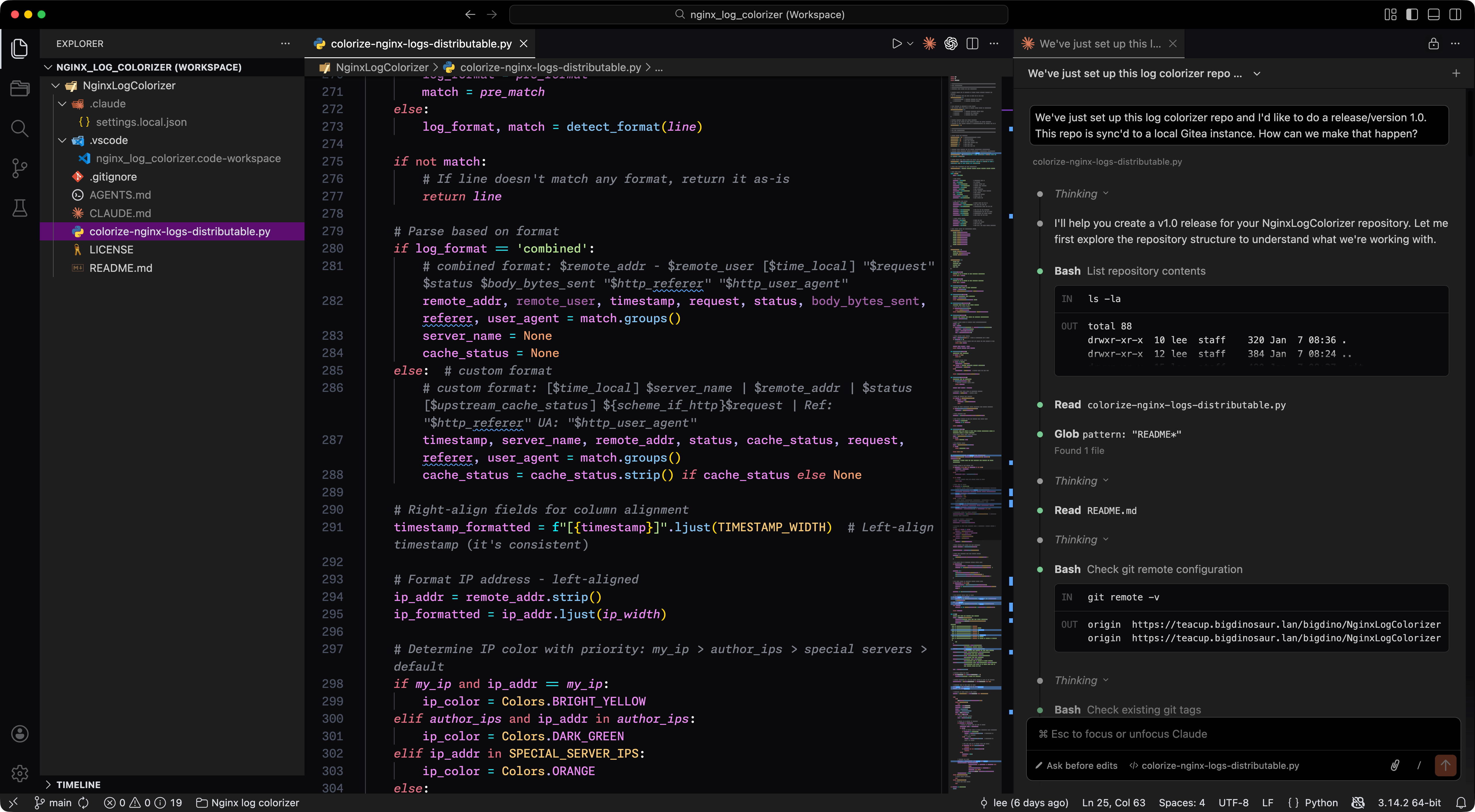
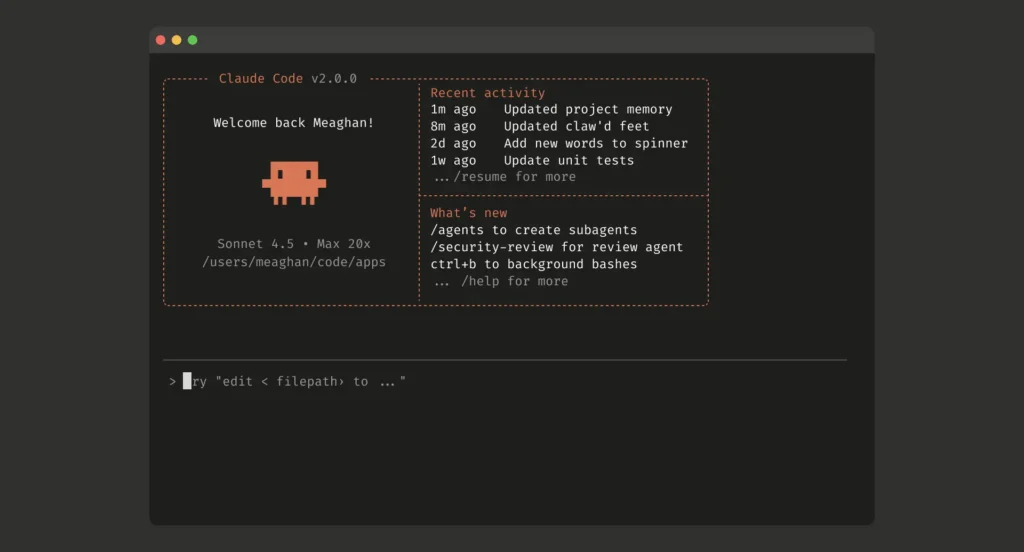
A screenshot of the Claude Code command-line interface.

A screenshot of the Claude Code command-line interface. Credit: Anthropic

Over the past few years, AI researchers have been probing LLMs’ deficiencies and finding ways to work around them. One recent innovation was the simulated reasoning model, which generates context (extending the prompt) in the form of reasoning-style text that can help an LLM home in on a more accurate output. Another innovation was an application called an “agent” that links several LLMs together to perform tasks simultaneously and evaluate outputs.

How coding agents are structured

In that sense, each AI coding agent is a program wrapper that works with multiple LLMs. There is typically a “supervising” LLM that interprets tasks (prompts) from the human user and then assigns those tasks to parallel LLMs that can use software tools to execute the instructions. The supervising agent can interrupt tasks below it and evaluate the subtask results to see how a project is going. Anthropic’s engineering documentation describes this pattern as “gather context, take action, verify work, repeat.”

If run locally through a command-line interface (CLI), users give the agents conditional permission to write files on the local machine (code or whatever is needed), run exploratory commands (say, “ls” to list files in a directory), fetch websites (usually using “curl”), download software, or upload files to remote servers. There are lots of possibilities (and potential dangers) with this approach, so it needs to be used carefully.

In contrast, when a user starts a task in the web-based agent like the web versions of Codex and Claude Code, the system provisions a sandboxed cloud container preloaded with the user’s code repository, where Codex can read and edit files, run commands (including test harnesses and linters), and execute code in isolation. Anthropic’s Claude Code uses operating system-level features to create filesystem and network boundaries within which the agent can work more freely.

The context problem

Every LLM has a short-term memory, so to speak, that limits the amount of data it can process before it “forgets” what it’s doing. This is called “context.” Every time you submit a response to the supervising agent, you are amending one gigantic prompt that includes the entire history of the conversation so far (and all the code generated, plus the simulated reasoning tokens the model uses to “think” more about a problem). The AI model then evaluates this prompt and produces an output. It’s a very computationally expensive process that increases quadratically with prompt size because LLMs process every token (chunk of data) against every other token in the prompt.

Anthropic’s engineering team describes context as a finite resource with diminishing returns. Studies have revealed what researchers call “context rot”: As the number of tokens in the context window increases, the model’s ability to accurately recall information decreases. Every new token depletes what the documentation calls an “attention budget.”

This context limit naturally limits the size of a codebase a LLM can process at one time, and if you feed the AI model lots of huge code files (which have to be re-evaluated by the LLM every time you send another response), it can burn up token or usage limits pretty quickly.

Tricks of the trade

To get around these limits, the creators of coding agents use several tricks. For example, AI models are fine-tuned to write code to outsource activities to other software tools. For example, they might write Python scripts to extract data from images or files rather than feeding the whole file through an LLM, which saves tokens and avoids inaccurate results.

Anthropic’s documentation notes that Claude Code also uses this approach to perform complex data analysis over large databases, writing targeted queries and using Bash commands like “head” and “tail” to analyze large volumes of data without ever loading the full data objects into context.

(In a way, these AI agents are guided but semi-autonomous tool-using programs that are a major extension of a concept we first saw in early 2023.)

Another major breakthrough in agents came from dynamic context management. Agents can do this in a few ways that are not fully disclosed in proprietary coding models, but we do know the most important technique they use: context compression.

The command line version of OpenAI codex running in a macOS terminal window.

The command-line version of OpenAI Codex running in a macOS terminal window. Credit: Benj Edwards

When a coding LLM nears its context limit, this technique compresses the context history by summarizing it, losing details in the process but shortening the history to key details. Anthropic’s documentation describes this “compaction” as distilling context contents in a high-fidelity manner, preserving key details like architectural decisions and unresolved bugs while discarding redundant tool outputs.

This means the AI coding agents periodically “forget” a large portion of what they are doing every time this compression happens, but unlike older LLM-based systems, they aren’t completely clueless about what has transpired and can rapidly re-orient themselves by reading existing code, written notes left in files, change logs, and so on.

Anthropic’s documentation recommends using CLAUDE.md files to document common bash commands, core files, utility functions, code style guidelines, and testing instructions. AGENTS.md, now a multi-company standard, is another useful way of guiding agent actions in between context refreshes. These files act as external notes that let agents track progress across complex tasks while maintaining critical context that would otherwise be lost.

For tasks requiring extended work, both companies employ multi-agent architectures. According to Anthropic’s research documentation, its system uses an “orchestrator-worker pattern” in which a lead agent coordinates the process while delegating to specialized subagents that operate in parallel. When a user submits a query, the lead agent analyzes it, develops a strategy, and spawns subagents to explore different aspects simultaneously. The subagents act as intelligent filters, returning only relevant information rather than their full context to the lead agent.

The multi-agent approach burns through tokens rapidly. Anthropic’s documentation notes that agents typically use about four times more tokens than chatbot interactions, and multi-agent systems use about 15 times more tokens than chats. For economic viability, these systems require tasks where the value is high enough to justify the increased cost.

Best practices for humans

While using these agents is contentious in some programming circles, if you use one to code a project, knowing good software development practices helps to head off future problems. For example, it’s good to know about version control, making incremental backups, implementing one feature at a time, and testing it before moving on.

What people call “vibe coding”—creating AI-generated code without understanding what it’s doing—is clearly dangerous for production work. Shipping code you didn’t write yourself in a production environment is risky because it could introduce security issues or other bugs or begin gathering technical debt that could snowball over time.

Independent AI researcher Simon Willison recently argued that developers using coding agents still bear responsibility for proving their code works. “Almost anyone can prompt an LLM to generate a thousand-line patch and submit it for code review,” Willison wrote. “That’s no longer valuable. What’s valuable is contributing code that is proven to work.”

In fact, human planning is key. Claude Code’s best practices documentation recommends a specific workflow for complex problems: First, ask the agent to read relevant files and explicitly tell it not to write any code yet, then ask it to make a plan. Without these research and planning steps, the documentation warns, Claude’s outputs tend to jump straight to coding a solution.

Without planning, LLMs sometimes reach for quick solutions to satisfy a momentary objective that might break later if a project were expanded. So having some idea of what makes a good architecture for a modular program that can be expanded over time can help you guide the LLM to craft something more durable.

As mentioned above, these agents aren’t perfect, and some people prefer not to use them at all. A randomized controlled trial published by the nonprofit research organization METR in July 2025 found that experienced open-source developers actually took 19 percent longer to complete tasks when using AI tools, despite believing they were working faster. The study’s authors note several caveats: The developers were highly experienced with their codebases (averaging five years and 1,500 commits), the repositories were large and mature, and the models used (primarily Claude 3.5 and 3.7 Sonnet via Cursor) have since been superseded by more capable versions.

Whether newer models would produce different results remains an open question, but the study suggests that AI coding tools may not always provide universal speed-ups, particularly for developers who already know their codebases well.

Given these potential hazards, coding proof-of-concept demos and internal tools is probably the ideal use of coding agents right now. Since AI models have no actual agency (despite being called agents) and are not people who can be held accountable for mistakes, human oversight is key.

Photo of Benj Edwards

Benj Edwards is Ars Technica’s Senior AI Reporter and founder of the site’s dedicated AI beat in 2022. He’s also a tech historian with almost two decades of experience. In his free time, he writes and records music, collects vintage computers, and enjoys nature. He lives in Raleigh, NC.

How AI coding agents work—and what to remember if you use them Read More »
we-asked-four-ai-coding-agents-to-rebuild-minesweeper—the-results-were-explosive

We asked four AI coding agents to rebuild Minesweeper—the results were explosive


How do four modern LLMs do at re-creating a simple Windows gaming classic?

Which mines are mine, and which are AI? Credit: Aurich Lawson | Getty Images

The idea of using AI to help with computer programming has become a contentious issue. On the one hand, coding agents can make horrific mistakes that require a lot of inefficient human oversight to fix, leading many developers to lose trust in the concept altogether. On the other hand, some coders insist that AI coding agents can be powerful tools and that frontier models are quickly getting better at coding in ways that overcome some of the common problems of the past.

To see how effective these modern AI coding tools are becoming, we decided to test four major models with a simple task: re-creating the classic Windows game Minesweeper. Since it’s relatively easy for pattern-matching systems like LLMs to play off of existing code to re-create famous games, we added in one novelty curveball as well.

Our straightforward prompt:

Make a full-featured web version of Minesweeper with sound effects that

1) Replicates the standard Windows game and

2) implements a surprise, fun gameplay feature.

Include mobile touchscreen support.

Ars Senior AI Editor Benj Edwards fed this task into four AI coding agents with terminal (command line) apps: OpenAI’s Codex based on GPT-5, Anthropic’s Claude Code with Opus 4.5, Google’s Gemini CLI, and Mistral Vibe. The agents then directly manipulated HTML and scripting files on a local machine, guided by a “supervising” AI model that interpreted the prompt and assigned coding tasks to parallel LLMs that can use software tools to execute the instructions. All AI plans were paid for privately with no special or privileged access given by the companies involved, and the companies were unaware of these tests taking place.

Ars Senior Gaming Editor (and Minesweeper expert) Kyle Orland then judged each example blind, without knowing which model generated which Minesweeper clone. Those somewhat subjective and non-rigorous results are below.

For this test, we used each AI model’s unmodified code in a “single shot” result to see how well these tools perform without any human debugging. In the real world, most sufficiently complex AI-generated code would go through at least some level of review and tweaking by a human software engineer who could spot problems and address inefficiencies.

We chose this test as a sort of simple middle ground for the current state of AI coding. Cloning Minesweeper isn’t a trivial task that can be done in just a handful of lines of code, but it’s also not an incredibly complex system that requires many interlocking moving parts.

Minesweeper is also a well-known game, with many versions documented across the Internet. That should give these AI agents plenty of raw material to work from and should be easier for us to evaluate than a completely novel program idea. At the same time, our open-ended request for a new “fun” feature helps demonstrate each agent’s penchant for unguided coding “creativity,” as well as their ability to create new features on top of an established game concept.

With all that throat-clearing out of the way, here’s our evaluation of the AI-generated Minesweeper clones, complete with links that you can use to play them yourselves.

Agent 1: Mistral Vibe

Play it for yourself

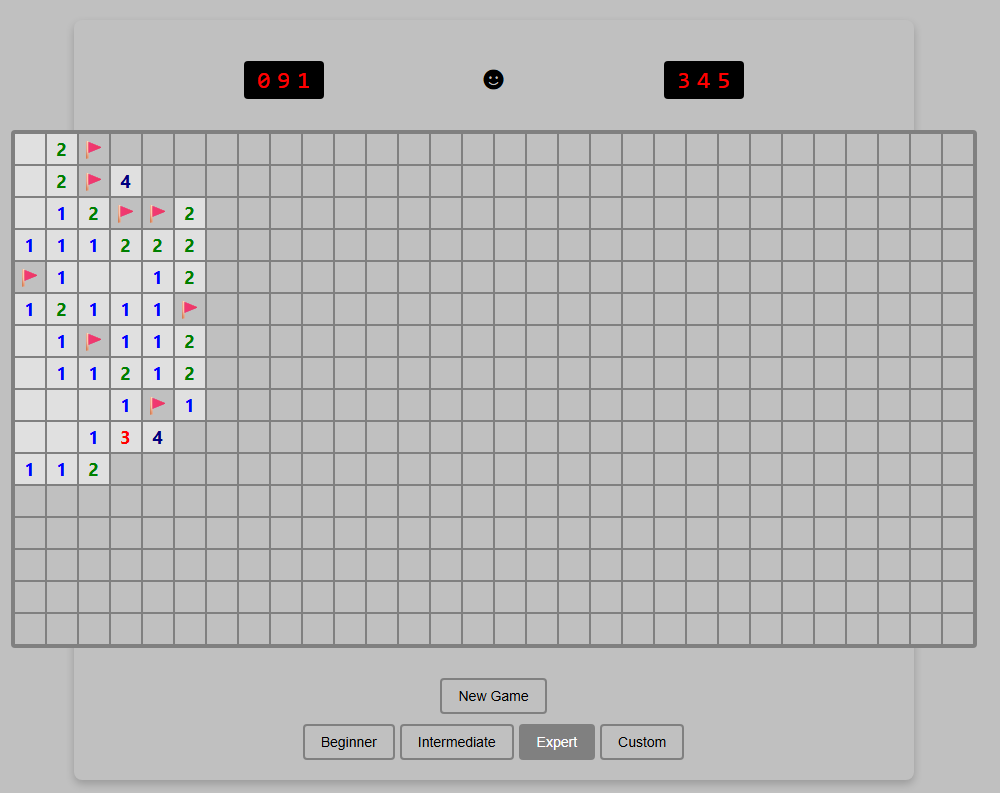
Just ignore that Custom button. It’s purely for show.

Just ignore that Custom button. It’s purely for show. Credit: Benj Edwards

Implementation

Right away, this version loses points for not implementing chording—the technique that advanced Minesweeper players use to quickly clear all the remaining spaces surrounding a number that already has sufficient flagged mines. Without this feature, this version feels more than a little clunky to play.

I’m also a bit perplexed by the inclusion of a “Custom” difficulty button that doesn’t seem to do anything. It’s like the model realized that customized board sizes were a thing in Minesweeper but couldn’t figure out how to implement this relatively basic feature.

The game works fine on mobile, but marking a square with a flag requires a tricky long-press on a tiny square that also triggers selector handles that are difficult to clear. So it’s not an ideal mobile interface.

Presentation

This was the only working version we tested that didn’t include sound effects. That’s fair, since the original Windows Minesweeper also didn’t include sound, but it’s still a notable relative omission since the prompt specifically asked for it.

The all-black “smiley face” button to start a game is a little off-putting, too, compared to the bright yellow version that’s familiar to both Minesweeper players and emoji users worldwide. And while that smiley face does start a new game when clicked, there’s also a superfluous “New Game” button taking up space for some reason.

“Fun” feature

The closest thing I found to a “fun” new feature here was the game adding a rainbow background pattern on the grid when I completed a game. While that does add a bit of whimsy to a successful game, I expected a little more.

Coding experience

Benj notes that he was pleasantly surprised by how well Mistral Vibe performed as an open-weight model despite lacking the big-money backing of the other contenders. It was relatively slow, however (third fastest out of four), and the result wasn’t great. Ultimately, its performance so far suggests that with more time and more training, a very capable AI coding agent may eventually emerge.

Overall rating: 4/10

This version got many of the basics right but left out chording and didn’t perform well on the small presentational and “fun” touches.

Agent 2: OpenAI Codex

Play it for yourself

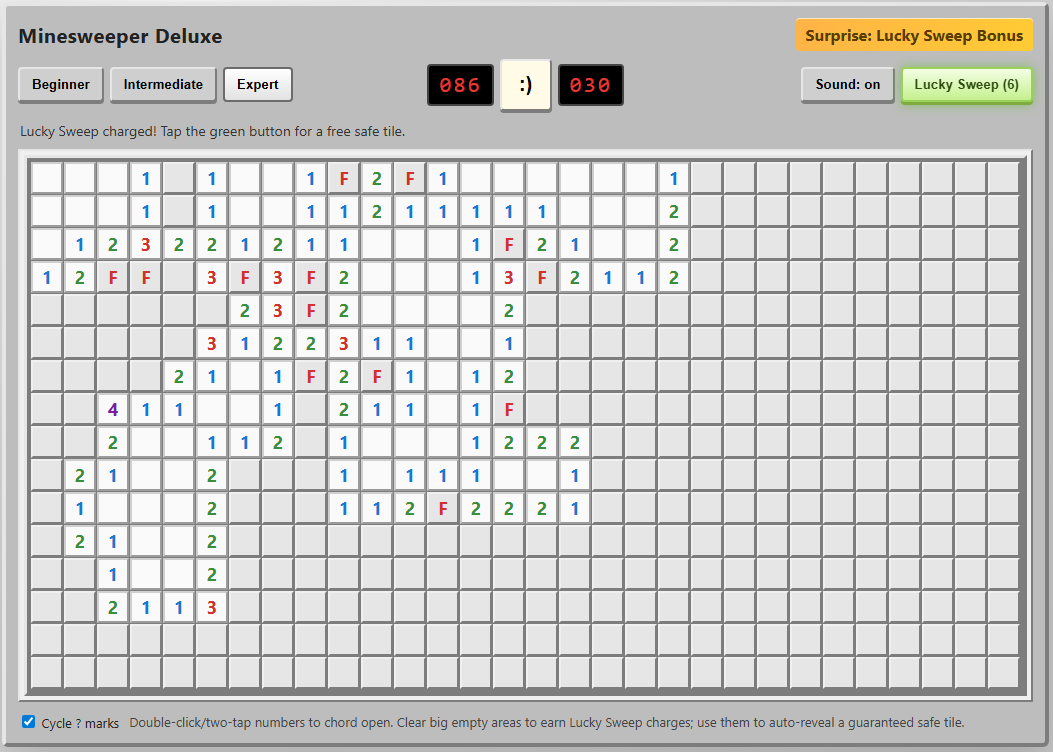
I can’t tell you how much I appreciate those chording instructions at the bottom.

I can’t tell you how much I appreciate those chording instructions at the bottom. Credit: Benj Edwards

Implementation

Not only did this agent include the crucial “chording” feature, but it also included on-screen instructions for using it on both PC and mobile browsers. I was further impressed by the option to cycle through “?” marks when marking squares with flags, an esoteric feature I feel even most human Minesweeper cloners might miss.

On mobile, the option to hold your finger down on a square to mark a flag is a nice touch that makes this the most enjoyable handheld version we tested.

Presentation

The old-school emoticon smiley-face button is pretty endearing, especially when you blow up and get a red-tinted “X(“. I was less impressed by the playfield “graphics,” which use a simple “*” for revealed mines and an ugly red “F” for flagged tiles.

The beeps-and-boops sound effects reminded me of my first old-school, pre-Sound-Blaster PC from the late ’80s. That’s generally a good thing, but I still appreciated the game giving me the option to turn them off.

“Fun” feature

The “Surprise: Lucky Sweep Bonus” listed in the corner of the UI explains that clicking the button gives you a free safe tile when available. This can be pretty useful in situations where you’d otherwise be forced to guess between two tiles that are equally likely to be mines.

Overall, though, I found it a bit odd that the game gives you this bonus only after you find a large, cascading field of safe tiles with a single click. It mostly functions as a “win more” button rather than a feature that offers a good balance of risk versus reward.

Coding experience

OpenAI Codex has a nice terminal interface with features similar to Claude Code (local commands, permission management, and interesting animations showing progress), and it’s fairly pleasant to use (OpenAI also offers Codex through a web interface, but we did not use that for this evaluation). However, Codex took roughly twice as long to code a functional game than Claude Code did, which might contribute to the strong result here.

Overall: 9/10

The implementation of chording and cute presentation touches push this to the top of the list. We just wish the “fun” feature was a bit more fun.

Agent 3: Anthropic Claude Code

Play it for yourself

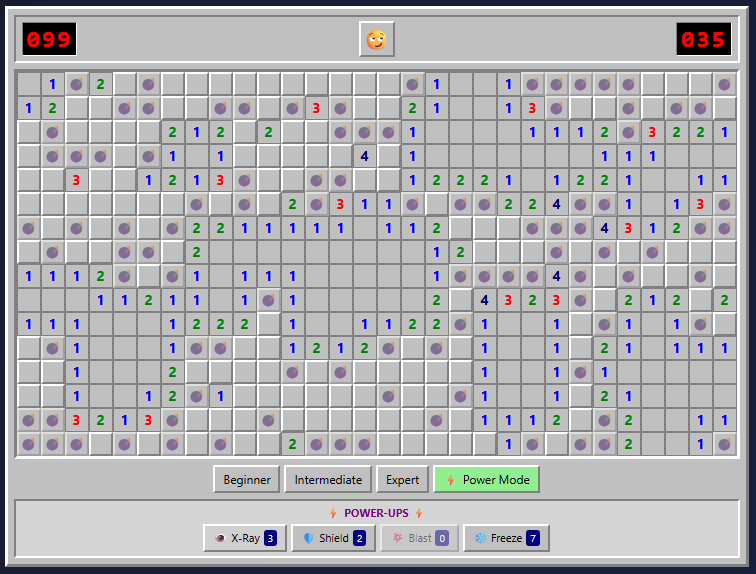
The Power Mod powers on display here make even Expert boards pretty trivial to complete.

The Power Mod powers on display here make even Expert boards pretty trivial to complete. Credit: Benj Edwards

Implementation

Once again, we get a version that gets all the gameplay basics right but is missing the crucial chording feature that makes truly efficient Minesweeper play possible. This is like playing Super Mario Bros. without the run button or Ocarina of Time without Z-targeting. In a word: unacceptable.

The “flag mode” toggle on the mobile version of this game is perfectly functional, but it’s a little clunky to use. It also visually cuts off a portion of the board at the larger game sizes.

Presentation

Presentation-wise, this is probably the most polished version we tested. From the use of cute emojis for the “face” button to nice-looking bomb and flag graphics and simple but effective sound effects, this looks more professional than the other versions we tested.

That said, there are some weird presentation issues. The “beginner” grid has weird gaps between columns, for instance. The borders of each square and the flag graphics can also become oddly grayed out at points, especially when using Power Mode (see below).

“Fun” feature

The prominent “Power Mode” button in the lower-right corner offers some pretty fun power-ups that alter the core Minesweeper formula in interesting ways. But the actual powers are a bit hit-and-miss.

I especially liked the “Shield” power, which protects you from an errant guess, and the “Blast” power, which seems to guarantee a large cascade of revealed tiles wherever you click. But the “X-Ray” power, which reveals every bomb for a few seconds, could be easily exploited by a quick player (or a crafty screenshot). And the “Freeze” power is rather boring, just stopping the clock for a few seconds and amounting to a bit of extra time.

Overall, the game hands out these new powers like candy, which makes even an Expert-level board relatively trivial with Power Mode active. Simply choosing “Power Mode” also seems to mark a few safe squares right after you start a game, making things even easier. So while these powers can be “fun,” they also don’t feel especially well-balanced.

Coding experience

Of the four tested models, Claude Code with Opus 4.5 featured the most pleasant terminal interface experience and the fastest overall coding experience (Claude Code can also use Sonnet 4.5, which is even faster, but the results aren’t quite as full-featured in our experience). While we didn’t precisely time each model, Opus 4.5 produced a working Minesweeper in under five minutes. Codex took at least twice as long, if not longer, while Mistral took roughly three or four times as long as Claude Code. Gemini, meanwhile, took hours of tinkering to get two non-working results.

Overall: 7/10

The lack of chording is a big omission, but the strong presentation and Power Mode options give this effort a passable final score.

Agent 4: Google Gemini CLI

Play it for yourself

So… where’s the game?

So… where’s the game? Credit: Benj Edwards

Implementation, presentation, etc.

Gemini CLI did give us a few gray boxes you can click, but the playfields are missing. While interactive troubleshooting with the agent may have fixed the issue, as a “one-shot” test, the model completely failed.

Coding experience

Of the four coding agents we tested, Gemini CLI gave Benj the most trouble. After developing a plan, it was very, very slow at generating any usable code (about an hour per attempt). The model seemed to get hung up attempting to manually create WAV file sound effects and insisted on requiring React external libraries and a few other overcomplicated dependencies. The result simply did not work.

Benj actually bent the rules and gave Gemini a second chance, specifying that the game should use HTML5. When the model started writing code again, it also got hung up trying to make sound effects. Benj suggested using the WebAudio framework (which the other AI coding agents seemed to be able to use), but the result didn’t work, which you can see at the link above.

Unlike the other models tested, Gemini CLI apparently uses a hybrid system of three different LLMs for different tasks (Gemini 2.5 Flash Lite, 2.5 Flash, and 2.5 Pro were available at the level of the Google account Benj paid for). When you’ve completed your coding session and quit the CLI interface, it gives you a readout of which model did what.

In this case, it didn’t matter because the results didn’t work. But it’s worth noting that Gemini 3 coding models are available for other subscription plans that were not tested here. For that reason, this portion of the test could be considered “incomplete” for Google CLI.

Overall: 0/10 (Incomplete)

Final verdict

OpenAI Codex wins this one on points, in no small part because it was the only model to include chording as a gameplay option. But Claude Code also distinguished itself with strong presentational flourishes and quick generation time. Mistral Vibe was a significant step down, and Google CLI based on Gemini 2.5 was a complete failure on our one-shot test.

While experienced coders can definitely get better results via an interactive, back-and-forth code editing conversation with an agent, these results show how capable some of these models can be, even with a very short prompt on a relatively straightforward task. Still, we feel that our overall experience with coding agents on other projects (more on that in a future article) generally reinforces the idea that they currently function best as interactive tools that augment human skill rather than replace it.

Photo of Kyle Orland

Kyle Orland has been the Senior Gaming Editor at Ars Technica since 2012, writing primarily about the business, tech, and culture behind video games. He has journalism and computer science degrees from University of Maryland. He once wrote a whole book about Minesweeper.

We asked four AI coding agents to rebuild Minesweeper—the results were explosive Read More »

anthropic-introduces-cheaper,-more-powerful,-more-efficient-opus-4.5-model

Anthropic introduces cheaper, more powerful, more efficient Opus 4.5 model

Anthropic today released Opus 4.5, its flagship frontier model, and it brings improvements in coding performance, as well as some user experience improvements that make it more generally competitive with OpenAI’s latest frontier models.

Perhaps the most prominent change for most users is that in the consumer app experiences (web, mobile, and desktop), Claude will be less prone to abruptly hard-stopping conversations because they have run too long. The improvement to memory within a single conversation applies not just to Opus 4.5, but to any current Claude models in the apps.

Users who experienced abrupt endings (despite having room left in their session and weekly usage budgets) were hitting a hard context window (200,000 tokens). Whereas some large language model implementations simply start trimming earlier messages from the context when a conversation runs past the maximum in the window, Claude simply ended the conversation rather than allow the user to experience an increasingly incoherent conversation where the model would start forgetting things based on how old they are.

Now, Claude will instead go through a behind-the-scenes process of summarizing the key points from the earlier parts of the conversation, attempting to discard what it deems extraneous while keeping what’s important.

Developers who call Anthropic’s API can leverage the same principles through context management and context compaction.

Opus 4.5 performance

Opus 4.5 is the first model to surpass an accuracy score of 80 percent—specifically, 80.9 percent in the SWE-Bench Verified benchmark, narrowly beating OpenAI’s recently released GPT-5.1-Codex-Max (77.9 percent) and Google’s Gemini 3 Pro (76.2 percent). The model performs particularly well in agentic coding and agentic tool use benchmarks, but still lags behind GPT-5.1 in visual reasoning (MMMU).

Anthropic introduces cheaper, more powerful, more efficient Opus 4.5 model Read More »

developers-joke-about-“coding-like-cavemen”-as-ai-service-suffers-major-outage

Developers joke about “coding like cavemen” as AI service suffers major outage

Growing dependency on AI coding tools

The speed at which news of the outage spread shows how deeply embedded AI coding assistants have already become in modern software development. Claude Code, announced in February and widely launched in May, is Anthropic’s terminal-based coding agent that can perform multi-step coding tasks across an existing code base.

The tool competes with OpenAI’s Codex feature, a coding agent that generates production-ready code in isolated containers, Google’s Gemini CLI, Microsoft’s GitHub Copilot, which itself can use Claude models for code, and Cursor, a popular AI-powered IDE built on VS Code that also integrates multiple AI models, including Claude.

During today’s outage, some developers turned to alternative solutions. “Z.AI works fine. Qwen works fine. Glad I switched,” posted one user on Hacker News. Others joked about reverting to older methods, with one suggesting the “pseudo-LLM experience” could be achieved with a Python package that imports code directly from Stack Overflow.

While AI coding assistants have accelerated development for some users, they’ve also caused problems for others who rely on them too heavily. The emerging practice of so-called “vibe coding“—using natural language to generate and execute code through AI models without fully understanding the underlying operations—has led to catastrophic failures.

In recent incidents, Google’s Gemini CLI destroyed user files while attempting to reorganize them, and Replit’s AI coding service deleted a production database despite explicit instructions not to modify code. These failures occurred when the AI models confabulated successful operations and built subsequent actions on false premises, highlighting the risks of depending on AI assistants that can misinterpret file structures or fabricate data to hide their errors.

Wednesday’s outage served as a reminder that as dependency on AI grows, even minor service disruptions can become major events that affect an entire profession. But perhaps that could be a good thing if it’s an excuse to take a break from a stressful workload. As one commenter joked, it might be “time to go outside and touch some grass again.”

Developers joke about “coding like cavemen” as AI service suffers major outage Read More »