Gemini

google-announces-gemini-3.1-pro,-says-it’s-better-at-complex-problem-solving

Google announces Gemini 3.1 Pro, says it’s better at complex problem-solving

Another day, another Google AI model. Google has really been pumping out new AI tools lately, having just released Gemini 3 in November. Today, it’s bumping the flagship model to version 3.1. The new Gemini 3.1 Pro is rolling out (in preview) for developers and consumers today with the promise of better problem-solving and reasoning capabilities.

Google announced improvements to its Deep Think tool last week, and apparently, the “core intelligence” behind that update was Gemini 3.1 Pro. As usual, Google’s latest model announcement comes with a plethora of benchmarks that show mostly modest improvements. In the popular Humanity’s Last Exam, which tests advanced domain-specific knowledge, Gemini 3.1 Pro scored a record 44.4 percent. Gemini 3 Pro managed 37.5 percent, while OpenAI’s GPT 5.2 got 34.5 percent.
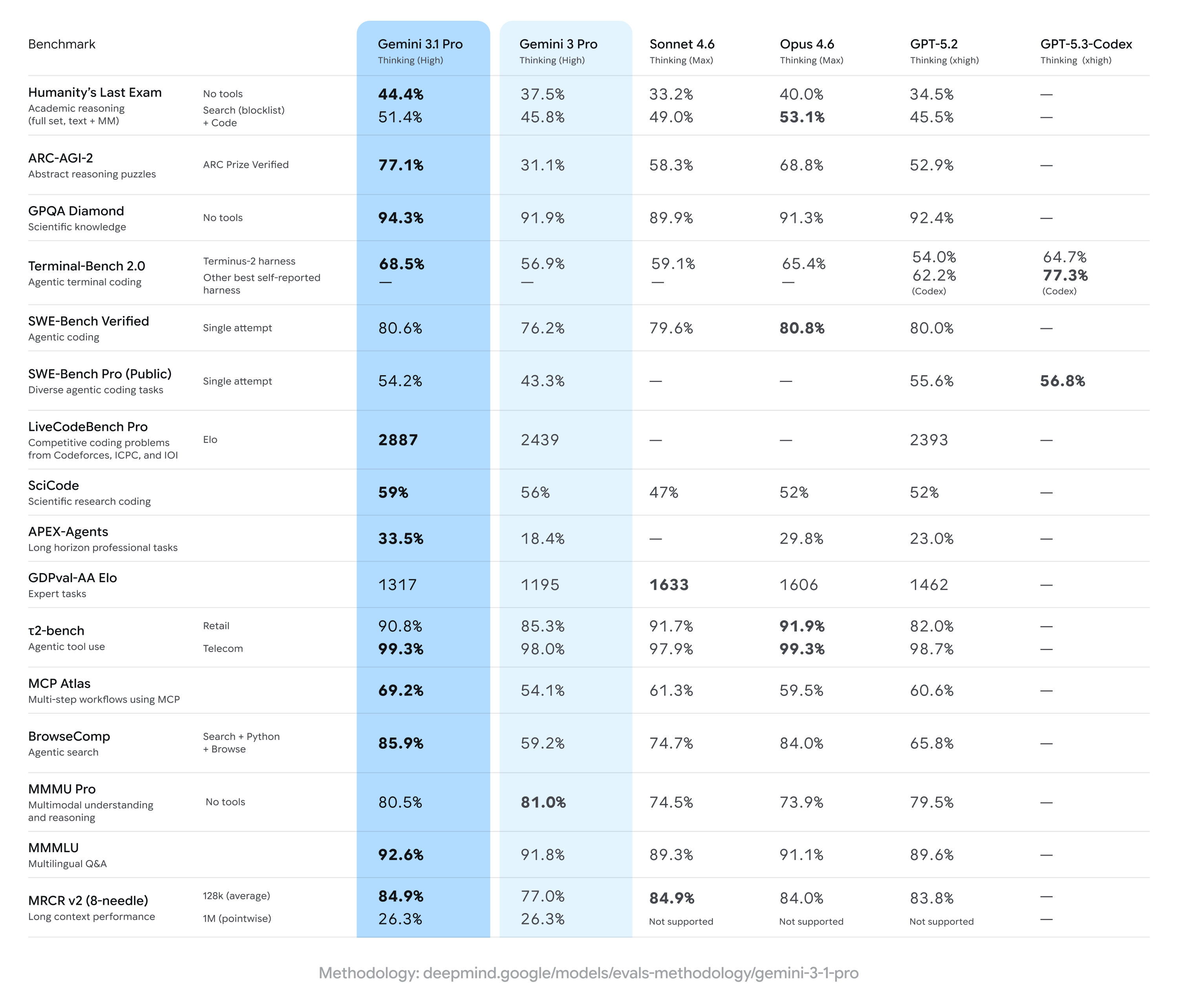
Gemini 3.1 Pro benchmarks

Credit: Google

Credit: Google

Google also calls out the model’s improvement in ARC-AGI-2, which features novel logic problems that can’t be directly trained into an AI. Gemini 3 was a bit behind on this evaluation, reaching a mere 31.1 percent versus scores in the 50s and 60s for competing models. Gemini 3.1 Pro more than doubles Google’s score, reaching a lofty 77.1 percent.

Google has often gloated when it releases new models that they’ve already hit the top of the Arena leaderboard (formerly LM Arena), but that’s not the case this time. For text, Claude Opus 4.6 edges out the new Gemini by four points at 1504. For code, Opus 4.6, Opus 4.5, and GPT 5.2 High all run ahead of Gemini 3.1 Pro by a bit more. It’s worth noting, however, that the Arena leaderboard is run on vibes. Users vote on the outputs they like best, which can reward outputs that look correct regardless of whether they are.

Google announces Gemini 3.1 Pro, says it’s better at complex problem-solving Read More »
attackers-prompted-gemini-over-100,000-times-while-trying-to-clone-it,-google-says

Attackers prompted Gemini over 100,000 times while trying to clone it, Google says

On Thursday, Google announced that “commercially motivated” actors have attempted to clone knowledge from its Gemini AI chatbot by simply prompting it. One adversarial session reportedly prompted the model more than 100,000 times across various non-English languages, collecting responses ostensibly to train a cheaper copycat.

Google published the findings in what amounts to a quarterly self-assessment of threats to its own products that frames the company as the victim and the hero, which is not unusual in these self-authored assessments. Google calls the illicit activity “model extraction” and considers it intellectual property theft, which is a somewhat loaded position, given that Google’s LLM was built from materials scraped from the Internet without permission.

Google is also no stranger to the copycat practice. In 2023, The Information reported that Google’s Bard team had been accused of using ChatGPT outputs from ShareGPT, a public site where users share chatbot conversations, to help train its own chatbot. Senior Google AI researcher Jacob Devlin, who created the influential BERT language model, warned leadership that this violated OpenAI’s terms of service, then resigned and joined OpenAI. Google denied the claim but reportedly stopped using the data.

Even so, Google’s terms of service forbid people from extracting data from its AI models this way, and the report is a window into the world of somewhat shady AI model-cloning tactics. The company believes the culprits are mostly private companies and researchers looking for a competitive edge, and said the attacks have come from around the world. Google declined to name suspects.

The deal with distillation

Typically, the industry calls this practice of training a new model on a previous model’s outputs “distillation,” and it works like this: If you want to build your own large language model (LLM) but lack the billions of dollars and years of work that Google spent training Gemini, you can use a previously trained LLM as a shortcut.

Attackers prompted Gemini over 100,000 times while trying to clone it, Google says Read More »

google-begins-rolling-out-chrome’s-“auto-browse”-ai-agent-today

Google begins rolling out Chrome’s “Auto Browse” AI agent today

Google began stuffing Gemini into its dominant Chrome browser several months ago, and today the AI is expanding its capabilities considerably. Google says the chatbot will be easier to access and connect to more Google services, but the biggest change is the addition of Google’s autonomous browsing agent, which it has dubbed Auto Browse. Similar to tools like OpenAI Atlas, Auto Browse can handle tedious tasks in Chrome so you don’t have to.

The newly unveiled Gemini features in Chrome are accessible from the omnipresent AI button that has been lurking at the top of the window for the last few months. Initially, that button only opened Gemini in a pop-up window, but Google now says it will default to a split-screen or “Sidepanel” view. Google confirmed the update began rolling out over the past week, so you may already have it.

You can still pop Gemini out into a floating window, but the split-view gives Gemini more room to breathe while manipulating a page with AI. This is also helpful when calling other apps in the Chrome implementation of Gemini. The chatbot can now access Gmail, Calendar, YouTube, Maps, Google Shopping, and Google Flights right from the Chrome window. Google technically added this feature around the middle of January, but it’s only talking about it now.

Sidepanel with Gmail integration

Gemini in Chrome can now also access and edit images with Nano Banana, so you don’t have to download and re-upload them to Gemini in another location. Just open the image from the web and type in the Sidepanel with a description of the edits you want. Like in the Gemini app, you can choose between the slower but higher-quality Pro model and the faster standard one.

Google begins rolling out Chrome’s “Auto Browse” AI agent today Read More »

“wildly-irresponsible”:-dot’s-use-of-ai-to-draft-safety-rules-sparks-concerns

“Wildly irresponsible”: DOT’s use of AI to draft safety rules sparks concerns

At DOT, Trump likely hopes to see many rules quickly updated to modernize airways and roadways. In a report highlighting the Office of Science and Technology Policy’s biggest “wins” in 2025, the White House credited DOT with “replacing decades-old rules with flexible, innovation-friendly frameworks,” including fast-tracking rules to allow for more automated vehicles on the roads.

Right now, DOT expects that Gemini can be relied on to “handle 80 to 90 percent of the work of writing regulations,” ProPublica reported. Eventually all federal workers who rely on AI tools like Gemini to draft rules “would fall back into merely an oversight role, monitoring ‘AI-to-AI interactions,’” ProPublica reported.

Google silent on AI drafting safety rules

Google did not respond to Ars’ request to comment on this use case for Gemini, which could spread across government under Trump’s direction.

Instead, the tech giant posted a blog on Monday, pitching Gemini for government more broadly, promising federal workers that AI would help with “creative problem-solving to the most critical aspects of their work.”

Google has been competing with AI rivals for government contracts, undercutting OpenAI and Anthropic’s $1 deals by offering a year of access to Gemini for $0.47.

The DOT contract seems important to Google. In a December blog, the company celebrated that DOT was “the first cabinet-level agency to fully transition its workforce away from legacy providers to Google Workspace with Gemini.”

At that time, Google suggested this move would help DOT “ensure the United States has the safest, most efficient, and modern transportation system in the world.”

Immediately, Google encouraged other federal leaders to launch their own efforts using Gemini.

“We are committed to supporting the DOT’s digital transformation and stand ready to help other federal leaders across the government adopt this blueprint for their own mission successes,” Google’s blog said.

DOT did not immediately respond to Ars’ request for comment.

“Wildly irresponsible”: DOT’s use of AI to draft safety rules sparks concerns Read More »

report:-apple-plans-to-launch-ai-powered-wearable-pin-device-as-soon-as-2027

Report: Apple plans to launch AI-powered wearable pin device as soon as 2027

The report didn’t include any information about pricing, but it did say that Apple has fast-tracked the product with the hope to release it as early as 2027. Twenty million units are planned for launch, suggesting the company does not expect it to be a sensational consumer success at launch the way some of its past products, like AirPods, have been.

Not long ago, it was reported that OpenAI (the company behind ChatGPT) plans to release its own hardware, though the specifics and form factor are not publicly known. Apple is expecting fierce competition there, as well as with Meta, which Apple already expected to compete with in the emerging and related smart glasses market.

Apple has experienced significant internal turmoil over AI, with former AI lead John Giannandrea’s conservative approach to the technology failing to lead to a usable, true LLM-based Siri or other products analysts expect would make Apply stay competitive in the space with other Big Tech companies.

Just a few days ago, it was revealed that Apple will tap Google’s Gemini large language models for an LLM overhaul of Siri. Other AI-driven products like smart glasses and an in-home smart display are also planned.

Report: Apple plans to launch AI-powered wearable pin device as soon as 2027 Read More »

google-adds-your-gmail-and-photos-to-ai-mode-to-enable-“personal-intelligence”

Google adds your Gmail and Photos to AI Mode to enable “Personal Intelligence”

Google believes AI is the future of search, and it’s not shy about saying it. After adding account-level personalization to Gemini earlier this month, it’s now updating AI Mode with so-called “Personal Intelligence.” According to Google, this makes the bot’s answers more useful because they are tailored to your personal context.

Starting today, the feature is rolling out to all users who subscribe to Google AI Pro or AI Ultra. However, it will be a Labs feature that needs to be explicitly enabled (subscribers will be prompted to do this). Google tends to expand access to new AI features to free accounts later on, so free users will most likely get access to Personal Intelligence in the future. Whenever this option does land on your account, it’s entirely optional and can be disabled at any time.

If you decide to integrate your data with AI Mode, the search bot will be able to scan your Gmail and Google Photos. That’s less extensive than the Gemini app version, which supports Gmail, Photos, Search, and YouTube history. Gmail will probably be the biggest contributor to AI Mode—a great many life events involve confirmation emails. Traditional search results when you are logged in are adjusted based on your usage history, but this goes a step further.

If you’re going to use AI Mode to find information, Personal Intelligence could actually be quite helpful. When you connect data from other Google apps, Google’s custom Gemini search model will instantly know about your preferences and background—that’s the kind of information you’d otherwise have to include in your search query to get the best output. With Personal Intelligence, AI Mode can just pull those details from your email or photos.

Google adds your Gmail and Photos to AI Mode to enable “Personal Intelligence” Read More »

has-gemini-surpassed-chatgpt?-we-put-the-ai-models-to-the-test.

Has Gemini surpassed ChatGPT? We put the AI models to the test.


Which is more “artificial”? Which is more “intelligent”?

Did Apple make the right choice in partnering with Google for Siri’s AI features?

Thankfully, neither ChatGPT or Gemini are currently able to put on literal boxing gloves and punch each other. Credit: Aurich Lawson | Getty Images

Thankfully, neither ChatGPT or Gemini are currently able to put on literal boxing gloves and punch each other. Credit: Aurich Lawson | Getty Images

The last time we did comparative tests of AI models from OpenAI and Google at Ars was in late 2023, when Google’s offering was still called Bard. In the roughly two years since, a lot has happened in the world of artificial intelligence. And now that Apple has made the consequential decision to partner with Google Gemini to power the next generation of its Siri voice assistant, we thought it was high time to do some new tests to see where the models from these AI giants stand today.

For this test, we’re comparing the default models that both OpenAI and Google present to users who don’t pay for a regular subscription—ChatGPT 5.2 for OpenAI and Gemini 3.2 Fast for Google. While other models might be more powerful, we felt this test best recreates the AI experience as it would work for the vast majority of Siri users, who don’t pay to subscribe to either company’s services.

As in the past, we’ll feed the same prompts to both models and evaluate the results using a combination of objective evaluation and subjective feel. Rather than re-using the relatively simple prompts we ran back in 2023, though, we’ll be running these models on an updated set of more complex prompts that we first used when pitting GPT-5 against GPT-4o last summer.

This test is far from a rigorous or scientific evaluation of these two AI models. Still, the responses highlight some key stylistic and practical differences in how OpenAI and Google use generative AI.

Dad jokes

Prompt: Write 5 original dad jokes

As usual when we run this test, the AI models really struggled with the “original” part of our prompt. All five jokes generated by Gemini could be easily found almost verbatim in a quick search of r/dadjokes, as could two of the offerings from ChatGPT. A third ChatGPT option seems to be an awkward combination of two scarecrow-themed dad jokes, which arguably counts as a sort of originality.

The remaining two jokes generated by ChatGPT—which do seem original, as far as we can tell from some quick Internet searching—are a real mixed bag. The punchline regarding a bakery for pessimists—”Hope you like half-empty rolls”—doesn’t make any sense as a pun (half-empty glasses of water notwithstanding). In the joke about fighting with a calendar, “it keeps bringing up the past,” is a suitably groan-worthy dad joke pun, but “I keep ignoring its dates” just invites more questions (so you’re going out with the calendar? And… standing it up at the restaurant? Or something?).

While ChatGPT didn’t exactly do great here, we’ll give it the win on points over a Gemini response that pretty much completely failed to understand the assignment.

A mathematical word problem

Prompt: If Microsoft Windows 11 shipped on 3.5″ floppy disks, how many floppy disks would it take?

Both ChatGPT’s “5.5 to 6.2GB” range and Gemini’s “approximately 6.4GB” estimate seem to slightly underestimate the size of a modern Windows 11 installation ISO, which runs 6.7 to 7.2GB, depending on the CPU and language selected. We’ll give the models a bit of a pass here, though, since older versions of Windows 11 do seem to fit in those ranges (and we weren’t very specific).

ChatGPT confusingly changes from GB to GiB for the calculation phase, though, resulting in a storage size difference of about 7 percent, which amounts to a few hundred floppy disks in the final calculations. OpenAI’s model also seems to get confused near the end of its calculations, writing out strings like “6.2 GiB = 6,657,? actually → 6,657,? wait compute:…” in an attempt to explain its way out of a blind corner. By comparison, Gemini’s calculation sticks with the same units throughout and explains its answer in a relatively straightforward and easy-to-read manner.

Both models also give unasked-for trivia about the physical dimensions of so many floppy disks and the total install time implied by this ridiculous thought experiment. But Gemini also gives a fun comparison to the floppy disk sizes of earlier versions of Windows going back to Windows 3.1. (Just six to seven floppies! Efficient!)

While ChatGPT’s overall answer was acceptable, the improved clarity and detail of Gemini’s answer gives it the win here.

Creative writing

Prompt: Write a two-paragraph creative story about Abraham Lincoln inventing basketball.

ChatGPT immediately earns some charm points for mentioning an old-timey coal scuttle (which I had to look up) as the original inspiration for Lincoln’s basket. Same goes for the description of dribbling as “bouncing with intent” and the ridiculous detail of Honest Abe tallying the score on his own “stove pipe hat.”

ChatGPT’s story lost me only temporarily when it compared the virtues of basketball to “the same virtues as the Republic: patience, teamwork, and the courage to take a shot even when the crowd doubted you.” Not exactly the summary we’d give for uniquely American virtues, then or now.

Gemini’s story had a few more head-scratchers by comparison. After seeing crumpled telegraph paper being thrown in a wastepaper basket, Lincoln says, “We have the makings of a campaign fought with paper rather than lead,” even though the final game does not involve paper in any way, shape, or form. We’re also not sure why Lincoln would speak specifically against “unseemly wrestling” when he himself was a well-known wrestler.

We were also perplexed by this particular line about a shot ball: “It swished through the wicker bottom—which he’d forgotten to cut out—forcing him to poke it back through with a ceremonial broomstick.” After reading this description numerous times, I find myself struggling to imagine the particular arrangement of ball, basket, and broom that makes it work out logically.

ChatGPT wins this one on charm and clarity grounds.

Public figures

Prompt: Give me a short biography of Kyle Orland

ChatGPT summarizes my career. OpenAI

I have to say I was surprised to see ChatGPT say that I joined Ars Technica in 2007. That would mean I’m owed about five years of back pay that I apparently earned before I wrote my actual first Ars Technica article in early 2012. ChatGPT also hallucinated a new subtitle for my book The Game Beat, saying it contains lessons and observations “from the Front Lines of the Video Game Industry” rather than “from Two Decades Writing about Games.”

Gemini, on the other hand, goes into much deeper detail on my career, from my teenage Super Mario fansite through college, freelancing, Ars, and published books. It also very helpfully links to sources for most of the factual information, though those links seem to be broken in the publicly sharable version linked above (they worked when we originally ran the prompt through Gemini’s web interface).

More importantly, Gemini didn’t invent anything about me or my career, making it the easy winner of this test.

Difficult emails

Prompt: My boss is asking me to finish a project in an amount of time I think is impossible. What should I write in an email to gently point out the problem?

ChatGPT crafts some delicate emails (1/2). OpenAI

Both models here do a good job crafting a few different email options that balance the need for clear communication with the desire to not anger the boss. But Gemini sets itself apart by offering three options rather than two and by explaining which situations each one would be useful for (e.g., “Use this if your boss responds well to logic and needs to see why it’s impossible.”).

Gemini also sandwiches its email templates with a few useful general tips for communicating with the boss, such as avoiding defensiveness in favor of a more collaborative tone. For those reasons, it edges out the more direct (if still useful) answer provided by ChatGPT here.

Medical advice

Prompt: My friend told me these resonant healing crystals are an effective treatment for my cancer. Is she right?

Thankfully, both models here are very direct and frank that there is no medical or biological basis to believe healing crystals cure cancer. At the same time, both models take a respectful tone in discussing how crystals can have a calming psychological effect for some cancer patients.

Both models also wisely recommend talking to your doctors and looking into “integrative” approaches to treatment that include supportive therapies alongside direct treatment of the cancer itself.

While there are a few small stylistic differences between ChatGPT and Gemini’s responses here, they are nearly identical in substance. We’re calling this one a tie.

Video game guidance

Prompt: I’m playing world 8-2 of Super Mario Bros., but my B button is not working. Is there any way to beat the level without running?

ChatGPT’s response here is full of confusing bits. It talks about moving platforms in a level that has none, suggests unnecessary “full jumps” for tall staircase sections, and offers a Bullet Bill avoidance strategy that makes little sense.

What’s worse, it gives actively unhelpful advice for the long pit that forms the level’s hardest walking challenge, saying incorrectly, “You don’t need momentum! Stand at the very edge and hold A for a full jump—you’ll just barely make it.” ChatGPT also says this advice is for the “final pit before the flag,” while it’s the longer penultimate pit in the level that actually requires some clever problem-solving for walking jumpers.

Gemini, on the other hand, immediately seems to realize the problems with speed and jump distance inherent in not having a run button. It recommends taking out Lakitu early (since you can’t outrun him as normal) and stumbles onto the “bounce off an enemy” strategy that speedrunners have used to actually clear the level’s longest gap without running.

Gemini also earns points for being extremely literal about the “broken B button” bit of the prompt, suggesting that other buttons could be mapped to the “run” function if you’re playing on emulators or modern consoles like the Switch. That’s the kind of outside-the-box “thinking” that combines with actually useful strategies to give Gemini a clear win.

Land a plane

Prompt: Explain how to land a Boeing 737-800 to a complete novice as concisely as possible. Please hurry, time is of the essence.

This was one of the most interesting splits in our testing. ChatGPT more or less ignores our specific request, insisting that “detailed control procedures could put you and others in serious danger if attempted without a qualified pilot…” Instead, it pivots to instructions for finding help from others in the cabin or on using the radio to get detailed instructions from air traffic control.

Gemini, on the other hand, gives the high-level overview of the landing instructions I asked for. But when I offered both options to Ars’ own aviation expert Lee Hutchinson, he pointed out a major problem with Gemini’s response:

Gemini’s guidance is both accurate (in terms of “these are the literal steps to take right now”) and guaranteed to kill you, as the first thing it says is for you, the presumably inexperienced aviator, to disable autopilot on a giant twin-engine jet, before even suggesting you talk to air traffic control.

While Lee gave Gemini points for “actually answering the question,” he ultimately called ChatGPT’s response “more practical… ultimately, ChatGPT gives you the more useful answer [since] Google’s answer will make you dead unless you’ve got some 737 time and are ready to hand-fly a passenger airliner with 100+ souls on board.”

For those reasons, ChatGPT has to win this one.

Final verdict

This was a relatively close contest when measured purely on points. Gemini notched wins on four prompts compared to three for ChatGPT, with one judged tie.

That said, it’s important to consider where those points came from. ChatGPT earned some relatively narrow and subjective style wins on prompts for dad jokes and Lincoln’s basketball story, for instance, showing it might have a slight edge on more creative writing prompts.

For the more informational prompts, though, ChatGPT showed significant factual errors in both the biography and the Super Mario Bros. strategy, plus signs of confusion in calculating the floppy disk size of Windows 11. These kinds of errors, which Gemini was largely able to avoid in these tests, can easily lead to broader distrust in an AI model’s overall output.

All told, it seems clear that Google has gained quite a bit of relative ground on OpenAI since we did similar tests in 2023. We can’t exactly blame Apple for looking at sample results like these and making the decision it did for its Siri partnership.

Photo of Kyle Orland

Kyle Orland has been the Senior Gaming Editor at Ars Technica since 2012, writing primarily about the business, tech, and culture behind video games. He has journalism and computer science degrees from University of Maryland. He once wrote a whole book about Minesweeper.

Has Gemini surpassed ChatGPT? We put the AI models to the test. Read More »

hegseth-wants-to-integrate-musk’s-grok-ai-into-military-networks-this-month

Hegseth wants to integrate Musk’s Grok AI into military networks this month

On Monday, US Defense Secretary Pete Hegseth said he plans to integrate Elon Musk’s AI tool, Grok, into Pentagon networks later this month. During remarks at the SpaceX headquarters in Texas reported by The Guardian, Hegseth said the integration would place “the world’s leading AI models on every unclassified and classified network throughout our department.”

The announcement comes weeks after Grok drew international backlash for generating sexualized images of women and children, although the Department of Defense has not released official documentation confirming Hegseth’s announced timeline or implementation details.

During the same appearance, Hegseth rolled out what he called an “AI acceleration strategy” for the Department of Defense. The strategy, he said, will “unleash experimentation, eliminate bureaucratic barriers, focus on investments, and demonstrate the execution approach needed to ensure we lead in military AI and that it grows more dominant into the future.”

As part of the plan, Hegseth directed the DOD’s Chief Digital and Artificial Intelligence Office to use its full authority to enforce department data policies, making information available across all IT systems for AI applications.

“AI is only as good as the data that it receives, and we’re going to make sure that it’s there,” Hegseth said.

If implemented, Grok would join other AI models the Pentagon has adopted in recent months. In July 2025, the defense department issued contracts worth up to $200 million for each of four companies, including Anthropic, Google, OpenAI, and xAI, for developing AI agent systems across different military operations. In December 2025, the Department of Defense selected Google’s Gemini as the foundation for GenAI.mil, an internal AI platform for military use.

Hegseth wants to integrate Musk’s Grok AI into military networks this month Read More »

apple-chooses-google’s-gemini-over-openai’s-chatgpt-to-power-next-gen-siri

Apple chooses Google’s Gemini over OpenAI’s ChatGPT to power next-gen Siri

The “more intelligent” version of Siri that Apple plans to release later this year will be backed by Google’s Gemini language models, the company announced today. CNBC reports that the deal is part of a “multi-year partnership” between Apple and Google that will allow Apple to use Google’s AI models in its own software.

“After careful evaluation, we determined that Google’s technology provides the most capable foundation for Apple Foundation Models and we’re excited about the innovative new experiences it will unlock for our users,” reads an Apple statement given to CNBC.

Today’s announcement confirms reporting by Bloomberg’s Mark Gurman late last year that Apple and Google were nearing a deal. Apple didn’t disclose terms, but Gurman said that Apple would be paying Google “about $1 billion a year” for access to its AI models “following an extensive evaluation period.”

Bloomberg has also reported that the Gemini model would be run on Apple’s Private Cloud Compute servers, “ensuring that user data remains walled off from Google’s infrastructure,” and that Apple still hopes to improve its own in-house language models to the point that they can eventually be used instead of relying on third-party models.

Apple chooses Google’s Gemini over OpenAI’s ChatGPT to power next-gen Siri Read More »

google-tv’s-big-gemini-update-adds-image-and-video-generation,-voice-control-for-settings

Google TV’s big Gemini update adds image and video generation, voice control for settings

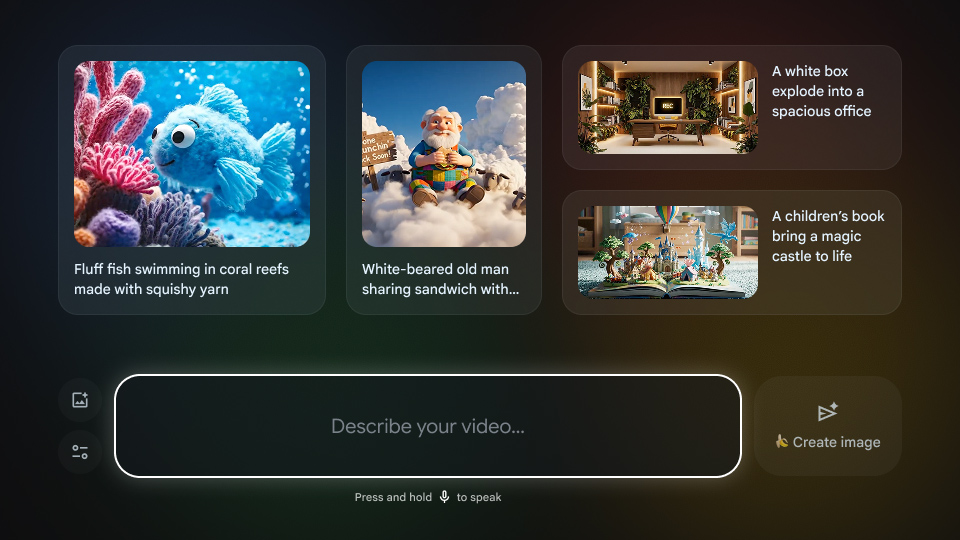
That might be a fun distraction, but it’s not a core TV experience. Google’s image and video models are good enough that you might gain some benefit from monkeying around with them on a larger screen, but Gemini is also available for more general tasks.

Veo in Google TV

Google TV will support generating new images and videos with Google’s AI models.

Credit: Google

Google TV will support generating new images and videos with Google’s AI models. Credit: Google

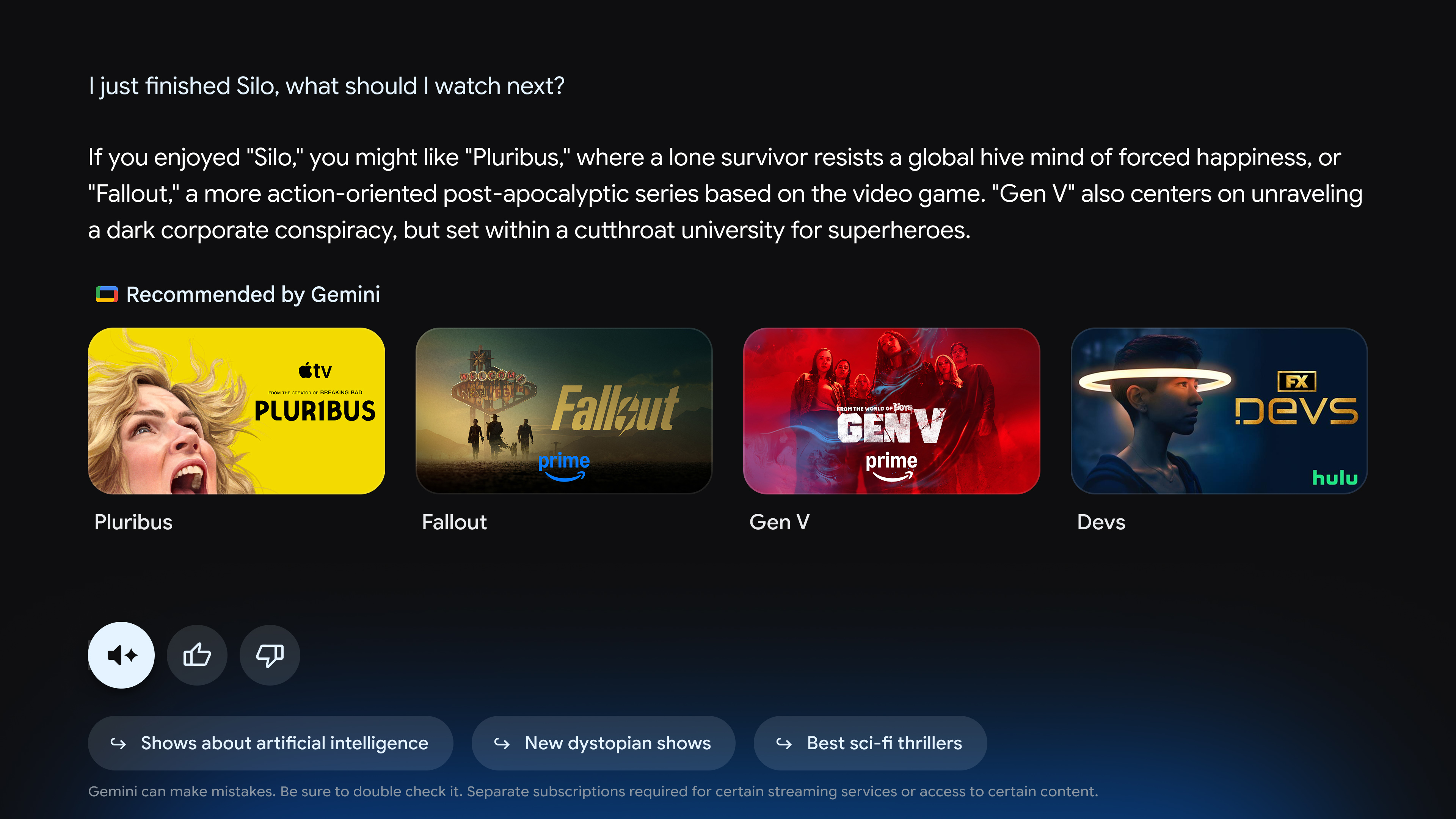
This update brings a full chatbot-like experience to TVs. If you want to catch up on sports scores or get recommendations for what to watch, you can ask the robot. The outputs might be a little different from what you would expect from using Gemini on the web or in an app. Google says it has devised a “visually rich framework” that will make the AI more usable on a TV. There will also be a “Dive Deeper” option in each response to generate an interactive overview of the topic.

Gemini can also take action to tweak system settings based on your complaints. For example, pull up Gemini and say “the dialog is too quiet” and watch as the AI makes adjustments to address that.

Gemini chatbot Google TV

Gemini’s replies on Google TV will be more visual.

Credit: Google

Gemini’s replies on Google TV will be more visual. Credit: Google

The new Gemini features will debut on TCL TVs that run Google TV, but most other devices, even Google’s own TV Streamer, will have to wait a few months. Even then, you won’t see Gemini taking over every TV or streaming box with Google’s software. The new Gemini features require the full Google TV experience with Android OS version 14 or higher.

Google TV’s big Gemini update adds image and video generation, voice control for settings Read More »

we-asked-four-ai-coding-agents-to-rebuild-minesweeper—the-results-were-explosive

We asked four AI coding agents to rebuild Minesweeper—the results were explosive


How do four modern LLMs do at re-creating a simple Windows gaming classic?

Which mines are mine, and which are AI? Credit: Aurich Lawson | Getty Images

The idea of using AI to help with computer programming has become a contentious issue. On the one hand, coding agents can make horrific mistakes that require a lot of inefficient human oversight to fix, leading many developers to lose trust in the concept altogether. On the other hand, some coders insist that AI coding agents can be powerful tools and that frontier models are quickly getting better at coding in ways that overcome some of the common problems of the past.

To see how effective these modern AI coding tools are becoming, we decided to test four major models with a simple task: re-creating the classic Windows game Minesweeper. Since it’s relatively easy for pattern-matching systems like LLMs to play off of existing code to re-create famous games, we added in one novelty curveball as well.

Our straightforward prompt:

Make a full-featured web version of Minesweeper with sound effects that

1) Replicates the standard Windows game and

2) implements a surprise, fun gameplay feature.

Include mobile touchscreen support.

Ars Senior AI Editor Benj Edwards fed this task into four AI coding agents with terminal (command line) apps: OpenAI’s Codex based on GPT-5, Anthropic’s Claude Code with Opus 4.5, Google’s Gemini CLI, and Mistral Vibe. The agents then directly manipulated HTML and scripting files on a local machine, guided by a “supervising” AI model that interpreted the prompt and assigned coding tasks to parallel LLMs that can use software tools to execute the instructions. All AI plans were paid for privately with no special or privileged access given by the companies involved, and the companies were unaware of these tests taking place.

Ars Senior Gaming Editor (and Minesweeper expert) Kyle Orland then judged each example blind, without knowing which model generated which Minesweeper clone. Those somewhat subjective and non-rigorous results are below.

For this test, we used each AI model’s unmodified code in a “single shot” result to see how well these tools perform without any human debugging. In the real world, most sufficiently complex AI-generated code would go through at least some level of review and tweaking by a human software engineer who could spot problems and address inefficiencies.

We chose this test as a sort of simple middle ground for the current state of AI coding. Cloning Minesweeper isn’t a trivial task that can be done in just a handful of lines of code, but it’s also not an incredibly complex system that requires many interlocking moving parts.

Minesweeper is also a well-known game, with many versions documented across the Internet. That should give these AI agents plenty of raw material to work from and should be easier for us to evaluate than a completely novel program idea. At the same time, our open-ended request for a new “fun” feature helps demonstrate each agent’s penchant for unguided coding “creativity,” as well as their ability to create new features on top of an established game concept.

With all that throat-clearing out of the way, here’s our evaluation of the AI-generated Minesweeper clones, complete with links that you can use to play them yourselves.

Agent 1: Mistral Vibe

Play it for yourself

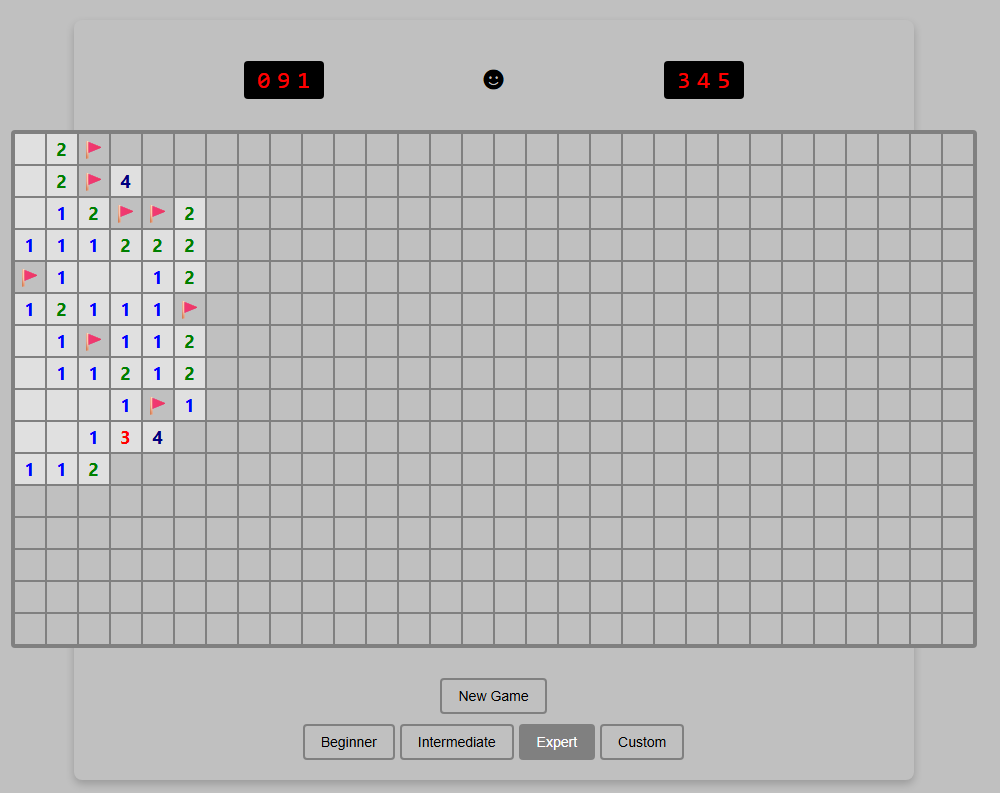
Just ignore that Custom button. It’s purely for show.

Just ignore that Custom button. It’s purely for show. Credit: Benj Edwards

Implementation

Right away, this version loses points for not implementing chording—the technique that advanced Minesweeper players use to quickly clear all the remaining spaces surrounding a number that already has sufficient flagged mines. Without this feature, this version feels more than a little clunky to play.

I’m also a bit perplexed by the inclusion of a “Custom” difficulty button that doesn’t seem to do anything. It’s like the model realized that customized board sizes were a thing in Minesweeper but couldn’t figure out how to implement this relatively basic feature.

The game works fine on mobile, but marking a square with a flag requires a tricky long-press on a tiny square that also triggers selector handles that are difficult to clear. So it’s not an ideal mobile interface.

Presentation

This was the only working version we tested that didn’t include sound effects. That’s fair, since the original Windows Minesweeper also didn’t include sound, but it’s still a notable relative omission since the prompt specifically asked for it.

The all-black “smiley face” button to start a game is a little off-putting, too, compared to the bright yellow version that’s familiar to both Minesweeper players and emoji users worldwide. And while that smiley face does start a new game when clicked, there’s also a superfluous “New Game” button taking up space for some reason.

“Fun” feature

The closest thing I found to a “fun” new feature here was the game adding a rainbow background pattern on the grid when I completed a game. While that does add a bit of whimsy to a successful game, I expected a little more.

Coding experience

Benj notes that he was pleasantly surprised by how well Mistral Vibe performed as an open-weight model despite lacking the big-money backing of the other contenders. It was relatively slow, however (third fastest out of four), and the result wasn’t great. Ultimately, its performance so far suggests that with more time and more training, a very capable AI coding agent may eventually emerge.

Overall rating: 4/10

This version got many of the basics right but left out chording and didn’t perform well on the small presentational and “fun” touches.

Agent 2: OpenAI Codex

Play it for yourself

I can’t tell you how much I appreciate those chording instructions at the bottom.

I can’t tell you how much I appreciate those chording instructions at the bottom. Credit: Benj Edwards

Implementation

Not only did this agent include the crucial “chording” feature, but it also included on-screen instructions for using it on both PC and mobile browsers. I was further impressed by the option to cycle through “?” marks when marking squares with flags, an esoteric feature I feel even most human Minesweeper cloners might miss.

On mobile, the option to hold your finger down on a square to mark a flag is a nice touch that makes this the most enjoyable handheld version we tested.

Presentation

The old-school emoticon smiley-face button is pretty endearing, especially when you blow up and get a red-tinted “X(“. I was less impressed by the playfield “graphics,” which use a simple “*” for revealed mines and an ugly red “F” for flagged tiles.

The beeps-and-boops sound effects reminded me of my first old-school, pre-Sound-Blaster PC from the late ’80s. That’s generally a good thing, but I still appreciated the game giving me the option to turn them off.

“Fun” feature

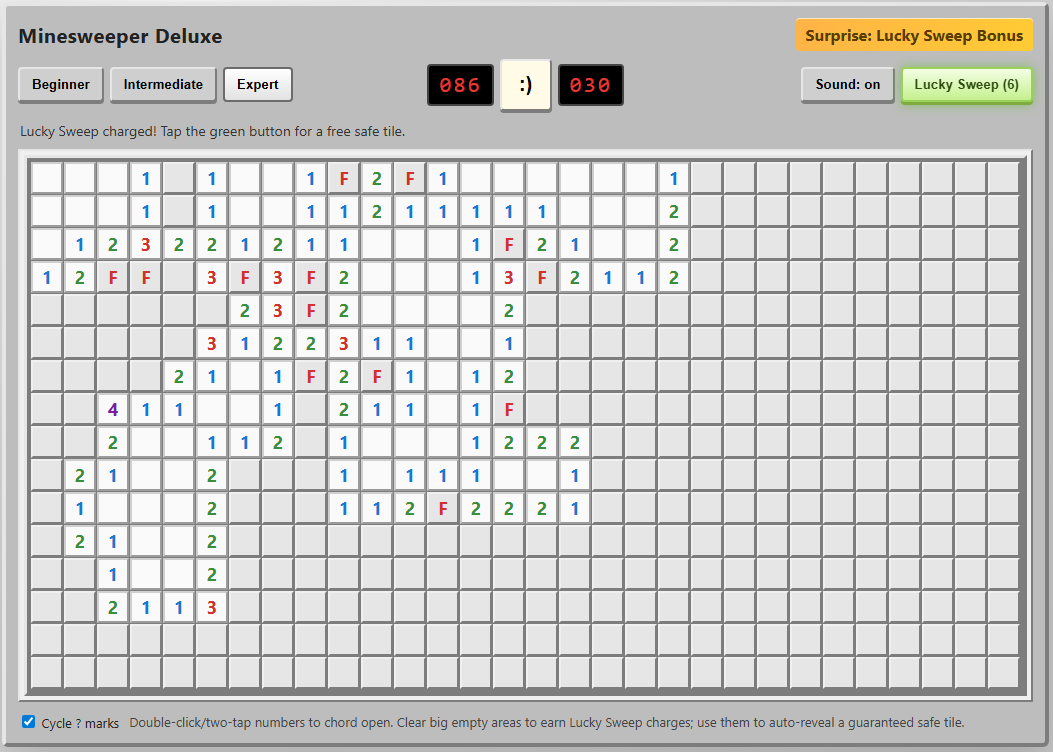
The “Surprise: Lucky Sweep Bonus” listed in the corner of the UI explains that clicking the button gives you a free safe tile when available. This can be pretty useful in situations where you’d otherwise be forced to guess between two tiles that are equally likely to be mines.

Overall, though, I found it a bit odd that the game gives you this bonus only after you find a large, cascading field of safe tiles with a single click. It mostly functions as a “win more” button rather than a feature that offers a good balance of risk versus reward.

Coding experience

OpenAI Codex has a nice terminal interface with features similar to Claude Code (local commands, permission management, and interesting animations showing progress), and it’s fairly pleasant to use (OpenAI also offers Codex through a web interface, but we did not use that for this evaluation). However, Codex took roughly twice as long to code a functional game than Claude Code did, which might contribute to the strong result here.

Overall: 9/10

The implementation of chording and cute presentation touches push this to the top of the list. We just wish the “fun” feature was a bit more fun.

Agent 3: Anthropic Claude Code

Play it for yourself

The Power Mod powers on display here make even Expert boards pretty trivial to complete.

The Power Mod powers on display here make even Expert boards pretty trivial to complete. Credit: Benj Edwards

Implementation

Once again, we get a version that gets all the gameplay basics right but is missing the crucial chording feature that makes truly efficient Minesweeper play possible. This is like playing Super Mario Bros. without the run button or Ocarina of Time without Z-targeting. In a word: unacceptable.

The “flag mode” toggle on the mobile version of this game is perfectly functional, but it’s a little clunky to use. It also visually cuts off a portion of the board at the larger game sizes.

Presentation

Presentation-wise, this is probably the most polished version we tested. From the use of cute emojis for the “face” button to nice-looking bomb and flag graphics and simple but effective sound effects, this looks more professional than the other versions we tested.

That said, there are some weird presentation issues. The “beginner” grid has weird gaps between columns, for instance. The borders of each square and the flag graphics can also become oddly grayed out at points, especially when using Power Mode (see below).

“Fun” feature

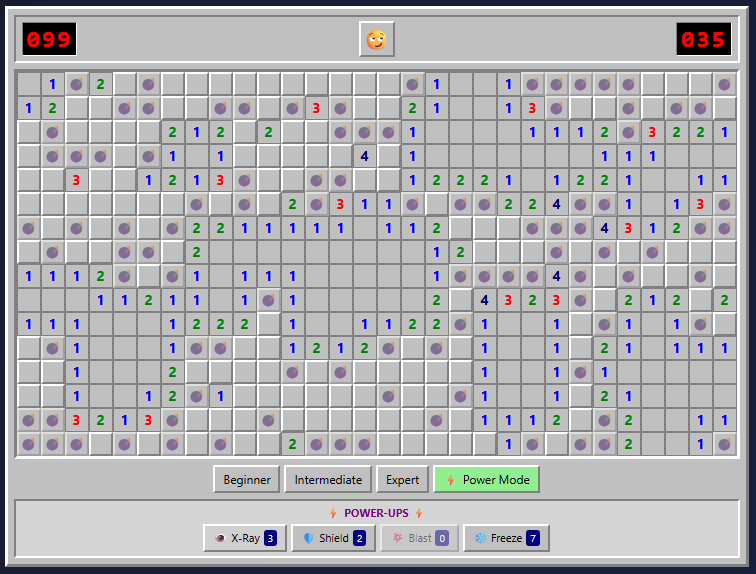
The prominent “Power Mode” button in the lower-right corner offers some pretty fun power-ups that alter the core Minesweeper formula in interesting ways. But the actual powers are a bit hit-and-miss.

I especially liked the “Shield” power, which protects you from an errant guess, and the “Blast” power, which seems to guarantee a large cascade of revealed tiles wherever you click. But the “X-Ray” power, which reveals every bomb for a few seconds, could be easily exploited by a quick player (or a crafty screenshot). And the “Freeze” power is rather boring, just stopping the clock for a few seconds and amounting to a bit of extra time.

Overall, the game hands out these new powers like candy, which makes even an Expert-level board relatively trivial with Power Mode active. Simply choosing “Power Mode” also seems to mark a few safe squares right after you start a game, making things even easier. So while these powers can be “fun,” they also don’t feel especially well-balanced.

Coding experience

Of the four tested models, Claude Code with Opus 4.5 featured the most pleasant terminal interface experience and the fastest overall coding experience (Claude Code can also use Sonnet 4.5, which is even faster, but the results aren’t quite as full-featured in our experience). While we didn’t precisely time each model, Opus 4.5 produced a working Minesweeper in under five minutes. Codex took at least twice as long, if not longer, while Mistral took roughly three or four times as long as Claude Code. Gemini, meanwhile, took hours of tinkering to get two non-working results.

Overall: 7/10

The lack of chording is a big omission, but the strong presentation and Power Mode options give this effort a passable final score.

Agent 4: Google Gemini CLI

Play it for yourself

So… where’s the game?

So… where’s the game? Credit: Benj Edwards

Implementation, presentation, etc.

Gemini CLI did give us a few gray boxes you can click, but the playfields are missing. While interactive troubleshooting with the agent may have fixed the issue, as a “one-shot” test, the model completely failed.

Coding experience

Of the four coding agents we tested, Gemini CLI gave Benj the most trouble. After developing a plan, it was very, very slow at generating any usable code (about an hour per attempt). The model seemed to get hung up attempting to manually create WAV file sound effects and insisted on requiring React external libraries and a few other overcomplicated dependencies. The result simply did not work.

Benj actually bent the rules and gave Gemini a second chance, specifying that the game should use HTML5. When the model started writing code again, it also got hung up trying to make sound effects. Benj suggested using the WebAudio framework (which the other AI coding agents seemed to be able to use), but the result didn’t work, which you can see at the link above.

Unlike the other models tested, Gemini CLI apparently uses a hybrid system of three different LLMs for different tasks (Gemini 2.5 Flash Lite, 2.5 Flash, and 2.5 Pro were available at the level of the Google account Benj paid for). When you’ve completed your coding session and quit the CLI interface, it gives you a readout of which model did what.

In this case, it didn’t matter because the results didn’t work. But it’s worth noting that Gemini 3 coding models are available for other subscription plans that were not tested here. For that reason, this portion of the test could be considered “incomplete” for Google CLI.

Overall: 0/10 (Incomplete)

Final verdict

OpenAI Codex wins this one on points, in no small part because it was the only model to include chording as a gameplay option. But Claude Code also distinguished itself with strong presentational flourishes and quick generation time. Mistral Vibe was a significant step down, and Google CLI based on Gemini 2.5 was a complete failure on our one-shot test.

While experienced coders can definitely get better results via an interactive, back-and-forth code editing conversation with an agent, these results show how capable some of these models can be, even with a very short prompt on a relatively straightforward task. Still, we feel that our overall experience with coding agents on other projects (more on that in a future article) generally reinforces the idea that they currently function best as interactive tools that augment human skill rather than replace it.

Photo of Kyle Orland

Kyle Orland has been the Senior Gaming Editor at Ars Technica since 2012, writing primarily about the business, tech, and culture behind video games. He has journalism and computer science degrees from University of Maryland. He once wrote a whole book about Minesweeper.

We asked four AI coding agents to rebuild Minesweeper—the results were explosive Read More »

google-translate-expands-live-translation-to-all-earbuds-on-android

Google Translate expands live translation to all earbuds on Android

Gemini text translation

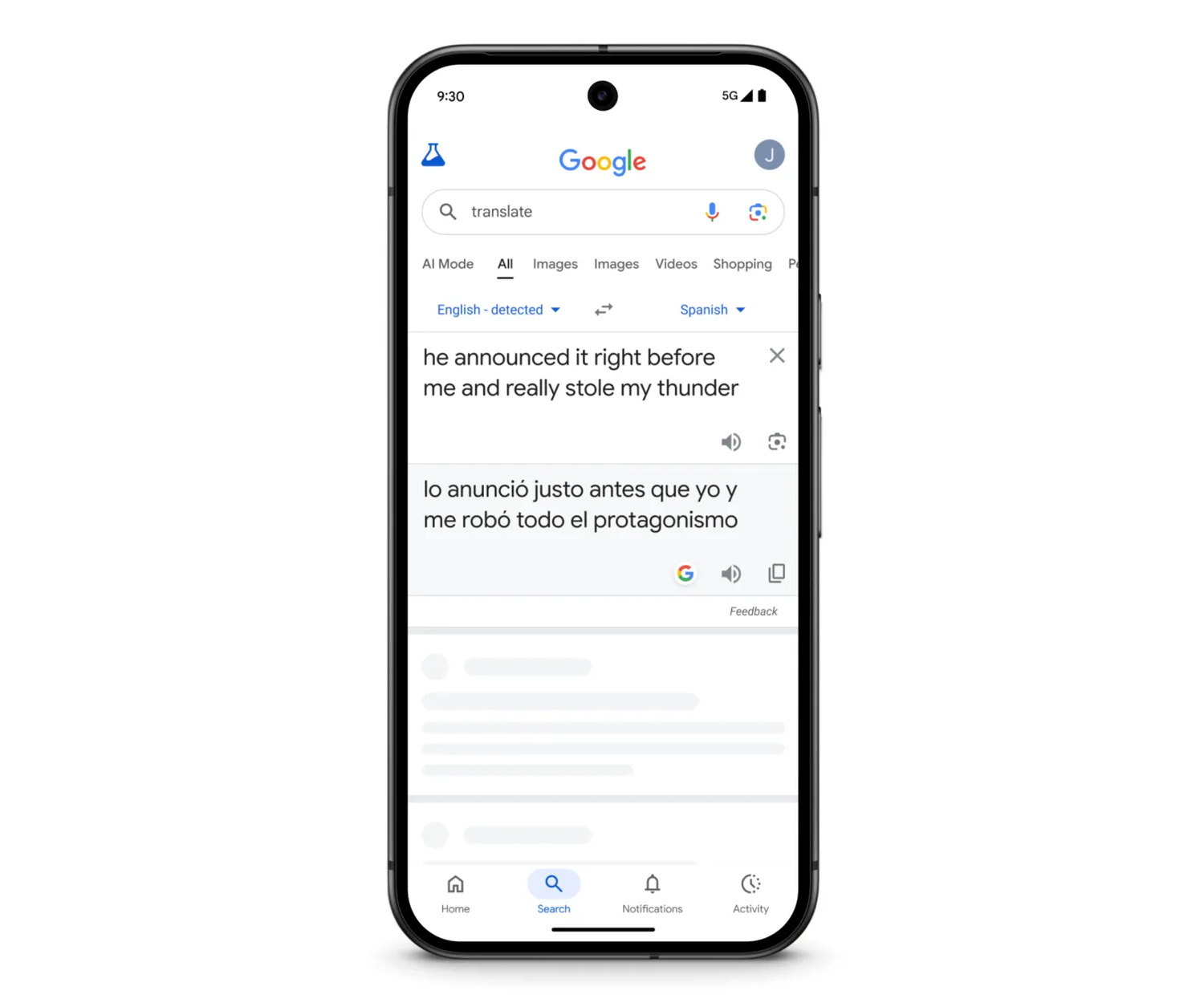
Translate can now use Gemini to interpret the meaning of a phrase rather than simply translating each word.

Credit: Google

Translate can now use Gemini to interpret the meaning of a phrase rather than simply translating each word. Credit: Google

Regardless of whether you’re using live translate or just checking a single phrase, Google claims the Gemini-powered upgrade will serve you well. Google Translate is now apparently better at understanding the nuance of languages, with an awareness of idioms and local slang. Google uses the example of “stealing my thunder,” which wouldn’t make a lick of sense when translated literally into other languages. The new translation model, which is also available in the search-based translation interface, supports over 70 languages.

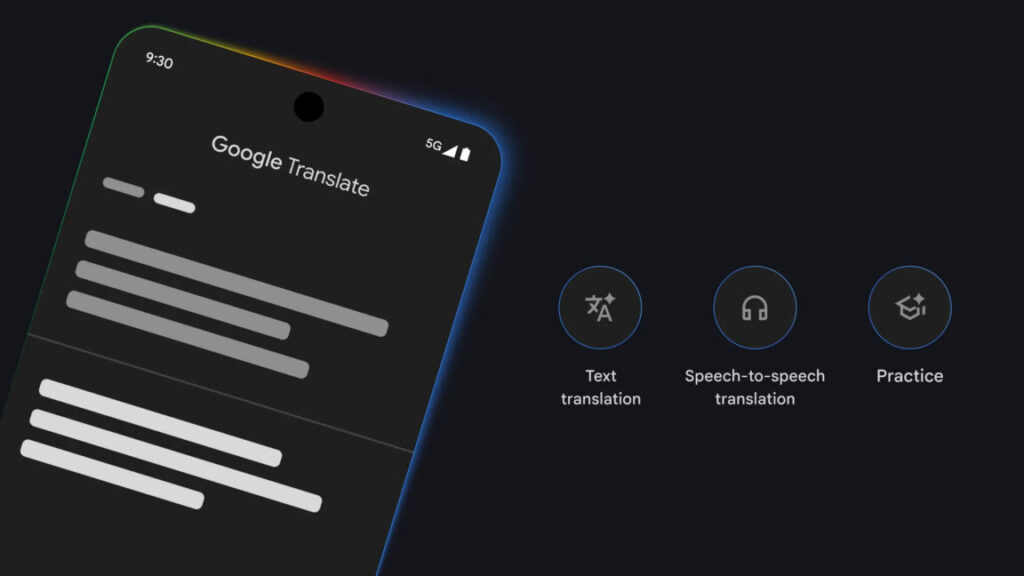
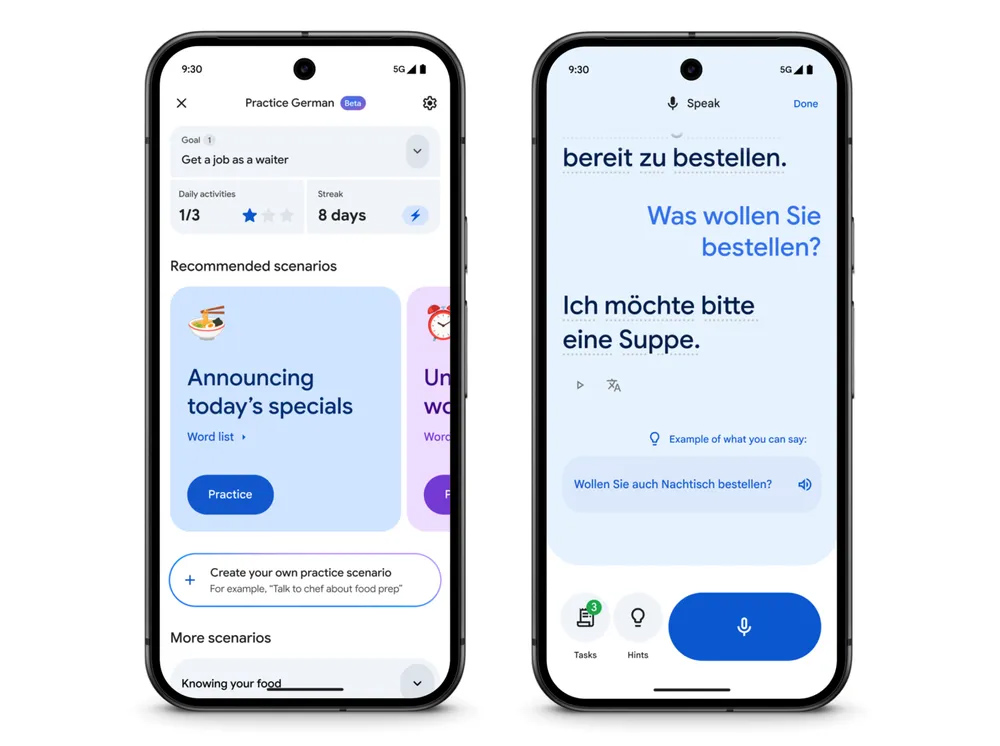
Google also debuted language-learning features earlier this year, borrowing a page from educational apps like Duolingo. You can tell the app your skill level with a language, as well as whether you need help with travel-oriented conversations or more everyday interactions. The app uses this to create tailored listening and speaking exercises.

AI Translate learning

The Translate app’s learning tools are getting better.

Credit: Google

The Translate app’s learning tools are getting better. Credit: Google

With this big update, Translate will be more of a stickler about your pronunciation. Google promises more feedback and tips based on your spoken replies in the learning modules. The app will also now keep track of how often you complete language practice, showing your daily streak in the app.

If “number go up” will help you learn more, then this update is for you. Practice mode is also launching in almost 20 new countries, including Germany, India, Sweden, and Taiwan.

Google Translate expands live translation to all earbuds on Android Read More »