Tech

android-phones-will-soon-reboot-themselves-after-sitting-unused-for-3-days

Android phones will soon reboot themselves after sitting unused for 3 days

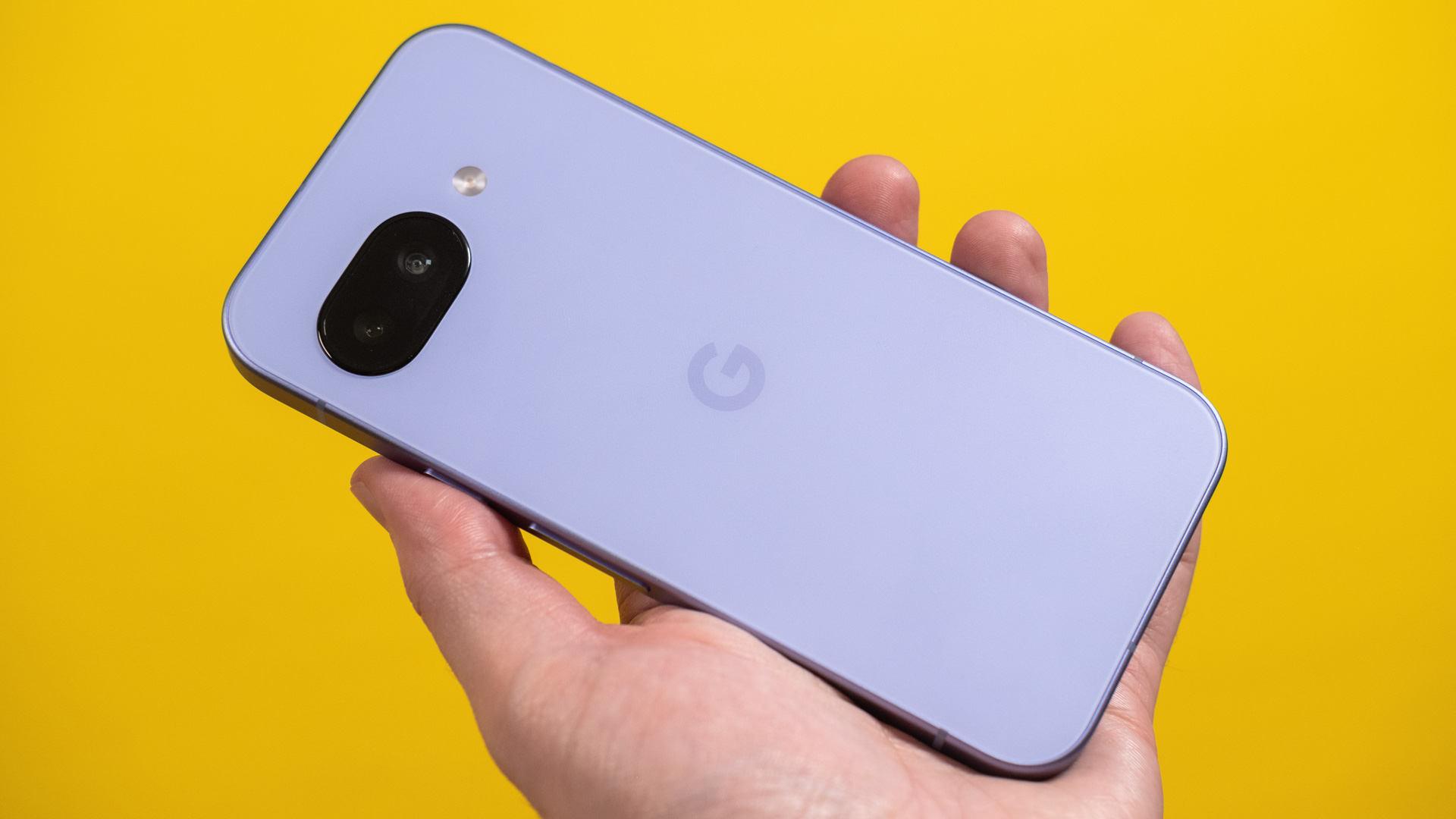
A silent update rolling out to virtually all Android devices will make your phone more secure, and all you have to do is not touch it for a few days. The new feature implements auto-restart of a locked device, which will keep your personal data more secure. It’s coming as part of a Google Play Services update, though, so there’s nothing you can do to speed along the process.

Google is preparing to release a new update to Play Services (v25.14), which brings a raft of tweaks and improvements to myriad system features. First spotted by 9to5Google, the update was officially released on April 14, but as with all Play Services updates, it could take a week or more to reach all devices. When 25.14 arrives, Android devices will see a few minor improvements, including prettier settings screens, improved connection with cars and watches, and content previews when using Quick Share.

Most importantly, Play Services 25.14 adds a feature that Google describes thusly: “With this feature, your device automatically restarts if locked for 3 consecutive days.”

This is similar to a feature known as Inactivity Reboot that Apple added to the iPhone in iOS 18.1. This actually caused some annoyance among law enforcement officials who believed they had suspects’ phones stored in a readable state, only to find they were rebooting and becoming harder to access due to this feature.

Android phones will soon reboot themselves after sitting unused for 3 days Read More »
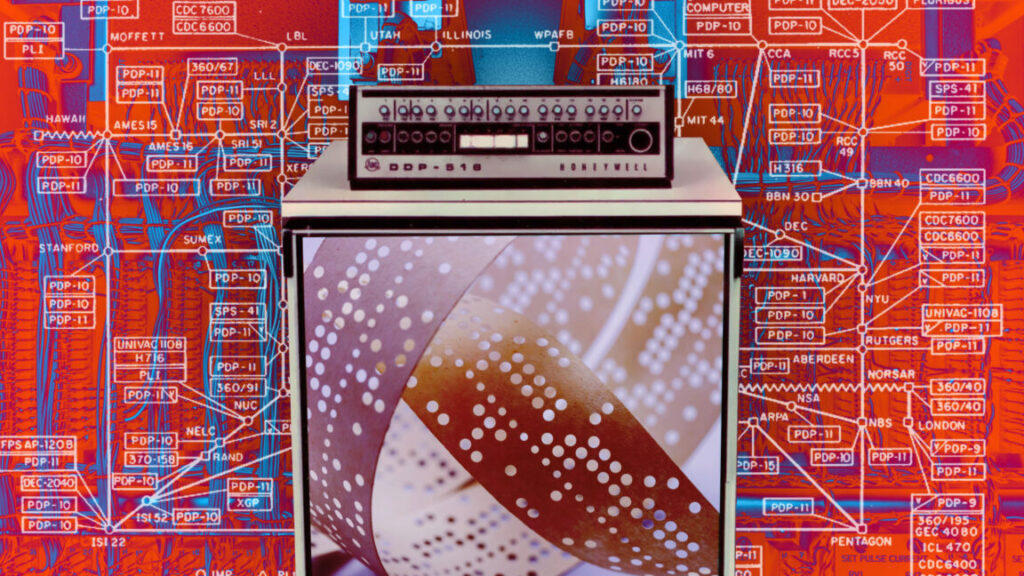
an-ars-technica-history-of-the-internet,-part-1

An Ars Technica history of the Internet, part 1


Intergalactic Computer Network

In our new 3-part series, we remember the people and ideas that made the Internet.

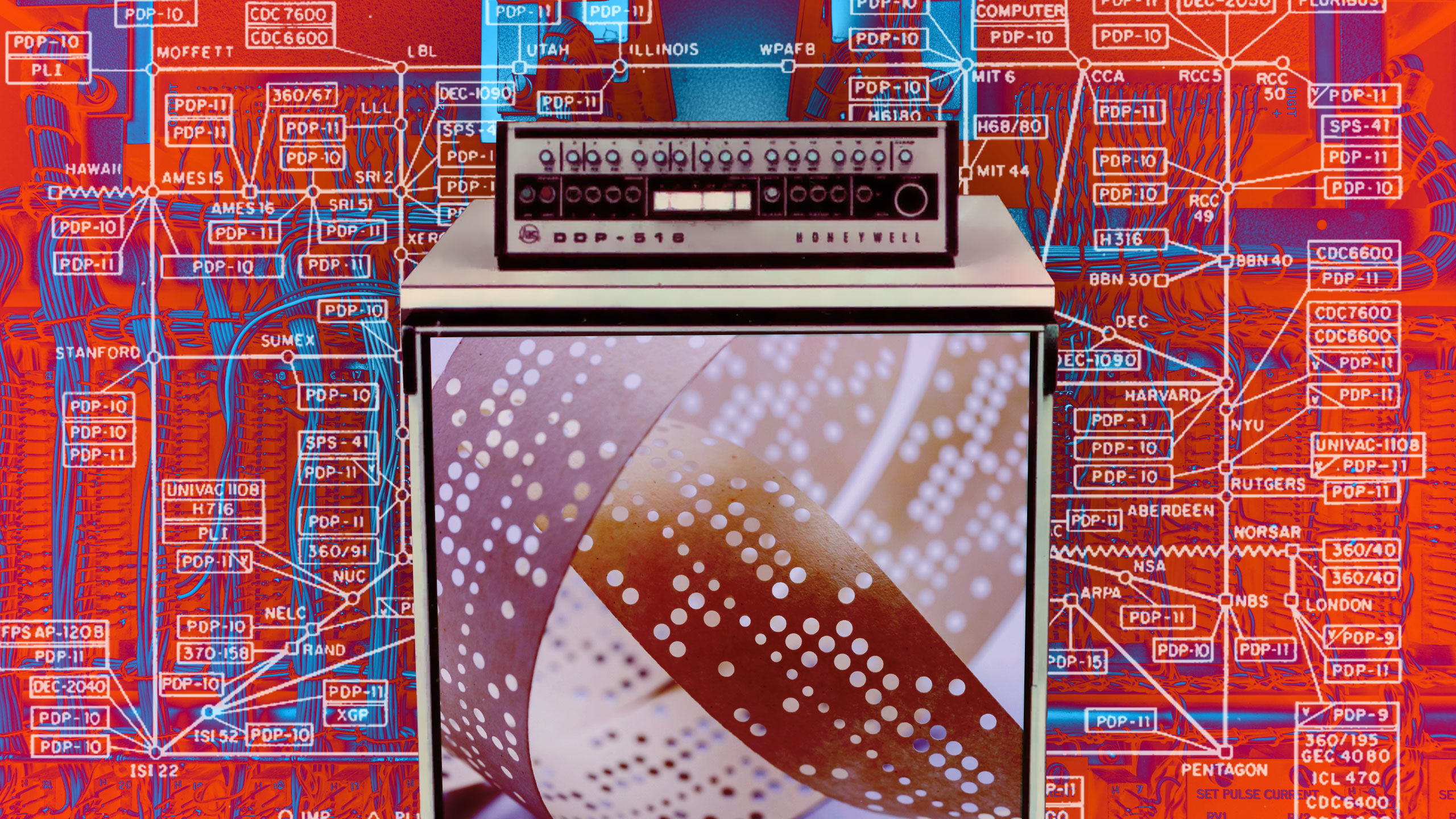
A collage of vintage computer elements

Credit: Collage by Aurich Lawson

Credit: Collage by Aurich Lawson

In a very real sense, the Internet, this marvelous worldwide digital communications network that you’re using right now, was created because one man was annoyed at having too many computer terminals in his office.

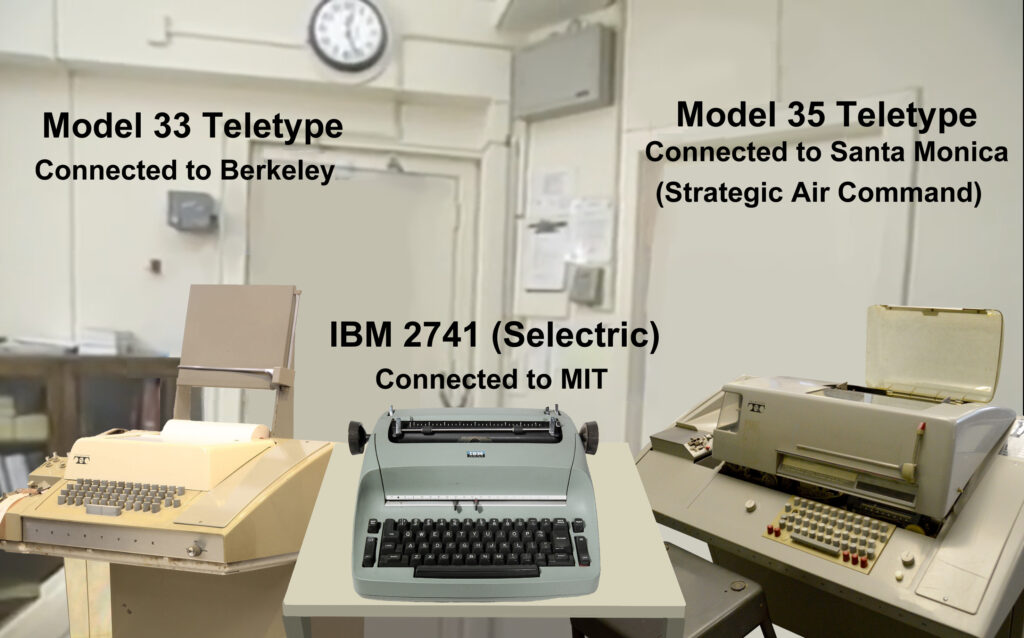
The year was 1966. Robert Taylor was the director of the Advanced Research Projects Agency’s Information Processing Techniques Office. The agency was created in 1958 by President Eisenhower in response to the launch of Sputnik. So Taylor was in the Pentagon, a great place for acronyms like ARPA and IPTO. He had three massive terminals crammed into a room next to his office. Each one was connected to a different mainframe computer. They all worked slightly differently, and it was frustrating to remember multiple procedures to log in and retrieve information.

Author’s re-creation of Bob Taylor’s office with three teletypes. Credit: Rama & Musée Bolo (Wikipedia/Creative Commons), steve lodefink (Wikipedia/Creative Commons), The Computer Museum @ System Source

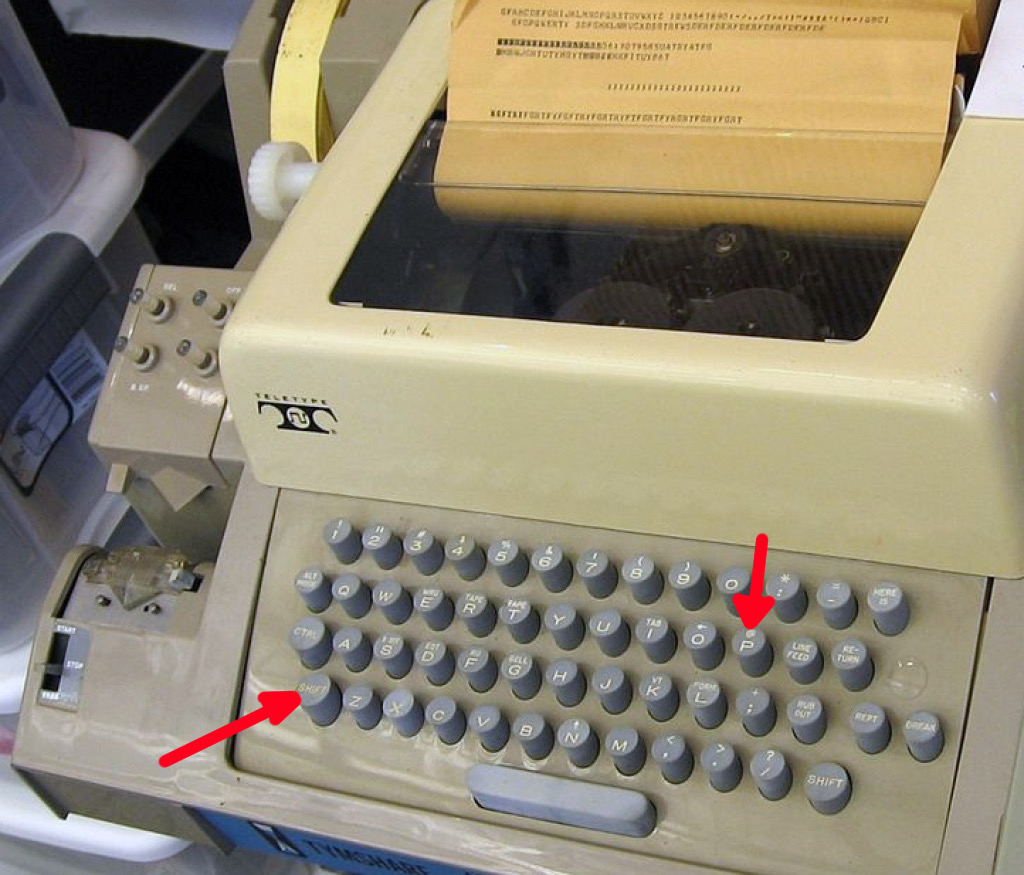
In those days, computers took up entire rooms, and users accessed them through teletype terminals—electric typewriters hooked up to either a serial cable or a modem and a phone line. ARPA was funding multiple research projects across the United States, but users of these different systems had no way to share their resources with each other. Wouldn’t it be great if there was a network that connected all these computers?

The dream is given form

Taylor’s predecessor, Joseph “J.C.R.” Licklider, had released a memo in 1963 that whimsically described an “Intergalactic Computer Network” that would allow users of different computers to collaborate and share information. The idea was mostly aspirational, and Licklider wasn’t able to turn it into a real project. But Taylor knew that he could.

In a 1998 interview, Taylor explained: “In most government funding, there are committees that decide who gets what and who does what. In ARPA, that was not the way it worked. The person who was responsible for the office that was concerned with that particular technology—in my case, computer technology—was the person who made the decision about what to fund and what to do and what not to do. The decision to start the ARPANET was mine, with very little or no red tape.”

Taylor marched into the office of his boss, Charles Herzfeld. He described how a network could save ARPA time and money by allowing different institutions to share resources. He suggested starting with a small network of four computers as a proof of concept.

“Is it going to be hard to do?” Herzfeld asked.

“Oh no. We already know how to do it,” Taylor replied.

“Great idea,” Herzfeld said. “Get it going. You’ve got a million dollars more in your budget right now. Go.”

Taylor wasn’t lying—at least, not completely. At the time, there were multiple people around the world thinking about computer networking. Paul Baran, working for RAND, published a paper in 1964 describing how a distributed military networking system could be made resilient even if some nodes were destroyed in a nuclear attack. Over in the UK, Donald Davies independently came up with a similar concept (minus the nukes) and invented a term for the way these types of networks would communicate. He called it “packet switching.”

On a regular phone network, after some circuit switching, a caller and answerer would be connected via a dedicated wire. They had exclusive use of that wire until the call was completed. Computers communicated in short bursts and didn’t require pauses the way humans did. So it would be a waste for two computers to tie up a whole line for extended periods. But how could many computers talk at the same time without their messages getting mixed up?

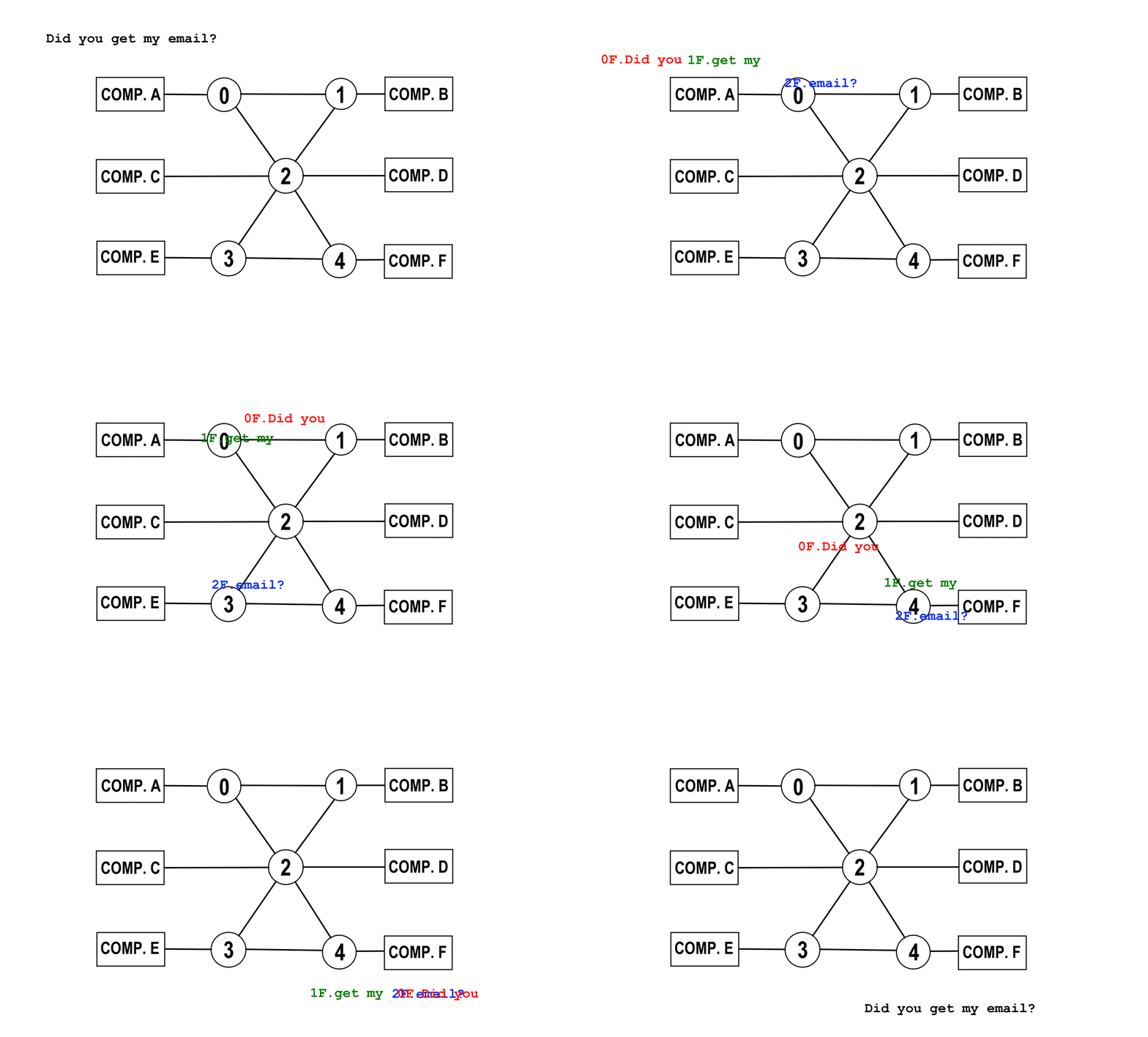
Packet switching was the answer. Messages were divided into multiple snippets. The order and destination were included with each message packet. The network could then route the packets in any way that made sense. At the destination, all the appropriate packets were put into the correct order and reassembled. It was like moving a house across the country: It was more efficient to send all the parts in separate trucks, each taking their own route to avoid congestion.

A simplified diagram of how packet switching works. Credit: Jeremy Reimer

By the end of 1966, Taylor had hired a program director, Larry Roberts. Roberts sketched a diagram of a possible network on a napkin and met with his team to propose a design. One problem was that each computer on the network would need to use a big chunk of its resources to manage the packets. In a meeting, Wes Clark passed a note to Roberts saying, “You have the network inside-out.” Clark’s alternative plan was to ship a bunch of smaller computers to connect to each host. These dedicated machines would do all the hard work of creating, moving, and reassembling packets.

With the design complete, Roberts sent out a request for proposals for constructing the ARPANET. All they had to do now was pick the winning bid, and the project could begin.

BB&N and the IMPs

IBM, Control Data Corporation, and AT&T were among the first to respond to the request. They all turned it down. Their reasons were the same: None of these giant companies believed the network could be built. IBM and CDC thought the dedicated computers would be too expensive, but AT&T flat-out said that packet switching wouldn’t work on its phone network.

In late 1968, ARPA announced a winner for the bid: Bolt Beranek and Newman. It seemed like an odd choice. BB&N had started as a consulting firm that calculated acoustics for theaters. But the need for calculations led to the creation of a computing division, and its first manager had been none other than J.C.R. Licklider. In fact, some BB&N employees had been working on a plan to build a network even before the ARPA bid was sent out. Robert Kahn led the team that drafted BB&N’s proposal.

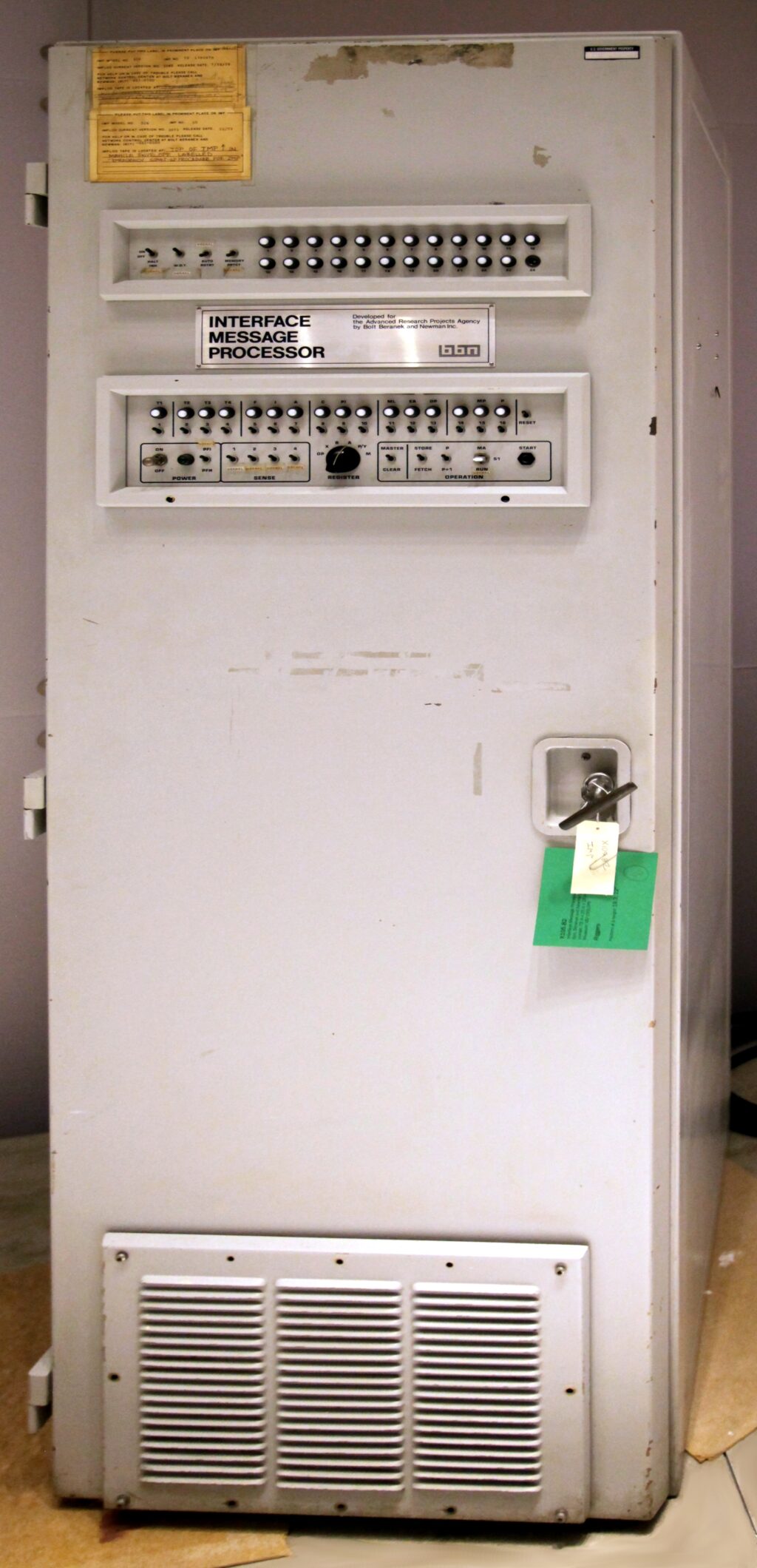
Their plan was to create a network of “Interface Message Processors,” or IMPs, out of Honeywell 516 computers. They were ruggedized versions of the DDP-516 16-bit minicomputer. Each had 24 kilobytes of core memory and no mass storage other than a paper tape reader, and each cost $80,000 (about $700,000 today). In comparison, an IBM 360 mainframe cost between $7 million and $12 million at the time.

An original IMP, the world’s first router. It was the size of a large refrigerator. Credit: Steve Jurvetson (CC BY 2.0)

The 516’s rugged appearance appealed to BB&N, who didn’t want a bunch of university students tampering with its IMPs. The computer came with no operating system, but it didn’t really have enough RAM for one. The software to control the IMPs was written on bare metal using the 516’s assembly language. One of the developers was Will Crowther, who went on to create the first computer adventure game.

One other hurdle remained before the IMPs could be put to use: The Honeywell design was missing certain components needed to handle input and output. BB&N employees were dismayed that the first 516, which they named IMP-0, didn’t have working versions of the hardware additions they had requested.

It fell on Ben Barker, a brilliant undergrad student interning at BB&N, to manually fix the machine. Barker was the best choice, even though he had slight palsy in his hands. After several stressful 16-hour days wrapping and unwrapping wires, all the changes were complete and working. IMP-0 was ready.

In the meantime, Steve Crocker at the University of California, Los Angeles, was working on a set of software specifications for the host computers. It wouldn’t matter if the IMPs were perfect at sending and receiving messages if the computers themselves didn’t know what to do with them. Because the host computers were part of important academic research, Crocker didn’t want to seem like he was a dictator telling people what to do with their machines. So he titled his draft a “Request for Comments,” or RFC.

This one act of politeness forever changed the nature of computing. Every change since has been done as an RFC, and the culture of asking for comments pervades the tech industry even today.

RFC No. 1 proposed two types of host software. The first was the simplest possible interface, in which a computer pretended to be a dumb terminal. This was dubbed a “terminal emulator,” and if you’ve ever done any administration on a server, you’ve probably used one. The second was a more complex protocol that could be used to transfer large files. This became FTP, which is still used today.

A single IMP connected to one computer wasn’t much of a network. So it was very exciting in September 1969 when IMP-1 was delivered to BB&N and then shipped via air freight to UCLA. The first test of the ARPANET was done with simultaneous phone support. The plan was to type “LOGIN” to start a login sequence. This was the exchange:

“Did you get the L?”

“I got the L!”

“Did you get the O?”

“I got the O!”

“Did you get the G?”

“Oh no, the computer crashed!”

It was an inauspicious beginning. The computer on the other end was helpfully filling in the “GIN” part of “LOGIN,” but the terminal emulator wasn’t expecting three characters at once and locked up. It was the first time that autocomplete had ruined someone’s day. The bug was fixed, and the test completed successfully.

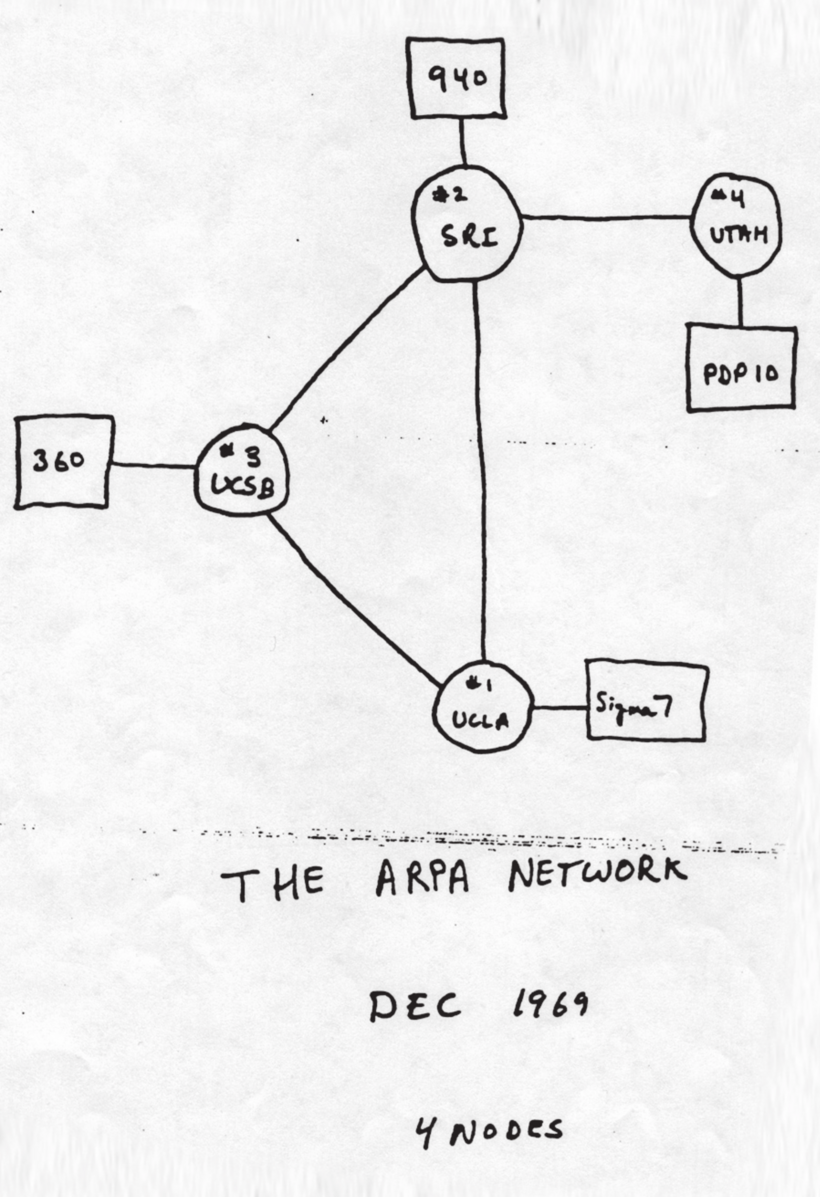
IMP-2, IMP-3, and IMP-4 were delivered to the Stanford Research Institute (where Doug Engelbart was keen to expand his vision of connecting people), UC Santa Barbara, and the University of Utah.

Now that the four-node test network was complete, the team at BB&N could work with the researchers at each node to put the ARPANET through its paces. They deliberately created the first ever denial of service attack in January 1970, flooding the network with packets until it screeched to a halt.

The original ARPANET, predecessor of the Internet. Circles are IMPs, and rectangles are computers. Credit: DARPA

Surprisingly, many of the administrators of the early ARPANET nodes weren’t keen to join the network.  They didn’t like the idea of anyone else being able to use resources on “their” computers. Taylor reminded them that their hardware and software projects were mostly ARPA-funded, so they couldn’t opt out.

The next month, Stephen Carr, Stephen Crocker, and Vint Cerf released RFC No. 33. It described a Network Control Protocol (NCP) that standardized how the hosts would communicate with each other. After this was adopted, the network was off and running.

J.C.R. Licklider, Bob Taylor, Larry Roberts, Steve Crocker, and Vint Cerf. Credit: US National Library of Medicine, WIRED, Computer Timeline, Steve Crocker, Vint Cerf

The ARPANET grew significantly over the next few years. Important events included the first ever email between two different computers, sent by Roy Tomlinson in July 1972. Another groundbreaking demonstration involved a PDP-10 in Harvard simulating, in real-time, an aircraft landing on a carrier. The data was sent over the ARPANET to a MIT-based graphics terminal, and the wireframe graphical view was shipped back to a PDP-1 at Harvard and displayed on a screen. Although it was primitive and slow, it was technically the first gaming stream.

A big moment came in October 1972 at the International Conference on Computer Communication. This was the first time the network had been demonstrated to the public. Interest in the ARPANET was growing, and people were excited. A group of AT&T executives noticed a brief crash and laughed, confident that they were correct in thinking that packet switching would never work. Overall, however, the demonstration was a resounding success.

But the ARPANET was no longer the only network out there.

The two keystrokes on a Model 33 Teletype that changed history. Credit: Marcin Wichary (CC BY 2.0)

A network of networks

The rest of the world had not been standing still. In Hawaii, Norman Abramson and Franklin Kuo created ALOHAnet, which connected computers on the islands using radio. It was the first public demonstration of a wireless packet switching network. In the UK, Donald Davies’ team developed the National Physical Laboratory (NPL) network. It seemed like a good idea to start connecting these networks together, but they all used different protocols, packet formats, and transmission rates. In 1972, the heads of several national networking projects created an International Networking Working Group. Cerf was chosen to lead it.

The first attempt to bridge this gap was SATNET, also known as the Atlantic Packet Satellite Network. Using satellite links, it connected the US-based ARPANET with networks in the UK. Unfortunately, SATNET itself used its own set of protocols. In true tech fashion, an attempt to make a universal standard had created one more standard instead.

Robert Kahn asked Vint Cerf to try and fix these problems once and for all. They came up with a new plan called the Transmission Control Protocol, or TCP. The idea was to connect different networks through specialized computers, called “gateways,” that translated and forwarded packets. TCP was like an envelope for packets, making sure they got to the right destination on the correct network. Because some networks were not guaranteed to be reliable, when one computer successfully received a complete and undamaged message, it would send an acknowledgement (ACK) back to the sender. If the ACK wasn’t received in a certain amount of time, the message was retransmitted.

In December 1974, Cerf, Yogen Dalal, and Carl Sunshine wrote a complete specification for TCP. Two years later, Cerf and Kahn, along with a dozen others, demonstrated the first three-network system. The demo connected packet radio, the ARPANET, and SATNET, all using TCP. Afterward, Cerf, Jon Postel, and Danny Cohen suggested a small but important change: They should take out all the routing information and put it into a new protocol, called the Internet Protocol (IP). All the remaining stuff, like breaking and reassembling messages, detecting errors, and retransmission, would stay in TCP. Thus, in 1978, the protocol officially became known as, and was forever thereafter, TCP/IP.

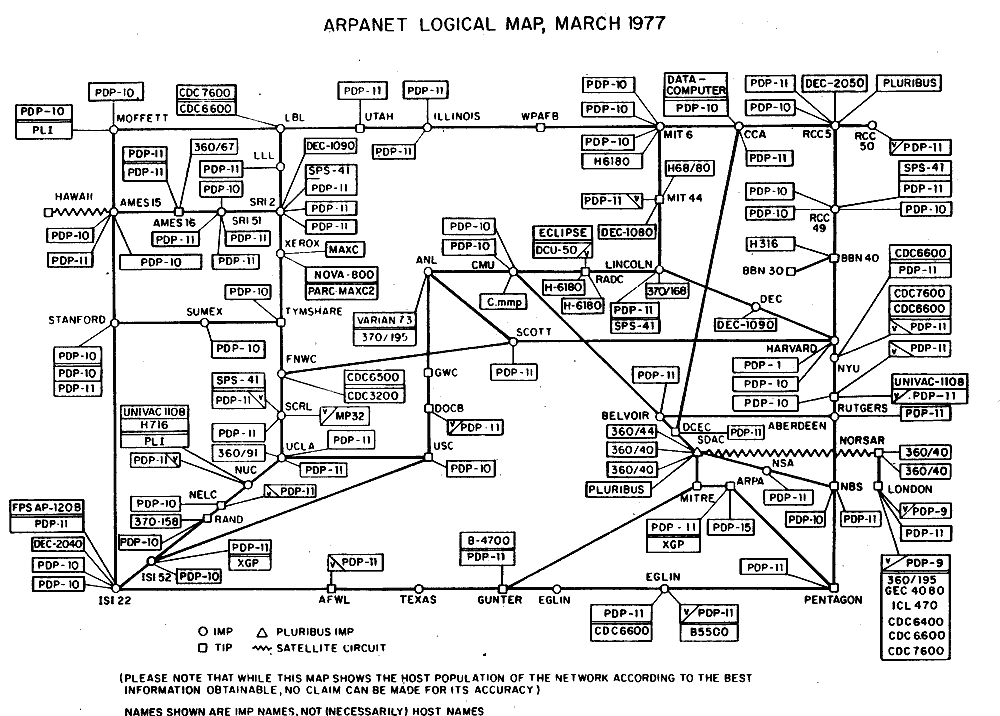
A map of the Internet in 1977. White dots are IMPs, and rectangles are host computers. Jagged lines connect to other networks. Credit: The Computer History Museum

If the story of creating the Internet was a movie, the release of TCP/IP would have been the triumphant conclusion. But things weren’t so simple. The world was changing, and the path ahead was murky at best.

At the time, joining the ARPANET required leasing high-speed phone lines for $100,000 per year. This limited it to large universities, research companies, and defense contractors. The situation led the National Science Foundation (NSF) to propose a new network that would be cheaper to operate. Other educational networks arose at around the same time. While it made sense to connect these networks to the growing Internet, there was no guarantee that this would continue. And there were other, larger forces at work.

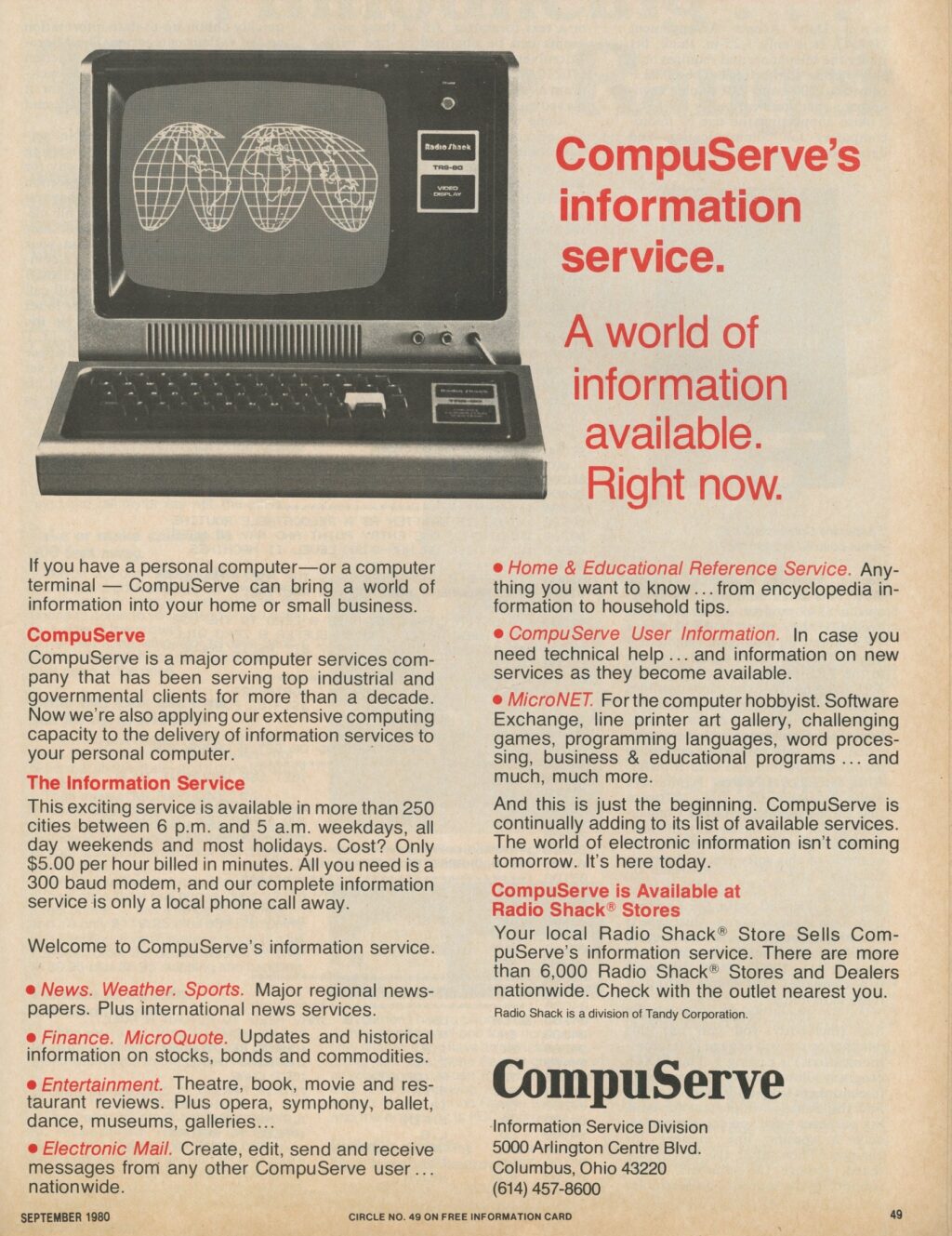
By the end of the 1970s, computers had improved significantly. The invention of the microprocessor set the stage for smaller, cheaper computers that were just beginning to enter people’s homes. Bulky teletypes were being replaced with sleek, TV-like terminals. The first commercial online service, CompuServe, was released to the public in 1979. For just $5 per hour, you could connect to a private network, get weather and financial reports, and trade gossip with other users. At first, these systems were completely separate from the Internet. But they grew quickly. By 1987, CompuServe had 380,000 subscribers.

A magazine ad for CompuServe from 1980. Credit: marbleriver

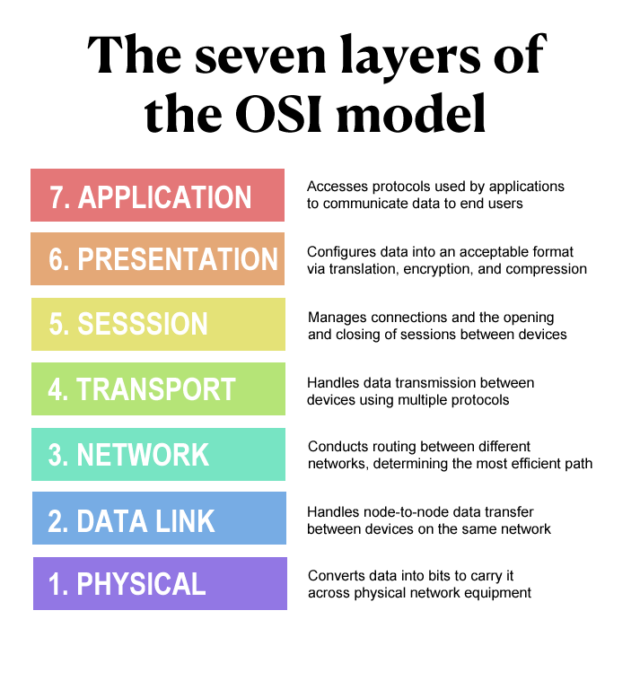
Meanwhile, the adoption of TCP/IP was not guaranteed. At the beginning of the 1980s, the Open Systems Interconnection (OSI) group at the International Standardization Organization (ISO) decided that what the world needed was more acronyms—and also a new, global, standardized networking model.

The OSI model was first drafted in 1980, but it wasn’t published until 1984. Nevertheless, many European governments, and even the US Department of Defense, planned to transition from TCP/IP to OSI. It seemed like this new standard was inevitable.

The seven-layer OSI model. If you ever thought there were too many layers, you’re not alone. Credit: BlueCat Networks

While the world waited for OSI, the Internet continued to grow and evolve. In 1981, the fourth version of the IP protocol, IPv4, was released. On January 1, 1983, the ARPANET itself fully transitioned to using TCP/IP. This date is sometimes referred to as the “birth of the Internet,” although from a user’s perspective, the network still functioned the same way it had for years.

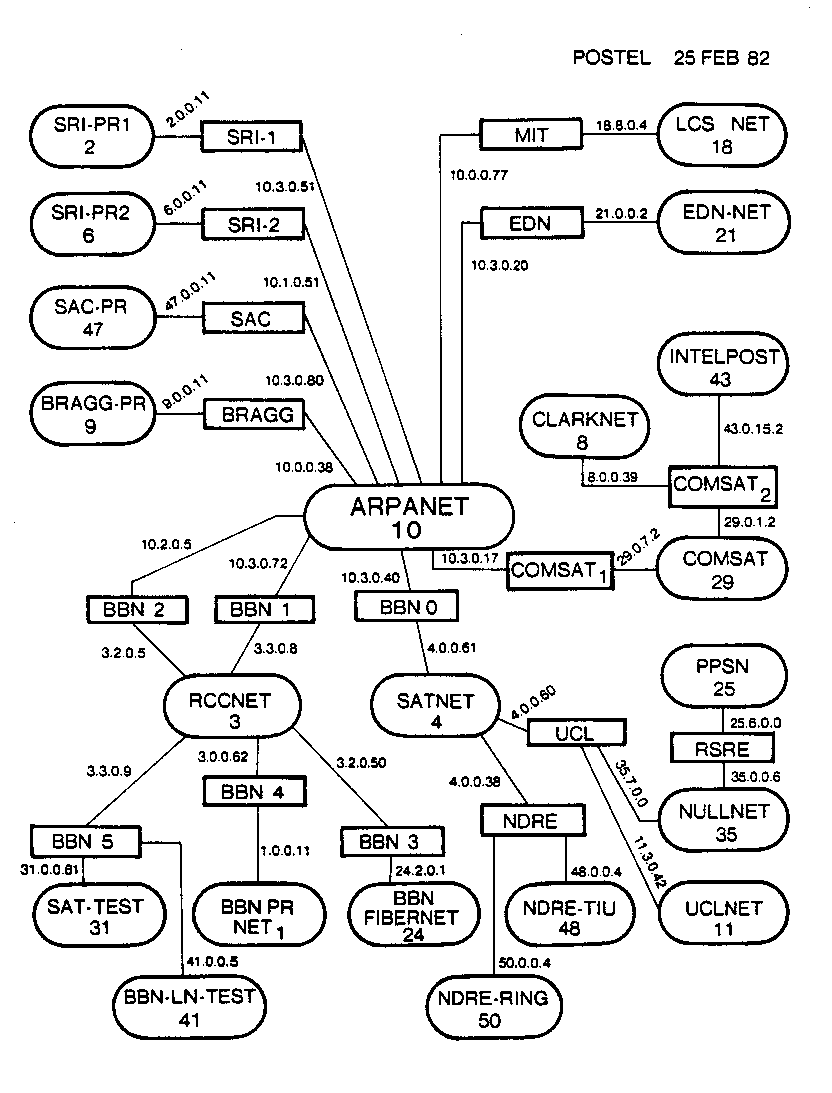
A map of the Internet from 1982. Ovals are networks, and rectangles are gateways. Hosts are not shown, but number in the hundreds. Note the appearance of modern-looking IPv4 addresses. Credit: Jon Postel

In 1986, the NFSNET came online, running under TCP/IP and connected to the rest of the Internet. It also used a new standard, the Domain Name System (DNS). This system, still in use today, used easy-to-remember names to point to a machine’s individual IP address. Computer names were assigned “top-level” domains based on their purpose, so you could connect to “frodo.edu” at an educational institution, or “frodo.gov” at a governmental one.

The NFSNET grew rapidly, dwarfing the ARPANET in size. In 1989, the original ARPANET was decommissioned. The IMPs, long since obsolete, were retired. However, all the ARPANET hosts were successfully migrated to other Internet networks. Like a Ship of Theseus, the ARPANET lived on even after every component of it was replaced.

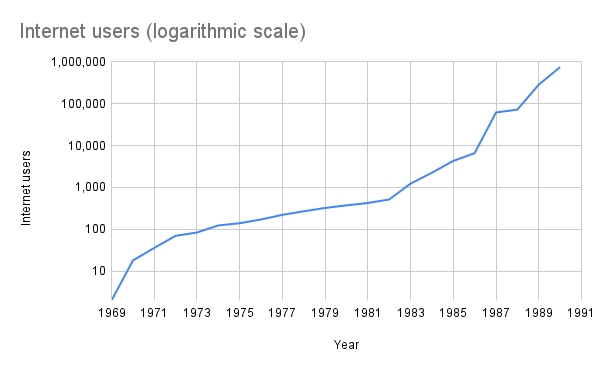
The exponential growth of the ARPANET/Internet during its first two decades. Credit: Jeremy Reimer

Still, the experts and pundits predicted that all of these systems would eventually have to transfer over to the OSI model. The people who had built the Internet were not impressed. In 1987, writing RFC No. 1,000, Crocker said, “If we had only consulted the ancient mystics, we would have seen immediately that seven layers were required.”

The Internet pioneers felt they had spent many years refining and improving a working system. But now, OSI had arrived with a bunch of complicated standards and expected everyone to adopt their new design. Vint Cerf had a more pragmatic outlook. In 1982, he left ARPA for a new job at MCI, where he helped build the first commercial email system (MCI Mail) that was connected to the Internet. While at MCI, he contacted researchers at IBM, Digital, and Hewlett-Packard and convinced them to experiment with TCP/IP. Leadership at these companies still officially supported OSI, however.

The debate raged on through the latter half of the 1980s and into the early 1990s. Tired of the endless arguments, Cerf contacted the head of the National Institute of Standards and Technology (NIST) and asked him to write a blue ribbon report comparing OSI and TCP/IP. Meanwhile, while planning a successor to IPv4, the Internet Advisory Board (IAB) was looking at the OSI Connectionless Network Protocol and its 128-bit addressing for inspiration. In an interview with Ars, Vint Cerf explained what happened next.

“It was deliberately misunderstood by firebrands in the IETF [Internet Engineering Task Force] that we are traitors by adopting OSI,” he said. “They raised a gigantic hoo-hah. The IAB was deposed, and the authority in the system flipped. IAB used to be the decision makers, but the fight flips it, and IETF becomes the standard maker.”

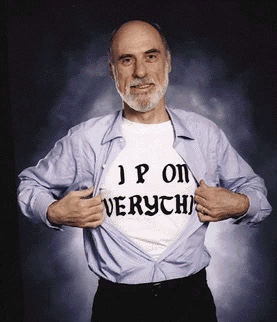
To calm everybody down, Cerf performed a striptease at a meeting of the IETF in 1992. He revealed a T-shirt that said “IP ON EVERYTHING.” At the same meeting, David Clark summarized the feelings of the IETF by saying, “We reject kings, presidents, and voting. We believe in rough consensus and running code.”

Vint Cerf strips down to the bare essentials. Credit: Boardwatch and Light Reading

The fate of the Internet

The split design of TCP/IP, which was a small technical choice at the time, had long-lasting political implications. In 2001, David Clark and Marjory Blumenthal wrote a paper that looked back on the Protocol War. They noted that the Internet’s complex functions were performed at the endpoints, while the network itself ran only the IP part and was concerned simply with moving data from place to place. These “end-to-end principles” formed the basis of “… the ‘Internet Philosophy’: freedom of action, user empowerment, end-user responsibility for actions undertaken, and lack of controls ‘in’ the Net that limit or regulate what users can do,” they said.

In other words, the battle between TCP/IP and OSI wasn’t just about two competing sets of acronyms. On the one hand, you had a small group of computer scientists who had spent many years building a relatively open network and wanted to see it continue under their own benevolent guidance. On the other hand, you had a huge collective of powerful organizations that believed they should be in charge of the future of the Internet—and maybe the behavior of everyone on it.

But this impossible argument and the ultimate fate of the Internet was about to be decided, and not by governments, committees, or even the IETF. The world was changed forever by the actions of one man. He was a mild-mannered computer scientist, born in England and working for a physics research institute in Switzerland.

That’s the story covered in the next article in our series.

Photo of Jeremy Reimer

I’m a writer and web developer. I specialize in the obscure and beautiful, like the Amiga and newLISP.

An Ars Technica history of the Internet, part 1 Read More »

turbulent-global-economy-could-drive-up-prices-for-netflix-and-rivals

Turbulent global economy could drive up prices for Netflix and rivals


“… our members are going to be punished.”

A scene from BBC’s Doctor Who. Credit: BBC/Disney+

Debate around how much taxes US-based streaming services should pay internationally, among other factors, could result in people paying more for subscriptions to services like Netflix and Disney+.

On April 10, the United Kingdom’s Culture, Media and Sport (CMS) Committee reignited calls for a streaming tax on subscription revenue acquired through UK residents. The recommendation came alongside the committee’s 120-page report [PDF] that makes numerous recommendations for how to support and grow Britain’s film and high-end television (HETV) industry.

For the US, the recommendation garnering the most attention is one calling for a 5 percent levy on UK subscriber revenue from streaming video on demand services, such as Netflix. That’s because if streaming services face higher taxes in the UK, costs could be passed onto consumers, resulting in more streaming price hikes. The CMS committee wants money from the levy to support HETV production in the UK and wrote in its report:

The industry should establish this fund on a voluntary basis; however, if it does not do so within 12 months, or if there is not full compliance, the Government should introduce a statutory levy.

Calls for a streaming tax in the UK come after 2024’s 25 percent decrease in spending for UK-produced high-end TV productions and 27 percent decline in productions overall, per the report. Companies like the BBC have said that they lack funds to keep making premium dramas.

In a statement, the CMS committee called for streamers, “such as Netflix, Amazon, Apple TV+, and Disney+, which benefit from the creativity of British producers, to put their money where their mouth is by committing to pay 5 percent of their UK subscriber revenue into a cultural fund to help finance drama with a specific interest to British audiences.” The committee’s report argues that public service broadcasters and independent movie producers are “at risk,” due to how the industry currently works. More investment into such programming would also benefit streaming companies by providing “a healthier supply of [public service broadcaster]-made shows that they can license for their platforms,” the report says.

The Department for Digital, Culture, Media and Sport has said that it will respond to the CMS Committee’s report.

Streaming companies warn of higher prices

In response to the report, a Netflix spokesperson said in a statement shared by the BBC yesterday that the “UK is Netflix’s biggest production hub outside of North America—and we want it to stay that way.” Netflix reportedly claims to have spent billions of pounds in the UK via work with over 200 producers and 30,000 cast and crew members since 2020, per The Hollywood Reporter. In May 2024, Benjamin King, Netflix’s senior director of UK and Ireland public policy, told the CMS committee that the streaming service spends “about $1.5 billion” annually on UK-made content.

Netflix’s statement this week, responding to the CMS Committee’s levy, added:

… in an increasingly competitive global market, it’s key to create a business environment that incentivises rather than penalises investment, risk taking, and success. Levies diminish competitiveness and penalise audiences who ultimately bear the increased costs.

Adam Minns, executive director for the UK’s Association for Commercial Broadcasters and On-Demand Services (COBA), highlighted how a UK streaming tax could impact streaming providers’ content budgets.

“Especially in this economic climate, a levy risks impacting existing content budgets for UK shows, jobs, and growth, along with raising costs for businesses,” he said, per the BBC.

An anonymous source that The Hollywood Reporter described as “close to the matter” said that “Netflix members have already paid the BBC license fee. A levy would be a double tax on them and us. It’s unfair. This is a tariff on success. And our members are going to be punished.”

The anonymous source added: “Ministers have already rejected the idea of a streaming levy. The creation of a Cultural Fund raises more questions than it answers. It also begs the question: Why should audiences who choose to pay for a service be then compelled to subsidize another service for which they have already paid through the license fee. Furthermore, what determines the criteria for ‘Britishness,’ which organizations would qualify for funding … ?”

In May, Mitchel Simmons, Paramount’s VP of EMEA public policy and government affairs, also questioned the benefits of a UK streaming tax when speaking to the CMS committee.

“Where we have seen levies in other jurisdictions on services, we then see inflation in the market. Local broadcasters, particularly in places such as Italy, have found that the prices have gone up because there has been a forced increase in spend and others have suffered as a consequence,” he said at the time.

Tax threat looms largely on streaming companies

Interest in the UK putting a levy on streaming services follows other countries recently pushing similar fees onto streaming providers.

Music streaming providers, like Spotify, for example, pay a 1.2 percent tax on streaming revenue made in France. Spotify blamed the tax for a 1.2 percent price hike in the country issued in May. France’s streaming taxes are supposed to go toward the Centre National de la Musique.

Last year, Canada issued a 5 percent tax on Canadian streaming revenue that’s been halted as companies including Netflix, Amazon, Apple, Disney, and Spotify battle it in court.

Lawrence Zhang, head of policy of the Centre for Canadian Innovation and Competitiveness at the Information Technology and Innovation Foundation think tank, has estimated that a 5 percent streaming tax would result in the average Canadian family paying an extra CA$40 annually.

A streaming provider group called the Digital Media Association has argued that the Canadian tax “could lead to higher prices for Canadians and fewer content choices.”

“As a result, you may end up paying more for your favourite streaming services and have less control over what you can watch or listen to,” the Digital Media Association’s website says.

Streaming companies hold their breath

Uncertainty around US tariffs and their implications on the global economy have also resulted in streaming companies moving slower than expected regarding new entrants, technologies, mergers and acquisitions, and even business failures, Alan Wolk, co-founder and lead analyst at TVRev, pointed out today. “The rapid-fire nature of the executive orders coming from the White House” has a massive impact on the media industry, he said.

“Uncertainty means that deals don’t get considered, let alone completed,” Wolk mused, noting that the growing stability of the streaming industry overall also contributes to slowing market activity.

For consumers, higher prices for other goods and/or services could result in smaller budgets for spending on streaming subscriptions. Establishing and growing advertising businesses is already a priority for many US streaming providers. However, the realities of stingier customers who are less willing to buy multiple streaming subscriptions or opt for premium tiers or buy on-demand titles are poised to put more pressure on streaming firms’ advertising plans. Simultaneously, advertisers are facing pressures from tariffs, which could result in less money being allocated to streaming ads.

“With streaming platform operators increasingly turning to ad-supported tiers to bolster profitability—rather than just rolling out price increases—this strategy could be put at risk,” Matthew Bailey, senior principal analyst of advertising at Omdia, recently told Wired. He added:

Against this backdrop, I wouldn’t be surprised if we do see some price increases for some streaming services over the coming months.

Streaming service providers are likely to tighten their purse strings, too. As we’ve seen, this can result in price hikes and smaller or less daring content selection.   

Streaming customers may soon be forced to reduce their subscriptions. The good news is that most streaming viewers are already accustomed to growing prices and have figured out which streaming services align with their needs around affordability, ease of use, content, and reliability. Customers may set higher standards, though, as streaming companies grapple with the industry and global changes.

Photo of Scharon Harding

Scharon is a Senior Technology Reporter at Ars Technica writing news, reviews, and analysis on consumer gadgets and services. She’s been reporting on technology for over 10 years, with bylines at Tom’s Hardware, Channelnomics, and CRN UK.

Turbulent global economy could drive up prices for Netflix and rivals Read More »
chrome’s-new-dynamic-bottom-bar-gives-websites-a-little-more-room-to-breathe

Chrome’s new dynamic bottom bar gives websites a little more room to breathe

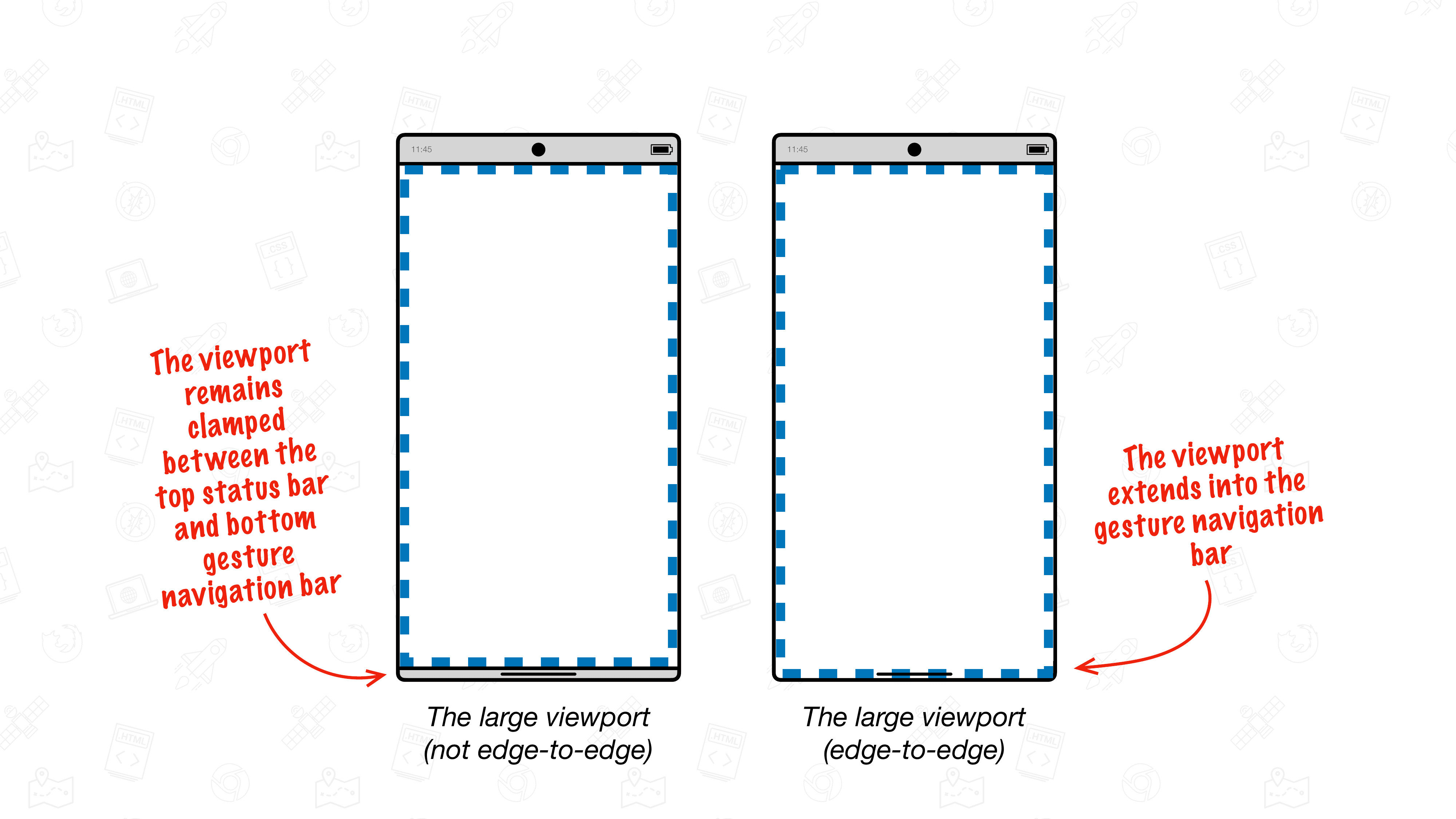
The Internet might look a bit different on Android soon. Last month, Google announced its intent to make Chrome for Android a more immersive experience by hiding the navigation bar background. The promised edge-to-edge update is now rolling out to devices on Chrome version 135, giving you a touch more screen real estate. However, some websites may also be a bit harder to use.

Moving from button to gesture navigation reduced the amount of screen real estate devoted to the system UI, which leaves more room for apps. Google’s move to a “dynamic bottom bar” in Chrome creates even more space for web content. When this feature shows up, the pages you visit will be able to draw all the way to the bottom of the screen instead of stopping at the navigation area, which Google calls the “chin.”

Chrome edge-to-edge

Credit: Google

As you scroll down a page, Chrome hides the address bar. With the addition of the dynamic bottom bar, the chin also vanishes. The gesture handle itself remains visible, shifting between white and black based on what is immediately behind it to maintain visibility. Unfortunately, this feature will not work if you have chosen to stick with the classic three-button navigation option.

Chrome’s new dynamic bottom bar gives websites a little more room to breathe Read More »
powerful-programming:-bbc-controlled-electric-meters-are-coming-to-an-end

Powerful programming: BBC-controlled electric meters are coming to an end

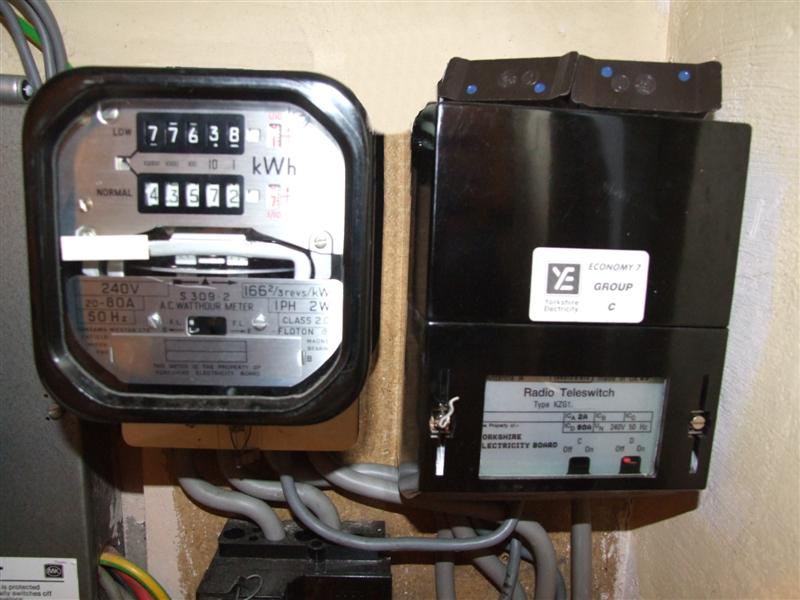
Two rare tungsten-centered, hand-crafted cooled anode modulators (CAM) are needed to keep the signal going, and while the BBC bought up the global supply of them, they are running out. The service is seemingly on its last two valves and has been telling the public about Long Wave radio’s end for nearly 15 years. Trying to remanufacture the valves is hazardous, as any flaws could cause a catastrophic failure in the transmitters.

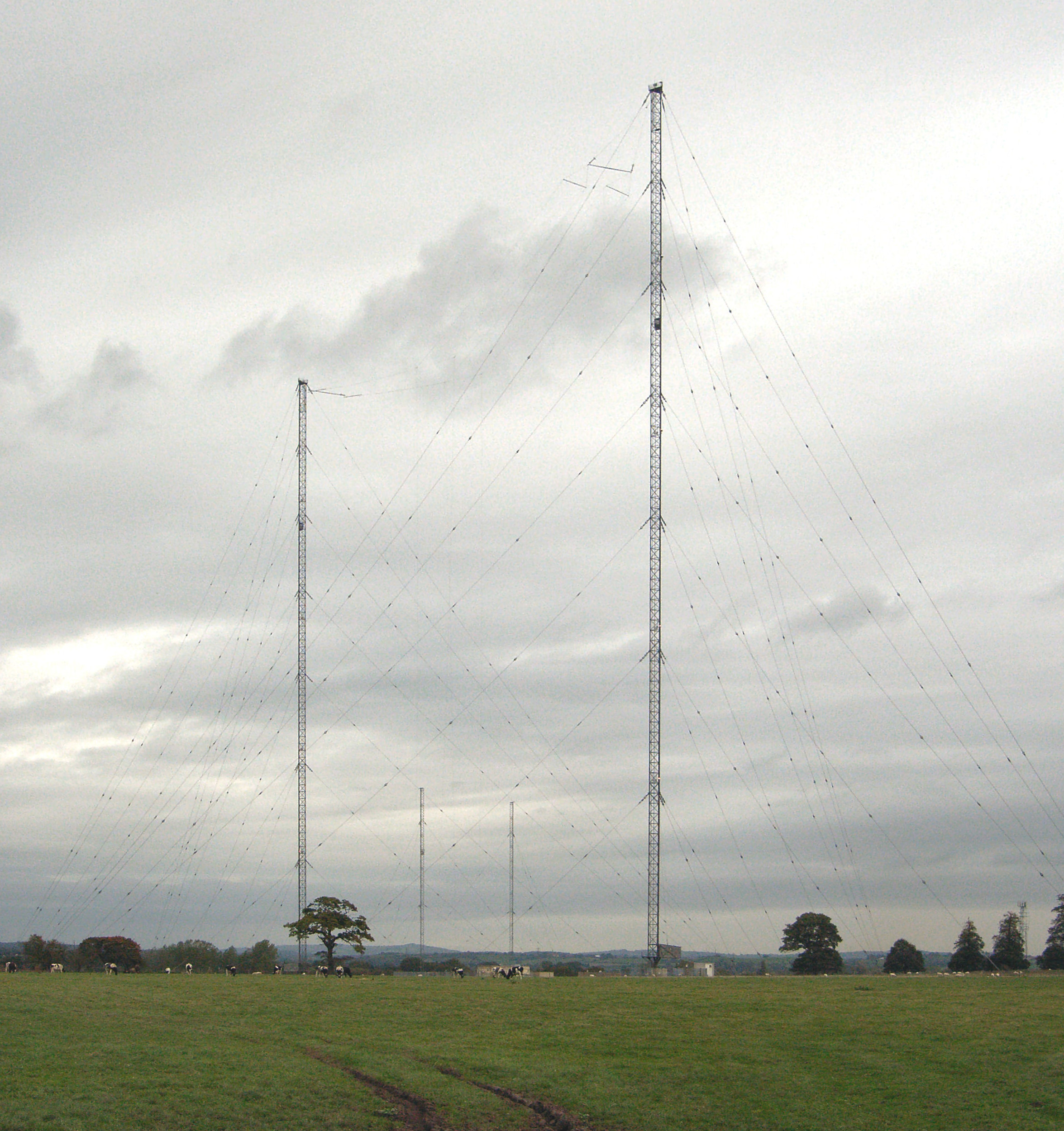
BBC Radio 4’s 198 kHz transmitting towers at Droitwich.

BBC Radio 4’s 198 kHz transmitting towers at Droitwich. Credit: Bob Nienhuis (Public domain)

Rebuilding the transmitter, or moving to different, higher frequencies, is not feasible for the very few homes that cannot get other kinds of lower-power radio, or internet versions, the BBC told The Guardian in 2011. What’s more, keeping Droitwich powered such that it can reach the whole of the UK, including Wales and lower Scotland, requires some 500 kilowatts of power, more than most other BBC transmission types.

As of January 2025, roughly 600,000 UK customers still use RTS meters to manage their power switching, after 300,000 were switched away in 2024. Utilities and the BBC have agreed that the service will stop working on June 30, 2025, and have pushed to upgrade RTS customers to smart meters.

In a combination of sad reality and rich irony, more than 4 million smart meters in the UK are not working properly. Some have delivered eye-popping charges to their customers, based on estimated bills instead of real readings, like Sir Grayson Perry‘s 39,000 pounds due on 15 simultaneous bills. But many have failed because the UK, like other countries, phased out the 2G and 3G networks older meters relied upon without coordinated transition efforts.

Powerful programming: BBC-controlled electric meters are coming to an end Read More »
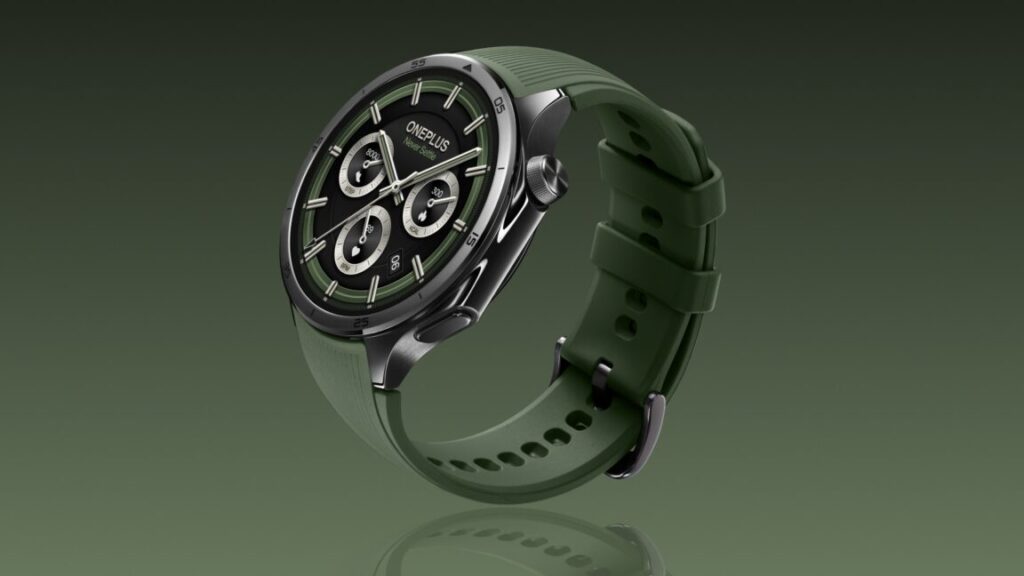
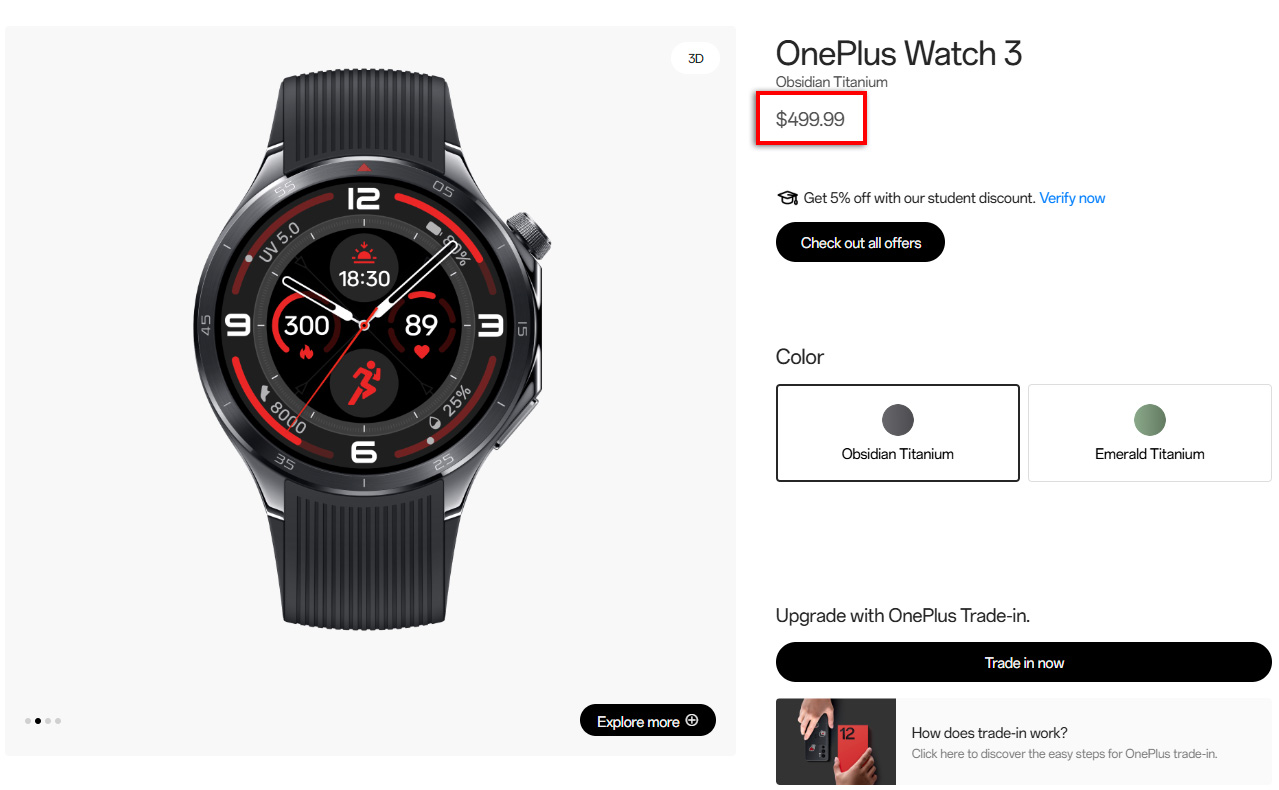
oneplus-releases-watch-3-with-inflated-$500-price-tag,-won’t-say-why

OnePlus releases Watch 3 with inflated $500 price tag, won’t say why

watch 3 pricing

Credit: OnePlus

The tariff fees are typically paid on a product’s declared value rather than the retail cost. So a $170 price bump could be close to what the company’s US arm will pay to import the Watch 3 in the midst of a trade war. Many technology firms have attempted to stockpile products in the US ahead of tariffs, but it’s possible OnePlus simply couldn’t do that because it had to fix its typo.

Losing its greatest advantage?

Like past OnePlus wearables, the Watch 3 is a chunky, high-power device with a stainless steel case. It sports a massive 1.5-inch OLED screen, the latest Snapdragon W5 wearable processor, 32GB of storage, and 2GB of RAM. It runs Google’s Wear OS for smart features, but it also has a dialed-back power-saving mode that runs separate RTOS software. This robust hardware adds to the manufacturing cost, which also means higher tariffs now. As it currently stands, the Watch 3 is just too expensive given the competition.

OnePlus has managed to piece together a growing ecosystem of devices, including phones, tablets, earbuds, and, yes, smartwatches. With a combination of competitive prices and high-end specs, it successfully established a foothold in the US market, something few Chinese OEMs have accomplished.

The implications go beyond wearables. OnePlus also swings for the fences with its phone hardware, using the best Arm chips and expensive, high-end OLED panels. OnePlus tends to price its phones lower than similar Samsung and Google hardware, so it doesn’t make as much on each phone. If the tariffs stick, that strategy could be unviable.

OnePlus releases Watch 3 with inflated $500 price tag, won’t say why Read More »
google-pixel-9a-review:-all-the-phone-you-need

Google Pixel 9a review: All the phone you need


The Pixel 9a looks great and shoots lovely photos, but it’s light on AI.

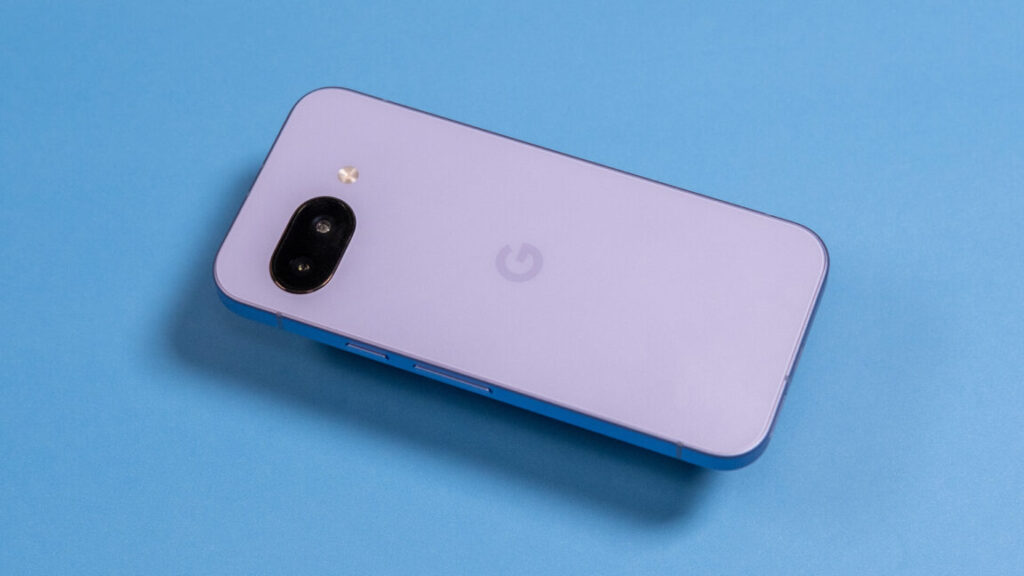
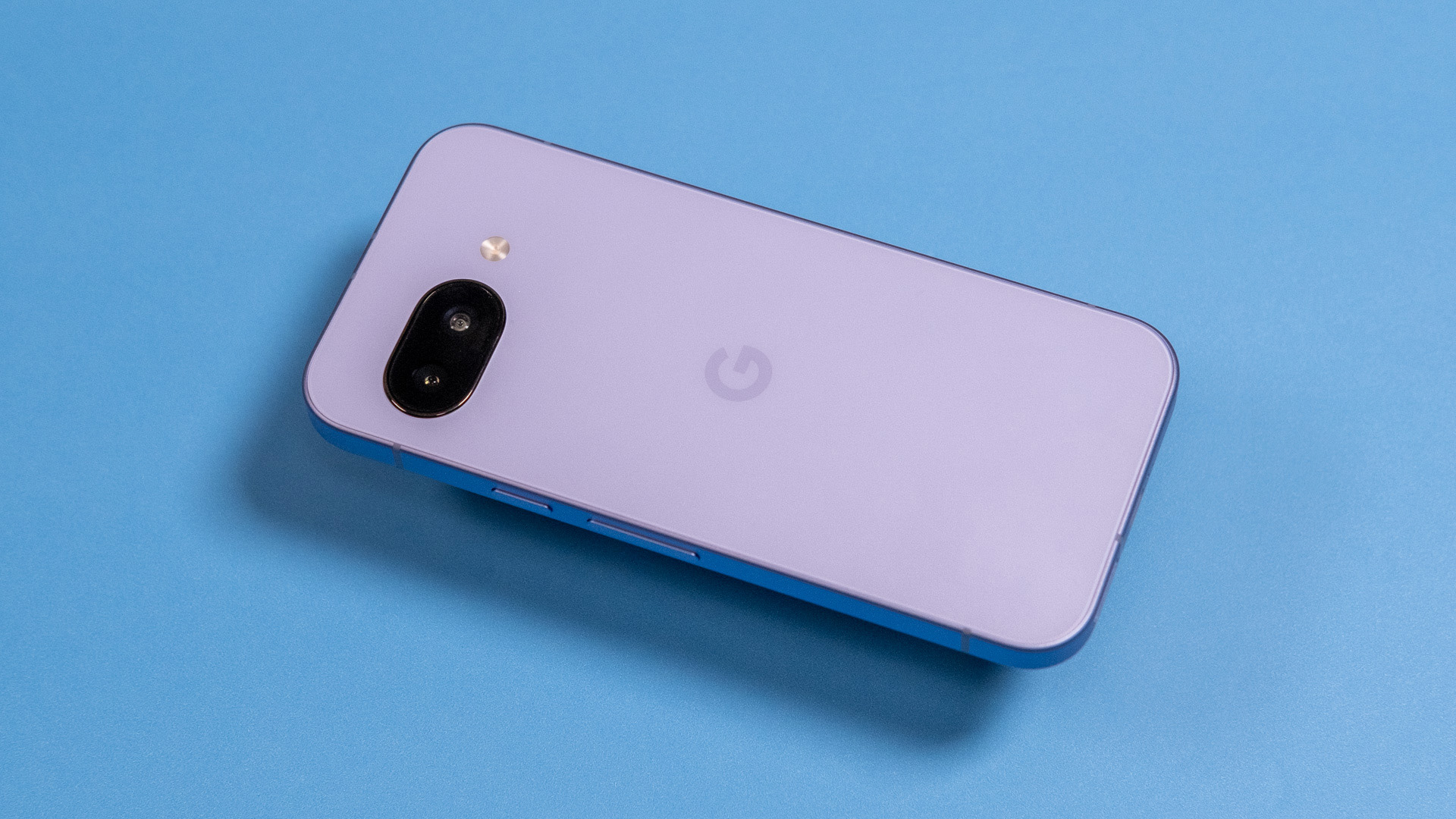
Pixel 9a floating back

The Pixel 9a adopts a streamlined design. Credit: Ryan Whitwam

The Pixel 9a adopts a streamlined design. Credit: Ryan Whitwam

It took a few years, but Google’s Pixel phones have risen to the top of the Android ranks, and its new Pixel 9a keeps most of what has made flagship Pixel phones so good, including the slick software and versatile cameras. Despite a revamped design and larger battery, Google has maintained the $499 price point of last year’s phone, undercutting other “budget” devices like the iPhone 16e.

However, hitting this price point involves trade-offs in materials, charging, and—significantly—the on-device AI capabilities compared to its pricier siblings. None of those are deal-breakers, though. In fact, the Pixel 9a may be coming along at just the right time. As we enter a period of uncertainty for imported gadgets, a modestly priced phone with lengthy support could be the perfect purchase.

A simpler silhouette

The Pixel 9a sports the same rounded corners and flat edges we’ve seen on other recent smartphones. The aluminum frame has a smooth, almost silky texture, with rolled edges that flow into the front and back covers.

Pixel 9a in hand

The 9a is just small enough to be cozy in your hand.

Credit: Ryan Whitwam

The 9a is just small enough to be cozy in your hand. Credit: Ryan Whitwam

On the front, there’s a sheet of Gorilla Glass 3, which has been a mainstay of budget phones for years. On the back, Google used recycled plastic with a matte finish. It attracts more dust and grime than glass, but it doesn’t show fingerprints as clearly. The plastic doesn’t feel as solid as the glass backs on Google’s more expensive phones, and the edge where it meets the aluminum frame feels a bit more sharp and abrupt than the glass on Google’s flagship phones.

Specs at a glance: Google Pixel 9a
SoC Google Tensor G4
Memory 8GB
Storage 128GB, 256GB
Display 1080×2424 6.3″ pOLED, 60–120 Hz
Cameras 48 MP primary, f/1.7, OIS; 13 MP ultrawide, f/2.2; 13 MP selfie, f/2.2
Software Android 15, 7 years of OS updates
Battery 5,100 mAh, 23 W wired charging, 7.5 W wireless charging
Connectivity Wi-Fi 6e, NFC, Bluetooth 5.3, sub-6 GHz 5G
Measurements 154.7×73.3×8.9 mm; 185 g

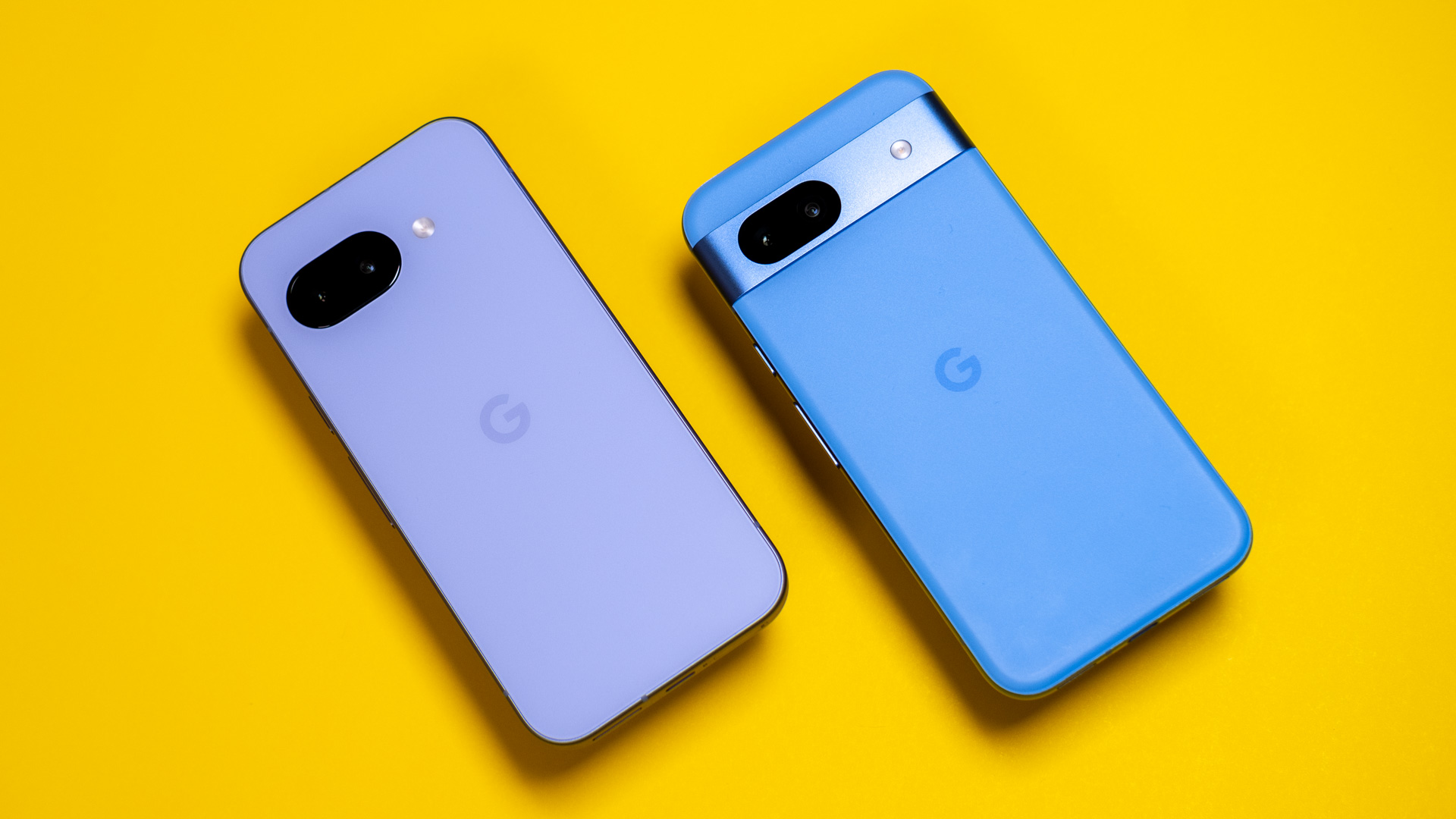
Were it not for the “G” logo emblazoned on the back, you might not recognize the Pixel 9a as a Google phone. It lacks the camera bar that has been central to the design language of all Google’s recent devices, opting instead for a sleeker flat design.

The move to a pOLED display saved a few millimeters, giving the designers a bit more internal volume. In the past, Google has always pushed toward thinner and thinner Pixels, but it retained the same 8.9 mm thickness for the Pixel 9a. Rather than shave off a millimeter, Google equipped the Pixel 9a with a 5,100 mAh battery, which is the largest ever in a Pixel, even beating out the larger and more expensive Pixel 9 Pro XL by a touch.

Pixel 9a and Pixel 8a

The Pixel 9a (left) drops the camera bar from the Pixel 8a (right).

Credit: Ryan Whitwam

The Pixel 9a (left) drops the camera bar from the Pixel 8a (right). Credit: Ryan Whitwam

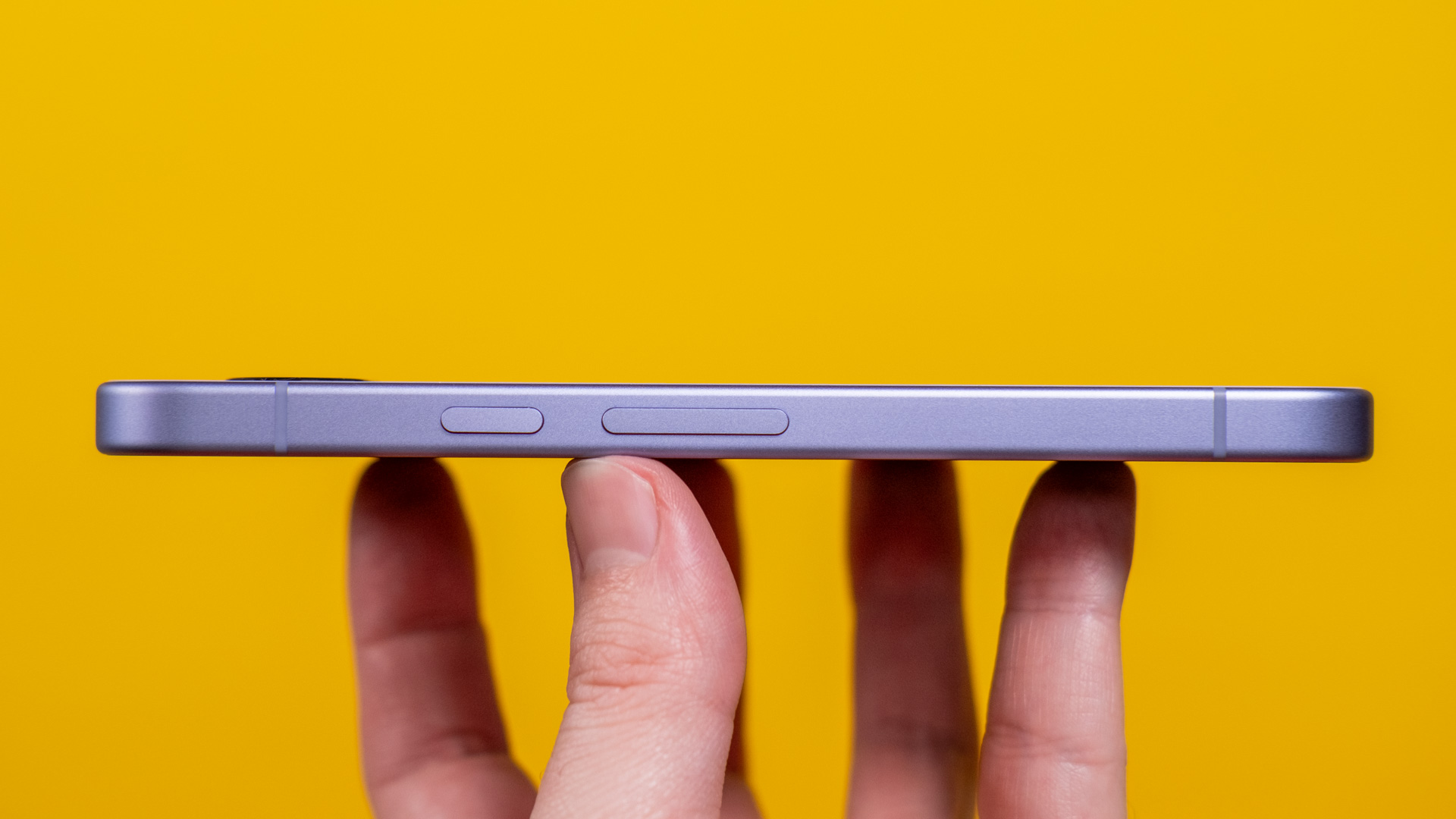
The camera module on the back is almost flush with the body of the phone, rising barely a millimeter from the surrounding plastic. The phone feels more balanced and less top-heavy than phones that have three or four cameras mounted to chunky aluminum surrounds. The buttons on the right edge are the only other disruptions to the phone’s clean lines. They, too, are aluminum, with nice, tactile feedback and no detectable wobble. Aside from a few tiny foibles, the build quality and overall feel of this phone are better than we’d expect for $499.

The 6.3-inch OLED is slightly larger than last year’s, and it retains the chunkier bezels of Google’s A-series phones. While the flagship Pixels are all screen from the front, there’s a sizable gap between the edge of the OLED and the aluminum frame. That means the body is a few millimeters larger than it probably had to be—the Pixel 9 Pro has the same display size, and it’s a bit more compact, for example. Still, the Pixel 9a does not look or feel oversized.

Pixel 9a edge

The camera bump just barely rises above the surrounding plastic.

Credit: Ryan Whitwam

The camera bump just barely rises above the surrounding plastic. Credit: Ryan Whitwam

The OLED is sharp enough at 1080p and has an impressively high peak brightness, making it legible outdoors. However, the low-brightness clarity falls short of what you get with more expensive phones like the Pixel 9 Pro or Galaxy S25. The screen supports a 120 Hz refresh rate, but that’s disabled by default. This panel does not use LTPO technology, which makes higher refresh rates more battery-intensive. There’s a fingerprint scanner under the OLED, but it has not been upgraded to ultrasonic along with the flagship Pixels. This one is still optical—it works quickly enough, but it lights up dark rooms and lacks reliability compared to ultrasonic sensors.

Probably fast enough

Google took a page from Apple when it debuted its custom Tensor mobile processors with the Pixel 6. Now, Google uses Tensor processors in all its phones, giving a nice boost to budget devices like the Pixel 9a. The Pixel 9a has a Tensor G4, which is identical to the chip in the Pixel 9 series, save for a slightly different modem.

Pixel 9a flat

With no camera bump, the Pixel 9a lays totally flat on surfaces with very little wobble.

Credit: Ryan Whitwam

With no camera bump, the Pixel 9a lays totally flat on surfaces with very little wobble. Credit: Ryan Whitwam

While Tensor is not a benchmark speed demon like the latest silicon from Qualcomm or Apple, it does not feel slow in daily use. A chip like the Snapdragon 8 Elite puts up huge benchmark numbers, but it doesn’t run at that speed for long. Qualcomm’s latest chips can lose half their speed to heat, but Tensor only drops by about a third during extended load.

However, even after slowing down, the Snapdragon 8 Elite is a faster gaming chip than Tensor. If playing high-end games like Diablo Immortal and Genshin Impact is important to you, you can do better than the Pixel 9a (and other Pixels).

9a geekbench

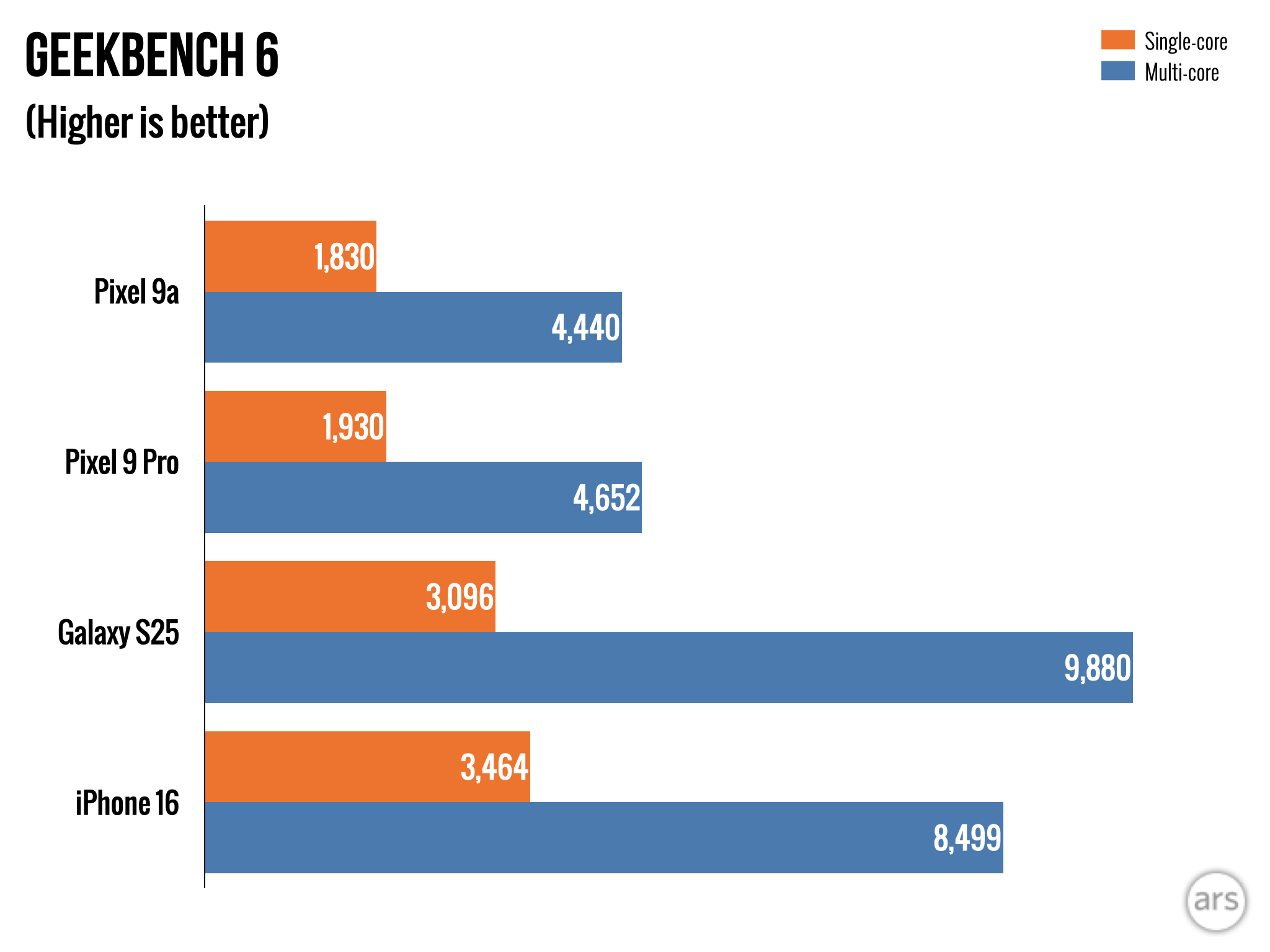
The 9a can’t touch the S25, but it runs neck and neck with the Pixel 9 Pro.

Credit: Ryan Whitwam

The 9a can’t touch the S25, but it runs neck and neck with the Pixel 9 Pro. Credit: Ryan Whitwam

In general use, the Pixel 9a is more than fast enough that you won’t spend time thinking about the Tensor chip. Apps open quickly, animations are unerringly smooth, and the phone doesn’t get too hot. There are some unavoidable drawbacks to its more limited memory, though. Apps don’t stay in memory as long or as reliably as they do on the flagship Pixels, for instance. There are also some AI limitations we’ll get to below.

With a 5,100 mAh battery, the Pixel 9a has more capacity than any other Google phone. Combined with the 1080p screen, the 9a gets much longer battery life than the flagship Pixels. Google claims about 30 hours of usage per charge. In our testing, this equates to a solid day of heavy use with enough left in the tank that you won’t feel the twinge of range anxiety as evening approaches. If you’re careful, you might be able to make it two days without a recharge.

Pixel 9a and 9 Pro XL

The Pixel 9a (right) is much smaller than the Pixel 9 Pro XL (left), but it has a slightly larger battery.

Credit: Ryan Whitwam

The Pixel 9a (right) is much smaller than the Pixel 9 Pro XL (left), but it has a slightly larger battery. Credit: Ryan Whitwam

As for recharging, Google could do better—the Pixel 9a manages just 23 W wired and 7.5 W wireless, and the flagship Pixels are only a little faster. Companies like OnePlus and Motorola offer phones that charge several times faster than Google’s.

The low-AI Pixel

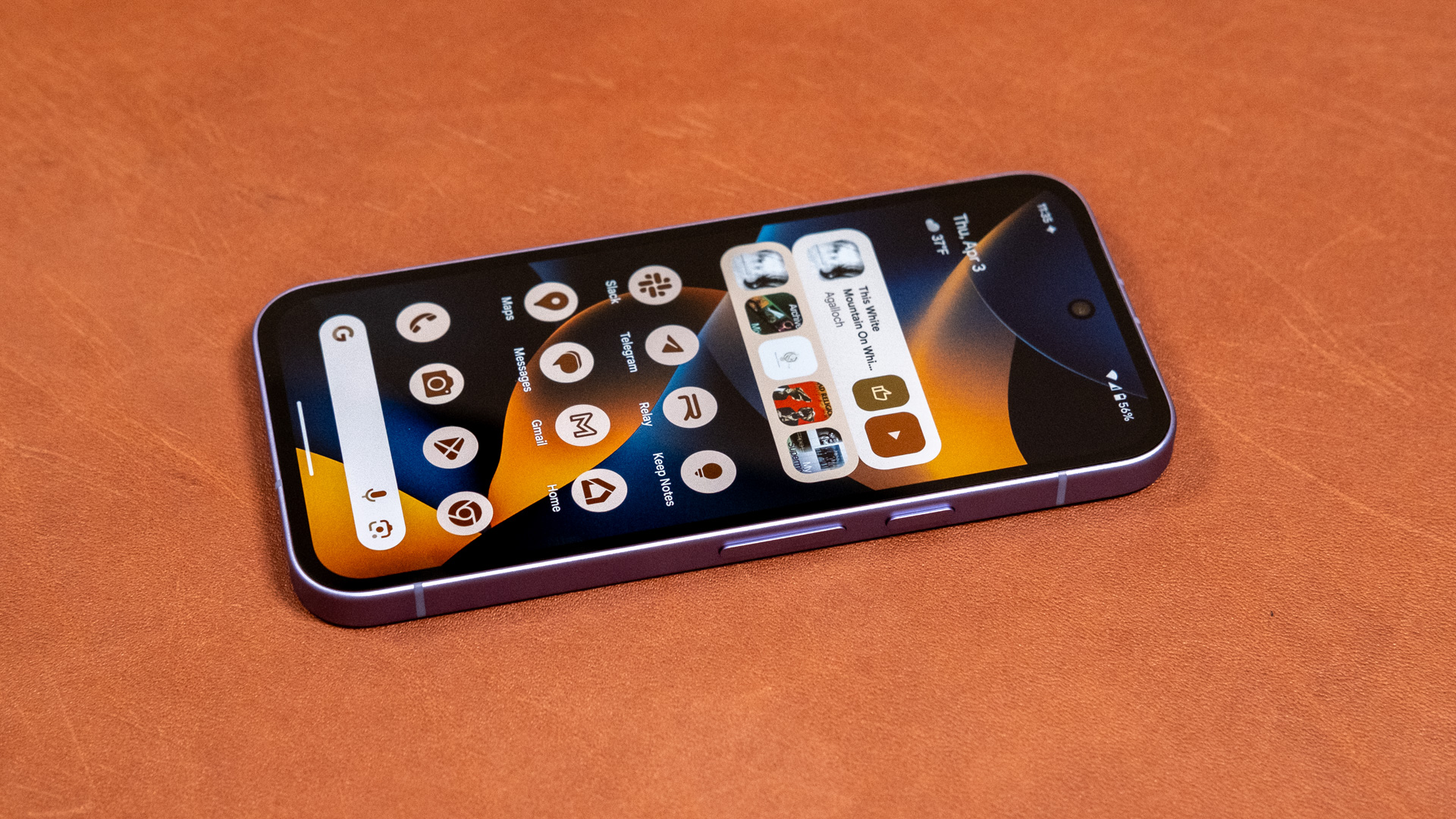
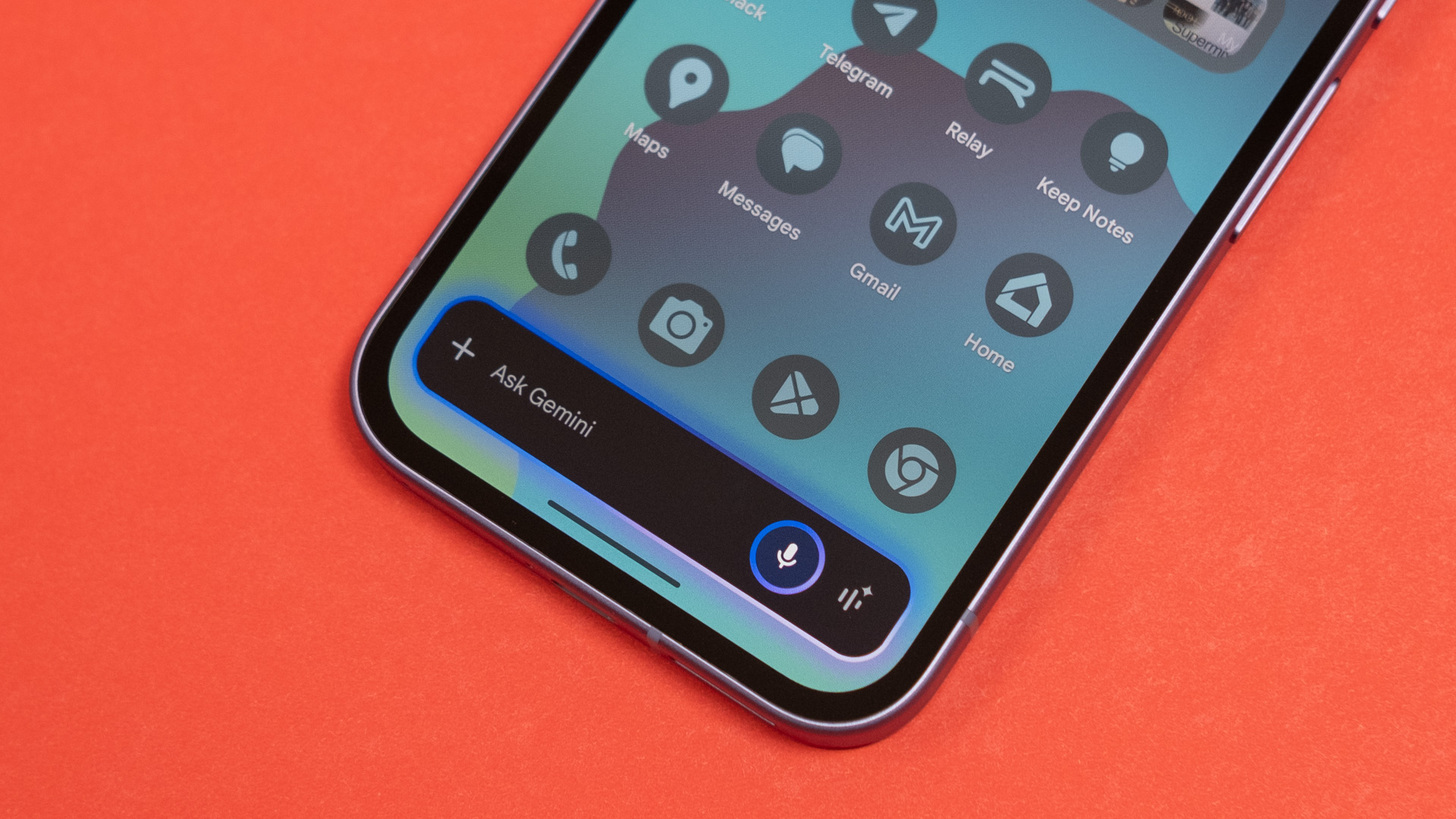
Google’s Pixel software is one of the primary reasons to buy its phones. There’s no bloatware on the device when you take it out of the box, which saves you from tediously extracting a dozen sponsored widgets and microtransaction-laden games right off the bat. Google’s interface design is also our favorite right now, with a fantastic implementation of Material You theming that adapts to your background colors.

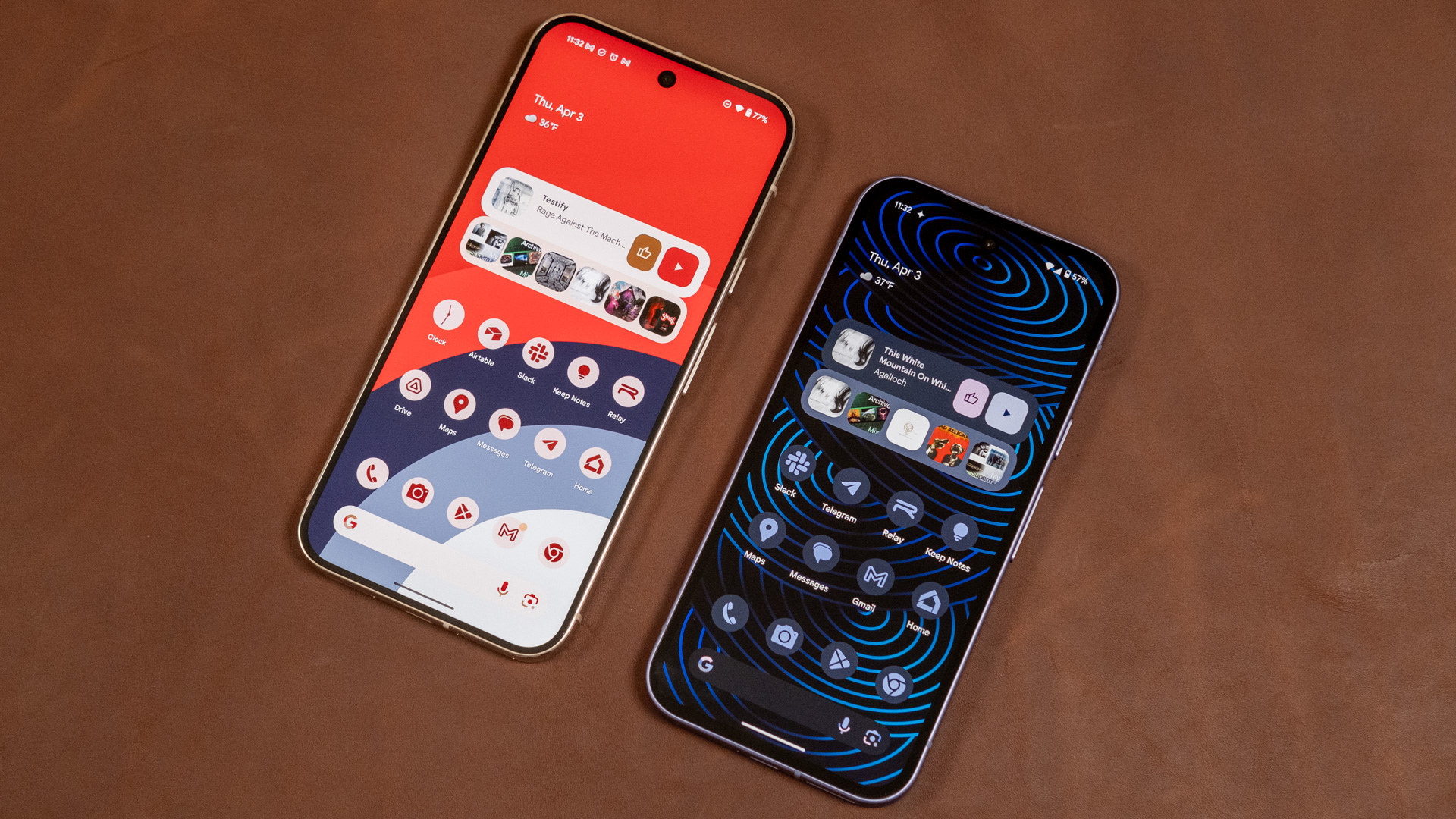
Gemini is the default assistant, but the 9a loses some of Google’s most interesting AI features.

Credit: Ryan Whitwam

Gemini is the default assistant, but the 9a loses some of Google’s most interesting AI features. Credit: Ryan Whitwam

The Pixel version of Android 15 also comes with a raft of thoughtful features, like the anti-spammer Call Screen and Direct My Call to help you navigate labyrinthine phone trees. Gemini is also built into the phone, fully replacing the now-doomed Google Assistant. Google notes that Gemini on the 9a can take action across apps, which is technically true. Gemini can look up data from one supported app and route it to another at your behest, but only when it feels like it. Generative AI is still unpredictable, so don’t bank on Gemini being a good assistant just yet.

Google’s more expensive Pixels also have the above capabilities, but they go further with AI. Google’s on-device Gemini Nano model is key to some of the newest and more interesting AI features, but large language models (even the small ones) need a lot of RAM. The 9a’s less-generous 8GB of RAM means it runs a less-capable version of the AI known as Gemini Nano XXS that only supports text input.

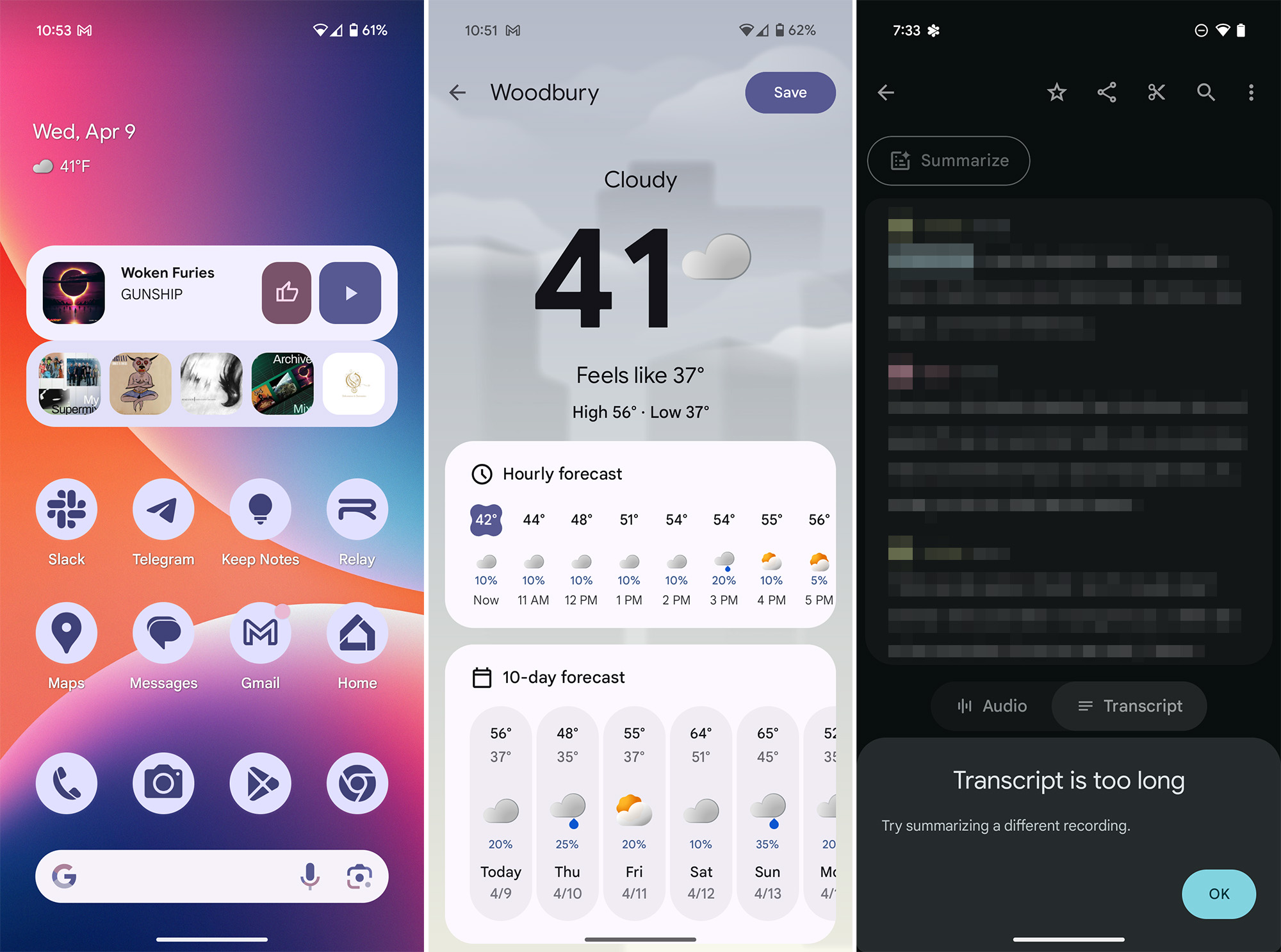
As a result, many of the AI features Google was promoting around the Pixel 9 launch just don’t work. For example, there’s no Pixel Screenshots app or Call Notes. Even some features that seem like they should work, like AI weather summaries, are absent on the Pixel 9a. Recorder summaries are supported, but Gemini Nano has a very nano context window. We tested with recordings ranging from two to 20 minutes, and the longer ones surpassed the model’s capabilities. Google tells Ars that 2,000 words (about 15 minutes of relaxed conversation) is the limit for Gemini Nano on this phone.

Pixel 9a software

The 9a is missing some AI features, and others don’t work very well.

Credit: Ryan Whitwam

The 9a is missing some AI features, and others don’t work very well. Credit: Ryan Whitwam

If you’re the type to avoid AI features, the less-capable Gemini model might not matter. You still get all the other neat Pixel features, along with Google’s market-leading support policy. This phone will get seven years of full update support, including annual OS version bumps and monthly security patches. The 9a is also entitled to special quarterly Pixel Drop updates, which bring new (usually minor) features.

Most OEMs struggle to provide even half the support for their phones. Samsung is neck and neck with Google, but its updates are often slower and more limited on older phones. Samsung’s vision for mobile AI is much less fleshed out than Google’s, too. Even with the Pixel 9a’s disappointing Gemini Nano capabilities, we expect Google to make improvements to all aspects of the software (even AI) over the coming years.

Capable cameras

The Pixel 9a has just two camera sensors, and it doesn’t try to dress up the back of the phone to make it look like there are more, a common trait of other Android phones. There’s a new 48 MP camera sensor similar to the one in the Pixel 9 Pro Fold, which is smaller and less capable than the main camera in the flagship Pixels. There’s also a 13 MP ultrawide lens that appears unchanged from last year. You have to spend a lot more money to get Google’s best camera hardware, but conveniently, much of the Pixel magic is in the software.

Pixel 9a back in hand

The Pixel 9a sticks with two cameras.

Credit: Ryan Whitwam

The Pixel 9a sticks with two cameras. Credit: Ryan Whitwam

Google’s image processing works extremely well, lightening dark areas while also preventing blowout in lighter areas. This impressive dynamic range results in even exposures with plenty of detail, and this is true in all lighting conditions. In dim light, you can use Night Sight to increase sharpness and brightness to an almost supernatural degree. Outside of a few edge cases with unusual light temperature, we’ve been very pleased with Google’s color reproduction, too.

The most notable drawback to the 9a’s camera is that it’s a bit slower than the flagship Pixels. The sensor is smaller and doesn’t collect as much light, even compared to the base model Pixel 9. This is more noticeable with shots using Night Sight, which gathers data over several seconds to brighten images. However, image capture is still generally faster than Samsung, OnePlus, and Motorola cameras. Google leans toward keeping shutter speeds high (low exposure time). Outdoors, that means you can capture motion with little to no blur almost as reliably as you can with the Pro Pixels.

The 13 MP ultrawide camera is great for landscape outdoor shots, showing only mild distortion at the edges of the frame despite an impressive 120-degree field-of-view. Unlike Samsung and OnePlus, Google also does a good job of keeping colors consistent across the sensors.

You can shoot macro photos with the Pixel 9a, but it works a bit differently than other phones. The ultrawide camera doesn’t have autofocus, nor is there a dedicated macro sensor. Instead, Google uses AI with the main camera to take close-ups. This seems to work well enough, but details are only sharp around the center of the frame, with ample distortion at the edges.

There’s no telephoto lens here, but Google’s capable image processing helps a lot. The new primary camera sensor probably isn’t hurting, either. You can reliably push the 48 MP primary to 2x digital zoom, and Google’s algorithms will produce photos that you’d hardly know have been enhanced. Beyond 2x zoom, the sharpening begins to look more obviously artificial.

A phone like the Pixel 9 Pro or Galaxy S25 Ultra with 5x telephoto lenses can definitely get sharper photos at a distance, but the Pixel 9a does not do meaningfully worse than phones that have 2–3x telephoto lenses.

The right phone at the right time

The Pixel 9a is not a perfect phone, but for $499, it’s hard to argue with it. This device has the same great version of Android seen on Google’s more expensive phones, along with a generous seven years of guaranteed updates. It also pushes battery life a bit beyond what you can get with other Pixel phones. The camera isn’t the best we’ve seen—that distinction goes to the Pixel 9 Pro and Pro XL. However, it gets closer than a $500 phone ought to.

Pixel 9a with keyboard

Material You theming is excellent on Pixels.

Credit: Ryan Whitwam

Material You theming is excellent on Pixels. Credit: Ryan Whitwam

You do miss out on some AI features with the 9a. That might not bother the AI skeptics, but some of these missing on-device features, like Pixel Screenshots and Call Notes, are among the best applications of generative AI we’ve seen on a phone yet. With years of Pixel Drops ahead of it, the 9a might not have enough muscle to handle Google’s future AI endeavors, which could lead to buyer’s remorse if AI turns out to be as useful as Google claims it will be.

At $499, you’d have to spend $300 more to get to the base model Pixel 9, a phone with weaker battery life and a marginally better camera. That’s a tough sell given how good the 9a is. If you’re not going for the Pro phones, stick with the 9a. With all the uncertainty over future tariffs on imported products, the day of decent sub-$500 phones could be coming to an end. With long support, solid hardware, and a beefy battery, the Pixel 9a could be the right phone to buy before prices go up.

The good

  • Good value at $499
  • Bright, sharp display
  • Long battery life
  • Clean version of Android 15 with seven years of support
  • Great photo quality

The bad

  • Doesn’t crush benchmarks or run high-end games perfectly
  • Missing some AI features from more expensive Pixels

Photo of Ryan Whitwam

Ryan Whitwam is a senior technology reporter at Ars Technica, covering the ways Google, AI, and mobile technology continue to change the world. Over his 20-year career, he’s written for Android Police, ExtremeTech, Wirecutter, NY Times, and more. He has reviewed more phones than most people will ever own. You can follow him on Bluesky, where you will see photos of his dozens of mechanical keyboards.

Google Pixel 9a review: All the phone you need Read More »
google-announces-faster,-more-efficient-gemini-ai-model

Google announces faster, more efficient Gemini AI model

We recently spoke with Google’s Tulsee Doshi, who noted that the 2.5 Pro (Experimental) release was still prone to “overthinking” its responses to simple queries. However, the plan was to further improve dynamic thinking for the final release, and the team also hoped to give developers more control over the feature. That appears to be happening with Gemini 2.5 Flash, which includes “dynamic and controllable reasoning.”

The newest Gemini models will choose a “thinking budget” based on the complexity of the prompt. This helps reduce wait times and processing for 2.5 Flash. Developers even get granular control over the budget to lower costs and speed things along where appropriate. Gemini 2.5 models are also getting supervised tuning and context caching for Vertex AI in the coming weeks.

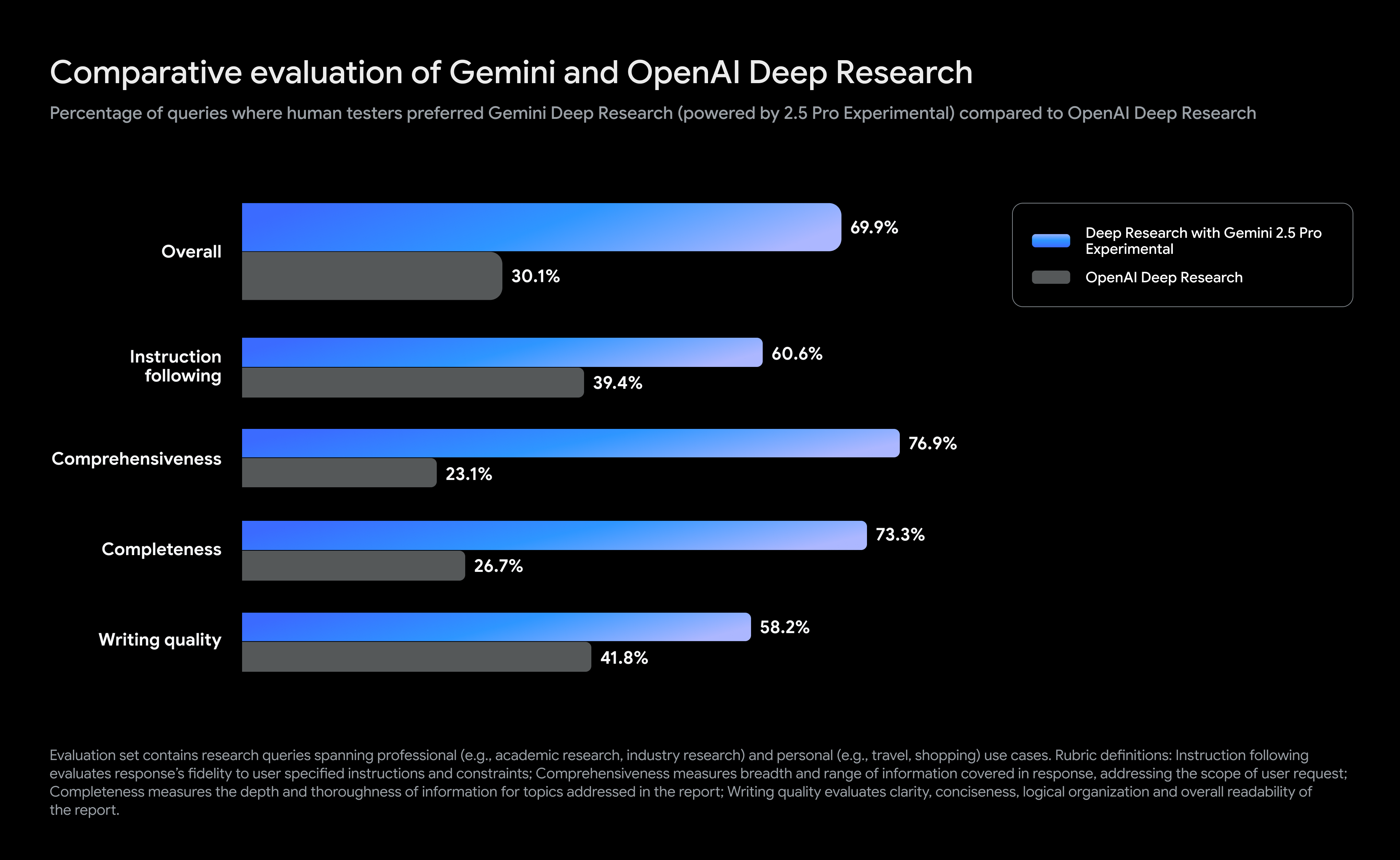
In addition to the arrival of Gemini 2.5 Flash, the larger Pro model has picked up a new gig. Google’s largest Gemini model is now powering its Deep Research tool, which was previously running Gemini 2.0 Pro. Deep Research lets you explore a topic in greater detail simply by entering a prompt. The agent then goes out into the Internet to collect data and synthesize a lengthy report.

Gemini vs. ChatGPT chart

Credit: Google

Google says that the move to Gemini 2.5 has boosted the accuracy and usefulness of Deep Research. The graphic above shows Google’s alleged advantage compared to OpenAI’s deep research tool. These stats are based on user evaluations (not synthetic benchmarks) and show a greater than 2-to-1 preference for Gemini 2.5 Pro reports.

Deep Research is available for limited use on non-paid accounts, but you won’t get the latest model. Deep Research with 2.5 Pro is currently limited to Gemini Advanced subscribers. However, we expect before long that all models in the Gemini app will move to the 2.5 branch. With dynamic reasoning and new TPUs, Google could begin lowering the sky-high costs that have thus far made generative AI unprofitable.

Google announces faster, more efficient Gemini AI model Read More »
japanese-railway-shelter-replaced-in-less-than-6-hours-by-3d-printed-model

Japanese railway shelter replaced in less than 6 hours by 3D-printed model

Hatsushima is not a particularly busy station, relative to Japanese rail commuting as a whole. It serves a town (Arida) of about 25,000, known for mandarin oranges and scabbardfish, that is shrinking in population, like most of Japan. Its station sees between one to three trains per hour at its stop, helping about 530 riders find their way. Its wooden station was due for replacement, and the replacement could be smaller.

The replacement, it turned out, could also be a trial for industrial-scale 3D-printing of custom rail shelters. Serendix, a construction firm that previously 3D-printed 538-square-foot homes for about $38,000, built a shelter for Hatsushima in about seven days, as shown at The New York Times. The fabricated shelter was shipped in four parts by rail, then pieced together in a span that the site Futurism says is “just under three hours,” but which the Times, seemingly present at the scene, pegs at six. It was in place by the first train’s arrival at 5: 45 am.

Either number of hours is a marked decrease from the days or weeks you might expect for a new rail station to be constructed. In one overnight, teams assembled a shelter that is 2.6 meters (8.5 feet) tall and 10 square meters (32 square feet) in area. It’s not actually in use yet, as it needs ticket machines and finishing, but is expected to operate by July, according to the Japan Times.

Japanese railway shelter replaced in less than 6 hours by 3D-printed model Read More »
the-2025-moto-g-stylus-has-a-sharper-display-and-“enhanced”-stylus-for-$400

The 2025 Moto G Stylus has a sharper display and “enhanced” stylus for $400

There aren’t many phones these days that come with a stylus, and those that do tend to be very expensive. If you can’t swing a Galaxy S25 Ultra, Motorola’s G Stylus lineup could be just what you need. The new 2025 Moto G Stylus is now official, featuring several key upgrades while maintaining the same $400 price tag.

The Moto G Stylus 2025 sticks with the style Motorola has cultivated over recent years, with a contoured vegan leather back. It comes in two Pantone colors called Gibraltar Sea and Surf the Web—one is dark blue and the other is a lighter, more vibrant blue. They look like fun colors. Moto’s language makes it sound like there could be more colors down the road, too.

The spec sheet paints a picture of a solid mobile device, but it won’t exceed expectations. Motorola moved to a Snapdragon 6 Gen 3 processor, which runs at a slightly higher clock speed than the Gen 1 it used in the 2024 model. It also has 8GB of RAM and 128GB of storage in the base model. An upgraded version with 256GB of storage and the same 8GB of RAM will be available, too.

Specs at a glance: Moto G Stylus 2025
SoC Snapdragon 6 Gen 3
Memory 8GB
Storage 128GB, 256GB
Display 2,712 x 1,220 6.7″ pOLED, 120 Hz
Cameras 50 MP primary, f/1.8, OIS; 13 MP ultrawide, f/2.2; 32 MP selfie, f/2.2
Software Android 15 (Hello UX)
Battery 5,000 mAh, 68 W wired charging, 15W wireless charging
Connectivity Wi-Fi 6e, NFC, Bluetooth 5.4, sub-6 GHz 5G
Measurements 162.15 x 74.78 x 8.29mm; 191 g

With the modest mid-range chipset, the 2025 Moto G Stylus should have excellent battery life. The company promises more than 40 hours of average usage from the 5,000 mAh cell, and it recharges at an impressive 68 W with a USB-PD cable. It also has speedy 15 W wireless charging. You often don’t even get charging that fast on flagship phones, including the Pixel 9 series.

Making mid-range a little less mid

Motorola opted to upgrade the screen on this device, moving to a 6.7-inch pOLED at an impressive 2,712 x 1,220 resolution. It retains the 120 Hz refresh rate of its predecessor and jumps to 3,000 nits of peak brightness (more than double that of last year’s phone). We haven’t seen this display in real life, but on paper, it checks all the boxes you’d expect from a much more expensive phone.

The phone’s raison d’être has been upgraded, as well. Motorola says the stylus for the new phone is 6.4 times more responsive. Moto is vague about how this was achieved—the stylus itself is still just a capacitive nub rather than an active stylus like you’d see on an expensive Samsung phone. The 2025 G Stylus display reportedly has lower latency, making the stylus input less laggy.

The 2025 Moto G Stylus has a sharper display and “enhanced” stylus for $400 Read More »
don’t-call-it-a-drone:-zipline’s-uncrewed-aircraft-wants-to-reinvent-retail

Don’t call it a drone: Zipline’s uncrewed aircraft wants to reinvent retail


Ars visits a zipline delivery service that’s deploying in more locations soon.

The inner portion of the Zipline P2 is lowered to the ground on a tether, facing into the wind, with a small propeller at the back. Doors on the bottom open when it touches the ground, depositing the cargo. Credit: Tim Stevens

The skies around Dallas are about to get a lot more interesting. No, DFW airport isn’t planning any more expansions, nor does American Airlines have any more retro liveries to debut. This will be something different, something liable to make all the excitement around the supposed New Jersey drones look a bit quaint.

Zipline is launching its airborne delivery service for real, rolling it out in the Dallas-Fort Worth suburb of Mesquite ahead of a gradual spread that, if all goes according to plan, will also see its craft landing in Seattle before the end of the year. These automated drones can be loaded in seconds, carry small packages for miles, and deposit them with pinpoint accuracy at the end of a retractable tether.

It looks and sounds like the future, but this launch has been a decade in the making. Zipline has already flown more than 1.4 million deliveries and covered over 100 million miles, yet it feels like things are just getting started.

The ranch

When Zipline called me and invited me out for a tour of a drone delivery testing facility hidden in the hills north of San Francisco, I was naturally intrigued, but I had no idea what to expect. Shipping logistics facilities tend to be dark and dreary spaces, with automated machinery stacked high on angular shelves within massive buildings presenting all the visual charm of a concrete paver.

Zipline’s facility is a bit different. It’s utterly stunning, situated among the pastures of a ranch that sprawls over nearly 7,000 acres of the kind of verdant, rolling terrain that has drawn nature lovers to Northern California for centuries.

A modest-looking facility amidst beautiful hills

The Zipline drone testing facility. Credit: Tim Stevens

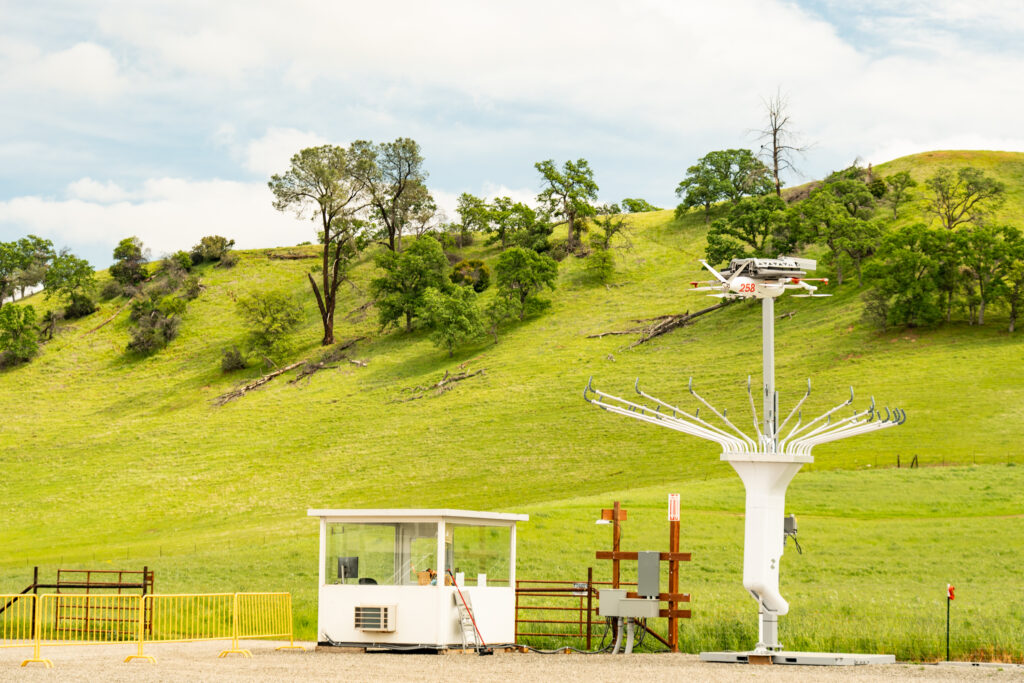
Zipline’s contribution to the landscape consists of a few shipping container-sized prefab office spaces, a series of tents, and some tall, metal structures that look like a stand of wireform trees. The fruit hanging from their aluminum branches are clusters of white drones, or at least what we’d call “drones.”

But the folks at Zipline don’t seem to like that term. Everyone I spoke with referred to the various craft hovering, buzzing, or gliding overhead as aircraft. That’s for good reason.

Not your average UAV

Go buy a drone at an electronics retailer, something from DJI perhaps, and you’ll have to abide by a series of regulations about how high and how far to fly it. Two of the most important rules: Never fly near an airport, and never let the thing out of your sight.

Zipline’s aircraft are much more comprehensive machines, able to fly for miles and miles. By necessity, they must fly well beyond the range of any human operator, or what’s called “beyond visual line of sight,” or BVLOS. In 2023, Zipline was the first commercial operator to get clearance for BVLOS flights.

Zipline’s aircraft operate under a series of FAA classifications—specifically, part 107, part 135, and the upcoming part 108, which will formalize BVLOS operation. The uncrewed aircraft, which are able to operate as such, navigate through controlled airspace, and even near airports, with the help of FAA-mandated transponder data as well as onboard sensors that can detect the presence of an approaching aircraft and automatically avoid it.

A tree-like tower houses a drone with rolling hills as the backdrop

A Zipline drone testing facility. Seen on the right is one of the “trees.” Credit: Tim Stevens

In fact, just about everything about Zipline’s aircraft is automatic. Onboard sensors sample the air through pitot tubes, detecting bad weather. The craft use this data to reroute themselves around the problem, then report back to save subsequent flights the hassle.

Wind speed and direction are also calculated, ensuring that deliveries are dropped with accuracy. Once the things are in the air, even the Zipline operators aren’t sure which way they’ll fly, only that they’ll figure out the right way to get the package there and return safely.

Zipline actually operates two separate aircraft that are suited for different mission types. The aircraft clinging to the aluminum trees, the type that will be exploring the skies over Dallas soon, are internally called Platform 2, or P2, and they’re actually two aircraft in one.

A P2 drone can hover in place using five propellers and take off vertically before seamlessly transitioning into efficient forward flight. When it reaches its destination, doors on the bottom open, and a second aircraft emerges. This baby craft, called a “Zip,” drops down on a tether.

Fins ensure the tethered craft stays facing into the wind while a small propeller at the rear keeps it from blowing off-target. When it touches the ground, its doors pop open, gently depositing a package from a cargo cavity that’s big enough for about four loaves of bread. Maximum payload capacity is eight pounds, and payloads can be delivered up to about 10 miles away.

Where there’s a P2, there must be a P1, and while Zipline’s first aircraft serves much the same purpose, it does so in a very different way. The P1 is a fixed-wing aircraft, looking for all the world like a hobbyist’s radio-controlled model, just bigger and way more expensive.

The P1 launches into the sky like a glider, courtesy of a high-torque winch that slings it aloft before its electric prop takes over. It can fly for over 120 miles on a charge before dropping its cargo, a package that glides to the ground via parachute.

The P1 slows momentarily during the drop and then buzzes back up to full speed dramatically before turning for home. There’s no gentle, vertical landing here. It instead cruises precisely toward a wire suspended high in the air. An instant before impact, it noses up, exposing a metal hook to the wire, which stops the thing instantly.

In naval aviator parlance, it’s an OK three-wire every time, and thanks to hot-swappable batteries, a P1 can be back in the air in just minutes. This feature has helped the company perform millions of successful deliveries, many carrying lifesaving supplies.

From Muhanga to Mesquite

The first deployment from the company that would become Zipline was in 2016 in Muhanga, Rwanda, beginning with the goal of delivering vaccines and other medical supplies quickly and reliably across the untamed expanses of Africa. Eric Watson, now head of systems and safety engineering at Zipline, was part of that initial crew.

“Our mission is to enable access to instant logistics to everyone in the world,” he said. “We started with one of the most visceral pain points, of being able to go to a place, operating in remote parts where access to medicine was a problem.”

It proved to be an incredible proving ground for the technology, but this wasn’t just some beta test designed to deliver greater ROI. Zipline already has success in a more important area: delivering lifesaving medicine. The company’s drones deliver things like vaccines, anti-venoms, and plasma. A 2023 study from the Wharton School at the University of Pennsylvania found that Zipline’s blood delivery service reduced deaths from postpartum hemorrhage by 51 percent.

That sort of promise attracted Lauren Lacey to the company. She’s Zipline’s head of integration quality and manufacturing engineering. A former engineer at Sandia Labs, where she spent a decade hardening America’s military assets, Lacey has brought that expertise to whipping Zipline’s aircraft into shape.

A woman stands by a drone in a testing facility

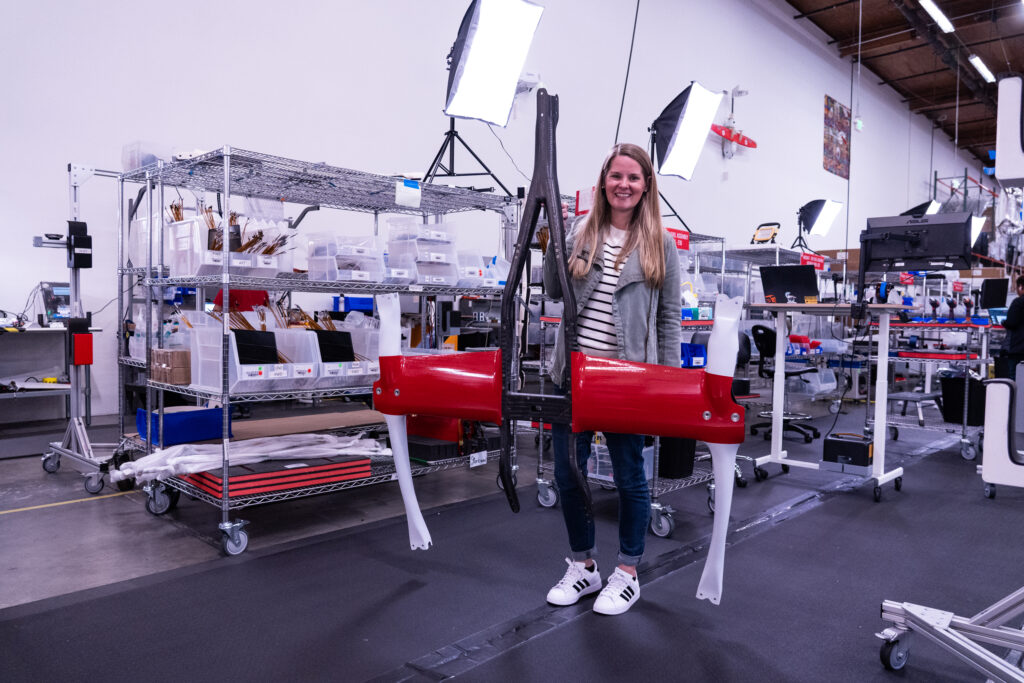
Lauren Lacey, Zipline’s head of integration quality and manufacturing engineering. Credit: Tim Stevens

Lacey walked me through the 11,000-square-foot Bay Area facility she and her team have turned into a stress-testing house of horrors for uncrewed aircraft. I witnessed everything from latches being subjected to 120° F heat while bathed in ultra-fine dust to a giant magnetic resonance device capable of rattling a circuit board with 70 Gs of force.

It’s all in the pursuit of creating an aircraft that can survive 10,000 deliveries. The various test chambers can replicate upward of 2,500 tests per day, helping the Zipline team iterate quickly and not only add strength but peel away unneeded mass, too.

“Every single gram that we put on the aircraft is one less that we can deliver to the customer,” Lacey said.

Now zipping

Zipline already has a small test presence in Arkansas, a pilot program with Walmart, but its rollout today is a big step forward. Once added to the system, customers can make orders through a dedicated Zipline app. Walmart is the only partner for now, but the company plans to offer more products on the retail and healthcare front, including restaurant food deliveries.

The app will show Walmart products eligible for this sort of delivery, calculating weight and volume to ensure that your order isn’t too big. The P2’s eight-pound payload may seem restrictive, but Jeff Bezos, in touting Amazon’s own future drone delivery program, previously said that 86 percent of the company’s deliveries are five pounds or less.

Amazon suspended its prototype drone program last year for software updates but is flying again in pilot programs in Texas and Arizona. The company has not provided an update on the number of flights lately, but the most recent figures were fewer than 10,000 drone deliveries. For comparison, Zipline currently completes thousands per day. Another future competitor, Alphabet-backed Wing, has flown nearly a half-million deliveries in the US and abroad.

Others are vying for a piece of the airborne delivery pie, too, but nobody I spoke with at Zipline seems worried. From what I could see from my visit, they have reason for confidence. The winds on that ranch in California were so strong that towering dust devils were dancing between the disaffected cattle during my visit. Despite that, the drones flew fast and true, and my requested delivery of bandages and medicine was safely and quickly deposited on the ground just a few feet from my own feet.

It felt like magic, yes, but more importantly, it was one of the most disruptive demonstrations I’ve seen. While the tech isn’t ideally suited for every situation, it may help cut down on the delivery trucks that are increasingly clogging rural roads, all while getting more things to more people who need them, and doing it emissions-free.

Don’t call it a drone: Zipline’s uncrewed aircraft wants to reinvent retail Read More »
framework-“temporarily-pausing”-some-laptop-sales-because-of-new-tariffs

Framework “temporarily pausing” some laptop sales because of new tariffs

Framework, the designers and sellers of the modular and repairable Framework Laptop 13 and other products, announced today that it would be “temporarily pausing US sales” on some of its laptop configurations as a result of new tariffs put on Taiwanese imports by the Trump administration. The affected models will be removed from Framework’s online store for now, and there’s no word on when buyers can expect them to come back.

“We priced our laptops when tariffs on imports from Taiwan were 0 percent,” the company responded to a post asking why it was pausing sales. “At a 10 percent tariff, we would have to sell the lowest-end SKUs at a loss.”

“Other consumer goods makers have performed the same calculations and taken the same actions, though most have not been open about it,” Framework said. Nintendo also paused US preorders for its upcoming Switch 2 console last week after the tariffs were announced.

For right now, Framework’s sales pause affects at least two specific laptop configurations: the Intel Core Ultra 5 125H and AMD Ryzen 5 7640U versions of the Framework Laptop 13. As of April 1, Framework was selling pre-built versions of those laptops for $999 and $899, respectively. Without those options, the cheapest versions of those laptops start at $1,399 and $1,499.

Framework “temporarily pausing” some laptop sales because of new tariffs Read More »